
Introduction
This manual provides detailed instructions for the safe and effective use of your Brizled RGB Christmas Lights. These 164ft string lights feature 500 color-changing LEDs, dimmable functionality, and remote control for versatile indoor and outdoor decoration.
What's in the Box
- 1 x 500 LED RGB Christmas Lights (164ft)
- 1 x Remote Controller
- 1 x User Manual
Setup Instructions
- Unpack the Lights: Carefully remove the string lights from the packaging, ensuring not to tangle the wire.
- Power Connection: Connect the light string to the UL certified low voltage power adapter. Ensure the connection is tight.
- Remote Preparation: Before first use, remove the insulation sheet from the remote controller's battery compartment.
- Placement: Position the lights in your desired indoor or outdoor location. For outdoor use, ensure the power adapter and electric transformer are protected from water.
- Initial Power On: Plug the power adapter into a suitable electrical outlet. The lights should illuminate.

Operating Instructions
Your Brizled RGB Christmas Lights can be controlled using the included 48-key remote control or the button on the control box.
Remote Control Functions:
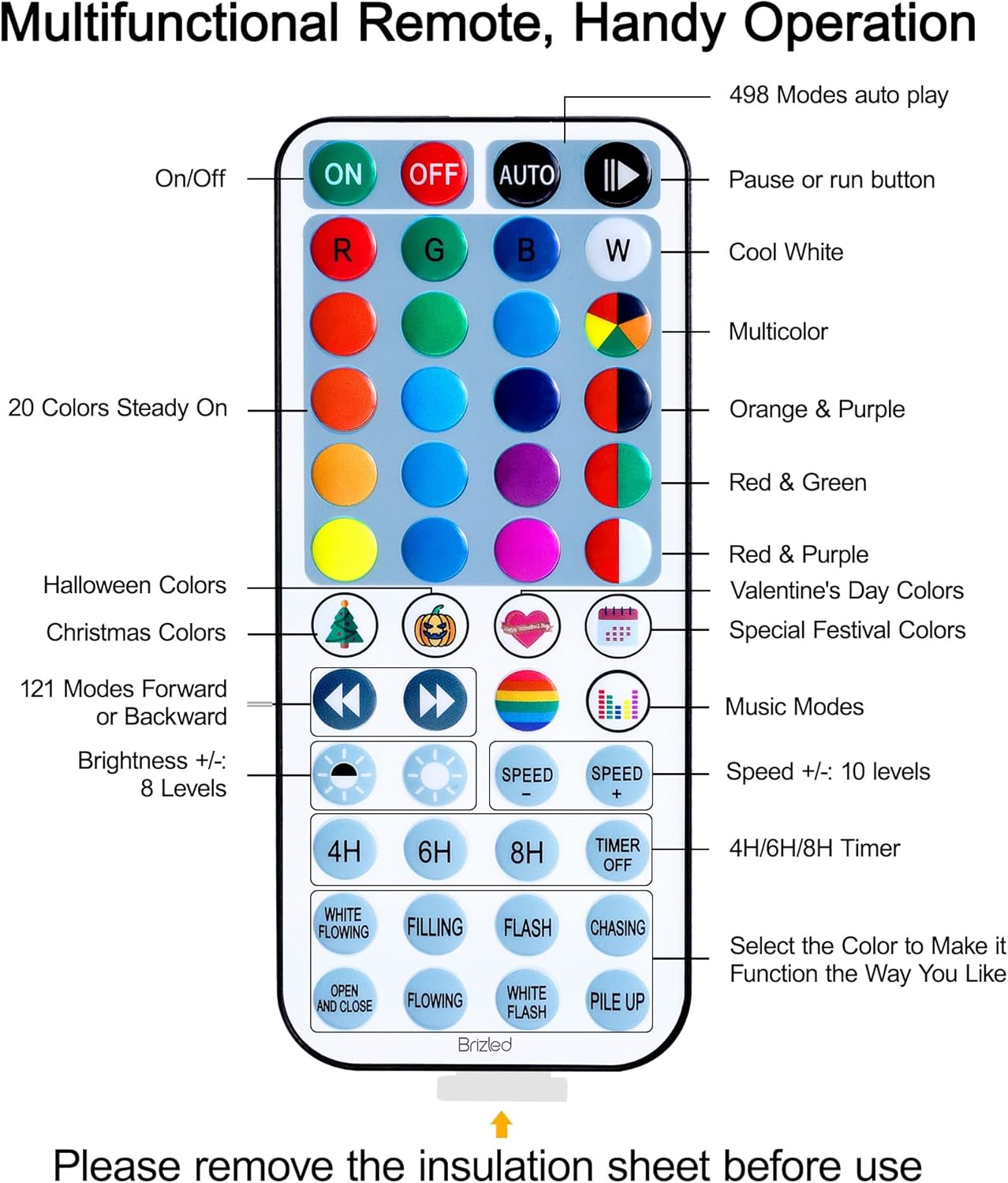
- On/Off: Power the lights on or off.
- Color Selection: Choose from 16 single colors, dual colors, triple colors, and multicolor options.
- Dynamic Modes: Select from 8 built-in lighting modes (e.g., White Flowing, Filling, Flash, Chasing, Open, Flowing, White Flash, Pile Up) to apply to any chosen static color combination.
- Music Modes: Two music modes are available. When activated, the lights will synchronize with music rhythms.
- Brightness Adjustment: 8 levels of brightness (bright, soft, dim) are available.
- Speed Adjustment: 10 speed levels to adjust dynamic modes.
- Pause/Play: Pause and select the current color as desired.
- Forward/Backward: Switch between up to 121 functions.
- Auto: Activates 498 auto-play modes.
Timer Function:
The lights feature a memory function and timer options:
- Select 4H, 6H, or 8H on the remote to activate the timer.
- Once set, the lights will automatically turn on for the selected duration (4/6/8 hours) and turn off for the remainder of the 24-hour cycle (20/18/16 hours).
- When the timer is active, the LED indicator on the control box will turn red. It will turn off when the timer is canceled.
Maintenance
- Cleaning: Disconnect power before cleaning. Wipe lights gently with a soft, dry cloth. Do not use harsh chemicals or abrasive cleaners.
- Storage: When not in use, store the lights in a cool, dry place, away from direct sunlight and moisture. Carefully coil the string to prevent tangling.
- Outdoor Use: The lights are IP44 water-resistant. However, it is crucial to protect the power adapter and electric transformer from direct water exposure (e.g., rain, snow) when used outdoors.
Troubleshooting
| Problem | Solution |
|---|---|
| Remote control not working |
|
| Lights stop working |
|
| Inconsistent light color or flickering | This can sometimes be caused by interference from other remotes. Try to operate the lights in an area free from other remote signals. If a single bulb consistently shows the wrong color, try unplugging and replugging the lights to reset. If the issue persists, contact customer support. |
| Power adapter or USB plug gets hot | While some warmth is normal, excessive heat can indicate a problem. Discontinue use immediately and contact customer support. Ensure the lights are not overloaded and are used with the provided adapter. |

Specifications
| Feature | Detail |
|---|---|
| Model Number | JY22RGB500F01 |
| Total Length | 170.56 ft |
| Lighted Length | 164 ft |
| Number of LEDs | 500 |
| Light Color | Multicolor (RGB) |
| Power Source | Corded Electric |
| Wattage | 5 watts |
| Control Method | Remote Control (48-key) |
| Special Features | Color Changing, Dimmable, Timer, Waterproof (IP44) |
| Indoor/Outdoor Usage | Indoor/Outdoor |
| Material Type | Plastic |
| Connectable | No |
Warranty and Support
All Brizled RGB string lights are thoroughly checked and packaged before shipping. If you encounter any issues with the product, please do not hesitate to contact us. We commit to responding within 24 hours and providing a 100% satisfactory resolution.
For support, please refer to the contact information provided with your purchase or visit the official Brizled website.