
1. Product Overview
The TopDiag P100 Pro is an intelligent electrical system circuit tester designed for 9V-30V vehicle electrical systems. It features a 2.4-inch color LCD display and a rugged, water and dust-resistant housing. This tool is essential for testing components both on and off the vehicle, checking for good and bad grounds, testing for continuity, and diagnosing circuit failures. It integrates multiple functions including voltage and ground signal testing in DC circuits, a ground function, 0-5V power supply, component activation, multimeter mode, and oscilloscope mode, streamlining automotive electrical system diagnostics.
The P100 Pro offers intelligent identification of voltage values, resistance values, and positive/negative polarity. It supports grounding detection, poor line contact identification, short circuit tracking and positioning, continuity tests, and signal circuit tests. These capabilities accelerate the diagnosis and troubleshooting of automotive power circuit problems.

Image 1: TopDiag P100 Pro Power Circuit Tester Kit with accessories.
2. Safety Precautions and Warnings
To prevent personal injury or damage to vehicles and the scan tool, carefully read this user's manual and observe the following safety precautions whenever working on a vehicle:
- Always perform automotive testing in a safe environment.
- Do not attempt to operate or observe the tool while driving a vehicle. Operating or observing the tool will cause driver distraction and could lead to a fatal accident.
- Wear safety eye protection that meets ANSI standards.
- Keep clothing, hair, hands, tools, and test equipment away from all moving or hot engine parts.
- Operate the vehicle in a well-ventilated work area. Exhaust gases are poisonous.
- Place blocks in front of the drive wheels and never leave the vehicle unattended while running tests.
- Use extreme caution when working around the ignition coil, distributor cap, ignition wires, and spark plugs. These components create hazardous voltages when the engine is running.
- Put the transmission in Park (P) for automatic transmissions or Neutral (N) for manual transmissions, and ensure the parking brake is engaged.
- Keep a fire extinguisher suitable for gasoline/chemical/electrical fires nearby.
- Do not connect or disconnect any test equipment while the ignition is ON or the engine is running.
- Keep the scan tool dry, clean, and free from oil, water, or grease. Use a mild detergent on a clean cloth to clean the outside of the scan tool when necessary.
The manufacturer is not responsible for any damage caused by unintentional or deliberate misuse of this product or tool.

Image 2: Illustration of safety guidelines for automotive testing.
3. Getting Started
To begin using your TopDiag P100 Pro, connect the device to your vehicle's 9V-30V power source, typically the vehicle battery, using the provided cables and clamps. Ensure a secure connection for both positive and negative terminals. Once connected, the device will power on, and you can navigate through the various modes using the control buttons.

Image 3: The P100 Pro stored in its portable carrying case.
4. Operating Modes
The TopDiag P100 Pro offers several diagnostic modes to assist with automotive electrical system testing:
4.1. Multimeter Mode
This mode provides comprehensive multimeter parameters, allowing you to quickly test DC voltage, resistance, and current in the circuit system. It displays real-time readings for accurate diagnostics.
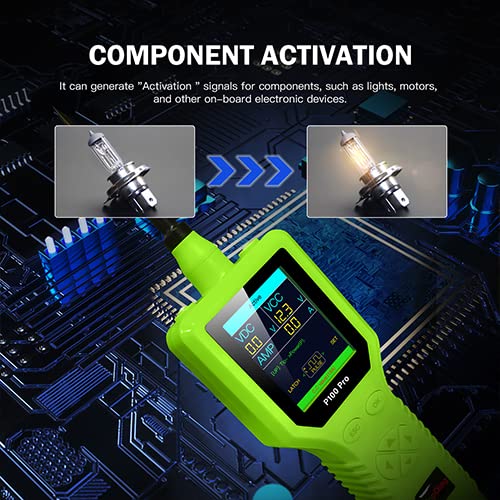
Image 4: The P100 Pro displaying various multimeter readings.
4.2. Oscilloscope Mode
The oscilloscope mode allows the device to display the parameter curve diagram of the tested component, such as voltage, frequency, and time. This visual representation helps in analyzing signal patterns and identifying anomalies.
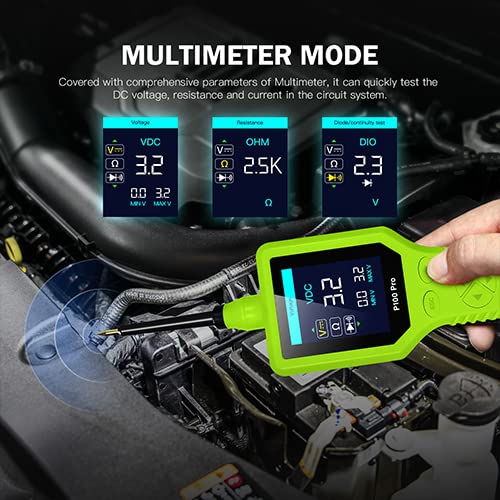
Image 5: The P100 Pro in oscilloscope mode, showing a waveform.
4.3. Component Activation
This function generates activation signals for various components, such as lights, motors, and other on-board electronic devices. It allows for direct testing of component functionality by providing power or ground signals.

Image 6: The P100 Pro used for component activation, illuminating a bulb.
4.4. 0-5V Power Supply Function
The P100 Pro includes a 0-5V adjustable power supply function. This feature allows you to simulate the voltage output by a sensor (0-5V can be adjusted incrementally), which is useful for verifying the wiring condition of a tested component or checking for short circuits or faults in the ECU circuit.

Image 7: The P100 Pro displaying the 0-5V power output settings.
4.5. Frequency and Duty Cycle Measurement
The device can measure and display the frequency and duty cycle of AC signals, providing insights into the performance of various automotive sensors and components that output pulsed signals.
4.6. Multi-language Support
The P100 Pro supports multiple languages, enhancing usability for a global audience.

Image 8: The P100 Pro interface showing multi-language support.
4.7. Operational Video Guide
For a visual demonstration of the P100 Pro's functions, please refer to the video below:
Video 1: Demonstration of TopDiag P100 Pro functions, including 0-5V adjustable power supply (0:05), positive and negative activation (0:13), oscilloscope mode (0:31), multimeter mode (0:44), and frequency measurement (0:59).
5. Maintenance
Proper maintenance ensures the longevity and reliable operation of your TopDiag P100 Pro:
- Cleaning: Keep the device clean and free from dust, dirt, oil, and grease. Use a soft, damp cloth with a mild detergent for cleaning the exterior. Avoid abrasive cleaners or solvents.
- Storage: Store the P100 Pro in a dry, cool environment, away from direct sunlight and extreme temperatures. Utilize the provided portable box for protection during storage and transport.
- Cable Care: Inspect cables and connectors regularly for any signs of wear, damage, or corrosion. Replace damaged cables immediately to prevent electrical hazards or inaccurate readings.
- Screen Protection: The device comes with a screen protector. Ensure it is properly applied or removed as instructed for optimal screen visibility and protection.
6. Troubleshooting
If you encounter issues with your TopDiag P100 Pro, consider the following basic troubleshooting steps:
- No Power: Ensure the device is correctly connected to a 9V-30V power source. Check the vehicle battery voltage and the integrity of the power cables and clamps.
- Inaccurate Readings: Verify that all connections are secure and clean. Ensure the probe tip is making good contact with the test point. Check for any damage to the probe or cables.
- Screen Issues: If the screen is unresponsive or displaying incorrectly, try restarting the device by disconnecting and reconnecting the power. Ensure the screen protector is not interfering with touch or display.
- Component Activation Failure: Confirm the component is properly wired and functional. Check for sufficient power supply from the P100 Pro and ensure the correct activation mode is selected.
- Device Not Responding: Disconnect the device from the power source, wait a few moments, and then reconnect. If the issue persists, consult the manufacturer's support.
7. Product Specifications
| Specification | Detail |
|---|---|
| Brand | TopDiag |
| Model Number | P100 Pro |
| Power Source | Battery Powered (Vehicle 9V-30V) |
| Min. Operating Voltage | 9 Volts |
| Measurement Type | Multimeter |
| Display | 2.4 inch Color LCD |
| Package Dimensions | 15.67 x 10.24 x 3.35 inches |
| Item Weight | 2.54 Pounds |
| Date First Available | June 8, 2022 |
8. Warranty and Support
For warranty information and technical support, please refer to the documentation included with your product or contact TopDiag customer service directly. Details regarding specific warranty periods and support channels are typically provided at the point of purchase or on the manufacturer's official website.

