
Introduction
This manual provides comprehensive instructions for the TIMEX TW2V51000 Stranger Things collaboration watch. It covers essential information regarding the watch's features, initial setup, daily operation, maintenance, and troubleshooting. Please read this manual thoroughly to ensure proper use and longevity of your timepiece.
Key features include a unique Stranger Things themed alarm, Indiglo night light with a special silhouette, and a display that references the show's setting.
Product Overview
The TIMEX TW2V51000 is a digital quartz watch featuring a black resin case and band, with a red digital display. It incorporates design elements inspired by the Netflix series Stranger Things.
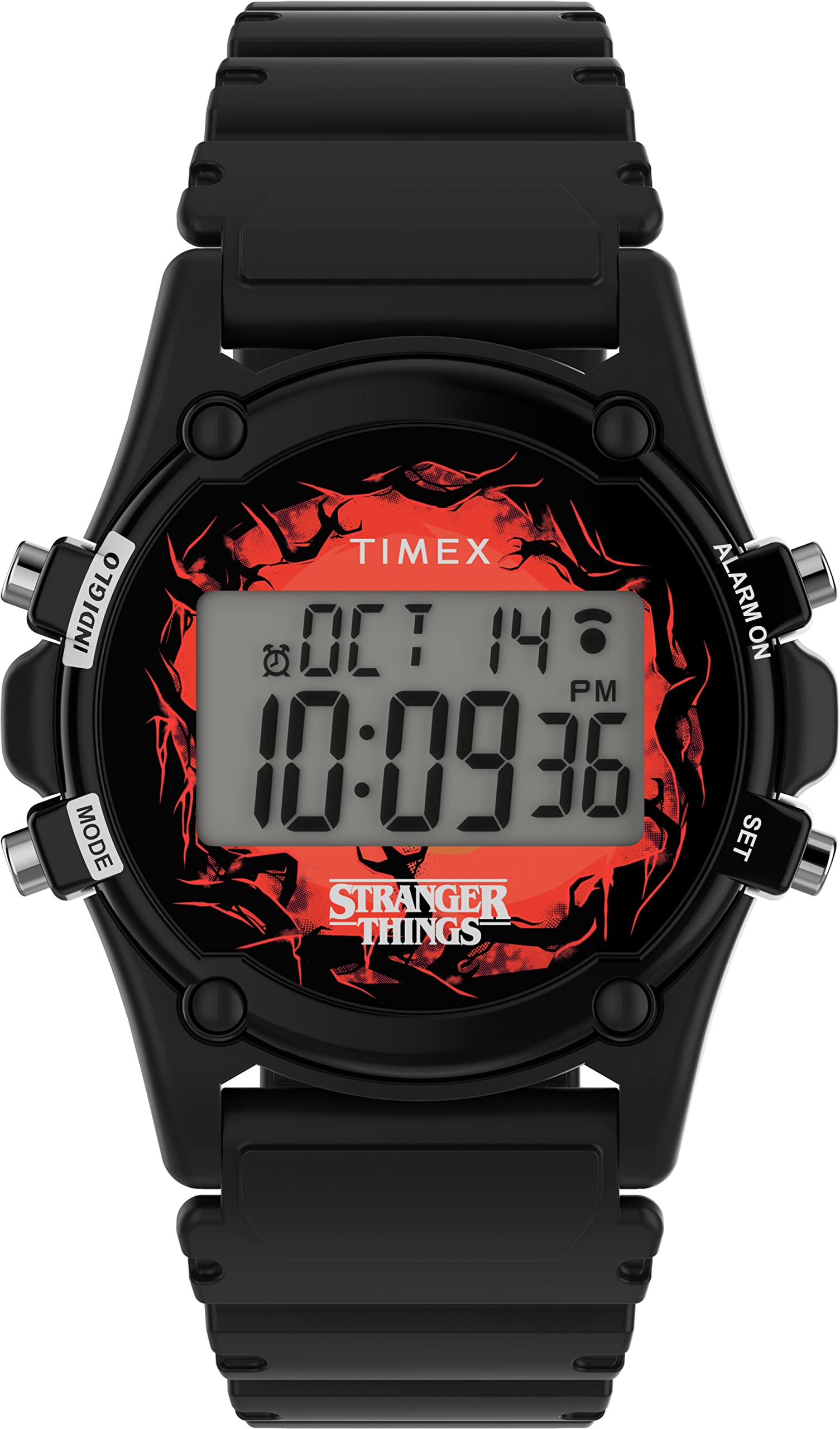
Front view of the TIMEX TW2V51000 watch, displaying the time and date on its red digital screen, along with the Stranger Things logo.

The watch face with the Indiglo backlight activated, showing a Mind Flayer silhouette in the background, a special feature of this collaboration model.

Side profile of the TIMEX TW2V51000 watch, highlighting the black resin case and the textured strap.

Detailed view of the watch's stainless steel case back, featuring engravings of the TIMEX and Netflix Stranger Things logos, along with the water resistance rating.
Watch Buttons:
- MODE: Cycles through display modes (Time, Alarm, Timer, Stopwatch).
- SET: Used to adjust settings in various modes.
- INDIGLO: Activates the Indiglo night light.
- ALARM ON: Activates or deactivates the alarm.
Setup
1. Setting Time and Date:
- Press the MODE button repeatedly until the time setting mode is displayed (usually indicated by flashing digits).
- Press the SET button to select the digit or setting you wish to adjust (e.g., hours, minutes, year, month, day).
- Use the ALARM ON button to increase the value or cycle through options.
- Continue pressing SET and ALARM ON until all desired settings are correct.
- Press MODE to exit the setting mode.
2. Setting the Alarm:
- Press the MODE button until the alarm display is shown.
- Press the SET button to enter alarm setting mode. The hour digits will flash.
- Use the ALARM ON button to adjust the hour.
- Press SET to move to the minute digits, then use ALARM ON to adjust minutes.
- Press MODE to save the alarm time and exit.
- To activate the Stranger Things theme alarm, ensure the alarm is set and then press the ALARM ON button to toggle the alarm function on/off. An alarm icon will appear on the display when active.
Operating Instructions
Time Display:
In normal time mode, the watch displays the current time and date. Note that the number '3' for 3 AM/PM is displayed in reverse, a design choice referencing the Stranger Things series.
Using Indiglo Night Light:
Press the INDIGLO button to illuminate the watch face. When activated, a silhouette of the Mind Flayer will appear, enhancing visibility in low-light conditions and adding a thematic element.
Alarm Function:
When the alarm is active, it will sound at the set time with the Stranger Things theme music. To silence the alarm, press any button. The alarm will automatically reset for the next day unless deactivated.
Cycling Through Modes:
Press the MODE button to cycle through the available functions: Time, Alarm, Stopwatch, and Timer.
Maintenance
- Water Resistance: This watch is water-resistant up to 30 meters (3 ATM). It is suitable for daily use and can withstand splashes or brief immersion in water. It is not recommended for swimming, diving, or prolonged water exposure.
- Cleaning: Clean the watch case and band with a soft, damp cloth. Avoid using harsh chemicals or abrasive materials.
- Battery: The watch uses a quartz movement powered by a battery. When the display dims or functions become erratic, the battery may need replacement. It is recommended to have the battery replaced by a qualified watch technician to maintain water resistance.
- Storage: Store the watch in a cool, dry place away from direct sunlight and extreme temperatures.
Troubleshooting
- Watch not displaying time: Check if the battery needs replacement. If recently replaced, ensure it was installed correctly.
- Alarm not sounding: Verify that the alarm time is set correctly and that the alarm function is activated (check for the alarm icon on the display).
- Indiglo light not working: Ensure the battery has sufficient power. If the battery is low, the Indiglo feature may be affected first.
- Buttons unresponsive: Gently press each button to ensure no debris is lodged. If issues persist, a professional inspection may be required.
For issues not covered here, please refer to the support section or contact customer service.
Specifications
| Brand | TIMEX |
| Model Number | TW2V51000 |
| Case Diameter | 40 mm |
| Case Thickness | 11 mm |
| Band Width | 22 mm |
| Band Material | Resin |
| Case Material | Resin |
| Display Type | Digital |
| Movement | Quartz |
| Water Resistance | 30 Meters (3 ATM) |
| Clasp Type | Buckle |
| Dial Color | Red (Digital Display) |
| Band Color | Black |
| Special Features | Indiglo Night Light with Mind Flayer silhouette, Stranger Things theme alarm, Reversed '3' display. |
| UPC | 194366216264 |
Warranty and Support
This TIMEX watch is covered by a manufacturer's warranty. Please refer to the warranty card included with your purchase for specific terms and conditions, including coverage duration and claim procedures.
For technical assistance, service, or warranty claims, please visit the official TIMEX website or contact their customer support. Keep your proof of purchase for warranty validation.
Official TIMEX Website: www.timex.com