
1. Introduction
This manual provides essential information for the installation, operation, and maintenance of your SRhonyra Geforce GTX 1050 Ti 4GB 4HDMI Graphics Card. This graphics card is designed for multi-display setups, offering robust performance for various applications.
The card features a Geforce GTX 1050 Ti GPU with 4GB GDDR5 high-speed video memory and four HDMI 2.0b outputs, eliminating the need for conversion cables for direct display connections. It supports advanced graphics technologies including DirectX 12 and OpenGL 4.5.
2. What's in the Box
Please verify that all items are present in the package:
- SRhonyra Geforce GTX 1050 Ti 4GB 4HDMI Graphics Card
- User Manual (this document)
3. Product Overview
The SRhonyra Geforce GTX 1050 Ti graphics card is built on the Pascal architecture, utilizing a 14 nm GP107 graphics processor. It is equipped with 4GB of GDDR5 memory and supports a 128-bit memory interface.
Key Features:
- GPU: Geforce GTX 1050 Ti
- Video Memory: 4GB GDDR5
- Output Ports: 4 x HDMI 2.0b
- Resolution Support: Up to 7680x4320 @60Hz (splicing screens) or 3840x2160 @60Hz (single screen)
- Interface: PCI Express 3.0 x16
- Power Connector: 6-pin
- Thermal Design Power (TDP): 80 Watts
- Construction: Features polymer tantalum capacitance for stable performance.

Image 3.1: SRhonyra Geforce GTX 1050 Ti Graphics Card, top-down view.

Image 3.2: Overview of the graphics card highlighting its 6-pin power connector, DirectX 12/OpenGL 4.5 API support, PCI-Express 3.0 x16 bus, 4GB GDDR5 memory, and 80W max power consumption.
4. Setup and Installation
4.1 System Requirements
- Motherboard: PCI Express x16 slot available.
- Power Supply Unit (PSU): 400W or greater recommended to meet overall system power requirements.
- Operating System: Windows 11, Windows 10 (32/64 bit), Windows 8.1 (32/64 bit), Windows 8 (32/64 bit), Windows 7 (32/64 bit).

Image 4.1: The graphics card requires a 6-pin power connector and a power supply unit (PSU) of 400W or greater.

Image 4.2: Supported operating systems include Windows 11, Windows 10 (32/64 bit), Windows 8.1 (32/64 bit), Windows 8 (32/64 bit), and Windows 7 (32/64 bit).
4.2 Physical Installation
- Power Off: Ensure your computer is completely powered off and unplugged from the wall outlet.
- Open Case: Remove the side panel of your computer case.
- Locate PCIe Slot: Identify an available PCI Express x16 slot on your motherboard. Remove any slot covers if necessary.
- Insert Graphics Card: Carefully align the graphics card with the PCIe slot and press down firmly until it is securely seated. Ensure the retention clip on the slot engages.
- Secure Card: Fasten the graphics card to the computer case with a screw or retention clip.
- Connect Power: Connect the 6-pin power cable from your power supply to the corresponding port on the graphics card.
- Close Case: Replace the side panel of your computer case.
4.3 Driver Installation
- Power On: Connect your monitor to one of the HDMI ports on the graphics card and power on your computer.
- Initial Display: Your computer may boot with a basic display driver.
- Download Drivers: Visit the official NVIDIA website (www.nvidia.com/drivers) to download the latest drivers for the Geforce GTX 1050 Ti.
- Install Drivers: Follow the on-screen instructions to install the drivers. A system restart may be required.
5. Operating Instructions
5.1 Connecting Multiple Monitors
This graphics card supports up to four simultaneous displays via its four HDMI 2.0b ports. For optimal performance and resolution, it is recommended to use HDMI 2.0 compatible cables.
- Connect Monitors: Plug your HDMI cables from your monitors into the HDMI ports on the graphics card.
- Configure Display Settings: Once your computer has booted and drivers are installed, right-click on your desktop and select 'Display settings' (Windows) or access your graphics driver control panel (e.g., NVIDIA Control Panel).
- Arrange Displays: In the display settings, you can detect, identify, and arrange your monitors. You can choose to extend your desktop across multiple displays, duplicate displays, or use only one display.
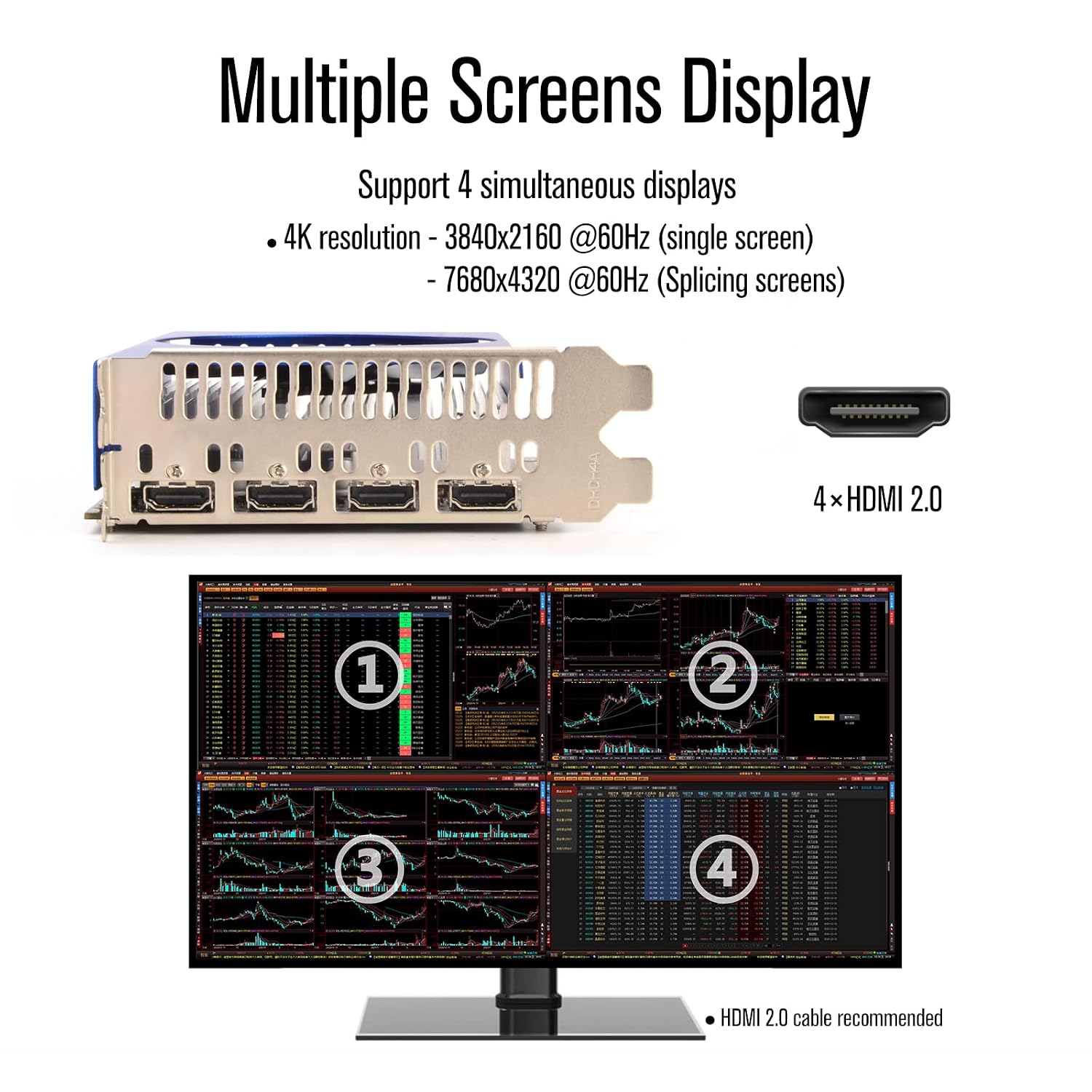
Image 5.1: The graphics card supports up to 4 simultaneous displays with 4K resolution (3840x2160 @60Hz) for single screens and 7680x4320 @60Hz for splicing screens, utilizing its four HDMI 2.0 ports.
6. Maintenance
To ensure the longevity and optimal performance of your graphics card, follow these general maintenance guidelines:
- Keep Clean: Periodically clean dust from the graphics card fan and heatsink using compressed air. Ensure the computer is powered off and unplugged before cleaning.
- Ventilation: Ensure your computer case has adequate airflow to prevent overheating. Avoid obstructing the card's fan or vents.
- Driver Updates: Regularly check for and install the latest graphics drivers from the NVIDIA website to benefit from performance improvements and bug fixes.
7. Troubleshooting
If you encounter issues with your graphics card, refer to the following common troubleshooting steps:
- No Display Output:
- Ensure the graphics card is fully seated in the PCIe slot.
- Verify the 6-pin power connector is securely attached.
- Check that your monitor cables are properly connected to the graphics card and the monitor.
- Test with a different monitor or cable if possible.
- Driver Issues:
- If you experience display artifacts, crashes, or poor performance, ensure you have installed the correct and latest drivers for your operating system.
- Try performing a clean installation of the graphics drivers.
- System Instability/Crashes:
- Verify your power supply meets the recommended 400W or greater requirement.
- Ensure proper ventilation to prevent overheating. Monitor GPU temperatures using third-party software.
If problems persist, please refer to the support section for further assistance.
8. Specifications
| Brand | SRhonyra |
| Model | SR105T4H41 |
| GPU | GTX 1050 Ti |
| Graphics RAM Size | 4GB GDDR5 |
| GPU Clock Speed | 1354 MHz |
| Hardware Interface | PCI Express x16 (PCIe 3.0) |
| Video Output Interface | 4 x HDMI 2.0b |
| Max Resolution | 7680x4320 @60Hz (splicing) / 3840x2160 @60Hz (single) |
| Wattage | 80 Watts |
| Power Connector | 6-pin |
| Product Dimensions | 17.4 x 11.1 x 0.25 cm |
| Item Weight | 300 g |
| Form Factor | Single Slot |
| Material | Copper |
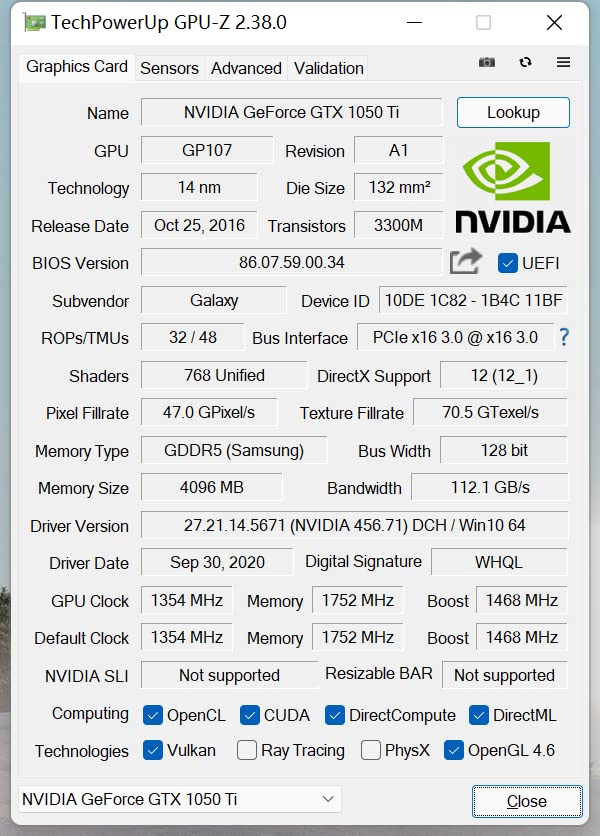
Image 8.1: GPU-Z utility displaying detailed specifications for the NVIDIA Geforce GTX 1050 Ti, including GPU type (GP107), 14nm technology, 4096MB GDDR5 memory, and clock speeds.

Image 8.2: Physical dimensions of the graphics card, showing a length of 6.85 inches and a height of 4.37 inches.
9. Support
For any questions or technical assistance regarding your SRhonyra Geforce GTX 1050 Ti graphics card, please contact our customer support. We aim to respond to all inquiries within 24 hours.
Please have your product model number (SR105T4H41) and a detailed description of your issue ready when contacting support.


