
Introduction
This manual provides comprehensive instructions for the ALLIMITY GCBLTV64AT replacement remote control. It is designed to function seamlessly with specific Changhong United television models, serving as a direct replacement for your original remote without requiring complex programming or setup procedures.
Please read this manual carefully to ensure proper use and to maximize the functionality of your new remote control.
Product Overview
The ALLIMITY GCBLTV64AT remote control is an ergonomic, black-colored device engineered for comfortable handling and intuitive operation. It features a standard button layout, providing access to all essential television functions.
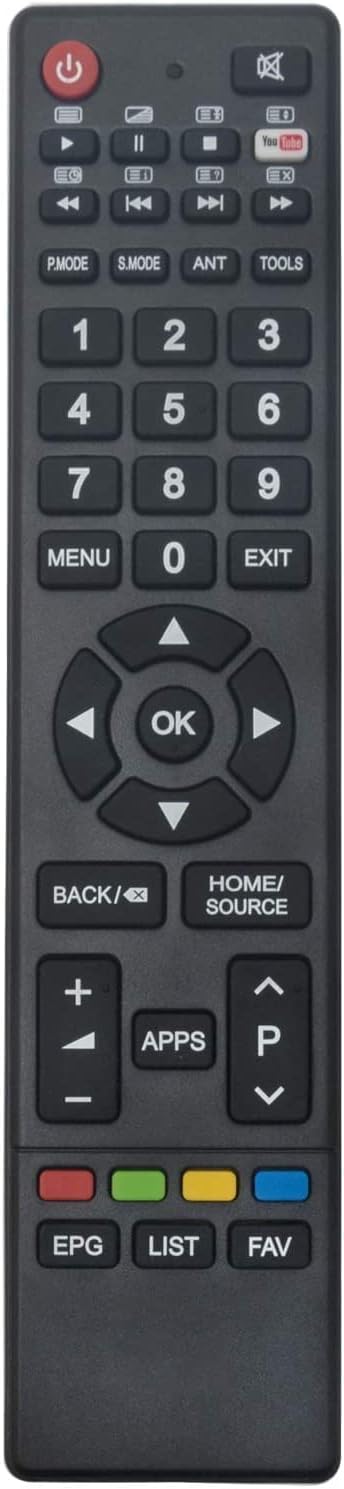
Figure 1: Front view of the ALLIMITY GCBLTV64AT remote control.
This remote control is specifically compatible with the following Changhong United TV models:
- LED42HS59
- LED39HS60
- LED43HS59
- LED49HS59
- UHD42C5600ISX2
Setup
The ALLIMITY GCBLTV64AT remote control is designed for immediate use with compatible TV models. No programming or complex setup is required. Simply install the batteries, and the remote will be ready to operate your television.
Battery Installation

Figure 2: Angled view of the remote control, indicating the battery compartment area.
- Locate the battery compartment cover on the back of the remote control.
- Slide or gently press and lift the cover to open the compartment.
- Insert two (2) AAA alkaline batteries into the compartment. Ensure that the positive (+) and negative (-) terminals of the batteries align correctly with the markings inside the compartment.
- Replace the battery compartment cover, ensuring it clicks securely into place.
Your remote control is now ready for use.
Operating Instructions
The GCBLTV64AT remote control is designed to replicate the functions of your original television remote. For optimal performance, ensure you point the remote directly at your television's infrared receiver.
Key Button Functions:
- Power (●): Turns the television on or off.
- Number Keys (0-9): Directly select channels.
- Volume Up/Down (+/-): Adjusts the sound volume.
- Channel Up/Down (P▲/P▼): Changes the television channel.
- Navigation Keys (◀ ▲ ► ▼): Navigate through menus and options.
- OK: Confirms selections in menus.
- BACK/⌫: Returns to the previous menu or screen.
- HOME/SOURCE: Accesses the TV's home menu or switches input sources (HDMI, AV, etc.).
- MENU: Opens the main settings menu.
- EXIT: Exits the current menu or function.
- APPS: Accesses smart TV applications.
- EPG (Electronic Program Guide): Displays the program guide.
- LIST: Shows a list of channels or recorded programs.
- FAV (Favorites): Accesses your favorite channels list.
- Colored Buttons (Red, Green, Yellow, Blue): These buttons typically correspond to specific functions displayed on the TV screen, varying by context.
Maintenance
Proper maintenance ensures the longevity and reliable performance of your remote control.
- Battery Replacement: Replace batteries when the remote's response becomes sluggish or stops working. Always use new AAA alkaline batteries and dispose of old batteries responsibly.
- Cleaning: Clean the remote control periodically with a soft, dry cloth. For stubborn dirt, lightly dampen the cloth with water or a mild, non-abrasive cleaner. Avoid using harsh chemicals or excessive moisture, which can damage the internal components.
- Storage: Store the remote in a dry place, away from direct sunlight, extreme temperatures, and high humidity.
- Avoid Drops: Protect the remote from physical impact, as drops can damage internal circuitry or external casing.
Troubleshooting
If you encounter issues with your ALLIMITY GCBLTV64AT remote control, try the following solutions:
- Remote Not Responding:
- Ensure the batteries are inserted correctly with the correct polarity.
- Replace old batteries with new AAA alkaline batteries.
- Check for any obstructions between the remote control and the TV's infrared receiver.
- Verify that the remote is pointed directly at the TV.
- Limited Range or Intermittent Functionality:
- Ensure there are no strong light sources (like direct sunlight or bright fluorescent lights) interfering with the infrared signal.
- Move closer to the television. The maximum effective range is approximately 10 meters.
- Replace batteries if they are low.
- Remote Does Not Control TV Functions:
- Confirm that your television model is listed as compatible (LED42HS59, LED39HS60, LED43HS59, LED49HS59, UHD42C5600ISX2). This remote is a direct replacement and does not require programming for these specific models.
- If your TV model is not listed, this remote may not be compatible.
Specifications
| Brand: | ALLIMITY |
| Model Name: | GCBLTV64AT |
| Compatible Devices: | Changhong United LED42HS59, LED39HS60, LED43HS59, LED49HS59, UHD42C5600ISX2 |
| Connectivity Technology: | Infrared |
| Controller Type: | Button Control |
| Maximum Range: | 10 Meters |
| Battery Type: | AAA Alkaline (2 required) |
| Special Feature: | Ergonomic Design |
| Color: | Black |
| Max Supported Devices: | 10 (refers to the remote's capability, not necessarily for this specific model) |
Warranty and Support
For information regarding warranty coverage, returns, or technical assistance, please refer to the purchase documentation or the retailer's website where the product was acquired.
Alternatively, you may contact the seller directly through the platform of purchase for support related to the ALLIMITY GCBLTV64AT remote control.
