
TIGERKING FPSD40
TIGERKING FPSD40 Fireproof Safe User Manual
Model: FPSD40 | Brand: TIGERKING
Introduction
This user manual provides detailed instructions for the safe and effective operation and maintenance of your TIGERKING FPSD40 Fireproof Safe. Please read this manual thoroughly before initial use and retain it for future reference. This safe is designed to protect your valuables from fire and theft, offering robust construction and dual access methods.
Safety Information
- Fireproof Certification: The TIGERKING FPSD40 safe is laboratory certified to withstand high temperatures of 1200°F (650°C) for 30 minutes, providing critical protection time for your valuables during a fire.
- Double Fire Protection: Features external hinges to prevent heat from spreading inward and fireproof plaster acting as a flame insulating layer.
- Robust Construction: Constructed from thickened steel, weighing approximately 45 pounds, and equipped with four solid 1-inch live-lock bolts to resist drilling and prying. The inner hinge side is recessed behind the outer edge of the safe when closed, ensuring sealing even if outer hinges are compromised.
- Secure Placement: For enhanced security, it is highly recommended to anchor the safe to the floor or wall using the provided bolts.
- Emergency Keys: Store emergency keys in a secure location away from the safe. Do not store them inside the safe.
Product Overview
The TIGERKING FPSD40 is a compact yet secure fireproof safe, ideal for home and office use. It features a digital keypad lock and emergency key access.
Key Features:
- Digital Keypad Lock
- Emergency Key Access
- Fireproof Construction (1200°F/650°C for 30 minutes)
- Thickened Carbon Steel and Fireproof Plaster Layers
- Four 1-inch Live-Lock Bolts
- Removable Interior Shelf
- Internal LED Light
Product Dimensions:
| Measurement | Dimension |
|---|---|
| Exterior Dimensions (D x W x H) | 14.2" x 12.2" x 15.7" (36.07cm x 30.99cm x 39.88cm) |
| Inner Dimensions (D x W x H) | 10.12" x 9.84" x 14.2" (25.70cm x 24.99cm x 36.07cm) |
| Capacity | 1.24 Cubic Feet |
| Item Weight | 51.4 pounds (23.38 Kilograms) |
The safe is equipped with a removable shelf, allowing for flexible storage of documents, laptops, pistols, cash, and medicine.

Figure 1: Front view of the TIGERKING FPSD40 safe with the door open, revealing its spacious interior and adjustable shelf. The image highlights the internal capacity suitable for various valuables.

Figure 2: The TIGERKING FPSD40 safe surrounded by flames, visually representing its fireproof certification for 30 minutes up to 1200°F/650°C.

Figure 3: A detailed diagram illustrating the external and internal dimensions of the TIGERKING FPSD40 safe, including depth, width, and height measurements.

Figure 4: An exploded view diagram of the safe's construction, highlighting its two fire protection layers: thickened carbon steel and fireproof plaster, designed to prevent heat transfer and provide flame insulation.
Setup Instructions
1. Unboxing and Initial Inspection
Carefully remove the safe from its packaging. Inspect the safe for any signs of damage during transit. Ensure all components, including emergency keys, bolts, and the user manual, are present.
2. Battery Installation
The digital lock requires four AA batteries (not included). Locate the battery compartment, typically on the inside of the safe door. Ensure batteries are inserted with correct polarity. Use good quality batteries for optimal performance and longevity.
Note: If the batteries inside the safe die, an emergency power connector for a 9-volt battery is available on the keypad for temporary power access.
3. Setting/Changing Passcode
To set or change your personal passcode:
- With the safe door open, locate the red "RESET" button on the inside of the door.
- Press the "RESET" button. The keypad lights should illuminate, indicating it's ready for a new code.
- Enter your desired new passcode (typically 3-8 digits).
- Press the "#" (pound) key or "ENTER" key to confirm. The light should turn green, indicating successful programming. If it blinks blue, the code was not successful; repeat the steps.
Important: Test your new code multiple times with the door open before closing it to ensure it works correctly.
4. Anchoring the Safe
For maximum security, anchor the safe to a solid surface (floor or wall) using the provided bolts. The safe has pre-drilled holes at the bottom for this purpose. Drilling into the floor or wall may be required. Ensure the safe is level and securely fastened to prevent unauthorized removal.
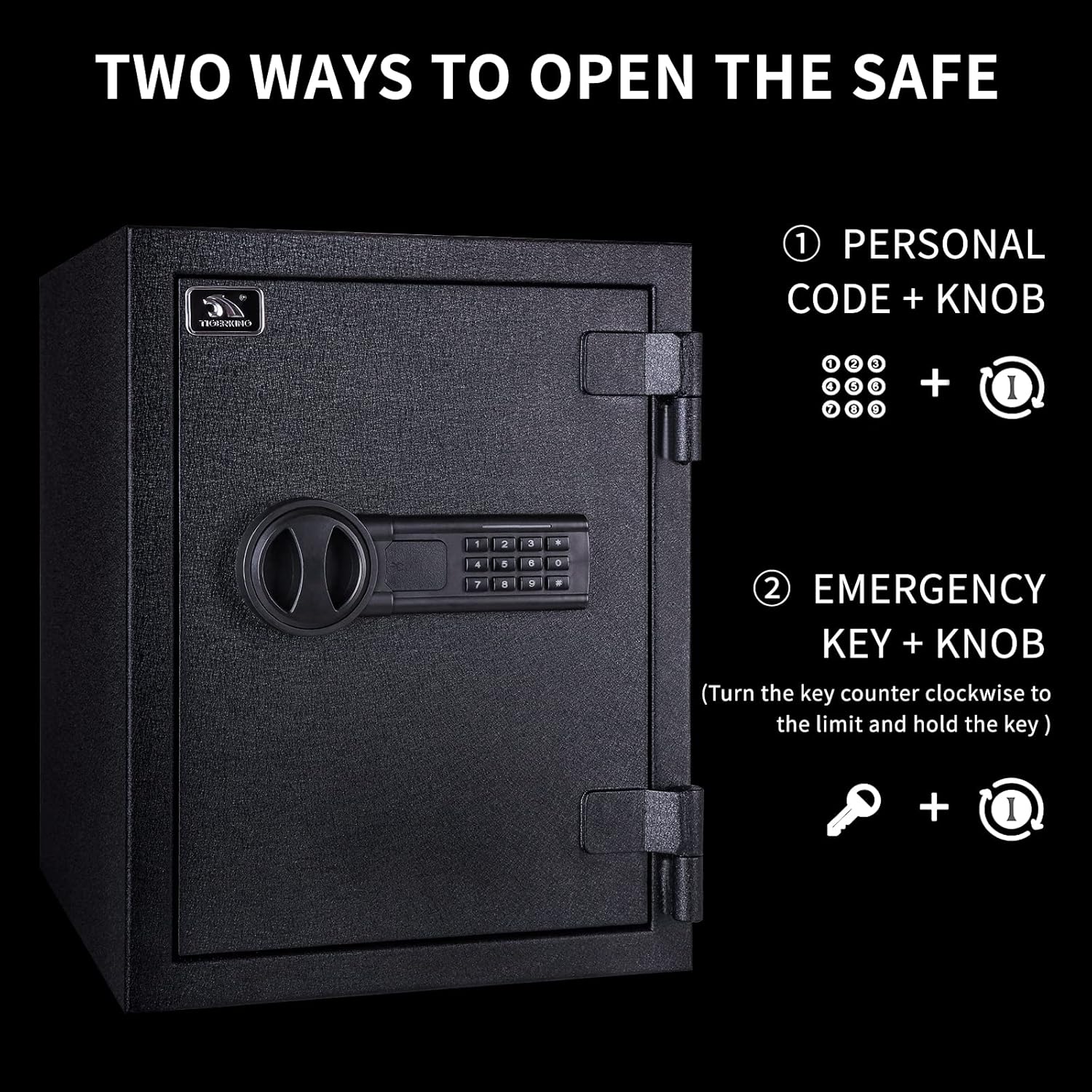
Figure 5: Close-up view of the safe's door mechanism, highlighting the solid 1-inch live-lock bolts, 0.7-inch thickness, internal LED light, and inner hinge design for enhanced security.
Operating Instructions
1. Opening the Safe with Digital Code
- Enter your personal passcode on the digital keypad.
- Press the "#" (pound) key or "ENTER" key.
- If the code is correct, the light will turn green. Within 5 seconds, turn the knob clockwise to open the safe door.
2. Opening the Safe with Emergency Key
In case of forgotten passcode or dead batteries, you can use the emergency key:
- Locate the keyhole cover on the digital keypad. Gently remove it.
- Insert the emergency key into the keyhole and turn it counter-clockwise (or as indicated by the safe's specific mechanism).
- While holding the key turned, turn the knob clockwise to open the safe door.

Figure 6: Visual guide demonstrating the two primary methods of opening the safe: using a personal digital code combined with turning the knob, or using the emergency key combined with turning the knob.
3. Mute/Unmute Keypad Sound
The keypad has a mute function. To mute the beeping sound when pressing keys, enter "4 zeros" followed by the "*" (star) key. To unmute, repeat the same sequence.
4. Closing and Locking the Safe
Close the safe door firmly. The safe will automatically lock. To ensure it is securely locked, try turning the knob without entering a code; it should not open.
Maintenance
- Battery Replacement: Replace batteries annually or when the keypad lights dim. Always use new, good quality batteries.
- Cleaning: Clean the exterior of the safe with a soft, damp cloth. Avoid abrasive cleaners or solvents that could damage the finish.
- Humidity Control: As safes are airtight, moisture can build up inside, potentially leading to mold, mildew, or rust on contents. It is recommended to use a dehumidifier or silica gel packs inside the safe, especially in humid climates, to protect your valuables.
Troubleshooting
| Problem | Possible Cause | Solution |
|---|---|---|
| Keypad not responding/lights dim | Low or dead batteries. | Replace the four AA batteries. If unable to open, use the emergency power connector with a 9V battery. |
| Safe not opening with code | Incorrect code entered; code not confirmed with # key; batteries low. | Re-enter code carefully, ensuring to press # after. Replace batteries. If still unsuccessful, use the emergency key. |
| Safe door not closing properly | Obstruction in the door frame; bolts not fully retracted. | Check for any items blocking the door. Ensure the knob is fully turned to retract bolts before closing. |
| Beeping sound when pressing keys | Keypad sound is enabled. | To mute, enter "4 zeros" followed by the "*" (star) key. |
Warranty and Support
TIGERKING has been manufacturing safes since 2000. We are committed to business integrity and quality after-sale assurance. Your TIGERKING FPSD40 safe comes with a 1-year warranty.
If you have any questions or require assistance with your safe, please feel free to contact our professional after-sales team. Your satisfaction is our aim.
For further support, please refer to the contact information provided on the product packaging or the official TIGERKING website.
Related documentsFPSD40


Ask a question about this manual
Ask about setup, troubleshooting, compatibility, parts, safety, or missing instructions. Manuals+ will review the question and use this page’s manual context to help answer it.