
1. Introduction
This manual provides detailed instructions for the safe and efficient operation of your KSUN DM10 Digital Two-Way Radio. Please read this manual thoroughly before using the device to ensure proper functionality and to prevent damage.
2. Product Overview
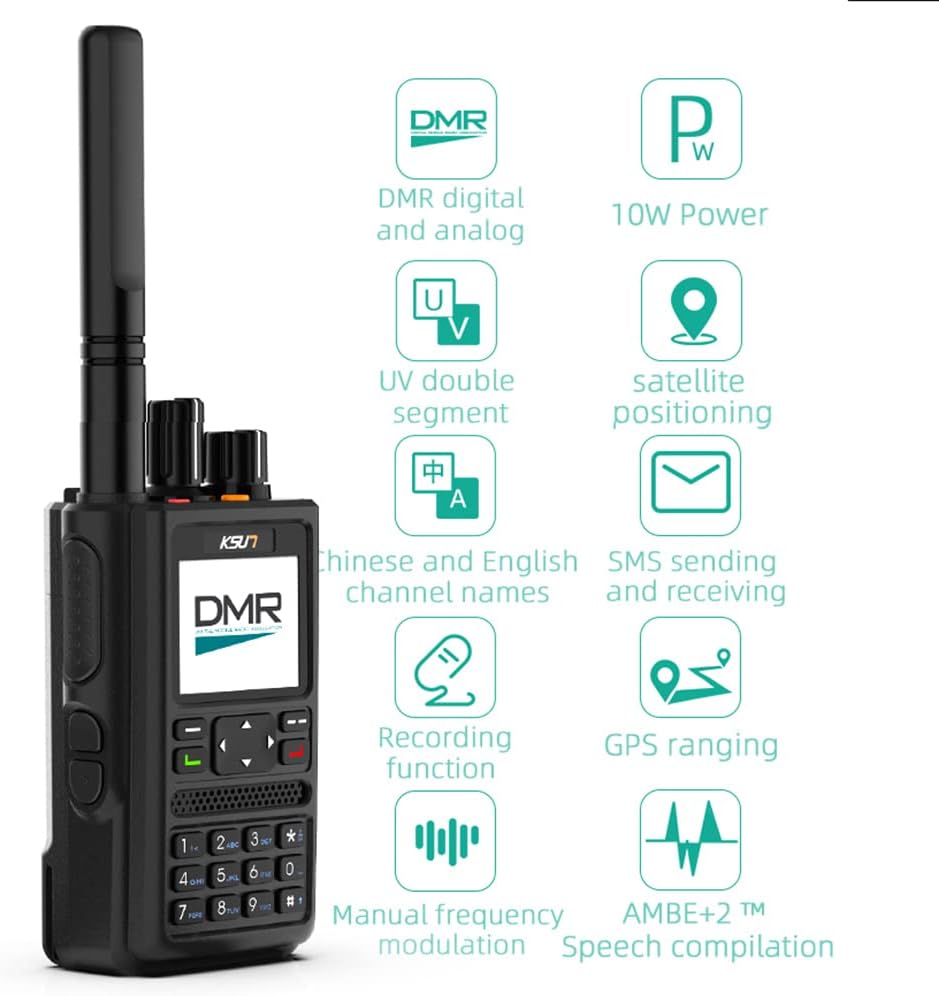
Image: The KSUN DM10 Digital Two-Way Radio, showcasing its design and primary interface.
2.1 Key Features
- 4000mAh Battery: Provides extended operation for 3-6 days of typical use, or 2-3 days of continuous use.
- SMS Functionality: Send and receive text messages with other DMR devices.
- Satellite GPS Positioning: Offers reliable positioning without requiring a network signal, suitable for outdoor environments.
- 1.77 Inch Large Screen: Displays essential information such as frequency, location, and battery status.
- Digital and Analog Modes: Supports both DMR digital and traditional analog communication.
- Recording Function: Allows for recording of communications.
- Intercom Encryption: Provides real-time encryption for secure communications.
- Manual Programmable: Features a digital keyboard for manual programming of frequencies and settings.
- UV Double Segment: Supports dual-band operation.
- 1000 Channel Capacity: Allows for extensive channel storage and management.
2.2 What's in the Box

Image: The KSUN DM10 radio and its included accessories laid out. This includes the radio unit, battery, belt clip, charger, charging cable, manual, lanyard, and antenna.
- 1 x KSUN DM10 Radio
- 1 x Battery (4000mAh Lithium Polymer)
- 1 x Belt Clip
- 1 x Charger
- 1 x Charging Cable
- 1 x User Manual
- 1 x Lanyard
- 1 x Antenna
2.3 Product Components

Image: A diagram highlighting the Channel knob, Power/Volume knob, PTT key, Custom keys, and Earphone jack on the KSUN DM10 radio.
Familiarize yourself with the radio's physical components:
- Channel Knob: Used to select communication channels.
- Power/Volume Knob: Controls power on/off and audio volume.
- PTT (Push-To-Talk) Key: Activates transmission.
- Custom Keys: Programmable buttons for various functions.
- Earphone Jack: For connecting external audio accessories.
- Antenna: For signal transmission and reception.
- 1.77-inch HD Screen: Displays operational information.
- Digital Keyboard: For manual frequency input and menu navigation.
2.4 Application Scenarios

Image: Examples of environments where the KSUN DM10 radio can be effectively used, such as construction sites, hotels, and outdoor adventures.
The KSUN DM10 is designed for reliable communication across various environments, including:
- Truck transportation
- Commercial hotels
- Property communities
- Construction sites
- Public safety industry
- Enterprise factories
2.5 Unboxing Video
Video: An unboxing demonstration of the KSUN DM10 Digital Two-Way Radio, showing all included components and a brief overview of the radio's display and features.
3. Setup
3.1 Battery Installation
- Align the battery with the battery compartment on the back of the radio.
- Gently push the battery into place until it clicks securely.
- To remove, slide the battery release latch (if present) and pull the battery away.
3.2 Antenna Attachment
- Screw the antenna clockwise into the connector on the top of the radio until it is finger-tight. Do not overtighten.
3.3 Charging the Battery
- Connect the charging cable to the charger base and plug the charger into a power outlet.
- Place the radio (with battery installed) or the battery alone into the charger slot.
- The charging indicator light will typically show red during charging and turn green when fully charged.
- A full charge can take several hours. Ensure the battery is fully charged before first use.
3.4 Initial Power On and Programming
- Turn the Power/Volume knob clockwise to power on the radio.
- The radio will display a welcome screen and then show the operating interface.
- For advanced programming and channel configuration, dedicated programming software (CPS) is required. Please contact customer service for the software if needed. The DM10 can be programmed using a standard K-head program cable (not included).
- Basic frequency and channel settings can be adjusted directly via the radio's digital keyboard and menu system.
4. Operating Instructions
4.1 Power On/Off and Volume Control
- Power On: Rotate the Power/Volume knob clockwise until a click is heard and the screen illuminates.
- Power Off: Rotate the Power/Volume knob counter-clockwise until a click is heard and the screen turns off.
- Volume Adjustment: Rotate the Power/Volume knob clockwise to increase volume and counter-clockwise to decrease volume.
4.2 Channel Selection

Image: The KSUN DM10 radio screen indicating its capacity for up to 1000 editable channels, supporting both analog and digital communication types.
- Rotate the Channel knob to select a desired channel. The selected channel number or name will appear on the 1.77-inch display.
- The radio supports up to 1000 channels, configurable for both analog and digital communication.
4.3 Transmitting and Receiving
- To transmit, press and hold the PTT (Push-To-Talk) key. Speak clearly into the microphone.
- Release the PTT key to stop transmitting and return to receive mode.
- Ensure you are on the correct channel and within range of the other party.
4.4 SMS Sending and Receiving

Image: The KSUN DM10 radio displaying options for sending and receiving SMS messages, including text editing and draft box functions, alongside its recording function.
- Navigate to the SMS menu using the radio's keypad and navigation buttons.
- Select "New Message" to compose a text message. Use the keypad to enter text.
- Choose a recipient from your contacts or enter a DMR ID.
- To view received messages, access the "Inbox" from the SMS menu.
4.5 GPS Positioning
The KSUN DM10 features satellite GPS positioning, allowing you to determine your location even without a cellular network signal. Access the GPS function through the radio's menu to view your coordinates.
4.6 Recording Function
The radio supports an optional recording function for both received and transmitted communications. This feature can be enabled or disabled through the radio's menu settings. Recorded audio files can typically be accessed and managed via the programming software (CPS).
4.7 Intercom Encryption

Image: A visual representation of the intercom encryption feature, showing the radio within a secure communication bubble.
For secure communications, the KSUN DM10 offers real-time encryption protection for work calls. This feature enhances privacy and can be configured within the radio's security settings, often requiring specific encryption keys or settings to be programmed.
4.8 LCD Icon Summary

Image: A table summarizing the various icons displayed on the KSUN DM10's LCD screen, along with their corresponding descriptions, such as Squelch, Battery level, GPS status, VOX, and encryption indicators.
Refer to the image above for a summary of the LCD icons and their meanings to understand the radio's status and active functions.
5. Maintenance
5.1 Cleaning
- Wipe the radio's surface with a soft, damp cloth. Do not use harsh chemicals or abrasive cleaners.
- Ensure the radio is powered off and the battery is removed before cleaning.
5.2 Battery Care
- Avoid fully discharging the battery frequently to prolong its lifespan.
- Store the battery in a cool, dry place when not in use for extended periods.
- Do not expose the battery to extreme temperatures or direct sunlight.
5.3 Storage
- Store the radio in a dry, dust-free environment.
- Remove the battery if storing the radio for a long duration.
6. Troubleshooting
| Problem | Possible Cause | Solution |
|---|---|---|
| Radio does not power on. | Battery is low or not installed correctly. | Charge the battery or re-install it securely. |
| Cannot transmit or receive. | Incorrect channel selected, out of range, or antenna not attached. | Verify channel, ensure within range, check antenna connection. |
| Hissing sound during reception. | Potential signal interference or squelch setting. | Adjust squelch level in settings. If problem persists, it may indicate external interference. |
| Difficulty programming channels. | Incorrect programming software (CPS) or cable. | Ensure you have the correct CPS and a standard K-head program cable. Contact customer service for software assistance. |
| GPS not acquiring signal. | Operating indoors or in an area with poor satellite visibility. | Move to an open outdoor area with a clear view of the sky. |
7. Specifications
| Feature | Detail |
|---|---|
| Brand | KSUN |
| Model Number | KSUN-DM10 |
| Color | Black |
| Number of Channels | 1000 |
| Frequency Range | 136-174 MHz / 400-470 MHz |
| Talking Range (Maximum) | 2 Miles (approximate, varies by terrain) |
| Voltage | 7.4 Volts (DC) |
| Water Resistance Level | Water Resistant |
| Product Dimensions (D x W x H) | 4.3" x 1.3" x 2.1" |
| Battery Type | 1 Lithium Polymer battery (included) |
| Battery Average Life | 36 Hours (typical usage) |
| Connectivity Protocol | DMR |
| Compatible Devices | Standard USB charging cables and standard programming cables |
8. Warranty and Support
For any issues with your KSUN DM10 handheld walkie-talkie, please contact customer service. Support is available to assist with product inquiries, troubleshooting, and software requests.
While specific warranty details are not provided in this manual, it is recommended to retain your proof of purchase for any warranty claims. For programming software, please reach out to the seller or manufacturer directly.