1. Important Safety Instructions
Please read all instructions carefully before operating this product. Retain this manual for future reference.
- Do not expose this appliance to rain or moisture.
- Do not use this apparatus near water.
- Clean only with a dry cloth.
- Do not block any ventilation openings. Install in accordance with the manufacturer's instructions.
- Do not install near any heat sources such as radiators, heat registers, stoves, or other apparatus (including amplifiers) that produce heat.
- Protect the power cord from being walked on or pinched, particularly at plugs, convenience receptacles, and the point where they exit from the apparatus.
- Only use attachments/accessories specified by the manufacturer.
- Unplug this apparatus during lightning storms or when unused for long periods of time.
- Refer all servicing to qualified service personnel. Servicing is required when the apparatus has been damaged in any way, such as power-supply cord or plug is damaged, liquid has been spilled or objects have fallen into the apparatus, the apparatus has been exposed to rain or moisture, does not operate normally, or has been dropped.
2. Package Contents
Verify that all items are present in your package:
- Technical Pro TPPLIT8 Loudspeaker
- Remote Control
- USB Charging Cable
- User Manual

Image: Included accessories and user manual cover.
3. Product Overview
3.1 Front Panel
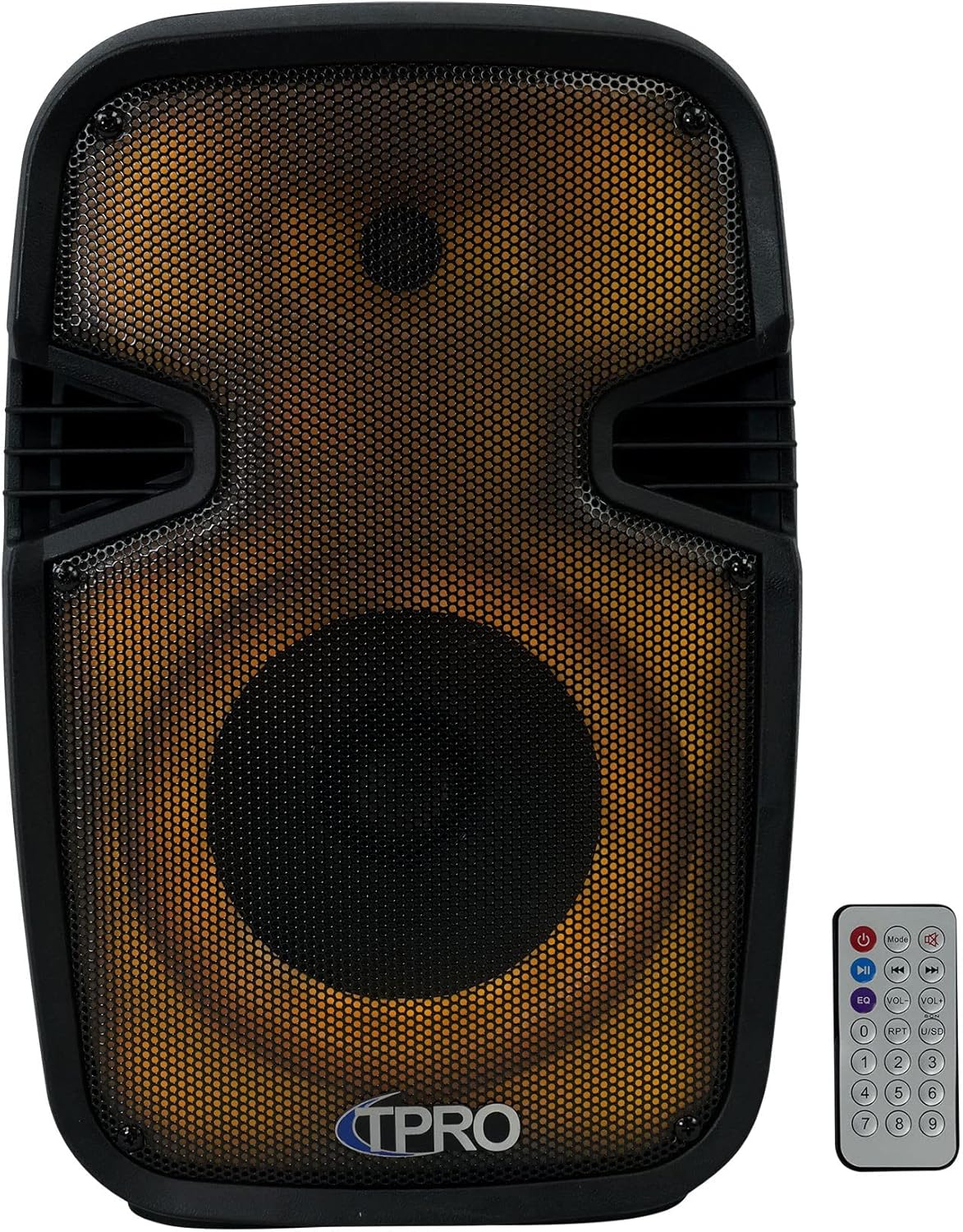
Image: Front view of the loudspeaker, showcasing the speaker grille and integrated LED lighting. The remote control is also visible.
3.2 Rear Control Panel

Image: Rear view of the loudspeaker, detailing the control panel. This includes volume controls, input selectors, USB and SD card slots, microphone input, AUX input, and power switch.
3.3 Side View and Portability

Image: Side view of the loudspeaker, illustrating the robust carry handle designed for easy transport.
3.4 Key Features Diagram

Image: A visual diagram highlighting the main functionalities of the loudspeaker, including various connectivity options and lighting effects.
3.5 Dimensions

Image: A diagram providing the physical measurements of the loudspeaker for placement and transport planning.
4. Setup
4.1 Initial Charging
Before first use, fully charge the loudspeaker's built-in rechargeable battery. Connect the provided USB charging cable to the speaker's charging port and a compatible USB power adapter (not included). The charging indicator light will typically show red while charging and turn off or change color when fully charged.
4.2 Power On/Off
Locate the power switch on the rear control panel. Flip the switch to the 'ON' position to power on the loudspeaker. Flip it to 'OFF' to power off the unit.
5. Operating Instructions
5.1 Bluetooth Pairing
- Power on the loudspeaker. It will automatically enter Bluetooth pairing mode, indicated by an audible prompt or flashing LED.
- On your mobile device (smartphone, tablet, etc.), enable Bluetooth and search for available devices.
- Select 'TPRO PLIT8' from the list of devices.
- Once paired, the loudspeaker will confirm with an audible sound. You can now stream audio wirelessly.
5.2 USB/SD Card Playback
- Insert a USB flash drive or SD card (with pre-loaded MP3 audio files) into the respective slot on the rear control panel.
- The loudspeaker should automatically detect the media and begin playback. If not, press the 'Mode' button to switch to USB/SD mode.
- Use the playback controls (Play/Pause, Next, Previous) on the loudspeaker or remote control to manage your music.
5.3 Microphone Input
- Connect a wired microphone (not included) to the 'MIC IN' jack on the rear control panel.
- Adjust the 'MIC VOL' knob to control the microphone's volume.
- Use the 'ECHO' knob to add an echo effect to the microphone audio.
5.4 AUX Input
- Connect an external audio source (e.g., MP3 player, laptop) to the 'AUX IN' jack on the rear control panel using a 3.5mm audio cable (not included).
- Press the 'Mode' button to switch the loudspeaker to AUX input mode.
- Control the volume from both the external device and the loudspeaker's master volume knob.
5.5 TWS (True Wireless Stereo) Pairing
To achieve true wireless stereo sound, you can pair two TPPLIT8 loudspeakers together:
- Ensure both loudspeakers are powered on and in Bluetooth mode, but not yet paired to any device.
- On one of the loudspeakers, press and hold the 'TWS' button (or a designated TWS pairing button, refer to the remote control section).
- The two speakers will attempt to connect to each other. Once connected, an audible prompt will confirm the TWS pairing.
- Now, connect your mobile device to the primary loudspeaker via Bluetooth (as described in section 5.1). Audio will play through both speakers in stereo.

Image: Two loudspeakers demonstrating a True Wireless Stereo setup for enhanced audio experience.
5.6 FM Radio
- Press the 'Mode' button to switch to FM Radio mode.
- Press the 'Play/Pause' button to initiate an automatic scan for available FM stations. The speaker will save detected stations.
- Use the 'Next' and 'Previous' buttons to navigate through the saved stations.
5.7 LED Lights Control
The loudspeaker features multi-color flashing disco LED party lights. Use the dedicated LED control button on the remote or the unit (if available) to cycle through different lighting modes or turn them off.
5.8 Remote Control Functions
The included remote control provides convenient access to various functions:

Image: The remote control unit, showing buttons for power, mode selection, playback, volume adjustment, equalizer presets, and a numeric keypad.
- Power Button: Turns the unit on/off.
- Mode Button: Cycles through input modes (Bluetooth, USB, SD, FM, AUX).
- Play/Pause: Plays or pauses current audio.
- Previous/Next: Skips to the previous or next track/station.
- Volume Up/Down: Adjusts the master volume.
- EQ: Cycles through equalizer presets.
- RPT (Repeat): Repeats current track or all tracks.
- USB/SD: Directly selects USB or SD card mode.
- Numeric Pad (0-9): For direct track selection in USB/SD mode or FM station input.
6. Maintenance
6.1 Cleaning
Wipe the exterior of the loudspeaker with a soft, dry cloth. Do not use abrasive cleaners, waxes, or solvents as they may damage the finish. Ensure no liquids enter the unit.
6.2 Storage
When not in use for extended periods, store the loudspeaker in a cool, dry place, away from direct sunlight and extreme temperatures. It is recommended to charge the battery periodically to maintain its lifespan.
7. Troubleshooting
| Problem | Possible Cause | Solution |
|---|---|---|
| No power | Battery discharged; Power switch off | Charge the battery; Turn the power switch to 'ON' |
| No sound | Volume too low; Incorrect input mode; Device not connected | Increase volume; Select correct input mode; Ensure device is properly connected/paired |
| Bluetooth not connecting | Speaker not in pairing mode; Device Bluetooth off; Too far from speaker | Ensure speaker is in Bluetooth pairing mode; Enable Bluetooth on device; Move device closer to speaker (within 30 feet) |
| TWS pairing failed | Speakers already paired to a device; Incorrect pairing procedure | Ensure both speakers are unpaired from other devices; Follow TWS pairing steps carefully |
8. Specifications
| Feature | Specification |
|---|---|
| Model Name | PLIT8 |
| Speaker Type | Speaker Systems |
| Speaker Size | 8 Inches |
| Woofer Diameter | 8 Inches |
| Speaker Maximum Output Power | 1200 Watts (Peak) |
| Connectivity Technology | Bluetooth |
| Wireless Communication Technology | Bluetooth |
| Bluetooth Range | 30 Feet |
| Power Source | Battery Powered |
| Impedance | 3 Ohm |
| Frequency Response | 18 KHz |
| Audio Output Mode | Stereo |
| Product Dimensions | 8"D x 9"W x 16"H |
| Item Weight | 6 pounds |
| Material | Plastic |
| Special Feature | LED Power Switch, Dazzling LED Glow Wall |
| Included Components | PA System, Remote Control, USB Cable, User Manual |
| UPC | 817802018269 |
9. Warranty and Support
This product comes with a Limited Warranty. For specific warranty details, please refer to the documentation included with your purchase or contact Technical Pro customer support.
For questions, comments, or technical support, please contact:
- Phone: 888-842-6277
- Email: info@tpro.com


