
Technical Pro PLIT12
Technical Pro PLIT12 Portable Bluetooth Party Speaker User Manual
Model: PLIT12
1. Introduction
Thank you for purchasing the Technical Pro PLIT12 Portable Bluetooth Party Speaker. This powerful and versatile speaker is designed to deliver high-quality audio with dynamic LED lighting effects, making it ideal for parties, events, and personal entertainment. Featuring Bluetooth connectivity, USB/TF card playback, FM radio, and microphone input, the PLIT12 offers a comprehensive audio solution. Please read this manual carefully to ensure proper operation and to maximize your enjoyment of this product.
2. Safety Instructions
- Power Source: Use only the specified power adapter for charging. Ensure the voltage matches the requirements of the speaker.
- Battery Care: For maximum battery life, fully charge the speaker for 8-10 hours prior to its initial use. Do not expose the battery to excessive heat or direct sunlight. Do not attempt to replace the battery yourself.
- Water and Moisture: Do not expose the speaker to water, rain, or excessive moisture. This product is not waterproof.
- Ventilation: Do not block any ventilation openings. Ensure adequate airflow around the speaker to prevent overheating.
- Cleaning: Disconnect the power before cleaning. Use a soft, dry cloth. Do not use liquid cleaners or aerosol sprays.
- Placement: Place the speaker on a stable, flat surface. Avoid placing it near heat sources, direct sunlight, or in areas with high humidity.
- Servicing: Do not attempt to repair or disassemble the speaker yourself. Refer all servicing to qualified service personnel.
- Hearing Protection: Avoid prolonged listening at high volume levels to prevent hearing damage.
3. Package Contents
Please check the box for the following items:
- Technical Pro PLIT12 Portable Bluetooth Party Speaker
- Wireless Remote Control
- Power Adapter
- User Manual
- Quick Start Guide
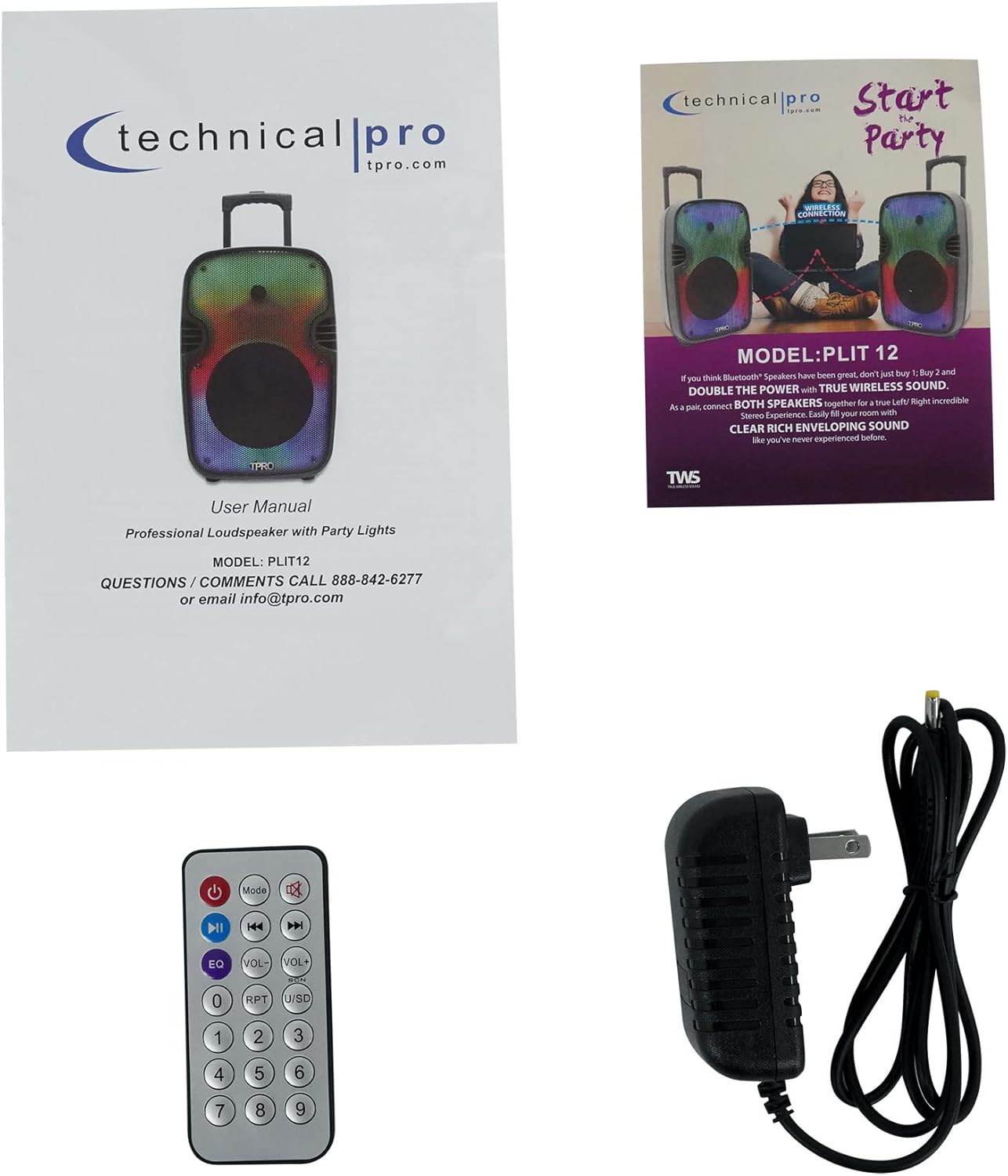
Image: Included accessories and documentation.
4. Product Features and Components
Front View

Image: Front view of the PLIT12 speaker and its remote control.
Rear Panel Controls and Inputs

Image: Detailed view of the rear control panel. Note: The sticker with '1011204545' is a product identifier.
- BT Pairing Name: TPRO PLIT12: Indicates the Bluetooth pairing name.
- Mode Button: Cycles through input modes (Bluetooth, USB, TF Card, FM Radio, AUX).
- REC Button: For recording audio (if supported).
- LED Mode Button: Changes the LED lighting patterns.
- LED Power Switch: Turns the LED lights on or off.
- Power Switch: Turns the speaker on or off.
- 12V Battery In: Power input for charging the internal battery.
- Volume Knob: Adjusts the master volume.
- Bass Knob: Adjusts the bass level.
- Treble Knob: Adjusts the treble level.
- Echo Knob: Adjusts the echo effect for the microphone.
- Mic Vol Knob: Adjusts the microphone volume.
- USB Port: For USB flash drives (up to 64GB).
- TF Card Slot: For TF (MicroSD) cards (up to 64GB).
- AUX Input: 3.5mm auxiliary input for external audio devices.
- Mic In: 1/4'' microphone input.
- LCD Screen: Displays current mode, track information, and other status indicators.
- Playback Controls: Play/Pause, Skip Forward, Skip Backward.
Key Features Overview

Image: Visual representation of the speaker's main features.
- 2000 Watts Peak Power: Delivers powerful sound output.
- 12" LED Woofer: Provides deep bass with dynamic LED lighting.
- Bluetooth v2.0 with EDR: Wireless connectivity with a range of 30 feet.
- Inputs: USB Flash Drive, TF Card, Microphone.
- LED Power Switch & Mode Button: Control the integrated LED lights.
- Portability: Easy to carry with wheels and a telescoping carry-on handle.
Iconic Features

Image: Icons illustrating key functionalities of the speaker.
- Bluetooth: Wireless audio streaming.
- LED Fade & Blending / LED Fire Wall / Running LED Ring: Multiple LED lighting modes.
- LED Woofer: Illuminated woofer for visual effects.
- Playback Controls: For media management.
- Rechargeable Battery: Built-in battery for portable use.
- TF/USB Inputs: For playing media from storage devices.
- TWS Stereo Sound: True Wireless Stereo for connecting two speakers.
- Wheels: For easy transport.
5. Setup
Initial Charging
- Before first use, connect the provided power adapter to the "12V Battery In" port on the rear panel and plug it into a power outlet.
- Allow the speaker to charge for 8-10 hours to ensure the battery is fully conditioned.
- The charging indicator (if present) will show the charging status.
Powering On/Off
- To turn on the speaker, flip the "Power" switch on the rear panel to the ON position.
- To turn off the speaker, flip the "Power" switch to the OFF position.
Bluetooth Pairing (Single Speaker)
- Turn on the speaker. The speaker will automatically enter Bluetooth mode or you can press the "Mode" button to select Bluetooth. The LCD screen will display "BLUE" or a similar indicator, and you will hear an audible prompt.
- Enable Bluetooth on your mobile device (smartphone, tablet, etc.).
- Search for Bluetooth devices and select "TPRO PLIT12" from the list.
- Once paired, the speaker will confirm with an audible sound. You can now play audio wirelessly from your device.
TWS (True Wireless Stereo) Pairing (Two Speakers)
TWS allows you to connect two PLIT12 speakers wirelessly for a true stereo sound experience.
- Ensure both PLIT12 speakers are powered on and in Bluetooth mode.
- On one of the speakers (this will be your primary speaker), press and hold the "TWS" button (if available, or a combination of buttons as per quick start guide, typically the Play/Pause button) until you hear a pairing sound.
- The two speakers will automatically connect to each other. Once connected, you will hear a confirmation sound.
- Now, connect your mobile device to the primary speaker via Bluetooth as described in the "Bluetooth Pairing (Single Speaker)" section.
- Audio will now play in stereo across both speakers.
Connecting USB/TF Card
- Insert a USB flash drive or TF card (with .mp3 files, max 64GB) into the respective port on the rear panel.
- The speaker will automatically switch to USB/TF mode and begin playing audio. If not, press the "Mode" button to select the correct input.
Connecting AUX Device
- Connect one end of a 3.5mm audio cable (not included) to the AUX input on the speaker.
- Connect the other end to the headphone jack or audio output of your external device.
- Press the "Mode" button until "AUX" is displayed on the LCD screen.
Connecting Microphone
- Plug a 1/4'' microphone (not included) into the "Mic In" port on the rear panel.
- Adjust the "Mic Vol" knob to control the microphone's volume.
- Use the "Echo" knob to add an echo effect to the microphone audio.
6. Operating Instructions
Bluetooth Playback
- Once paired, control playback (play/pause, skip tracks) directly from your connected Bluetooth device or using the speaker's playback controls.
USB/TF Card Playback
- Use the playback controls on the speaker or remote to navigate tracks.
- The "Repeat" function on USB/TF card inputs allows for continuous playback of a single track or all tracks.
FM Radio Operation
- Press the "Mode" button to switch to FM Radio mode.
- Press the Play/Pause button to auto-scan and save available FM stations.
- Use the Skip Forward/Backward buttons to navigate between saved stations.
LED Light Modes
- Use the "LED Power Switch" to turn the LED lights on or off.
- Press the "LED Mode Button" to cycle through various lighting effects, including LED Glow Wall with Burning Mode and Running LED Ring.
Remote Control Functions
The included wireless remote control provides convenient access to various functions:
- Power Button: Turns the speaker on/off.
- Mode Button: Cycles through input modes.
- EQ Button: Adjusts equalizer presets.
- Volume Up/Down: Adjusts master volume.
- Playback Controls: Play/Pause, Previous Track, Next Track.
- RPT (Repeat) Button: Repeats current track or all tracks (for USB/TF).
- USB/SD Button: Selects USB or SD (TF) card input directly.
- Numeric Keypad: For direct track selection (on USB/TF) or FM station tuning.
7. Maintenance
- Cleaning: Wipe the speaker's exterior with a soft, dry, lint-free cloth. Do not use abrasive cleaners, waxes, or solvents.
- Battery Care: To prolong battery life, avoid fully discharging the battery frequently. Recharge the speaker regularly, even if not in use, especially if storing for extended periods.
- Storage: Store the speaker in a cool, dry place away from direct sunlight and extreme temperatures.
- Transport: Utilize the integrated pull-up trolley and built-in wheels for easy and safe transportation.
8. Troubleshooting
- No Power:
Solution: Ensure the power adapter is securely connected and plugged into a working outlet. Check if the battery is charged. Try charging the unit for several hours. - No Sound:
Solution: Check the master volume level on the speaker and your connected device. Ensure the correct input mode (Bluetooth, USB, AUX, FM) is selected. If using a microphone, check its volume knob. - Bluetooth Not Connecting:
Solution: Ensure the speaker is in Bluetooth mode. Turn off and on Bluetooth on your device. Forget "TPRO PLIT12" from your device's Bluetooth list and try pairing again. Ensure your device is within the 30-foot range. - USB/TF Card Not Playing:
Solution: Ensure the files are in .mp3 format. Check if the USB drive/TF card is properly inserted and not corrupted. The maximum supported size is 64GB. - LED Lights Not Working:
Solution: Ensure the "LED Power Switch" is in the ON position. Try pressing the "LED Mode Button" to cycle through modes. - Remote Control Not Responding:
Solution: Ensure there are no obstructions between the remote and the speaker. Check and replace the remote control battery if necessary.
9. Specifications
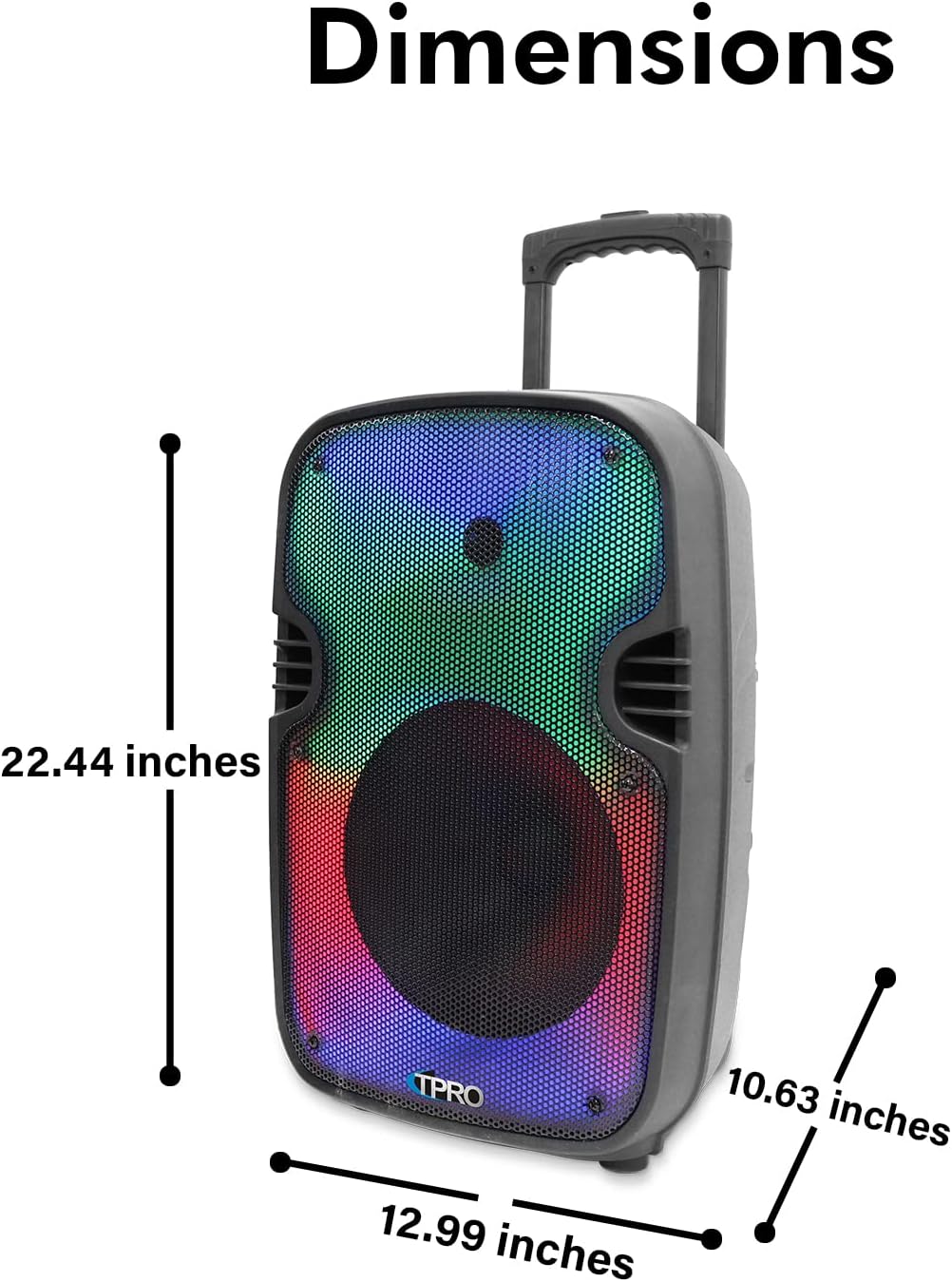
Image: Product dimensions.
| Feature | Detail |
|---|---|
| Model Number | PLIT12 |
| Output Wattage | 2000 Watts (Peak Power) |
| Woofer Size | 12 inches (LED Woofer) |
| Connectivity Technology | Bluetooth |
| Bluetooth Range | 30 Feet |
| Audio Inputs | USB flash drive, FM Radio, AUX, Microphone, Bluetooth |
| USB Card Maximum Size | 64GB |
| Supported File Types | .mp3 files (from USB/TF drives) |
| Power Source | Battery Powered |
| Impedance | 3 Ohms |
| Sensitivity | 80 ±2dB (1W@1M) |
| Frequency Response | 80Hz - 18KHz |
| Material | Plastic |
| Product Dimensions (L x W x H) | 10 x 13 x 23 inches |
| Item Weight | 10 pounds |
| UPC | 817802018252 |
| Manufacturer | Technical Pro |
10. Warranty and Support
For warranty information, technical support, or service inquiries, please contact Technical Pro directly. Refer to the contact information provided with your product packaging or visit the official Technical Pro website for the most up-to-date support details.
Manufacturer: Technical Pro
Related documentsPLIT12


Ask a question about this manual
Ask about setup, troubleshooting, compatibility, parts, safety, or missing instructions. Manuals+ will review the question and use this page’s manual context to help answer it.