1. Introduction
Thank you for choosing the NEEDONE 16L Electric Cooler Humidor, Model NO-16A. This electronic cabinet is designed to provide a stable and controlled environment for storing your cigars, ensuring their quality and flavor are maintained. Featuring cooling control, Spanish cedar wood shelves, and a digital hygrometer, this humidor offers precise conditions for your collection.
This manual provides essential information for the safe and efficient operation of your humidor. Please read it thoroughly before use and retain it for future reference.

Image 1.1: Front view of the NEEDONE 16L Electric Cooler Humidor.
2. Safety Information
To prevent injury to yourself and others, or damage to the appliance, please observe the following safety precautions:
- Ensure the humidor is placed on a stable, level surface away from direct sunlight, heat sources, and excessive moisture.
- Do not block ventilation openings. Allow adequate space around the unit for proper air circulation.
- This appliance is for indoor use only.
- Do not immerse the power cord, plug, or appliance in water or other liquids.
- Unplug the humidor before cleaning or performing any maintenance.
- Keep out of reach of children.
- The humidor exclusively cools below ambient temperature and does not offer heating.
3. Package Contents
Verify that all components are present upon unpacking:
- NEEDONE 16L Electric Cooler Humidor Unit
- Adjustable Spanish Cedar Wood Shelves (quantity may vary)
- Adjustable Spanish Cedar Wood Drawer with Digital Hygrometer
- Movable Water Sink (for humidity management)
- Power Cord
- Instruction Manual (this document)
4. Setup
4.1 Unpacking and Placement
- Carefully remove the humidor from its packaging.
- Place the humidor on a firm, level surface. Ensure there is at least 5 inches (12.7 cm) of space at the back and sides for proper ventilation.
- Avoid placing the unit near direct sunlight, heating vents, or appliances that produce heat. The advised ambient temperature range for optimal performance is 64°F to 78°F (18°C to 25.5°C).
- Adjust the height of the humidor using the adjustable feet at the bottom to ensure stability.

Image 4.1: Product dimensions for placement consideration.
4.2 Initial Seasoning of Spanish Cedar Wood
Spanish cedar wood requires seasoning to prevent it from absorbing moisture from your cigars. This process helps the wood reach an ideal humidity level.
- Remove all cedar shelves and the drawer from the humidor.
- Lightly wipe the cedar wood with a clean cloth dampened with distilled water. Do not soak the wood.
- Place the movable water sink in the humidor and fill it with distilled water.
- Return the cedar components to the humidor. Close the door and allow the unit to sit for 24-48 hours to absorb moisture.
- Monitor the digital hygrometer. Once it stabilizes around 65-70% RH, the humidor is seasoned and ready for use.
4.3 Power Connection
Connect the power cord to the humidor and then plug it into a grounded electrical outlet. The control panel display will illuminate.
4.4 Digital Hygrometer
The humidor includes a digital hygrometer integrated into the cedar drawer to display the internal humidity. Ensure it is properly seated in its designated slot.

Image 4.2: Digital hygrometer display.
5. Operating Instructions
5.1 Control Panel Overview
The touch control panel on the door allows for easy adjustment of settings. The panel auto-locks after 30 seconds of inactivity. To unlock, press and hold the "+" and "-" buttons simultaneously for 5 seconds until you hear a "BEEP".
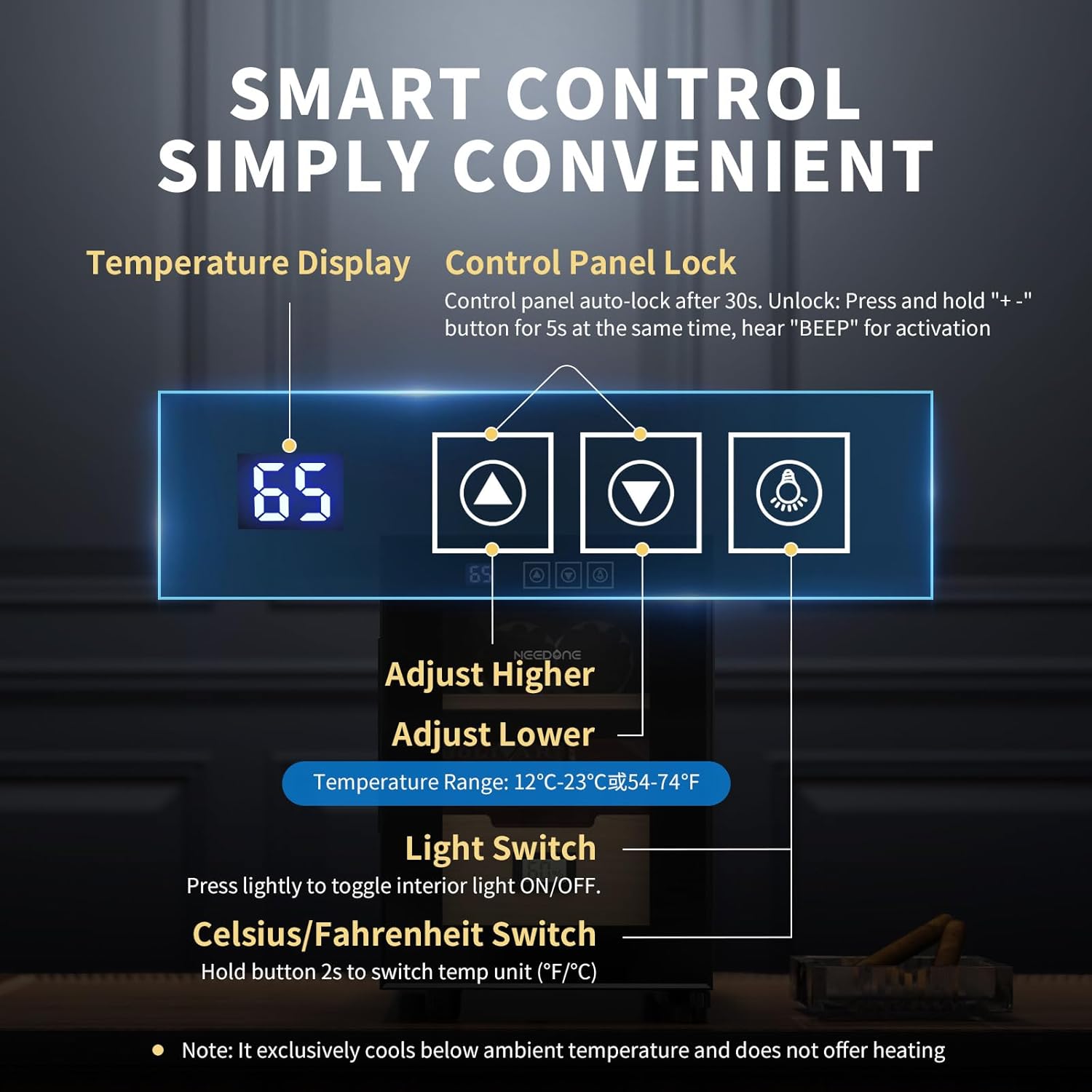
Image 5.1: Smart control panel functions.
- Temperature Display: Shows the current internal temperature.
- Adjust Higher (Up Arrow): Increases the set temperature.
- Adjust Lower (Down Arrow): Decreases the set temperature.
- Light Switch (Light Bulb Icon): Press lightly to toggle the interior LED light ON/OFF.
- Celsius/Fahrenheit Switch: Hold the light switch button for 2 seconds to switch between temperature units (°F/°C).
5.2 Temperature Adjustment
The humidor provides a user-adjustable temperature range of 54°F to 74°F (12°C to 23°C). The recommended applicable temperature for cigar storage is 64°F to 78°F (18°C to 25.5°C). Use the "+" and "-" buttons to set your desired temperature.
Note: This unit is designed for cooling only and does not have a heating function. It cools below ambient temperature.
5.3 Humidity Management
The humidor features an air closed-loop circulation system and a movable water sink to help maintain humidity. For optimal cigar preservation, a relative humidity (RH) of 55-65% is recommended.
- Fill the movable water sink with distilled water. Place it in its designated area within the humidor.
- Monitor the digital hygrometer to ensure the desired humidity level is maintained.
- For enhanced humidity control, especially in dry environments, it is recommended to use humidifier packs (e.g., Boveda packs) in conjunction with the water sink.

Image 5.2: Movable water sink.

Image 5.3: General guidelines for cigar storage conditions.
5.4 Loading and Arranging Cigars
The humidor has a capacity of up to 100 cigars, depending on their ring gauge. Utilize the adjustable cedar shelves and drawer to organize your collection.
- Arrange cigars to allow for proper air circulation. Avoid overcrowding.
- The Spanish cedar wood helps promote aging and imparts a desirable aroma to your cigars.

Image 5.4: Spanish cedar shelves for cigar storage.
6. Maintenance
6.1 Cleaning the Humidor
- Always unplug the humidor before cleaning.
- Wipe the exterior with a soft, damp cloth. Avoid abrasive cleaners or solvents.
- Clean the interior with a clean, slightly damp cloth. Do not use soap or detergents inside the humidor, as odors can be absorbed by the cedar wood and cigars.
- Ensure the interior is dry before plugging the unit back in.
6.2 Water Reservoir Refill
Regularly check the water level in the movable sink. Refill with distilled water as needed to maintain desired humidity levels. Do not use tap water, as minerals can cause buildup and affect performance.
6.3 Spanish Cedar Wood Care
The Spanish cedar shelves and drawer are designed to enhance your cigar collection. Avoid using any cleaning agents on the cedar wood. If the wood appears dry, you may lightly wipe it with a cloth dampened with distilled water, similar to the initial seasoning process.
7. Troubleshooting
If you experience issues with your NEEDONE Humidor, please consult the following table before contacting support.
| Problem | Possible Cause | Solution |
|---|---|---|
| Humidor not cooling | Power cord not connected; Temperature setting too high; Ambient temperature too low. | Ensure power cord is securely plugged in; Adjust temperature setting lower; Note that the unit cools below ambient temperature, it does not heat. |
| Temperature unstable or incorrect | Door not closed properly; Poor ventilation; Ambient temperature fluctuations. | Ensure door is fully closed; Check for adequate space around the unit; Avoid frequent door openings. |
| Humidity too low/high | Water sink empty; Humidor not seasoned; Door not sealed; Too many/few cigars. | Refill water sink with distilled water; Re-season cedar wood if necessary; Ensure door seal is intact; Adjust cigar quantity or use humidifier packs. |
| Excessive noise | Unit not level; Obstruction of fan. | Adjust leveling feet; Ensure nothing is blocking the internal fan. The unit operates quietly, typically below 38dB. |
8. Specifications
| Feature | Detail |
|---|---|
| Model Number | NO-16A |
| Capacity | 16 Liters (approx. 100 cigars, depending on ring gauge) |
| Product Dimensions | 20 x 9.8 x 14.1 inches (50.8 x 24.9 x 35.8 cm) |
| Weight | 21.25 Pounds (9.64 kg) |
| Temperature Range | 54°F to 74°F (12°C to 23°C) |
| Cooling Technology | Semiconductor refrigeration |
| Humidity Control | Air closed-loop circulation, movable water sink, digital hygrometer |
| Noise Level | Less than 38dB |
| Shelving Material | Spanish Cedar Wood |
9. Warranty and Support
9.1 Warranty Information
NEEDONE offers a one-year quality pledge for this product, covering manufacturing defects and malfunctions under normal use. This warranty does not cover damage caused by misuse, accident, unauthorized modification, or improper installation.
9.2 Customer Support
For any questions, concerns, or technical assistance, please contact NEEDONE customer service via Amazon's seller messaging service. We guarantee a response within 24 hours to ensure swift assistance.


