
1. Introduction
This manual provides essential information for the safe and effective use, installation, and maintenance of your Crown CR-GC150 Group GC12 12V 150 AH Deep Cycle Battery. Please read this manual thoroughly before installation or operation to ensure optimal performance and longevity of your battery.
The Crown CR-GC150 battery is designed for deep cycle applications, including golf carts, floor scrubbers, marine vessels, and RVs, offering reliable power and extended life.
2. Safety Information
WARNING: Batteries contain sulfuric acid, which is highly corrosive. They also produce explosive hydrogen gas. Always follow safety precautions to prevent serious injury or property damage.
- Personal Protective Equipment (PPE): Always wear safety glasses, gloves, and protective clothing when handling batteries.
- Ventilation: Ensure adequate ventilation when charging or using batteries to disperse hydrogen gas. Do not charge in an enclosed space.
- No Smoking/Open Flames: Keep sparks, flames, and smoking materials away from batteries.
- Short Circuits: Do not allow metal tools or objects to touch both battery terminals simultaneously. This can cause a short circuit, leading to sparks, fire, or explosion.
- Acid Spill: In case of contact with acid, flush immediately with water for at least 15 minutes and seek medical attention. Neutralize spills with baking soda.
- Lifting: This battery is heavy (approximately 81 lbs). Use proper lifting techniques or assistance to avoid injury.
- Charging: Use only chargers designed for lead-acid deep cycle batteries. Follow charger manufacturer's instructions.
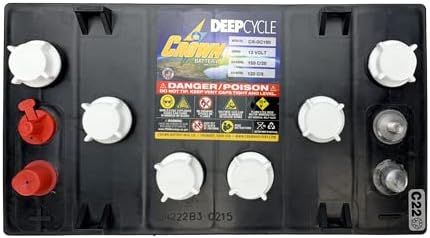
Figure 2.1: Top view of the Crown CR-GC150 battery, highlighting safety labels and terminal caps. Note the "DANGER/POISON" warning and symbols for eye protection, no smoking, and corrosive material.
3. Setup and Installation
Proper installation is crucial for battery performance and safety.
3.1 Unpacking and Inspection
Upon receiving your battery, inspect it for any signs of damage during shipping. If damage is found, contact your supplier immediately.
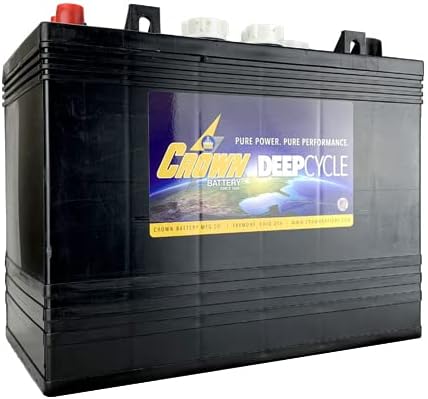
Figure 3.1: Front view of the Crown CR-GC150 Deep Cycle Battery, showing the product label and overall casing.
3.2 Battery Placement
- Place the battery in a clean, dry, well-ventilated area.
- Ensure the battery is securely fastened to prevent movement or tipping, especially in mobile applications.
- Maintain adequate clearance around the battery for air circulation and maintenance access.
3.3 Terminal Connections
The Crown CR-GC150 features SAE Automotive Post and Threaded Stud terminals.
- Clean battery terminals and cable connectors thoroughly before making connections.
- Connect the positive (+) cable to the positive (+) terminal and the negative (-) cable to the negative (-) terminal.
- Tighten all connections securely to prevent arcing and ensure good electrical contact. Do not overtighten.
- Apply a thin coat of anti-corrosion grease to the terminals after connections are made.

Figure 3.2: Angled view of the Crown CR-GC150 battery, showing the red positive terminal cap and black negative terminal, along with the six cell caps.
3.4 Initial Charge
It is recommended to fully charge the battery before its first use to ensure maximum capacity and lifespan. Refer to Section 5.2 for charging guidelines.
4. Operating Guidelines
The Crown CR-GC150 is a deep cycle battery, designed to be discharged and recharged repeatedly. Avoid using it for starting applications unless specifically designed for dual-purpose use.
4.1 Discharge Depth
For optimal battery life, avoid discharging the battery below 50% of its capacity regularly. Occasional deeper discharges are acceptable, but frequent deep discharges (below 20%) will significantly reduce battery lifespan.
4.2 Temperature Considerations
Battery performance and lifespan are affected by temperature. Extreme temperatures (very hot or very cold) can reduce capacity and accelerate degradation. Operate the battery within recommended temperature ranges, typically between 0°C and 45°C (32°F and 113°F).
5. Maintenance
Regular maintenance will extend the life and performance of your Crown deep cycle battery.
5.1 Cleaning
- Keep the battery top clean and dry. Dirt and moisture can create conductive paths, leading to self-discharge.
- Clean terminals and cable connectors regularly to prevent corrosion. Use a wire brush and a solution of baking soda and water to remove corrosion. Rinse with clean water and dry thoroughly.
5.2 Watering (Electrolyte Level)
This is a flooded lead-acid battery and requires periodic watering.
- Check electrolyte levels regularly, especially after charging.
- Remove the vent caps. The electrolyte level should be just above the plates.
- If low, add distilled water only. Do not add tap water or acid.
- Do not overfill. Overfilling can cause acid overflow during charging.
- Replace vent caps securely.
5.3 Charging
- Use a charger specifically designed for 12V deep cycle lead-acid batteries.
- Ensure the charger's voltage and amperage settings are appropriate for a 12V, 150Ah battery.
- Always charge in a well-ventilated area.
- Avoid overcharging, which can damage the battery and lead to excessive water loss.
- Store batteries fully charged. If storing for extended periods, use a float charger or perform a maintenance charge every 30-60 days.
6. Troubleshooting
This section addresses common issues you might encounter with your battery.
| Problem | Possible Cause | Solution |
|---|---|---|
| Battery not holding charge | Sulfation, undercharging, old age, internal short. | Ensure proper charging cycle. Check electrolyte levels. If battery is old, consider replacement. Consult a professional. |
| Low voltage output | Undercharged, loose/corroded connections, damaged cell. | Fully charge battery. Clean and tighten terminals. Check individual cell voltages (if possible). |
| Excessive water consumption | Overcharging, high operating temperature. | Check charger settings. Ensure proper ventilation. Avoid operating in extreme heat. |
| Corrosion on terminals | Acid fumes, loose connections. | Clean terminals with baking soda solution. Apply anti-corrosion grease. Ensure connections are tight. |
7. Specifications
Key technical specifications for the Crown CR-GC150 Group GC12 12V 150 AH Battery.
| Feature | Specification |
|---|---|
| Part Number | CR-GC150 (Replaces Trojan T1275) |
| Voltage | 12 Volts |
| Capacity (20 Hr Rate) | 150 Ah |
| Reserve Capacity (RC) @ 75 Amps | 103 Minutes |
| BCI Group Size | GC12 |
| Chemistry | Lead Acid (Flooded) |
| Case Material | Polypropylene |
| Terminals | SAE Automotive Post and Threaded Stud |
| Item Weight | 81 lbs (approx. 36.7 kg) |
| Product Dimensions (L x W x H) | 12.92" x 7.06" x 9.7" (approx. 32.8 x 17.9 x 24.6 cm) |
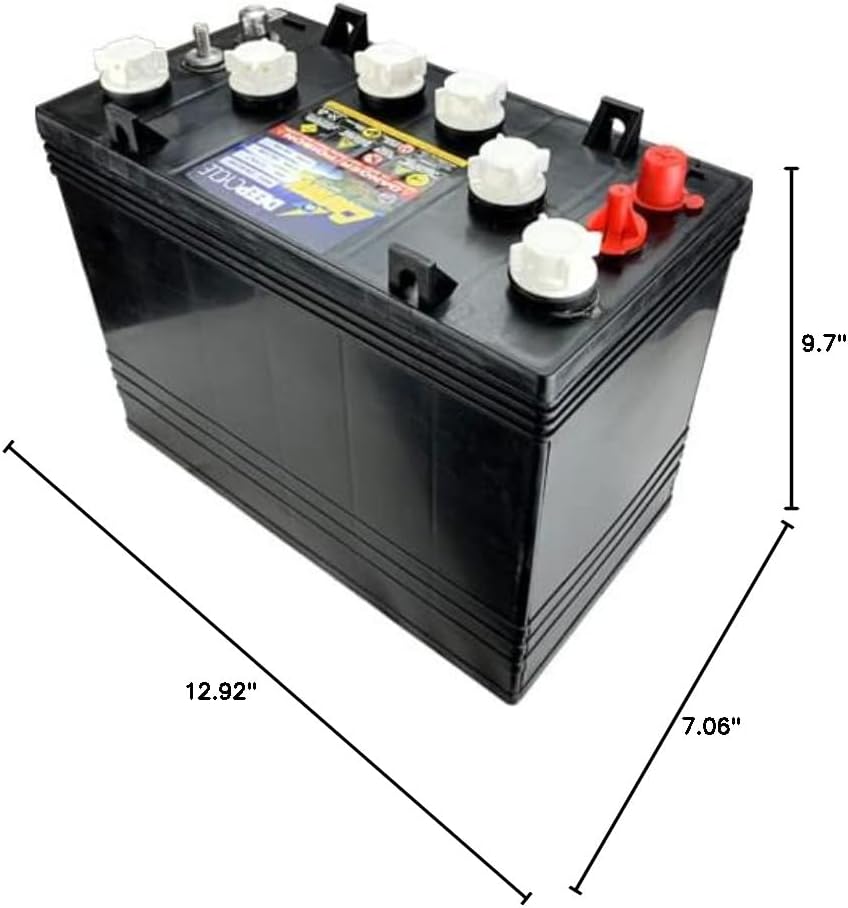
Figure 7.1: Dimensional drawing of the Crown CR-GC150 battery, indicating its length (12.92"), width (7.06"), and height (9.7").
8. Warranty and Support
For warranty information and technical support, please refer to the official website of Banshee or contact your point of purchase. Keep your proof of purchase for warranty claims.
For further assistance, you may visit the Banshee Store on Amazon: Banshee Premium Motorsports Batteries Store.