
Sigma BC 23.16 STS (02316)
Sigma Sport BC 23.16 STS Bicycle Computer User Manual
Model: BC 23.16 STS (02316)
Brand: Sigma
Introduction
The Sigma Sport BC 23.16 STS is a sophisticated wireless bicycle computer designed to provide comprehensive data for cyclists. It offers a wide range of functions including speed, distance, time, heart rate, cadence, altitude profiles, and calculated power output. With its intuitive operation, large log capacity, and reliable STS wireless transmission, it is an ideal companion for training and touring. Data can be easily transferred to your smartphone via NFC for detailed analysis.

Image: The Sigma Sport BC 23.16 STS bicycle computer, showing its clear display with various cycling metrics.
Package Contents
Upon opening the package, ensure all the following components are present:
- Sigma Sport BC 23.16 STS Bicycle Computer (with pre-installed battery)
- STS 2450 Mount Bracket
- STS Speed Transmitter
- STS Cadence Transmitter
- STS Heart Rate Textile Chest Strap
- Powerful Magnet (for speed sensor)
- Magnet (for cadence sensor)
- Mounting Material (O-rings, zip ties)

Image: A visual representation of all items included in the product packaging, ensuring users can verify their contents.
Setup Guide
1. Battery Installation
The bicycle computer comes with a pre-installed CR2032 battery. For initial use, ensure the battery is properly seated. The device is designed for long battery life, typically over 2 years. When replacing the battery, an integrated memory chip saves all total values and settings, so no data is lost.
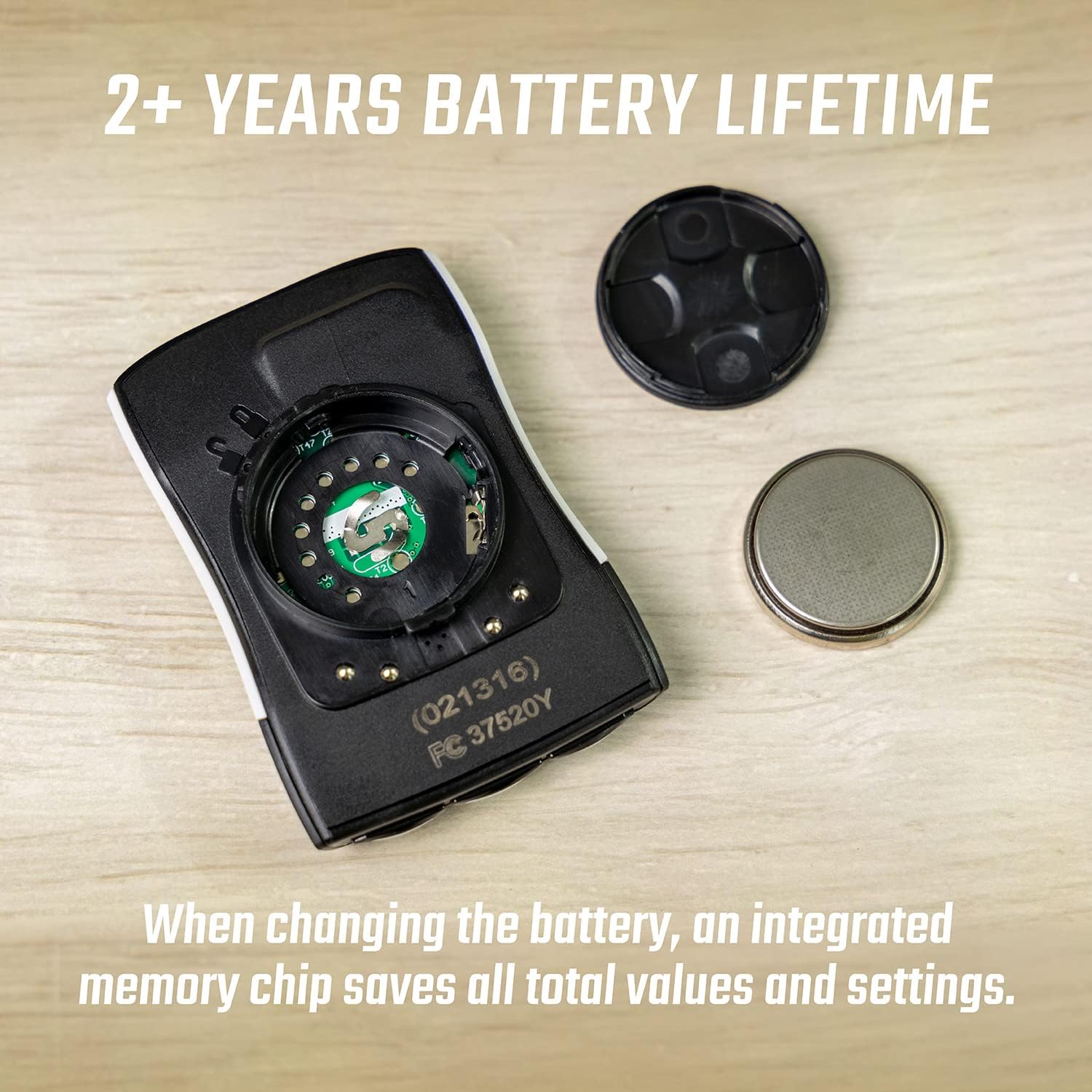
Image: The battery compartment of the BC 23.16 STS, showing the CR2032 battery and its cover, highlighting the ease of replacement and data retention feature.
2. Sensor and Mount Installation
Install the STS 2450 mount on your bicycle handlebars or stem using the provided mounting material. Position the STS Speed Transmitter on the front fork and the powerful magnet on a spoke of the front wheel, ensuring a small gap (approx. 2-5mm) between them. For cadence, attach the STS Cadence Transmitter to the chainstay and its magnet to the crank arm, maintaining a similar small gap. The STS Heart Rate Textile Chest Strap should be worn directly on your skin, just below your chest muscles, for accurate heart rate monitoring.
3. Initial Configuration via NFC
The BC 23.16 STS supports Near Field Communication (NFC) for easy initial setup and data transfer. Download the Sigma Link app on your smartphone. Activate NFC on your phone and hold it close to the bicycle computer. The app will guide you through setting up wheel size, time, date, and personal data for accurate calculations.
Operating Instructions
1. Display and Functions
The computer features a clear 2.1-inch LCD display with a backlight function for visibility in various lighting conditions. It offers over 23 functions, including:
- Current, Average, and Maximum Speed
- Trip Distance and Total Distance
- Ride Time and Total Ride Time
- Current, Average, and Maximum Heart Rate
- Current, Average, and Maximum Cadence
- Altitude Functions (Current Altitude, Ascent/Descent, Altitude Profile)
- Calculated Power Output (Watts)
- Temperature
- Lap Function

Image: Multiple views of the BC 23.16 STS display, illustrating its diverse range of functions including lap tracking and power measurement.

Image: A detailed view of the BC 23.16 STS, highlighting its 2.1-inch screen size and physical dimensions (Depth: 12.5mm, Height: 66.5mm, Width: 44mm).
2. Menu Navigation
The device features conveniently placed buttons for intuitive menu navigation. Use the buttons on the bottom and sides to scroll through functions, access settings, and confirm selections. Small graphical indicators on the display assist in menu guidance.
3. Data Logging and Transfer
The BC 23.16 STS can store up to 99 logging sessions, accumulating a total recording time of up to 500 hours at a 20-second interval. After your ride, data can be transferred to your smartphone via NFC using the Sigma Link app for detailed analysis, sharing, and integration with platforms like Strava and Komoot.
4. Automatic Bike Recognition
The computer supports automatic recognition for up to two different bicycles. This feature allows you to use the same computer across multiple bikes without manual re-configuration, as it automatically detects which bike's sensors are active.

Image: Demonstrates the automatic bike recognition feature, allowing the computer to seamlessly switch between data profiles for two different bicycles.
Maintenance
1. Battery Replacement
When the battery indicator appears on the display, it's time to replace the CR2032 battery in the main unit. For sensors, refer to their individual manuals for battery type and replacement instructions. Always use fresh, high-quality batteries. Ensure the battery compartment is sealed properly after replacement to maintain water resistance.
2. Cleaning
Clean the bicycle computer and sensors with a soft, damp cloth. Do not use abrasive cleaners or solvents, as these can damage the display or casing. Ensure all components are dry before storage or next use.
Troubleshooting
- No Speed/Cadence/Heart Rate Display:
- Check battery levels in the computer and respective sensors.
- Ensure sensors and magnets are correctly aligned and within the recommended distance (2-5mm).
- Verify that the computer is paired with the correct sensors.
- Check for any physical obstructions or damage to sensors/magnets.
- Inaccurate Readings:
- Confirm the wheel circumference setting in the computer matches your bicycle's wheel size.
- Ensure the heart rate strap is worn correctly and moistened for good conductivity.
- Check for strong electromagnetic interference from other devices.
- Display Not Working:
- Check the main unit's battery.
- Perform a soft reset (refer to the full manual for specific instructions, usually involves holding certain buttons).
- NFC Data Transfer Issues:
- Ensure NFC is enabled on your smartphone.
- Make sure the Sigma Link app is updated to the latest version.
- Hold the phone directly over the NFC area of the computer.
Specifications
| Feature | Detail |
|---|---|
| Model Number | 02316 |
| Display Type | LCD |
| Screen Size | 2.1 inches |
| Dimensions (L x W x H) | 1.7 x 1.6 x 4.5 cm (approx. 17L x 16W x 45H mm) |
| Weight | 220 grams |
| Power Source | 1 x CR2032 Battery (included) |
| Battery Life | 2+ years (computer unit) |
| Connectivity | STS Wireless, NFC |
| Water Protection Rating | IPX8 |
| Log Capacity | 99 logs, up to 500 hours (20-second interval) |
| Functions | 23+ functions (Speed, Distance, Time, HR, Cadence, Altitude, Power, etc.) |
| Automatic Recognition | Up to 2 bikes |
Warranty and Support
For specific warranty information and support, please refer to the official Sigma Sport website or contact their customer service directly. Warranty terms typically cover manufacturing defects for a specified period from the date of purchase. Keep your proof of purchase for any warranty claims.
Online resources, including detailed manuals and FAQs, are often available on the manufacturer's website to assist with further questions or advanced features.
Related documentsBC 23.16 STS (02316)


Ask a question about this manual
Ask about setup, troubleshooting, compatibility, parts, safety, or missing instructions. Manuals+ will review the question and use this page’s manual context to help answer it.