
1. Introduction
This manual provides essential information for the installation, operation, and maintenance of your Resideo 6160C 32-Character Custom Alpha Display Keypad. The 6160C keypad is designed to provide intuitive control and clear status indications for compatible Honeywell VISTA security systems, specifically VISTA-15P and VISTA-20P panels. It features a large, user-friendly interface with continuously backlit keys and a plain-English display for easy understanding of system events and zones. An integrated speaker provides audible feedback for system status, entry/exit delays, and alarm conditions.
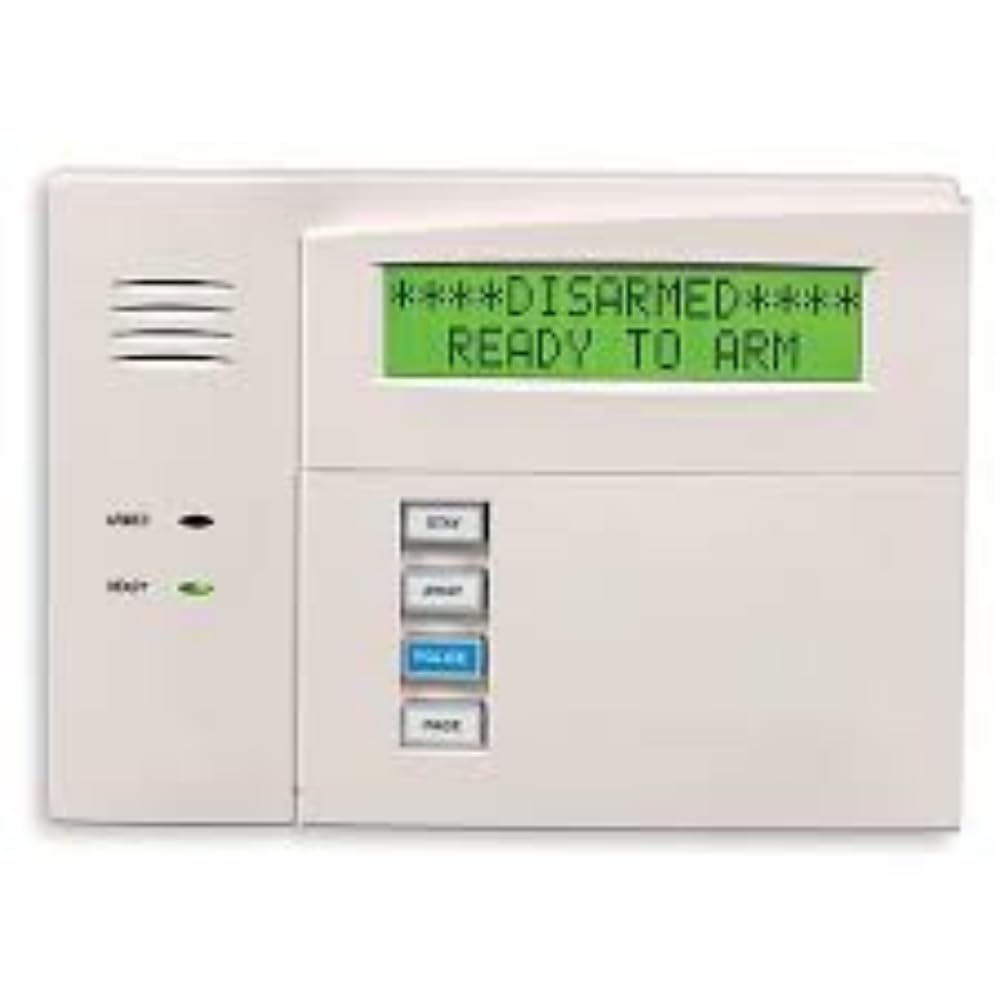
Figure 1: Resideo 6160C Keypad. This image displays the front view of the keypad, highlighting its large display, numerical keys, and dedicated function buttons.
2. Setup
2.1 Compatibility
The 6160C Keypad is compatible with Honeywell VISTA-15P and VISTA-20P security system control panels.
2.2 Mounting
- Select Location: Choose a central, easily accessible location away from direct sunlight, heat sources, and moisture.
- Prepare Wiring: Ensure all power to the control panel is disconnected before beginning wiring. Route the necessary low-voltage wiring from the control panel to the keypad mounting location.
- Mount Keypad: Secure the keypad base to the wall using appropriate screws and anchors. Ensure wiring passes through the designated opening in the base.
2.3 Wiring
Connect the keypad to the control panel's data bus terminals. Refer to your VISTA control panel's installation manual for specific wiring diagrams and terminal assignments. Typically, four wires are used for power and data communication (Red for +12VDC, Black for Ground, Green for Data In, Yellow for Data Out).
2.4 Initial Power-Up
After all wiring is complete and secure, restore power to the control panel. The keypad display should illuminate, and it may prompt for initial programming or display system status. Consult your VISTA control panel's programming guide for keypad addressing and system integration.
3. Operating Instructions
The 6160C keypad provides a clear interface for managing your security system.
3.1 Arming the System
To arm your system, enter your 4-digit security code followed by the desired arming function key (e.g., AWAY for full protection, STAY for perimeter protection).
- Arm Away: Enter [Security Code] + [AWAY]. All zones are armed.
- Arm Stay: Enter [Security Code] + [STAY]. Perimeter zones are armed, interior zones are bypassed.
- Arm Night: Enter [Security Code] + [NIGHT]. Similar to Stay, but may include specific interior zones.
3.2 Disarming the System
To disarm the system and silence any alarms, enter your 4-digit security code followed by the OFF key.
- Disarm: Enter [Security Code] + [OFF].
3.3 Checking System Status
The keypad's plain-English display provides continuous updates on your system's status. Common messages include:
- READY TO ARM: All protected zones are closed and the system can be armed.
- NOT READY: One or more protected zones are open. The display will indicate which zones are open.
- ARMED AWAY: System is armed in Away mode.
- ARMED STAY: System is armed in Stay mode.
3.4 Function Keys
The 6160C features four programmable function keys (A, B, C, D) that can be configured for quick access to common system functions, such as panic alarms, system tests, or lighting control. Refer to your system's programming guide for specific functions assigned to these keys.
3.5 Audible Feedback
The built-in speaker provides distinct tones for various system events:
- Entry/Exit Delay: A series of beeps indicating the countdown for arming or disarming.
- Alarm: A loud, continuous tone indicating an alarm condition.
- Trouble Condition: A short, intermittent beep indicating a system trouble (e.g., low battery, communication failure). Press any key to silence, then check the display for details.
4. Maintenance
The Resideo 6160C Keypad requires minimal maintenance to ensure optimal performance.
- Cleaning: Gently wipe the keypad's surface and display with a soft, dry, or slightly damp cloth. Avoid using abrasive cleaners, solvents, or excessive moisture, as these can damage the keypad.
- Regular Testing: Periodically test your entire security system, including the keypad, in accordance with your security provider's recommendations. This ensures all components are functioning correctly.
- Power Supply: Ensure the keypad receives consistent power from the control panel. If the keypad loses power, it will not function.
5. Troubleshooting
If you encounter issues with your 6160C Keypad, refer to the following common problems and solutions:
- Keypad Display is Blank:
- Check if the control panel has power.
- Verify all wiring connections between the keypad and the control panel are secure.
- Ensure the keypad's address is correctly set and recognized by the control panel.
- Keypad Not Responding to Input:
- Ensure the system is not in a busy state (e.g., during communication with central station).
- Try entering your code again carefully.
- If the issue persists, power cycle the control panel (disconnect and reconnect power) and retest.
- Audible Tones Not Working:
- Check the system's volume settings, if applicable.
- Ensure the keypad speaker is not obstructed.
- If other keypads are working, the issue might be specific to this unit.
- "NOT READY" Message Persists:
- Check the keypad display for specific zone numbers that are open. Close all doors and windows associated with those zones.
- If a zone remains open, it may indicate a sensor issue. Contact your security technician.
For persistent issues, contact your security system installer or Resideo technical support.
6. Specifications
| Feature | Description |
|---|---|
| Model Number | 6160C |
| Manufacturer | Honeywell Home (RESIDEO) |
| Display Type | 32-Character Custom Alpha Display |
| Keypad Backlighting | Continuously Backlit Keys |
| Audible Feedback | Built-in Speaker for System Status, Delays, Alarms |
| Programmable Keys | 4 Function Keys (A, B, C, D) |
| Compatibility | Honeywell VISTA-15P, VISTA-20P Control Panels |
| Color | White |
| Item Weight | 1 pound |
7. Warranty and Support
7.1 Warranty Information
The Resideo 6160C Keypad comes with a 2-Year Limited Manufacturer Warranty. Please retain your proof of purchase for warranty claims. For detailed terms and conditions, refer to the warranty documentation provided with your product or visit the official Resideo website.
7.2 Technical Support
For technical assistance, installation questions, or troubleshooting beyond the scope of this manual, please contact your authorized security system dealer or Resideo customer support. Support contact information can typically be found on the manufacturer's official website or in your system's main documentation.


