
MOSFiATA PAR-36
MOSFiATA PAR-36 RGB 36 LED Stage Light User Manual
Model: PAR-36
Introduction
Thank you for purchasing the MOSFiATA PAR-36 RGB 36 LED Stage Lights. This manual provides detailed instructions for the safe and efficient operation of your new stage lighting system. Please read this manual thoroughly before use and retain it for future reference.
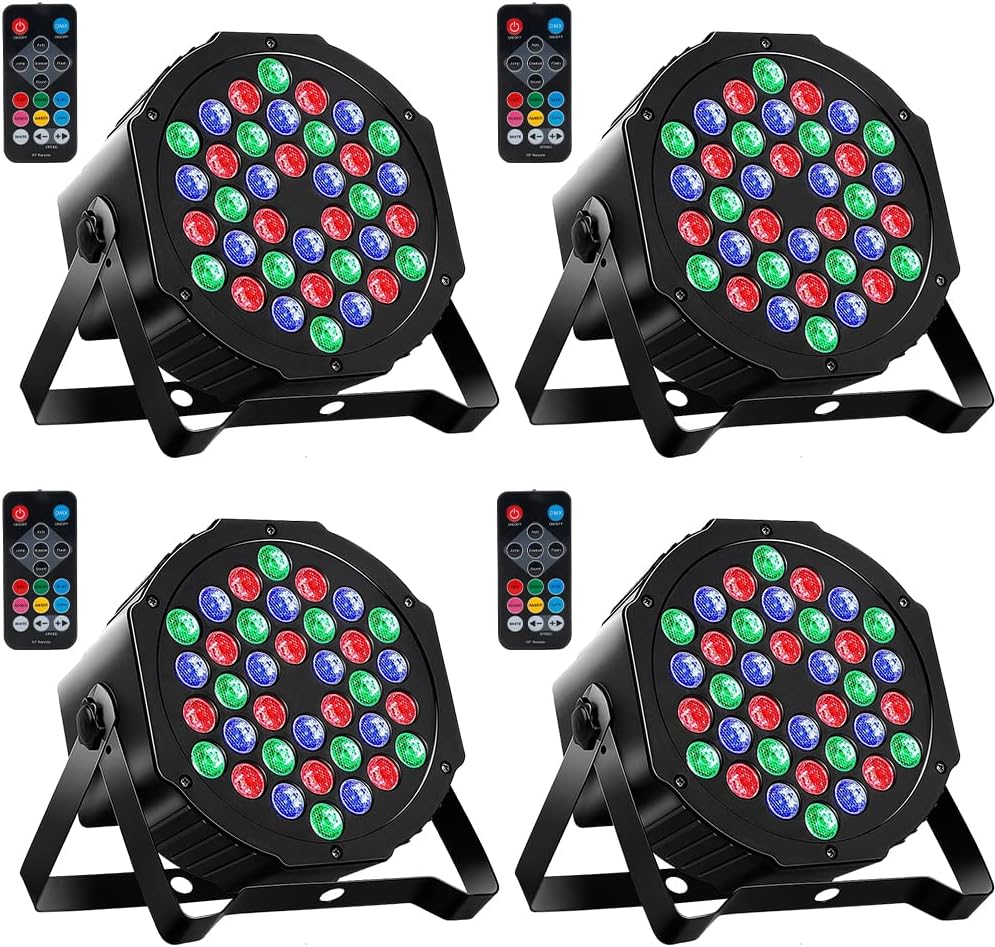
Image: Four MOSFiATA PAR-36 LED stage lights, each with a remote control, showcasing the product's appearance.
Safety Information
- Always connect to a grounded power outlet.
- Do not expose the device to rain or moisture.
- Ensure proper ventilation to prevent overheating.
- Do not open the housing; there are no user-serviceable parts inside.
- Disconnect power before cleaning or servicing.
- Avoid direct eye exposure to the light source.
Package Contents
The MOSFiATA PAR-36 (4-Pack) typically includes the following items:
- 4x MOSFiATA PAR-36 LED Stage Lights
- 4x Mounting Brackets
- 8x Mounting Screws (2 per bracket)
- 4x Remote Controls
- 1x User Manual

Image: Contents of the MOSFiATA PAR-36 package, including the light unit, remote, manual, and mounting hardware.
Product Overview
The MOSFiATA PAR-36 features 36 high-quality RGB LEDs, offering a wide range of colors and lighting effects. Key components include:
- 36 LED Array: Provides bright and vibrant illumination.
- Hexagon Lens Design: Enhances lighting effect and coverage.
- Dual Bracket: Allows for versatile mounting options (floor, wall, ceiling).
- 4-Digit Digital Display: For mode selection and DMX addressing.
- DMX IN/OUT Ports: For professional DMX control.
- Ventilation Fan: Ensures optimal operating temperature.
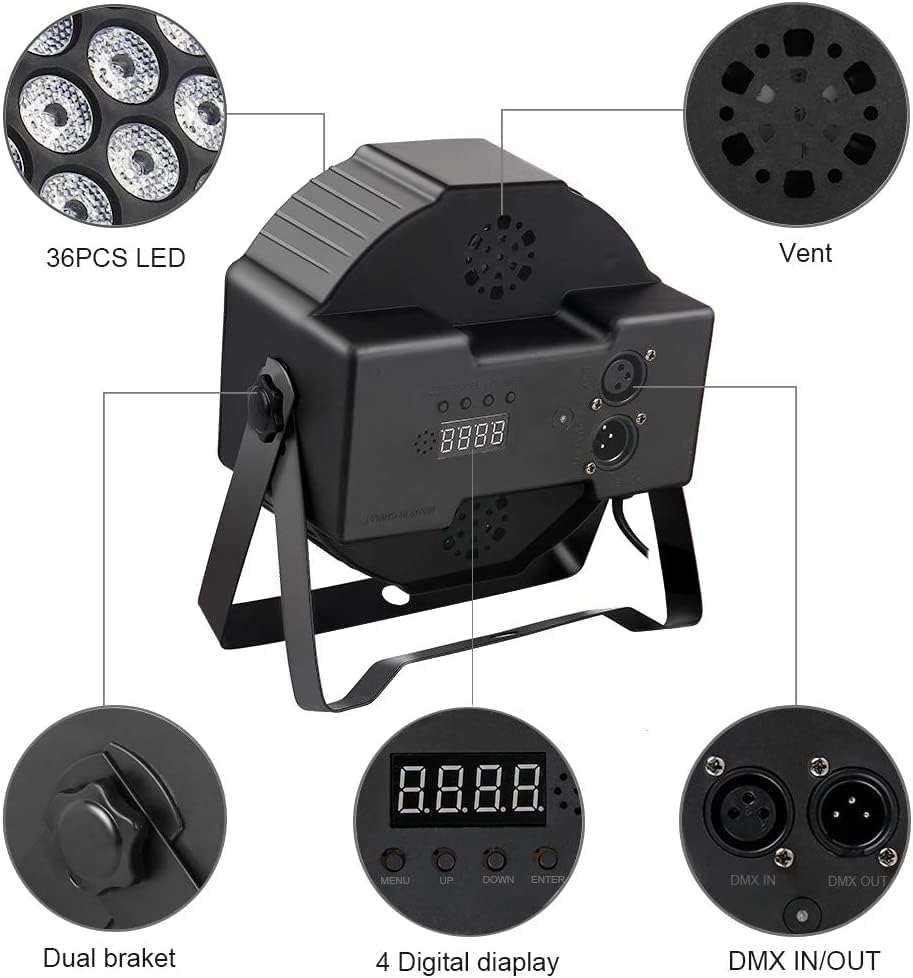
Image: Detailed view of the MOSFiATA PAR-36 LED light, highlighting the 36 LEDs, ventilation fan, dual bracket, 4-digit display, and DMX input/output ports.
Setup and Installation
Mounting
The PAR-36 lights come with adjustable dual brackets for flexible installation. They can be mounted on ceilings, walls, placed on floors, or attached to truss systems.
- Attach the mounting bracket to the light using the provided screws.
- Secure the light to your desired surface (ceiling, wall) or place it on a stable flat surface. Ensure the mounting point can support the weight of the fixture.
- Adjust the angle of the light as needed using the bracket's knobs.
Power Connection
Connect the power cable to the light fixture and then to a standard AC110V 50/60Hz power outlet. Ensure the power source matches the light's requirements.
Operating Instructions
The MOSFiATA PAR-36 lights can be operated via the onboard digital display or the included remote control. They support 7 different working modes.
Remote Control Operation
The wireless remote control allows for convenient adjustment of modes, colors, and speed. Ensure the remote has a clear line of sight to the light's IR receiver.

Image: Remote control layout with labeled buttons for various functions including LDE ON/OFF, Automatic mode, Jump mode, Sound mode, 7 Colors mode, DMX ON/OFF, Auto, Flash mode, Gradual mode, Speed +/-, and individual color buttons.
- LDE ON/OFF: Turns the light on or off.
- DMX ON/OFF: Toggles DMX control mode.
- Auto: Activates automatic mode.
- Jump: Activates jump mode (color changing).
- Flash: Activates strobe mode.
- Sound: Activates sound-activated mode.
- Gradual: Activates fading mode.
- Color Buttons (Red, Green, Blue, Roseo, Cayn, Amber, White): Selects static colors.
- Speed +/-: Adjusts the speed of dynamic modes (Jump, Flash, Gradual).
Working Modes
- Static Color Mode: Select a single color (Red, Green, Blue, etc.) to remain constant.
- Strobe Mode: The light flashes on and off rapidly. Speed can be adjusted.
- Fading Mode: Colors smoothly transition from one to another. Speed can be adjusted.
- Automatic Mode: The light cycles through various pre-programmed patterns and colors automatically.
- Sound Activated Mode: The light reacts to music or sound, changing patterns and colors in sync with the beat.
- Master-Slave Mode: Connect multiple PAR-36 units. One unit acts as the master, controlling all other connected slave units to synchronize effects. Connect the DMX OUT of the master to the DMX IN of the first slave, and so on.
- DMX Control Mode: For professional lighting control. Connect the light to a DMX controller using a DMX cable (not included). Set the DMX address on the light's digital display. Refer to the DMX channel chart (if available, otherwise general DMX setup).

Image: Illustration of four MOSFiATA PAR-36 LED lights connected in a DMX chain, demonstrating DMX control setup.

Image: Examples of static color outputs from the PAR-36 light, including Red, Green, Blue, Roseo, Cayn, Amber, and White.
Maintenance
- Cleaning: Periodically clean the exterior of the fixture with a soft, dry cloth. Do not use harsh chemicals or abrasive materials. Ensure the lenses are clean for optimal light output.
- Ventilation: Keep the ventilation openings clear of dust and debris to ensure proper airflow and prevent overheating.
- Storage: When not in use, store the lights in a cool, dry place away from direct sunlight and extreme temperatures.
Troubleshooting
| Problem | Possible Cause | Solution |
|---|---|---|
| Light does not turn on. | No power, faulty cable, remote battery dead. | Check power connection. Ensure outlet is working. Replace remote battery. |
| Remote control not working. | Remote battery dead, obstruction, out of range. | Replace remote battery. Ensure clear line of sight to the light. Operate within effective range. |
| Lights not synchronizing in Master-Slave mode. | Incorrect DMX cable connection, incorrect mode setting. | Verify DMX cable connections (OUT to IN). Ensure master is set to master mode and slaves to slave mode. |
| Light overheats or shuts off. | Poor ventilation, fan obstructed. | Ensure adequate space around the fixture for airflow. Clean any dust or debris from the fan and vents. |
Specifications
| Feature | Detail |
|---|---|
| Model | PAR-36 |
| Light Source | 36 x 1W RGB LEDs |
| Voltage | AC110V |
| Frequency | 50/60Hz |
| Power Consumption | 75 Watts (Max) |
| Control Modes | Static Color, Strobe, Fading, Automatic, Sound Activated, Master-Slave, DMX |
| DMX Channels | 3-7 Channels |
| Material | Plastic, Copper finish |
| Dimensions (L x W x H) | 6.8" x 6.8" x 6.9" (approx. 17.5cm x 17.5cm x 17.5cm) |
| Item Weight | 6.8 pounds (approx. 3.09 kg) |
| Included Components | Remote control |

Image: Visual representation of the product dimensions, specifications table, and package contents.
Warranty and Support
MOSFiATA is dedicated to providing high-quality products and a satisfactory shopping experience. For any questions or support needs regarding your PAR-36 LED Stage Lights, please contact MOSFiATA customer service. Refer to your purchase documentation for specific warranty details.
You can visit the official MOSFiATA store for more information: MOSFiATA Store
Ask a question about this manual
Ask about setup, troubleshooting, compatibility, parts, safety, or missing instructions. Manuals+ will review the question and use this page’s manual context to help answer it.