
1. Safety Information
Please read all instructions carefully before assembly and use. Failure to follow these instructions may result in injury or damage to the product.
- Keep children and pets away from the desk during operation.
- Ensure all cables connected to the desk have sufficient slack to accommodate height adjustments.
- Do not place objects taller than the maximum desk height underneath the desk.
- Do not sit or stand on the desk.
- Avoid placing liquids directly on the desk surface without using the cup holder.
- Regularly check all screws and bolts to ensure they are tightened.
- In case of malfunction, disconnect power and contact customer support.
2. Product Overview
The FLEXISPOT GT2 is a height-adjustable gaming desk designed for comfort and functionality. It features a robust steel frame, a durable tabletop, and integrated accessories to enhance your gaming or work setup.
Key Features:
- Height Adjustment: Electric motor for smooth transitions between sitting and standing positions (73-123 cm range, 25mm/s speed).
- Enhanced Stability: High-quality steel legs and a thick tabletop ensure a stable surface for gaming equipment.
- Integrated Accessories: Includes a cup holder and headphone hook to keep your desktop tidy.
- Cable Management: Features cable routing holes for organized wiring.
- Anti-Collision System: Automatically stops and retracts if an obstruction is detected during height adjustment.
- RGB Lighting: Customizable RGB lighting around the desk edges, controllable via remote, to create an immersive atmosphere.
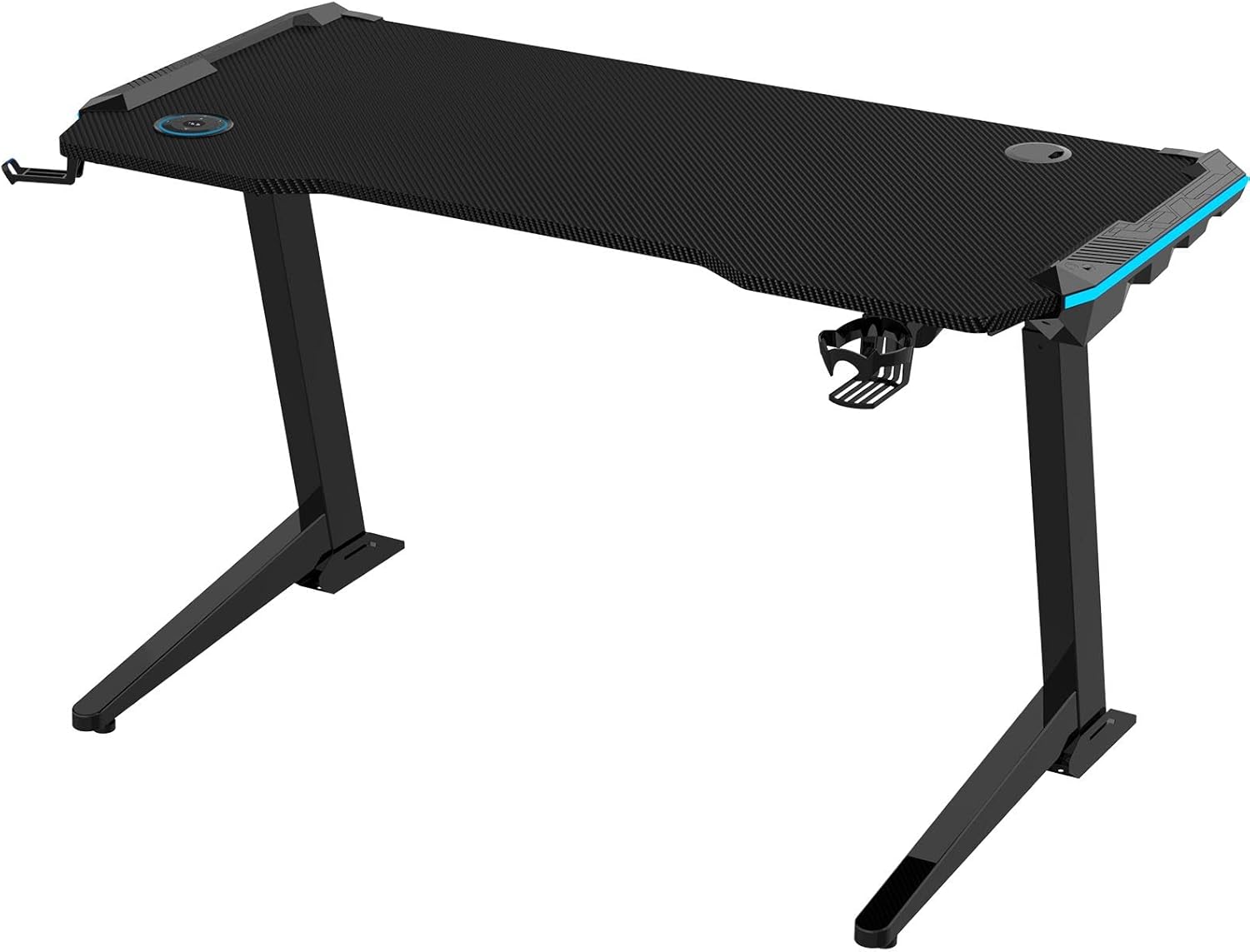
Image 2.1: The FLEXISPOT GT2 Height Adjustable Gaming Desk with its black carbon fiber texture tabletop and sturdy frame.

Image 2.2: The GT2 desk integrated into a gaming environment, showcasing its RGB lighting and spacious design.
3. Assembly Instructions
Assembly typically requires two people. Follow the steps below for proper setup.
3.1 Unpacking and Component Check
- Carefully unpack all components and place them on a soft, clean surface to prevent scratches.
- Verify all parts are present against the packing list.
3.2 Attaching the Legs
- Attach the desk legs to the tabletop using the provided screws. Ensure they are securely fastened.
3.3 Installing Accessories
- Mount the cup holder and headphone hook to the designated slots on the desk.
- Route any necessary cables through the cable management holes.

Image 3.1: Diagram showing the placement of the cup holder, headphone hook, and cable management holes on the GT2 desk.
3.4 Connecting Power
- Connect the power cable to the desk's control box and then to a power outlet.
4. Operating Instructions
4.1 Height Adjustment
The desk features an electric height adjustment system with a control panel.
- Up/Down Buttons: Use the ▲ (Up) and ▼ (Down) buttons on the controller to adjust the desk height.
- Memory Presets: The controller allows you to save preferred height settings. Press 'M' followed by a number (1, 2, 3, or 4) to save the current height. To recall a saved height, press the corresponding number button.
- LED Indicator: The controller displays the current desk height in centimeters.

Image 4.1: The GT2 desk's control panel, showing up/down buttons, memory presets, and an LED height display.
4.2 RGB Lighting Control
The desk's RGB lighting can be customized to suit your preference.
- Use the dedicated remote control (if included) or touch buttons on the desk to change lighting colors and modes.
- Select from various colors and dynamic effects to create your desired ambiance.

Image 4.2: Close-up of the desk's edge highlighting the integrated RGB lighting feature.
4.3 Anti-Collision System
The GT2 desk is equipped with an anti-collision feature to prevent damage.
- If the desk encounters an obstruction during height adjustment, it will automatically stop and retract slightly to prevent collision.

Image 4.3: Illustration demonstrating the anti-collision feature, where the desk stops movement upon detecting an obstacle.
5. Maintenance
Regular maintenance ensures the longevity and optimal performance of your FLEXISPOT GT2 desk.
- Cleaning: Wipe the desk surface with a soft, damp cloth. Avoid harsh chemicals or abrasive cleaners.
- Motor Care: Keep the motor and moving parts free from dust and debris. Do not lubricate the motor.
- Cable Management: Periodically check cables for wear or damage and ensure they are neatly organized to prevent interference with desk movement.
- Fasteners: Occasionally check all screws and bolts for tightness and re-tighten if necessary.
6. Troubleshooting
If you encounter issues with your desk, refer to the following common problems and solutions.
- Desk not moving:
- Check if the power cable is securely connected to both the desk and the wall outlet.
- Ensure no obstructions are blocking the desk's movement.
- Uneven movement:
- Ensure the desk is placed on a level surface.
- Check that all leg components are properly assembled and tightened.
- RGB lighting not working:
- Verify the lighting power connection.
- Check the remote control battery (if applicable).
If the problem persists, please contact FLEXISPOT customer support.
7. Specifications
| Feature | Specification |
|---|---|
| Brand | FLEXISPOT |
| Model | GT2 |
| Height Adjustment Range | 73 cm - 123 cm |
| Lifting Speed | 25 mm/s |
| Tabletop Material | Thickened material (carbon fiber texture) |
| Frame Material | Steel |
| Color | Black |
| Product Dimensions | 125 cm (Depth) x 60 cm (Width) x 72 cm (Height - minimum) |
| Package Dimensions | 135 x 70.5 x 19.6 cm |
| Package Weight | 36 kg |
| Features | Height Adjustment, RGB Lighting, Anti-Collision, Cup Holder, Headphone Hook, Cable Management Holes |

Image 7.1: Overview of the GT2 desk's key features and dimensions, including load capacity and height range.
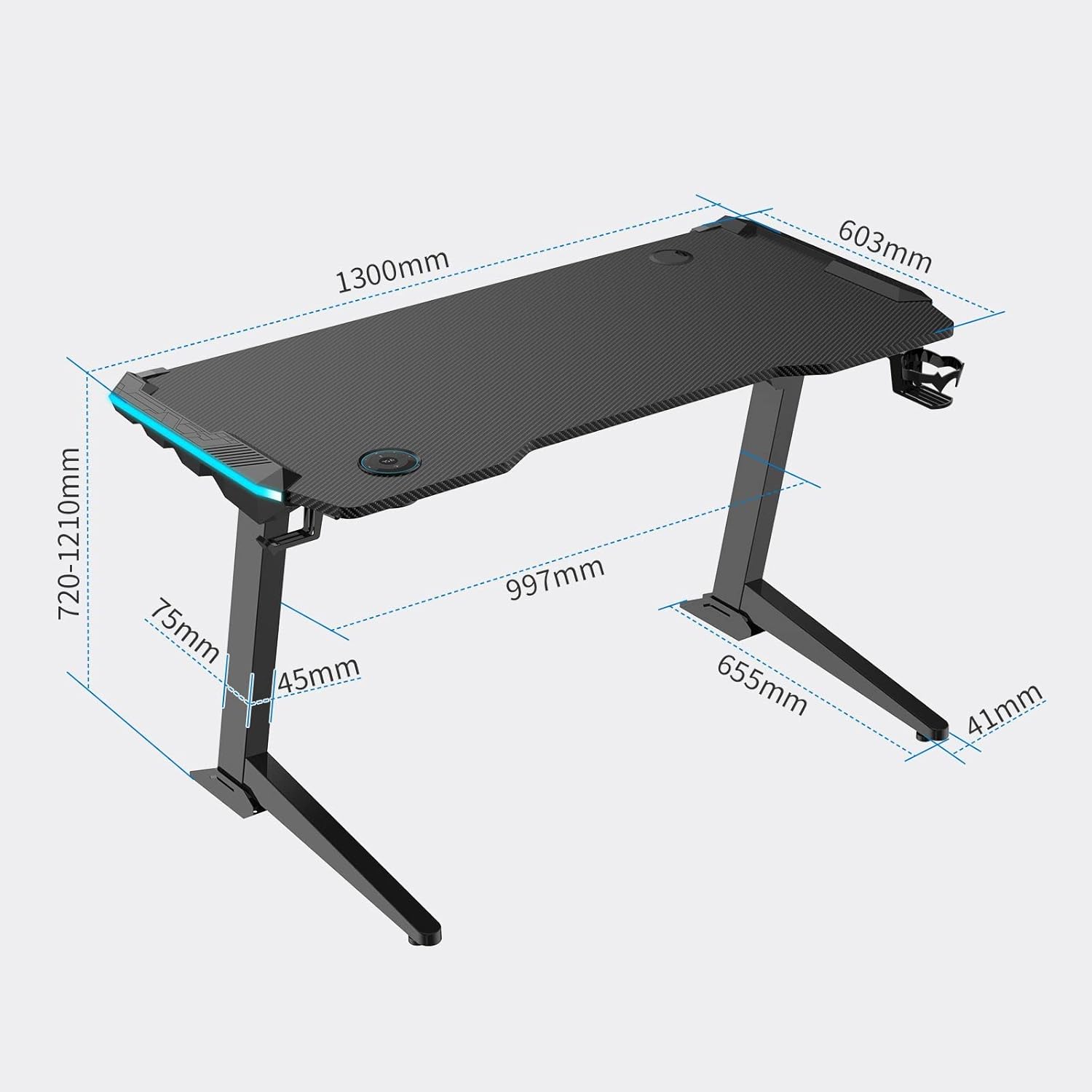
Image 7.2: Detailed dimensional drawing of the FLEXISPOT GT2 desk.
8. Warranty and Support
FLEXISPOT provides comprehensive support for its products.
- Manufacturer's Warranty: The FLEXISPOT GT2 desk comes with a 5-year free long-term manufacturer's warranty. There is no limit to the number of support requests during the warranty period.
- Customer Support: FLEXISPOT has established a call center in Japan to provide excellent after-sales service. Support is available in Japanese, ensuring clear communication for any inquiries or issues.
For warranty claims or technical assistance, please contact FLEXISPOT customer service through their official channels.

