
MAXLANDER ML8A512
MAXLANDER Cordless Leaf Blower & Vacuum User Manual
Model: ML8A512
Brand: MAXLANDER
1. Introduction
Thank you for choosing the MAXLANDER Cordless Leaf Blower & Vacuum. This versatile 3-in-1 tool is designed for efficient outdoor and indoor cleaning, functioning as a leaf blower, vacuum, and mulcher. Its brushless motor provides powerful performance for various tasks, from clearing leaves and light snow to tidying up household debris.

Figure 1.1: The MAXLANDER 3-in-1 Cordless Leaf Blower and Vacuum, shown with its two 4.0Ah batteries, dual charger, blower tube, vacuum tube, and collection bag.

Figure 1.2: Overview of the 3-in-1 functionality, highlighting the 330 CFM air volume, 170 MPH air speed, 40V power, 4.0Ah battery, brushless motor, and 1.5-hour charge time.
2. Safety Instructions
Always observe basic safety precautions when using electrical appliances to reduce the risk of fire, electric shock, and personal injury.
General Safety
- Read all instructions carefully before operation.
- Wear appropriate personal protective equipment (PPE), including eye protection, hearing protection, and sturdy footwear.
- Keep children, bystanders, and pets away from the operating area.
- Do not operate the tool in wet conditions or rain.
- Ensure all vents are clear of debris to prevent overheating.
- Never point the blower nozzle at people or animals.
- Do not use the vacuum function to pick up hot, sharp, or hazardous materials.
Battery Safety
- Use only the specified charger and batteries provided by MAXLANDER.
- Do not expose batteries to extreme temperatures or direct sunlight.
- Do not short-circuit battery terminals.
- Store batteries in a cool, dry place when not in use.
- If the battery is damaged or leaking, discontinue use immediately and dispose of it properly.
3. Package Contents
Verify that all items are present upon opening the package:
- 1 x Main Machine Unit (Blower/Vacuum)
- 2 x 4.0Ah Lithium Batteries
- 1 x Fast Charger
- 1 x Blower Tube
- 1 x Vacuum Tube
- 1 x Collection Bag (45L capacity)
- 1 x Shoulder Strap
- 1 x User Manual (Warranty Card included)

Figure 3.1: Visual representation of all components included in the product package.
4. Assembly
Follow these steps to assemble your MAXLANDER Leaf Blower & Vacuum:
4.1. Attaching the Blower Tube
- Align the blower tube with the air outlet on the main unit.
- Push the tube firmly until it clicks into place. Ensure it is securely fastened.
4.2. Attaching the Vacuum Tube and Collection Bag
- To convert to vacuum mode, remove the blower tube if attached.
- Attach the vacuum tube to the main intake opening. Push firmly until it is secure.
- Connect the collection bag to the air outlet where the blower tube would normally attach. Ensure the bag's opening is fully seated and secured to prevent debris leakage.
- Attach the shoulder strap to the designated points on the unit and adjust for comfortable use.
5. Setup
5.1. Charging the Batteries
Before first use, fully charge both 4.0Ah lithium batteries.
- Connect the fast charger to a standard electrical outlet.
- Insert the batteries into the charging slots. The indicator lights on the charger will show the charging status.
- A full charge typically takes approximately 1.5 hours per battery. The indicator light will change when charging is complete.
- If the machine is not used for more than 5 minutes, reinsert the battery to activate it.

Figure 5.1: The two 4.0Ah batteries included with the MAXLANDER unit, emphasizing their extended battery life compared to smaller capacity batteries.

Figure 5.2: The dual battery charger with two batteries inserted, showing the charging indicator lights.
5.2. Installing the Battery
Once charged, slide a battery into the battery slot on the main unit until it clicks securely into place.
6. Operating Instructions
The MAXLANDER unit features an intelligent control panel for easy operation.
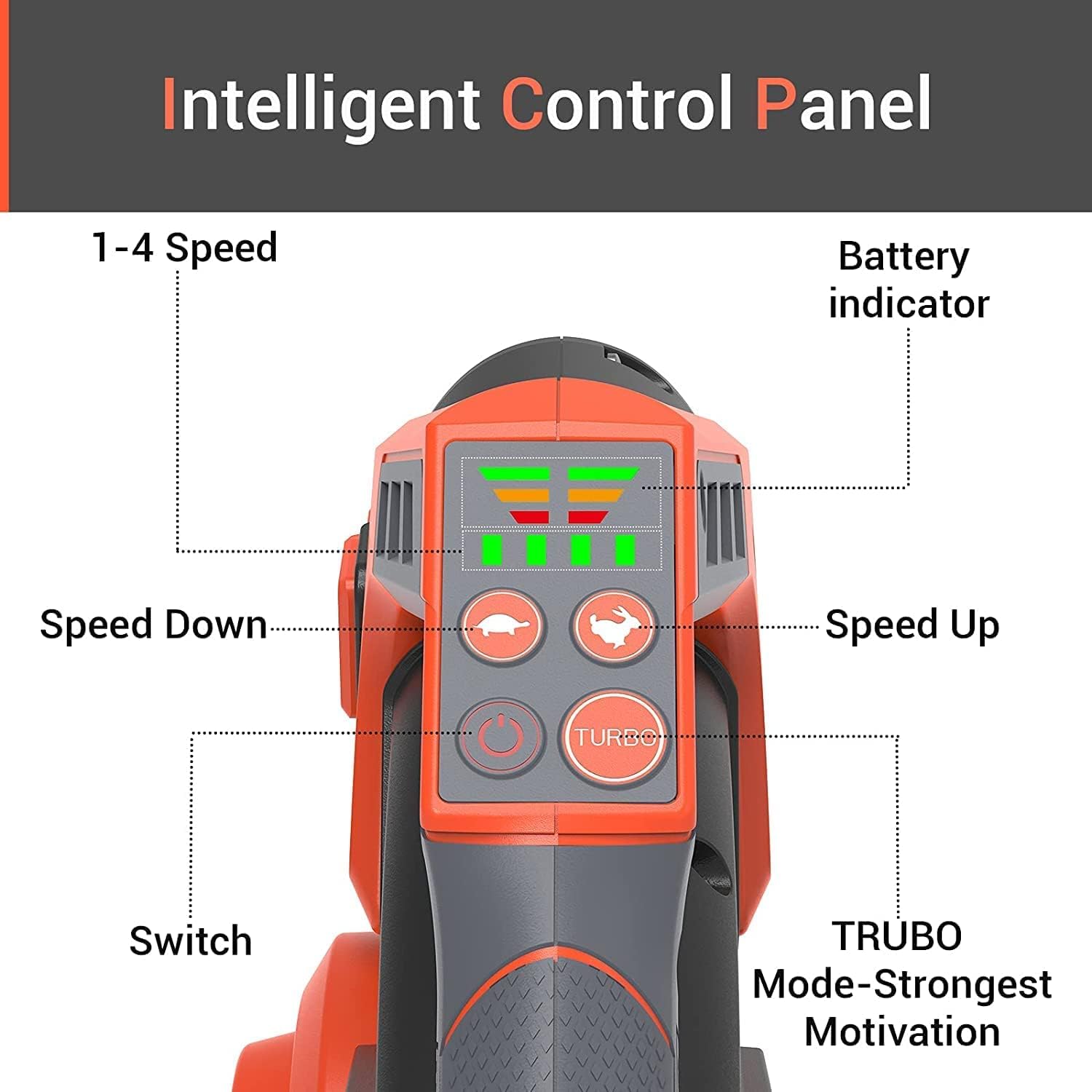
Figure 6.1: The intelligent control panel, showing the battery indicator, speed up/down buttons, power switch, and TURBO mode button.
6.1. Powering On/Off
- Press the Power Switch button on the control panel to turn the unit on or off.
- The battery indicator lights will illuminate to show the current charge level.
6.2. Adjusting Speed
The unit offers 5 speed settings for various tasks:
- Use the Speed Up and Speed Down buttons to cycle through speeds 1-4.
- For maximum power, press the TURBO button. This activates the highest speed setting (equivalent to speed 5), providing up to 170 MPH wind speed and 330 CFM air volume.
- Speeds 1-2: Ideal for cleaning household dust, pet hair, and light debris.
- Speeds 3-4: Suitable for clearing fallen leaves and light snow.
- TURBO Mode: For heavy-duty tasks, including wet leaves and stubborn debris.
6.3. Blower Mode Operation
With the blower tube attached, use the unit to clear debris by directing the airflow. Maintain a comfortable distance from the ground for optimal performance.
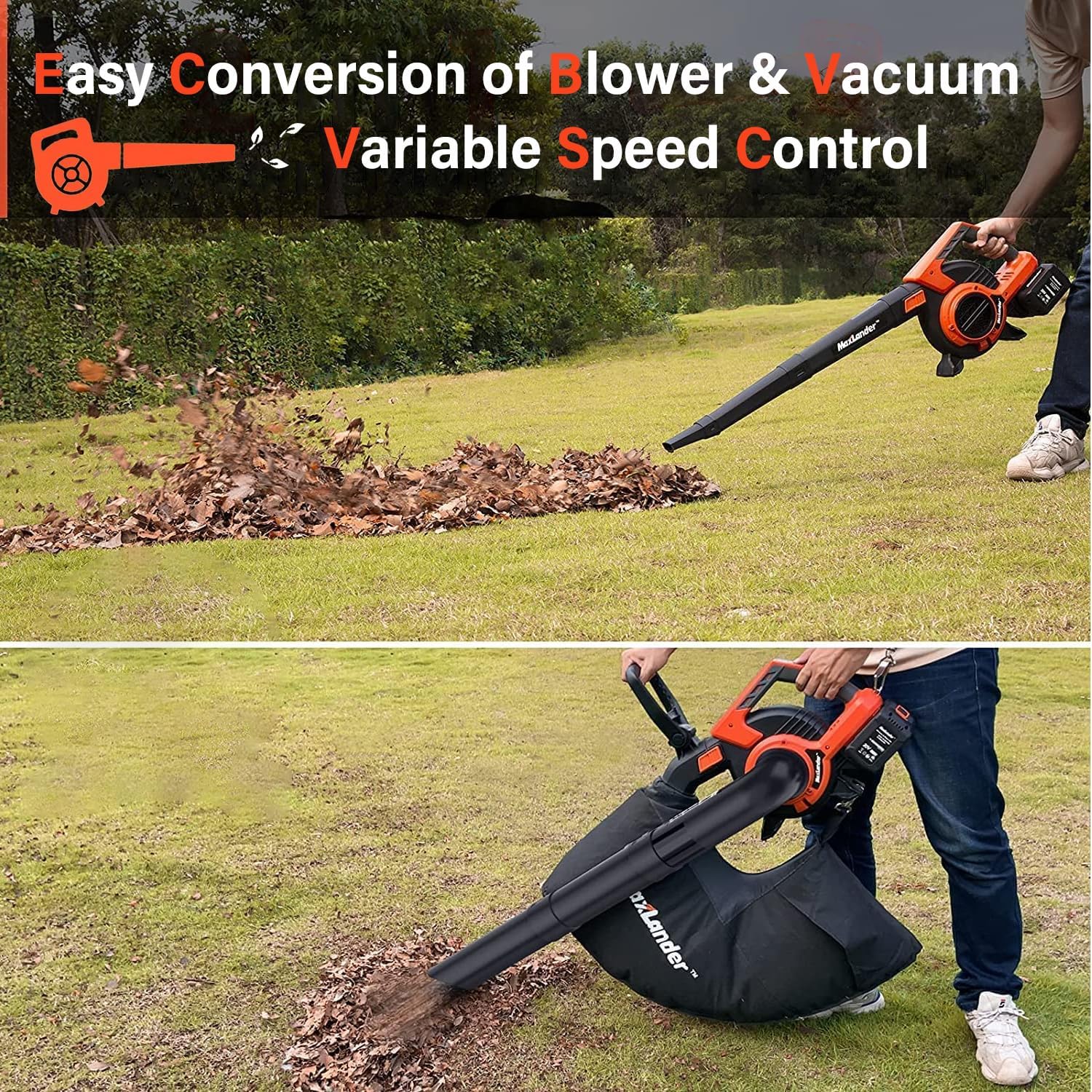
Figure 6.2: The unit in blower mode, effectively moving leaves across a lawn.
6.4. Vacuum and Mulcher Mode Operation
When configured for vacuuming, the unit will collect debris into the attached collection bag. The integrated mulching function will reduce the volume of collected material.
- Ensure the vacuum tube and collection bag are securely attached.
- Move the vacuum tube over the debris to be collected. The unit will draw in leaves and other light garden waste.
- The solid sawtooth steel plate inside the unit will mulch the collected material, reducing its volume and preventing blockages.
- Monitor the collection bag and empty it when full. The bottom zipper design allows for easy disposal.

Figure 6.3: The unit in vacuum mode, demonstrating the mulching function as leaves are collected into the bag.

Figure 6.4: A composite image illustrating the powerful leaf blowing, efficient vacuum cleaning, and mulching capabilities with the 45L collection bag.
7. Maintenance
Regular maintenance ensures optimal performance and extends the lifespan of your MAXLANDER unit.
7.1. Cleaning
- Always remove the battery before cleaning.
- Wipe the exterior of the unit with a damp cloth. Do not use harsh chemicals or abrasive cleaners.
- Clean the blower and vacuum tubes regularly to prevent blockages.
- Empty and clean the collection bag after each use. It can be washed with water and air-dried.
- Inspect the air intake and outlet for any debris buildup and clear as necessary.
7.2. Storage
- Store the unit and batteries in a cool, dry place, away from direct sunlight and extreme temperatures.
- Ensure batteries are partially charged (not fully depleted or fully charged) before long-term storage to preserve battery health.
- Keep the unit out of reach of children.
8. Troubleshooting
Refer to the table below for common issues and their solutions.
| Problem | Possible Cause | Solution |
|---|---|---|
| Unit does not turn on. | Battery not installed correctly or depleted. | Ensure battery is fully inserted. Charge battery if low. Reinsert battery to activate if idle for >5 mins. |
| Low air flow/suction. | Blocked tube or intake/outlet. Collection bag full. | Check and clear any blockages in tubes or vents. Empty collection bag. |
| Unit stops unexpectedly. | Overheating due to prolonged use or blockage. Battery depleted. | Allow unit to cool down. Clear any blockages. Charge battery. |
| Mulching function not effective. | Material too large or wet. | Avoid vacuuming excessively large or wet debris. Clear any internal blockages. |
If the problem persists after attempting these solutions, please contact MAXLANDER customer support.
9. Specifications
| Feature | Detail |
|---|---|
| Model Name | ML8A512 |
| Brand | MAXLANDER |
| Power Source | Battery Powered |
| Voltage | 40 Volts (2 x 20V batteries) |
| Battery Capacity | 2 x 4.0Ah Lithium Ion |
| Charging Time | Approx. 1.5 hours (Fast Charge) |
| Max Air Speed | 170 MPH |
| Max Air Volume | 360 CFM (Blower) / 330 CFM (TURBO) |
| Speed Settings | 5 Speeds + TURBO Mode |
| Collection Bag Capacity | 45 Liters |
| Item Weight (Blower Mode) | 3.6 KG / 7.9 lbs |
| Item Weight (Vacuum Mode) | 4.5 KG / 9.9 lbs |
| Product Dimensions (L x W x H) | 11.02" x 12.99" x 16.93" |
| Special Features | 3-in-1 (Blower, Vacuum, Mulcher), Brushless Motor, Intelligent Control Panel |

Figure 9.1: A detailed comparison of key specifications for the MAXLANDER unit against typical alternatives.

Figure 9.2: Dimensional drawings of the MAXLANDER unit in both blower and vacuum configurations, showing length and height.
10. Warranty and Support
MAXLANDER provides a 1-year warranty for this product, effective from the date of purchase.
This warranty covers manufacturing defects and ensures the product functions as intended under normal use.
For any questions, technical assistance, or warranty claims regarding your MAXLANDER Cordless Leaf Blower & Vacuum, please contact our customer support team. Refer to the warranty card included in your package for specific contact details and terms.
We are committed to providing high-quality products and excellent after-sales service.
Related documentsML8A512

Ask a question about this manual
Ask about setup, troubleshooting, compatibility, parts, safety, or missing instructions. Manuals+ will review the question and use this page’s manual context to help answer it.