
1. Introduction
The SUNWAYFOTO GH-04 Lightweight Gimbal Head is engineered to provide stable and smooth support for large telephoto lenses and camera setups. Its design facilitates effortless tracking of moving subjects, making it ideal for wildlife, sports, and action photography. This manual provides detailed instructions for the proper setup, operation, and maintenance of your GH-04 Gimbal Head to ensure optimal performance and longevity.
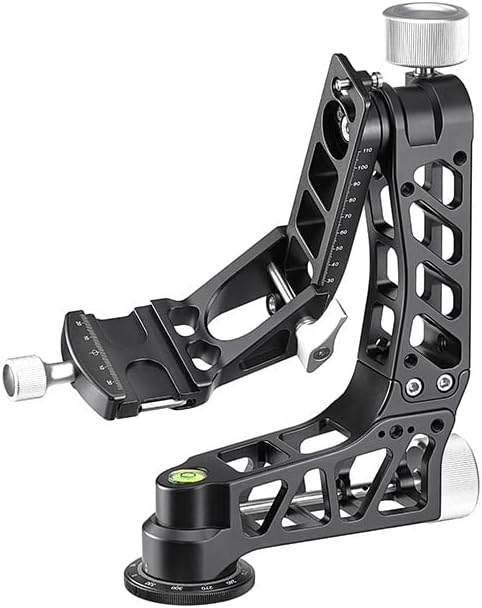
Figure 1: The SUNWAYFOTO GH-04 Lightweight Gimbal Head, showcasing its robust and open-frame design.
2. Product Overview and Features
The GH-04 Gimbal Head combines a lightweight design with high load capacity, offering precision and durability. Key features include:
- Rock Solid Construction: Designed for stability and durability, capable of supporting heavy camera and lens combinations.
- Lightweight Design: Weighing approximately 1060g (2.3lb), it is designed for portability without compromising strength.
- High Load Capacity: Supports camera setups up to 30kg (66lbs).
- Arca-Compatible Clamp: Features a 120mm Arca-compatible quick release clamp for secure and fast camera attachment.
- Smooth Movement: Provides fluid pan and tilt movements for precise subject tracking.
- Integrated Bubble Level: Ensures accurate leveling of the gimbal head.
- Reinforced Base Socket: Equipped with a 3/8" threaded base socket for secure tripod mounting, including a 1/4" to 3/8" bushing adapter.
3. Package Contents
Please verify that all items are present in your package:
- SUNWAYFOTO GH-04 Lightweight Gimbal Head
- DPG-120DR 120mm Quick Release Plate
- 1/4" to 3/8" Bushing Adapter
- Fitted Foam Carry Case
- 3mm Hex Wrench
- 4mm Hex Wrench
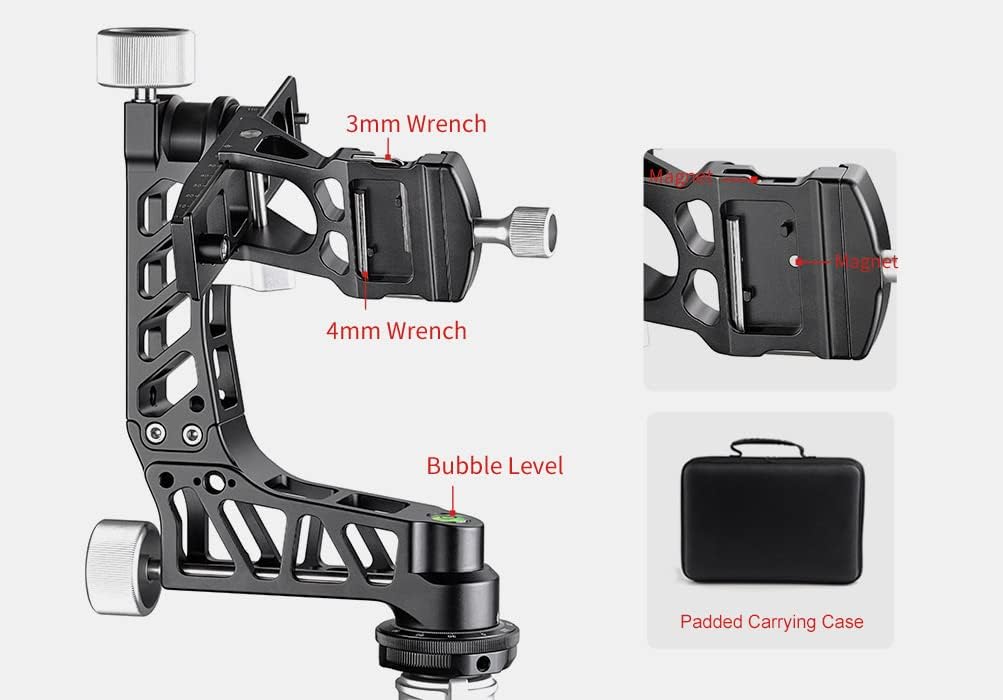
Figure 2: The GH-04 Gimbal Head with its included 3mm and 4mm wrenches, bubble level, and padded carrying case.
4. Setup
4.1 Mounting the Gimbal Head to a Tripod
- Ensure your tripod is stable and capable of supporting the combined weight of the gimbal head, camera, and lens.
- Locate the 3/8" threaded socket at the base of the GH-04 Gimbal Head. If your tripod has a 1/4" mounting screw, use the provided 1/4" to 3/8" bushing adapter.
- Screw the gimbal head onto the tripod's mounting screw until it is securely tightened. Do not overtighten.

Figure 3: The GH-04 Gimbal Head securely attached to a tripod, ready for camera mounting.
4.2 Attaching the Camera and Lens
- Attach the DPG-120DR 120mm Quick Release Plate to the tripod collar foot of your telephoto lens. Ensure it is firmly secured.
- Loosen the quick release clamp knob on the gimbal head.
- Slide the quick release plate with the attached lens into the clamp. The safety stops on the plate prevent accidental disengagement.
- Tighten the quick release clamp knob until the lens is securely held.
4.3 Balancing the Camera and Lens
Proper balancing is crucial for smooth operation and to prevent strain on the gimbal head. The goal is for the camera and lens to remain stationary at any angle when the tilt lock is disengaged.
- Horizontal Balance: With the quick release clamp knob slightly loosened, slide the camera/lens assembly forward or backward on the quick release plate until the system is horizontally balanced. Tighten the clamp knob.
- Vertical Balance: Adjust the vertical arm of the gimbal head by loosening its locking knob. Move the arm up or down until the camera/lens assembly is vertically balanced. The vertical adjustment range is 110mm. Tighten the vertical arm locking knob.
- Pan Balance: Ensure the panning base is level using the integrated bubble level. Adjust tripod legs if necessary.

Figure 4: A camera and telephoto lens mounted and balanced on the GH-04 Gimbal Head.
5. Operating Instructions
5.1 Panning Movement
The panning base allows for 360-degree horizontal rotation. Loosen the panning lock knob located at the base of the gimbal head to enable smooth panning. Tighten the knob to lock the panning movement.

Figure 5: The extra-large panning base with a diameter of 60mm, featuring a reinforced 3/8" threaded socket.
5.2 Tilting Movement
The tilt mechanism allows for vertical movement of the camera and lens. Loosen the tilt lock knob to enable tilting. Once the desired angle is achieved, tighten the knob to secure the position. The GH-04 is designed to provide variable drag if the knob is partially tightened, allowing for fine control over movement.
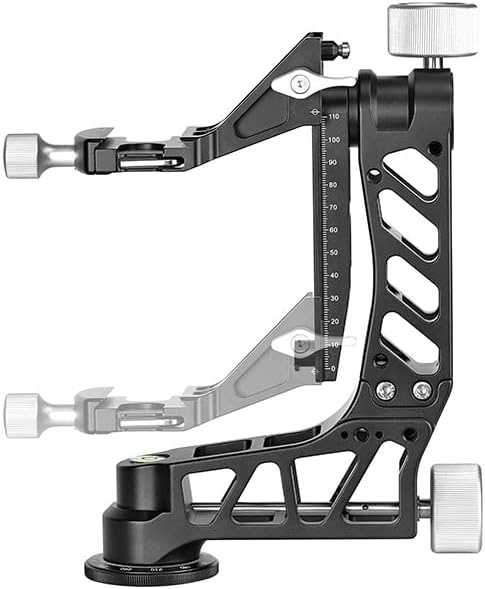
Figure 6: The vertical adjustment range of the GH-04 Gimbal Head, illustrating its flexibility for balancing.
5.3 Using the Quick Release Plate
The DPG-120DR 120mm Quick Release Plate is designed to increase contact surface between the lens and the gimbal, ensuring stable balancing for super telephoto lenses. The plate features safety stops at each end to prevent the camera from sliding off completely when adjusting balance.

Figure 7: The 120mm Quick Release Plate (DPG-120DR) included with the GH-04 Gimbal Head.
6. Maintenance
- Cleaning: Use a soft, dry cloth to wipe down the gimbal head after each use. For stubborn dirt, a slightly damp cloth can be used, followed by immediate drying. Avoid harsh chemicals or abrasive materials.
- Lubrication: The gimbal head is designed for maintenance-free operation. Do not attempt to lubricate internal mechanisms, as this may attract dust and impair performance.
- Storage: Store the gimbal head in its fitted foam carry case in a cool, dry place, away from direct sunlight and extreme temperatures.
- Inspection: Periodically check all screws and knobs to ensure they are tight. If any part appears damaged or loose, contact customer support.
7. Troubleshooting
- Camera/Lens Not Balancing: Re-check the horizontal and vertical balancing steps (Section 4.3). Ensure the quick release plate is correctly positioned and tightened.
- Movement Not Smooth: Ensure all locking knobs (pan and tilt) are sufficiently loosened. If the issue persists, check for any obstructions or debris in the moving parts.
- Quick Release Plate Slipping: Ensure the quick release clamp knob is fully tightened. Verify that the quick release plate is correctly seated in the clamp.
8. Specifications
| Feature | Specification |
|---|---|
| Model | GH-04 |
| Brand | SUNWAYFOTO |
| Material | Aluminum Alloy |
| Color | Black |
| Max Load Capacity | 30 kg (66 lbs) |
| Net Weight | 1060 g (2.3 lbs) |
| Height | 253 mm |
| Length | 212 mm |
| Clamp Width | 60 mm |
| Vertical Adjustment Range | 110 mm |
| Base Diameter | 60 mm |
| Tripod Mount Thread | 3/8" (with 1/4" adapter) |

Figure 8: Dimensions and weight of the GH-04 Gimbal Head, highlighting its lightweight design.
9. Warranty and Support
9.1 Warranty Information
The SUNWAYFOTO GH-04 Lightweight Gimbal Head comes with a 5-year warranty from the date of purchase. This warranty covers manufacturing defects and material flaws under normal use. It does not cover damage caused by misuse, unauthorized modifications, accidents, or normal wear and tear.
9.2 Customer Support
For technical assistance, warranty claims, or any questions regarding your SUNWAYFOTO GH-04 Gimbal Head, please contact SUNWAYFOTO customer support through their official website or your retailer. Please have your purchase receipt and product model number available when contacting support.