
1. Introduction
This manual provides detailed instructions for the safe and effective operation of your RONGPRO Laser Level. Please read this manual thoroughly before using the device and retain it for future reference. This laser level is designed for various indoor and outdoor construction, renovation, and alignment tasks, offering precision and ease of use.
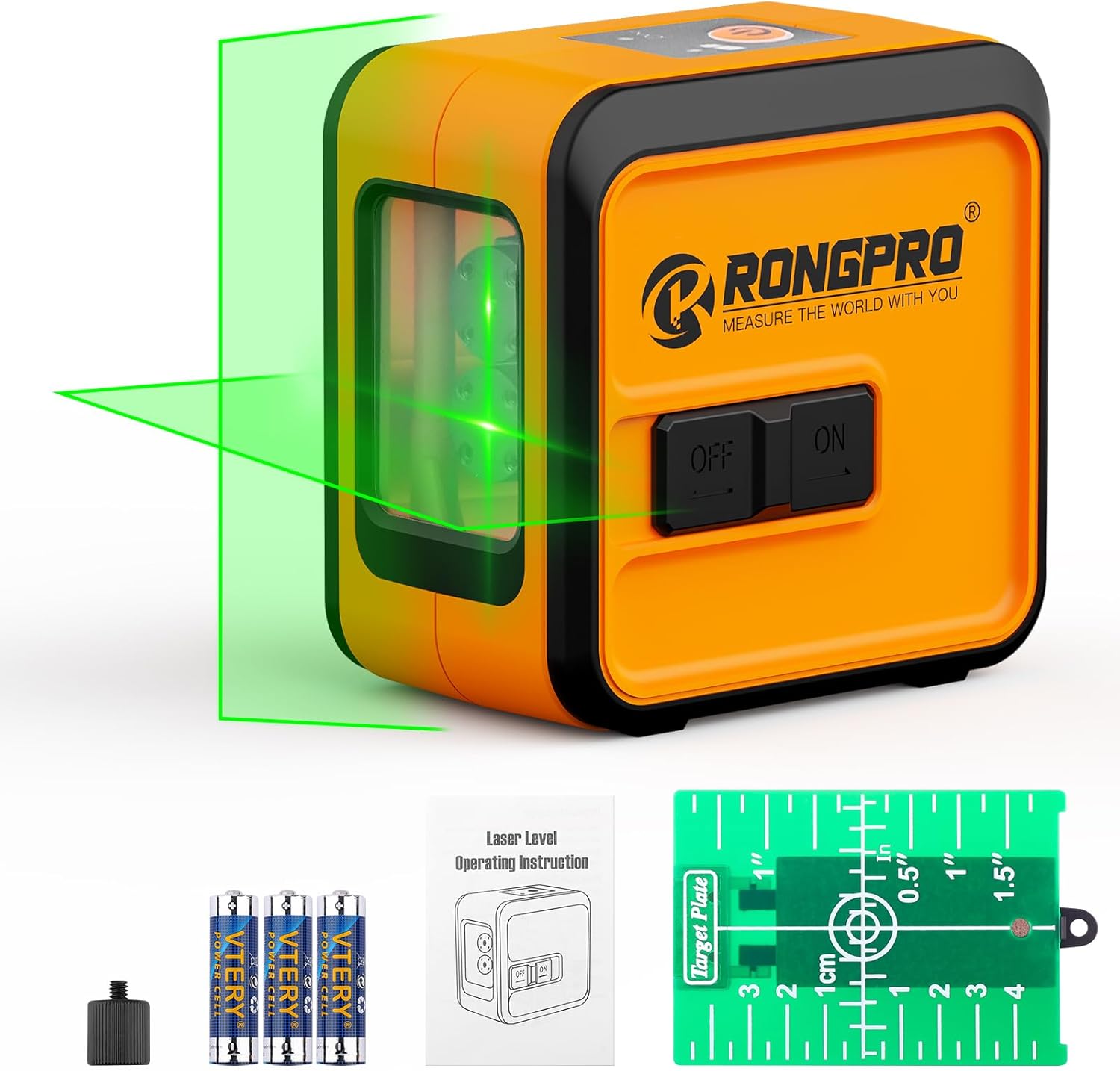
Figure 1: RONGPRO Laser Level and Included Accessories
2. Product Features
- Upgrade Dual Modules: Features two laser sources, each offering vertical, horizontal, and cross laser line measurement modes.
- Self-Leveling Feature: Automatically levels on inclined surfaces within 4 degrees. Flashes to indicate out-of-level conditions.
- Easy to Use: One-button operation for selecting horizontal or vertical lines, suitable for indoor and outdoor applications.
- Green Laser with High Visibility and Precision: Upgraded chip technology provides maximum line laser visibility up to 98ft (30m), 2 times brighter than red lasers.
- Portable and Durable: Compact design, ideal for both DIY projects and extensive construction, includes a soft-case for protection.

Figure 2: Overview of Laser Level Features
3. Setup
3.1 Battery Installation
- Locate the battery compartment latch on the side of the device.
- Open the latch and insert the required batteries (not included) according to the polarity indicators inside the compartment.
- Close the battery compartment latch securely.
3.2 Mounting the Device
The RONGPRO Laser Level features a 1/4"-20 threaded mount at the bottom, allowing it to be attached to a standard tripod or mounting bracket for stable positioning. Ensure the device is securely fastened before operation.

Figure 3: Key Components of the Laser Level
4. Operating Instructions
4.1 Power On/Off
Slide the ON/OFF switch located on the side of the device to the "ON" position to power on the laser level. Slide it to the "OFF" position to power off.
4.2 Self-Leveling Mode
When the device is powered on by sliding the switch to "ON", it immediately enters self-leveling mode. In this mode, the laser will automatically level itself if placed on a surface inclined within 4 degrees. If the inclination exceeds 4 degrees, the laser lines will flash to indicate an out-of-level condition. Adjust the device's position until the flashing stops and the lines become steady.

Figure 4: Self-Leveling Operation
4.3 Manual Mode (Locked Mode)
To activate manual mode, first ensure the ON/OFF switch is in the "OFF" position. Then, press and hold the top multifunction button for approximately 2 seconds. The laser lines will appear, and you can now tilt the device to project diagonal lines for specific applications like stair laying or custom angles. The lines will not self-level in this mode.

Figure 5: Manual Mode Activation
4.4 Line Selection
While in self-leveling mode (ON position), short press the top multifunction button to cycle through the available laser line modes:
- First press: Horizontal line only.
- Second press: Vertical line only.
- Third press: Cross lines (horizontal and vertical).

Figure 6: Laser Line Modes
4.5 Adjusting Brightness
To adjust the brightness of the laser lines, long press the top multifunction button while the device is in the "ON" position. This will toggle between a dimmer (power-saving) line and a brighter (highlight) line, optimizing visibility for different lighting conditions.

Figure 7: Brightness Adjustment
4.6 Using the Target Plate
The included green target plate enhances laser line visibility, especially over longer distances or in bright environments. It features measurement markings in inches and centimeters, a magnetic strip for attaching to metal surfaces, and a foldable stand for freestanding use. A hole at the top allows for hanging if needed.

Figure 8: Target Plate in Use for Suspended Ceiling
4.7 Application Scenarios
The RONGPRO Laser Level is versatile for numerous tasks:
- Hanging pictures and decorations
- Installing wall tiles and flooring
- Cabinet installation
- Outdoor work and construction
- Stair laying


Figure 9: Diverse Applications of the Laser Level
5. Maintenance
- Cleaning: Regularly wipe the device with a soft, dry cloth. Avoid using abrasive cleaners or solvents that could damage the housing or laser windows.
- Battery Care: Remove batteries if the device will not be used for an extended period to prevent leakage and corrosion.
- Storage: Store the laser level in its provided soft-case in a cool, dry place, protected from dust, debris, and extreme temperatures.
- Handling: Handle the device with care to avoid drops or impacts, which can affect its calibration and accuracy.
6. Troubleshooting
| Problem | Possible Cause | Solution |
|---|---|---|
| Laser lines are flashing continuously. | Device is out of its self-leveling range (>4 degrees inclination). | Adjust the device's position to a more level surface until the flashing stops. |
| Laser lines are dim or not visible. | Low battery or bright ambient light. | Replace batteries. Long press the multifunction button to switch to highlight mode. Use the target plate for better visibility. |
| Device does not turn on. | No batteries, incorrect battery installation, or dead batteries. | Ensure batteries are installed correctly with proper polarity. Replace with fresh batteries. |
| Laser lines are not straight or accurate. | Device is in manual mode, or has been dropped/damaged. | Ensure the device is in self-leveling mode (ON switch, not long-pressed from OFF). If accuracy issues persist after a fall, contact customer support. |
7. Specifications
| Attribute | Detail |
|---|---|
| Brand | RONGPRO |
| Model Number | Laser Level |
| Material | Acrylonitrile Butadiene Styrene |
| Color | Yellow |
| Style | Cross Line Laser Level |
| Operation Mode | Automatic/Manual |
| Item Weight | 15.3 ounces |
| Package Dimensions | 6.34 x 4.45 x 3.35 inches |
| Special Features | Green-line, Self-leveling |
| Included Components | Case |
| Batteries Included? | No |
| Batteries Required? | No |
8. Warranty and Support
RONGPRO is committed to providing high-quality products and excellent customer service. If you encounter any issues with your laser level, or have questions regarding its operation or warranty, please contact RONGPRO customer support directly. Many users have reported positive experiences with RONGPRO's responsive customer service, especially concerning warranty claims.
Please refer to the product packaging or the official RONGPRO website for the most up-to-date warranty information and contact details.