

Introduction
This manual provides essential information for the setup, operation, maintenance, and troubleshooting of your new RCA 75-inch webOS Series 4K UHD HDR Smart TV (Model: RWOSU7549). Please read this manual thoroughly before using the television to ensure proper functionality and safety.
The RCA webOS Smart TV offers a comprehensive entertainment experience with 4K UHD resolution, High Dynamic Range (HDR) technology, and a smart platform providing access to various streaming services and applications.
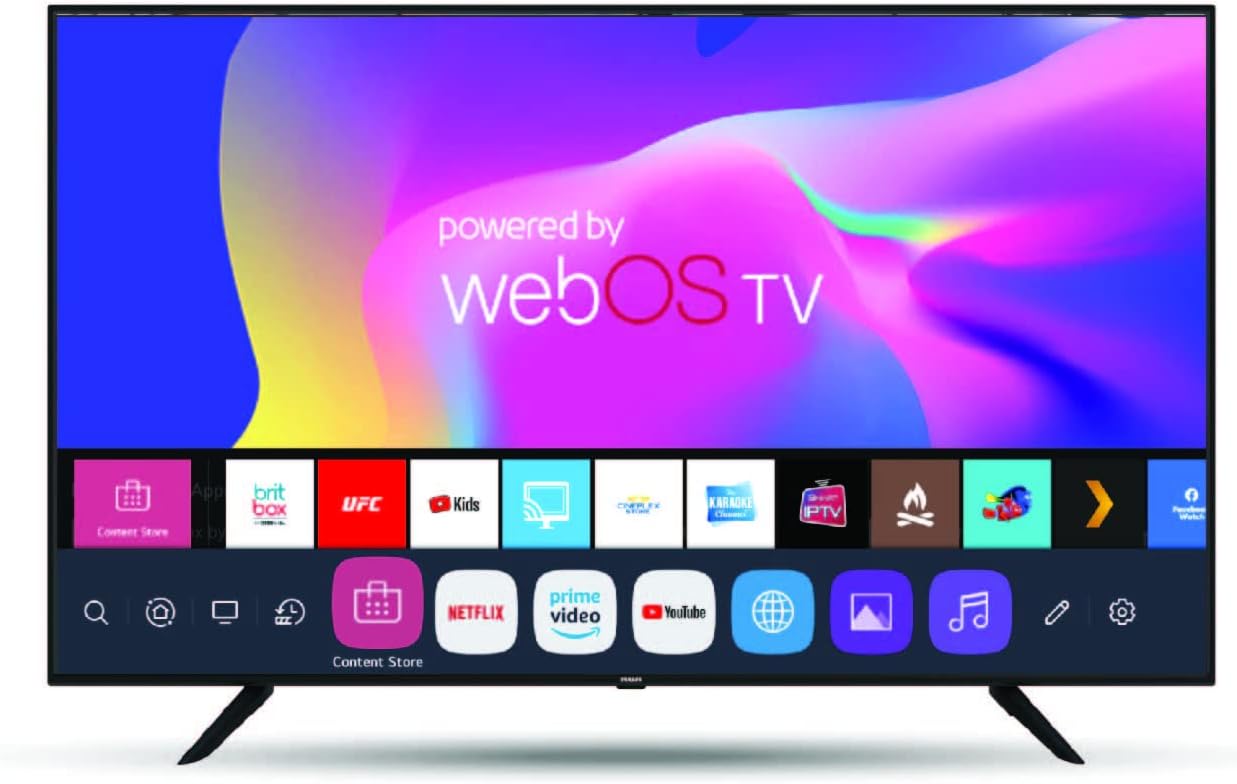
Image: Front view of the RCA 75-inch webOS Smart TV, showcasing its slim bezel and the webOS interface with various app icons like Netflix, Prime Video, and YouTube.
Safety Information
Always observe the following safety precautions when operating your television:
- Do not expose the TV to rain or moisture.
- Do not block ventilation openings.
- Ensure proper grounding of the power cord.
- Avoid placing the TV in direct sunlight or near heat sources.
- Clean only with a dry cloth.
- Refer all servicing to qualified service personnel.
Setup
Unboxing and Initial Inspection
Carefully remove the TV and all accessories from the packaging. Verify that all included components are present:
- RCA 75-inch webOS Smart TV
- Remote Control
- Power Cord
- TV Stand (if applicable)
- User Manual (this document)
Stand Installation or Wall Mounting
If using the included stand, attach it securely to the TV following the instructions provided in the separate quick start guide. If wall-mounting, ensure you use a compatible VESA mount (not included) and follow the mount manufacturer's instructions, paying attention to the TV's weight and dimensions.
Connecting Power and Network
- Connect the power cord to the TV's power input and then to a wall outlet.
- For internet access, connect an Ethernet cable to the TV's LAN port for a wired connection, or proceed with Wi-Fi setup during the initial configuration.
Connecting External Devices
Your TV features multiple connectivity options:
- HDMI Ports: Connect Blu-ray players, gaming consoles, cable boxes, etc.
- USB Ports: Connect USB drives for media playback.
- Bluetooth: Connect compatible audio devices wirelessly.
Initial Setup Wizard
Upon first power-on, the TV will guide you through an initial setup wizard. This includes:
- Language selection
- Network connection (Wi-Fi setup)
- Channel scanning (for antenna/cable)
- Time zone and date settings
- Accepting terms and conditions for webOS services
Voice Control Setup (ThinQ AI, Alexa, Google Assistant)
The TV supports voice control via ThinQ AI (requires mobile app download), Amazon Alexa, and Google Assistant. Follow the on-screen prompts during initial setup or access the TV's settings menu to link your preferred voice assistant accounts.
Operating
Basic TV Functions
- Power On/Off: Press the Power button on the remote or TV.
- Volume Control: Use the Volume Up/Down buttons.
- Channel Selection: Use Channel Up/Down or number buttons.
- Input Source: Press the Input/Source button to switch between HDMI, USB, TV, etc.
Navigating webOS Smart Platform
The webOS platform provides an intuitive interface for accessing smart features:
- Press the Home button on your remote to open the Launcher Bar, which displays your installed apps and recent content.
- Use the directional pad and OK button to navigate and select items.
- Access the Content Store to download additional applications like Facebook Watch, BritBox, etc.
Streaming Services and Apps
Your TV comes preloaded with popular streaming applications:
- Netflix
- Amazon Prime Video
- YouTube
- UFC.TV
- V Live
- And more available through the Content Store.
Log in with your existing accounts for these services to access content.
4K UHD and HDR Features
The TV automatically detects and optimizes content for 4K UHD resolution and High Dynamic Range (HDR). Ensure your source device (e.g., 4K Blu-ray player, streaming stick) is also 4K/HDR compatible and connected via an HDMI port that supports these features.
- 4K Resolution: Provides 4 times the detail of Full HD.
- Active HDR: Enhances contrast and color accuracy for a more lifelike picture.
- 60Hz Refresh Rate: Minimizes motion blur for fast-paced content.
Voice Control Usage
Once configured, use voice commands to control your TV. For example, you can say "Turn off TV," "Change volume to 20," or "Open Netflix" if using a compatible voice-enabled remote or linked smart speaker.
Maintenance
Cleaning the TV
- Always unplug the TV before cleaning.
- Use a soft, dry cloth to wipe the screen and cabinet.
- For stubborn marks, lightly dampen the cloth with water or a specialized screen cleaner (avoid harsh chemicals).
- Do not spray liquid directly onto the TV.
Software Updates
Your webOS TV may receive periodic software updates to improve performance and add new features. Ensure your TV is connected to the internet. You can check for updates manually in the TV's settings menu (typically under "All Settings" > "General" > "About This TV" > "Check for Updates").
Troubleshooting
Before contacting support, try the following solutions for common issues:
| Problem | Possible Solution |
|---|---|
| No Power | Check if the power cord is securely plugged into the TV and the wall outlet. Try a different outlet. |
| No Picture / Black Screen | Ensure the correct input source is selected. Check cable connections to external devices. Restart the TV. |
| No Sound | Check volume level and mute status. Verify audio cables for external devices. Check TV audio output settings. |
| Cannot Connect to Wi-Fi | Ensure Wi-Fi is enabled on the TV. Restart your router. Re-enter Wi-Fi password carefully. Move TV closer to router if signal is weak. |
| Remote Control Not Working | Replace batteries. Ensure no obstructions between remote and TV. Re-pair the remote if it's a smart remote. |
| Apps Not Loading / Slow Performance | Check internet connection speed. Close unused apps. Restart the TV. Clear app cache (if option available in settings). |
Specifications
| Feature | Detail |
|---|---|
| Brand | RCA |
| Model Number | RWOSU7549 |
| Screen Size | 75 Inches (191 cm diagonal) |
| Display Technology | LED |
| Resolution | 4K UHD (3840 x 2160) |
| Refresh Rate | 60 Hz |
| HDR Support | Active HDR |
| Operating System | webOS |
| Connectivity | Bluetooth, Ethernet, HDMI, USB, Wi-Fi |
| Supported Internet Services | Amazon Instant Video, Browser, Netflix, Prime Video, YouTube, UFC.TV, V Live, Content Store |
| Voice Control | Works with ThinQ AI (via mobile app), Alexa, Google Assistant |
| Aspect Ratio | 16:9 |
| Item Weight | 70 Pounds |
| Product Dimensions (L x W x H) | 73 x 9 x 44 inches |
| Color | Black |
| Included Components | TV, Remote |
Warranty Information
RCA products are covered by a limited warranty. For specific details regarding the warranty period, coverage, and terms for your RCA 75-inch webOS Series 4K UHD HDR Smart TV, please refer to the warranty card included with your product or visit the official RCA website.
Keep your purchase receipt as proof of purchase for warranty claims.
Customer Support
If you encounter issues not covered in the troubleshooting section or require further assistance, please contact RCA customer support.
- Online Support: Visit the official RCA support website for FAQs, drivers, and contact forms.
- Phone Support: Refer to your product packaging or the RCA website for customer service phone numbers.
When contacting support, please have your TV's model number (RWOSU7549) and serial number ready.

