
1. Introduction
Thank you for choosing the QCY T19 Truly Wireless Smart Earbuds. These earbuds are designed to provide a superior audio experience with advanced features such as quad microphones for clear calls, HiFi sound, and a stable Bluetooth 5.1 connection. This manual will guide you through the setup, operation, and maintenance of your new earbuds.
2. Package Contents
- QCY T19 Truly Wireless Earbuds (Left and Right)
- Charging Case
- USB Charging Cable
- Ear Tips (various sizes)
- User Manual
3. Product Overview
Familiarize yourself with the components of your QCY T19 earbuds and charging case.

Figure 3.1: QCY T19 earbuds in their charging case, viewed from the front with the lid open, showing both earbuds seated inside. A green LED indicator is visible on the front of the case.
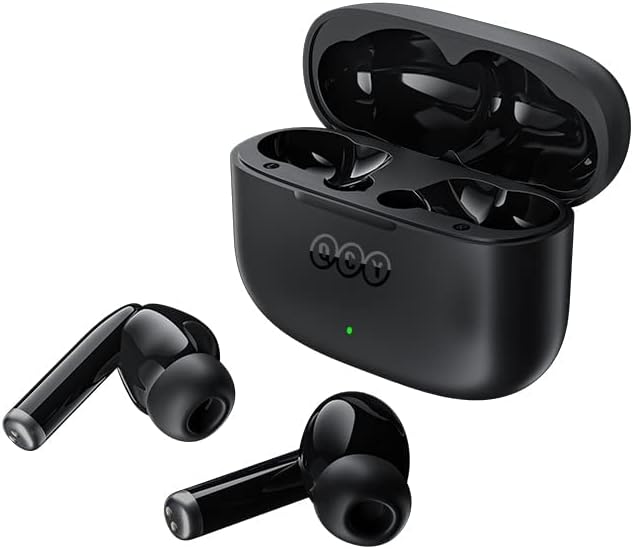
Figure 3.2: QCY T19 earbuds removed from their charging case, which is open in the background. The two earbuds are positioned in the foreground, showcasing their design.

Figure 3.3: A close-up view of the two QCY T19 earbuds, showing their in-ear design, stems, and the microphone grilles.

Figure 3.4: An overhead view of the QCY T19 charging case with the lid open, showing the precise cutouts for the left and right earbuds and the charging pins.
4. Getting Started
4.1 Charging the Earbuds and Case
Before first use, fully charge the earbuds and the charging case.
- Place the earbuds into the charging case. Ensure they are correctly seated in their respective slots.
- Connect the USB charging cable to the charging port on the case and the other end to a USB power adapter (not included) or a computer's USB port.
- The LED indicator on the case will show charging status. Once fully charged, the indicator will change or turn off.
- A full charge provides up to 30 hours of total playback time with the charging case.
4.2 Pairing with Your Device
The QCY T19 earbuds use Bluetooth 5.1 for a stable connection.
- Open the charging case. The earbuds will automatically enter pairing mode (or manually put them into pairing mode if they were previously paired by holding the touch control).
- On your smartphone or Bluetooth-enabled device, go to the Bluetooth settings.
- Search for new devices and select "QCY T19" from the list.
- Once connected, you will hear a confirmation tone, and the earbuds will be ready for use.
- For subsequent uses, the earbuds will automatically connect to the last paired device when removed from the case.
5. Operating Instructions
5.1 Touch Controls
The QCY T19 earbuds feature sensitive touch controls for various functions:
- Play/Pause: Single tap on either earbud.
- Next Track: Double tap on the right earbud.
- Previous Track: Double tap on the left earbud.
- Answer/End Call: Single tap on either earbud.
- Reject Call: Press and hold either earbud for 2 seconds.
- Activate Voice Assistant: Triple tap on either earbud.
- Toggle Low Latency Mode: (Specific gesture, refer to quick start guide if available, typically a triple tap on right earbud or similar).
5.2 Calling Functionality
With quad microphones and ENC (Environmental Noise Cancellation) algorithm, the T19 ensures crystal clear calling.
- During a call, your voice is precisely picked up while ambient noises are blocked.
- Use the touch controls to manage calls as described above.
5.3 Low Latency Mode
The low latency feature synchronizes audio with video, providing a more enjoyable experience for watching videos, movies, or playing games.
- Activate this mode via the touch controls for reduced audio delay.
6. Care and Maintenance
To ensure the longevity and optimal performance of your QCY T19 earbuds, follow these care instructions:
- Cleaning: Regularly clean the earbuds and charging case with a soft, dry, lint-free cloth. Do not use harsh chemicals or abrasive materials.
- Ear Tips: Remove and clean the ear tips periodically with water and mild soap. Ensure they are completely dry before reattaching.
- Charging Contacts: If charging issues occur, gently clean the charging contacts on both the earbuds and inside the case with a cotton swab.
- Storage: Store the earbuds in their charging case when not in use to protect them and keep them charged.
- Avoid Extreme Conditions: Do not expose the earbuds to extreme temperatures, humidity, or liquids.
7. Troubleshooting
If you encounter issues with your QCY T19 earbuds, try the following solutions:
- Earbuds not pairing: Ensure earbuds are charged. Turn off and on Bluetooth on your device. Forget "QCY T19" from your device's Bluetooth list and try pairing again.
- Only one earbud working: Place both earbuds back into the charging case, close the lid, wait a few seconds, then open the lid and take them out again. This often re-syncs them.
- No sound: Check the volume level on your device and the earbuds. Ensure the earbuds are properly connected to your device.
- Charging issues: Ensure the charging cable is securely connected. Try a different USB port or power adapter. Clean the charging contacts on the earbuds and case.
- Poor call quality: Ensure the microphones are not obstructed. Check your network signal.
If the problem persists, refer to the QCY official support website for further assistance.
8. Specifications
| Feature | Specification |
|---|---|
| Brand | QCY |
| Model Name | T19-BLACK |
| Connectivity Technology | Wireless (Bluetooth) |
| Wireless Communication Technologies | Bluetooth |
| Ear Placement | In Ear |
| Form Factor | In Ear |
| Noise Control | Active Noise Cancellation (for calling) |
| Sensitivity | 102 dB |
| Batteries | 1 Lithium Ion batteries required (included) |
| Product Dimensions | 5.8 x 2.39 x 4.5 cm; 90 g |
| Color | Black |
9. Warranty and Support
QCY products are manufactured to high-quality standards. For warranty information and customer support, please refer to the documentation included with your purchase or visit the official QCY website. Keep your proof of purchase for any warranty claims.
For further assistance, you may visit the QCY Store on Amazon.