
1. Introduction
Thank you for choosing the Mifaso 3-Sided Multi Plug Power Strip with Shelf and Night Light. This device is designed to expand your wall outlet capacity, providing multiple AC outlets, USB charging ports, surge protection, and a convenient night light with a detachable shelf. Please read this manual thoroughly before use to ensure proper installation and operation.

Image 1.1: Overview of the Mifaso 3-Sided Multi Plug Power Strip.
2. Safety Information
To prevent injury, electric shock, fire, or product damage, always follow these basic safety precautions:
- Do not exceed the electrical ratings of this product. Refer to the Specifications section for details.
- This product is for indoor use only. Do not use in wet or damp conditions.
- Do not disassemble or modify the device. Contact customer support for service.
- Keep away from children and pets.
- Ensure the device is securely plugged into a grounded wall outlet.
- The built-in surge protector helps protect connected devices from power spikes.

Image 2.1: Visual representation of multi-protection features including short-circuit, fire-resistance, over-temperature control, and overload protection.
3. Product Features
The Mifaso Multi Plug Power Strip offers a range of features for enhanced convenience and safety:
- 9-in-1 Design: Combines 5 AC outlets, 3 USB-A ports, and 1 USB-C port.
- 3-Sided Outlet Configuration: Allows for multiple large adapters without blocking adjacent outlets.
- Smart Night Light: Features an automatic light sensor and manual touch control.
- Detachable Shelf: Provides a stable surface for charging devices, keeping countertops tidy.
- 1800 Joule Surge Protection: Safeguards electronic devices from power surges and spikes.
- USB-C Fast Charge: Delivers up to 5V/3A for compatible devices.
- Secure Wall Mounting: Includes a removable screw and plastic prong for stable attachment to duplex and decor outlets.
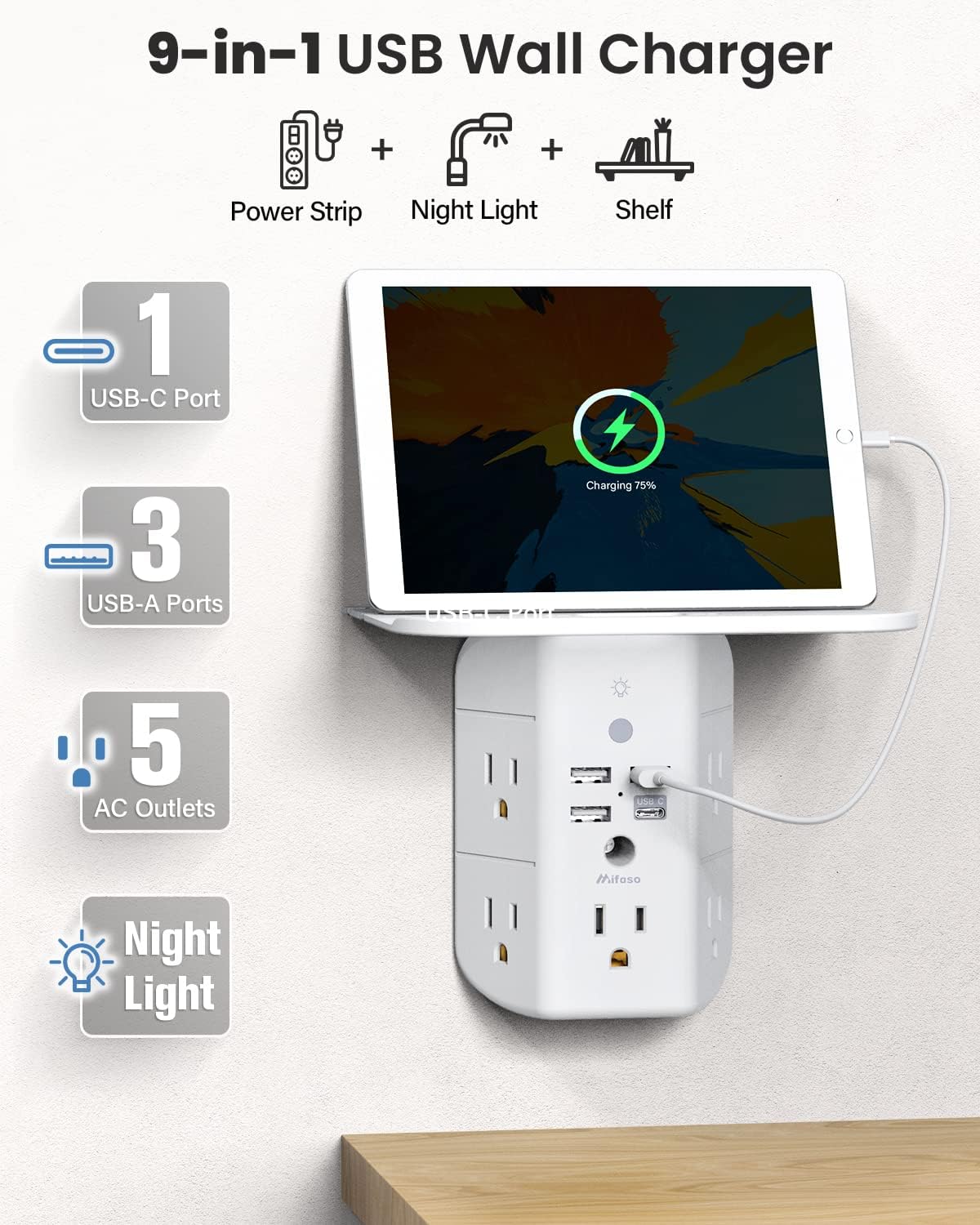
Image 3.1: Illustration of the 9-in-1 functionality, highlighting 1 USB-C port, 3 USB-A ports, 5 AC outlets, night light, and shelf.

Image 3.2: Demonstrates the wide spacing of AC outlets, allowing for larger power adapters to be used simultaneously.
4. Package Contents
The package should contain the following items:
- Mifaso 3-Sided Multi Plug Power Strip
- Detachable Shelf
- Mounting Screw (pre-installed or included separately)
- User Manual (this document)
5. Setup and Installation
Follow these steps to install your Mifaso Multi Plug Power Strip:
- Prepare the Wall Outlet: Ensure the wall outlet you intend to use is a standard duplex or decor outlet. If your outlet has a faceplate, remove it.
- Attach the Shelf: Slide the detachable shelf into the designated slot on the top of the power strip until it clicks securely into place.
- Position the Power Strip: Align the prongs of the power strip with the wall outlet. The plastic prong on the back of the power strip can be cut off if you are installing it on a GFCI or USB receptacle outlet, as shown in Image 5.1.
- Secure to Wall: Insert the central screw (if not already in place) into the hole on the power strip and tighten it into the wall outlet's screw hole using a Phillips-head screwdriver. This ensures a firm and stable connection.

Image 5.1: Step-by-step guide for installation, including how to adapt for different outlet types.

Image 5.2: Comparison showing the secure installation with the screw versus an unsecured plug.
6. Operating Instructions
6.1 AC Outlets
The power strip features 5 standard AC outlets distributed across three sides. The wide spacing accommodates larger power adapters without obstructing other outlets.
6.2 USB Charging Ports
The device includes 3 USB-A ports and 1 USB-C port for charging various electronic devices.
- USB-A Ports: Provide a total output of 3.1A.
- USB-C Port: Features smart technology for fast charging, delivering up to 5V/3A. Note: The USB-C port does not support devices requiring 14-22V charging voltage.

Image 6.1: Close-up view of the 5 AC outlets, 3 USB-A ports, and 1 USB-C port with their respective voltage/amperage ratings.
6.3 Smart Night Light
The integrated LED night light (1.5W) offers two modes of operation:
- Automatic Mode: The built-in light sensor automatically activates the night light when ambient lighting is low and turns it off when the environment is bright.
- Manual Control: To manually turn the night light on or off, lightly touch the light logo (touch sensor) on the top of the unit.

Image 6.2: Details the light sensor for automatic operation and the touch sensor for manual control of the night light.
6.4 Detachable Shelf
The detachable shelf provides a convenient surface to hold small devices while they charge. The shelf measures approximately 4.7 x 6.3 inches and can support items up to 10 lbs.

Image 6.3: Illustrates the dimensions and usage of the detachable shelf.
7. Maintenance
To maintain your power strip in optimal condition:
- Unplug the device from the wall outlet before cleaning.
- Wipe the exterior with a soft, dry cloth. Do not use liquid cleaners or aerosols.
- Keep the outlets free from dust and debris.
8. Troubleshooting
- Problem: Night light is not working.
- Solution: The touch sensor may have been accidentally pressed during packaging or handling, turning the light off. Lightly press the light logo (touch sensor) on the top of the unit to reactivate the night light. Ensure the ambient light is low enough for automatic mode to activate, or manually turn it on.
- Problem: Devices are not charging.
- Solution: Ensure the power strip is securely plugged into a live wall outlet. Check if the device's power requirements are within the power strip's specifications. Verify that the charging cables are functional and properly connected.
- Problem: Power strip feels loose in the wall outlet.
- Solution: Ensure the mounting screw is properly tightened into the wall outlet's screw hole. This screw is crucial for a stable installation.
9. Specifications
| Attribute | Value |
|---|---|
| Model Number | MFS54CT |
| AC Outlets | 5 |
| USB-A Ports | 3 (Total 3.1A) |
| USB-C Port | 1 (Max 5V/3A) |
| Surge Protection | 1800 Joules |
| Night Light Power | 1.5W |
| Input Voltage | 125V |
| Product Dimensions | 4.8 x 3.5 x 0.04 inches |
| Item Weight | 3.53 ounces |
| Shelf Dimensions | 4.7 x 6.3 inches |
| Color | White |
10. Warranty and Support
Mifaso products are designed for reliability and performance. For any questions, technical support, or warranty inquiries, please contact Mifaso customer service through the retailer's platform or the official Mifaso website. Please have your product model number (MFS54CT) and purchase information ready when contacting support.