
Introduction
Thank you for choosing the BLAZEVIDEO W600 WiFi Trail Camera. This manual provides detailed instructions for setting up, operating, and maintaining your trail camera. Please read this manual thoroughly before use to ensure proper functionality and to maximize your camera's performance.

Image: Two BLAZEVIDEO W600 WiFi Trail Cameras, designed for outdoor use.
Product Overview
Key Features
- High-Resolution Imaging: Captures 24MP still images and 1296P H.264 video for clear and detailed recordings.
- Wireless Connectivity: Features low-power-consumption Wi-Fi and Bluetooth for seamless connection to the "TrailCam Mobile" app on your smartphone.
- Fast Trigger Speed: A rapid 0.5-second trigger time ensures you capture fast-moving subjects.
- Wide Detection Angle: Equipped with a 110° detection angle and side motion sensors for comprehensive coverage.
- Enhanced Night Vision: Provides clear night vision up to 75 feet (23 meters).
- Durable Design: IP66 waterproof rating ensures reliable operation in various outdoor conditions.
- Large Storage Support: Supports SDHC SD cards up to 256GB (not included).
- User-Friendly Display: Integrated 2.4-inch LCD display for easy navigation and playback.
- Flexible Recording Modes: Offers photo only, video only, and photo + video modes, along with loop recording, time lapse, and timer functions.
- Security Features: Includes password protection and serial number imprint for identifying multiple cameras.
What's in the Box
- BLAZEVIDEO W600 WiFi Trail Camera
- Antenna
- Instruction Manual
- USB Cable

Image: Included components of the BLAZEVIDEO W600 WiFi Trail Camera.
Setup
1. Battery Installation
The camera requires 8 AA batteries (not included). For optimal performance and battery life, use 1.5V AA batteries, preferably lithium in cold conditions.
- Open the camera casing by unlatching the side clips.
- Locate the battery compartment on the right side of the camera.
- Insert 8 AA batteries, ensuring correct polarity (+/-) as indicated inside the compartment.
- Close the battery compartment securely.

Image: Proper battery installation for the trail camera.
2. SD Card Installation
A high-speed SDHC SD card (up to 256GB) is required for storing photos and videos (not included).
- With the camera casing open, locate the SD card slot on the bottom left side.
- Insert the SD card with the metal contacts facing up until it clicks into place.
- To remove, press the card gently until it springs out.

Image: The camera supports up to 256GB SD cards.
3. Antenna Installation
Screw the provided antenna into the designated port on the top of the camera until it is finger-tight.
4. Powering On
After installing batteries and the SD card, close the camera casing and latch the clips securely. Move the power switch to the "ON" position to power on the camera.
5. App Installation & Connection (TrailCam Mobile)
The "TrailCam Mobile" app allows you to control the camera and view media wirelessly.
- Download the "TrailCam Mobile" app from your device's app store:
- Enable Wi-Fi and Bluetooth on your smartphone.
- Turn on the trail camera.
- Open the "TrailCam Mobile" app on your phone and select "WiFi camera".
- Follow the in-app instructions to connect to your camera's Wi-Fi network.
- Once connected, you can set camera parameters and view files directly from your phone.

Image: Wireless connectivity and app control for the trail camera.
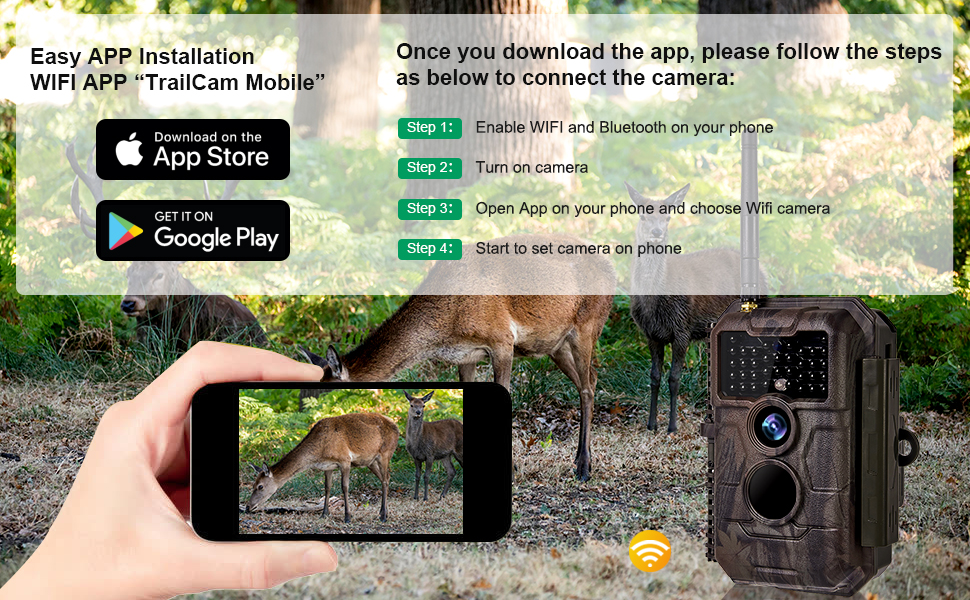
Image: Step-by-step guide for connecting the camera to the mobile app.
Operation
Recording Modes
The camera offers three primary recording modes, selectable via the camera's menu or the mobile app:
- Photo Only: Captures still images when motion is detected.
- Video Only: Records video clips when motion is detected.
- Photo + Video: Captures a still image followed by a video clip upon motion detection.

Image: Examples of 24MP photo and 1296P H.264 video quality.
Motion Detection and Trigger Speed
The camera features a 0.5-second trigger speed and a 110° detection angle to capture subjects quickly and efficiently. Adjust the PIR sensitivity setting (Low, Normal, High) in the menu to optimize detection based on environmental conditions and desired trigger distance (up to 75ft).

Image: The 110° wide-angle lens provides broad coverage.
Night Vision
The camera is equipped with infrared LEDs for clear night vision without disturbing wildlife. The night vision range extends up to 75 feet (20 meters).

Image: Example of clear night vision capture.
Time Lapse Function
Use the Time Lapse feature to capture events over extended periods, such as plant growth or weather patterns. Set the desired interval between shots in the camera settings.
Loop Recording
When enabled, loop recording allows the camera to continuously record by overwriting the oldest files when the SD card is full. This ensures continuous operation without manual card management.
Password Protection
To prevent unauthorized access to your camera's settings and stored media, you can set a password through the camera's menu. Remember your password, as there is no direct reset button.
Mounting the Camera
The camera can be easily tied to a tree using the included strap or mounted on a tripod using the 1/4-20 UNC screw hole at the bottom. Ensure the camera is securely positioned to capture the desired area.

Image: The IP66 waterproof design allows for outdoor mounting in various weather conditions.
Maintenance
Battery Care
- Replace all 8 AA batteries simultaneously to ensure consistent power.
- Remove batteries if the camera will not be used for an extended period to prevent leakage.
- Use high-quality 1.5V AA batteries for optimal performance and longevity.
SD Card Management
- Regularly format the SD card using the camera's menu option to maintain optimal performance and prevent data corruption.
- Back up important photos and videos to a computer or external storage device before formatting or deleting from the SD card.
Cleaning
- Wipe the camera's exterior with a soft, damp cloth. Avoid abrasive cleaners.
- Gently clean the lens with a lens cleaning cloth to ensure clear image quality. Do not touch the lens directly with fingers.
Troubleshooting
| Problem | Possible Cause / Solution |
|---|---|
| Camera does not power on. |
|
| No photos/videos captured. |
|
| Poor image/video quality. |
|
| Cannot connect to the app. |
|
Specifications
| Feature | Detail |
|---|---|
| Model Name | W600Red WiFi Trail Camera |
| Effective Still Resolution | 24 MP |
| Video Capture Resolution | 1296P H.264 |
| Trigger Speed | 0.5 Seconds |
| Viewing Angle | 110 Degrees |
| Night Vision Range | 75 Feet (23 meters) |
| Water Resistance Level | IP66 Waterproof |
| Flash Memory Type | SD/SDHC/SDXC (up to 256GB) |
| Power Source | 8 x 1.5V AA Batteries |
| Display | 2.4-inch LCD |
| Connectivity Technology | Wireless (Wi-Fi, Bluetooth) |
| Control Method | App (TrailCam Mobile) |
| Item Weight | 2.4 pounds |
| Dimensions | 7.99 x 7.17 x 5.28 inches (Package) |
Warranty and Support
BLAZEVIDEO is committed to providing high-quality products and customer service. For any issues or inquiries regarding your W600 WiFi Trail Camera, please refer to the following:
- Warranty Information: Please refer to the warranty card included with your product or visit the official BLAZEVIDEO website for detailed warranty terms and conditions.
- Customer Support: For technical assistance, troubleshooting, or service requests, please contact BLAZEVIDEO customer support through their official channels.
- Online Resources: Additional support and FAQs may be available on the BLAZEVIDEO Store on Amazon.


