
Introduction
This manual provides detailed instructions for the safe and efficient operation of your Max Power MPD816 PA Speaker. Please read this manual thoroughly before using the product and retain it for future reference.
The Max Power MPD816 is a portable PA speaker system designed for both indoor and outdoor use, featuring Bluetooth connectivity, LED lights, a rechargeable battery, and inputs for a microphone and auxiliary devices.
Package Contents
Verify that all items are present in the package:
- Max Power MPD816 PA Speaker
- Wired Microphone
- Remote Control
- Type-C Charging Cable
- User Manual (this document)

Figure 1: Max Power MPD816 PA Speaker with included wired microphone, remote control, and charging cable.
Setup
1. Charging the Speaker
Before initial use, fully charge the speaker's built-in lithium-ion battery. The speaker comes with a Type-C charging cable for fast charging.
- Connect the Type-C charging cable to the charging port on the speaker.
- Connect the other end of the charging cable to a compatible AC power adapter (not included) or a USB power source.
- The charging indicator light will illuminate. Once fully charged, the indicator light may change color or turn off, depending on the model.
- A full charge provides approximately 6 hours of playback time.
Note: Use only the provided charging cable or a certified Type-C cable to prevent damage to the device.
2. Powering On/Off
Locate the power switch on the control panel of the speaker.
- To power on: Press and hold the power button until the display illuminates.
- To power off: Press and hold the power button until the display turns off.
3. Connecting the Microphone
The wired microphone can be connected for karaoke or public address functions.
- Locate the microphone input jack on the speaker's control panel.
- Insert the microphone cable into the microphone input jack.
- Adjust the microphone volume using the dedicated knob on the control panel or the remote control.

Figure 2: Speaker control panel with various inputs and controls.
Operating Instructions
1. Bluetooth Connectivity
Connect your smartphone, tablet, or other Bluetooth-enabled device wirelessly to the speaker.
- Power on the speaker. The speaker will automatically enter Bluetooth pairing mode, indicated by a flashing Bluetooth icon on the display or an audible prompt.
- On your device, enable Bluetooth and search for available devices.
- Select "Max Power MPD816" (or similar name) from the list of devices.
- Once paired, the speaker will emit a confirmation sound, and the Bluetooth icon will stop flashing.
- You can now play audio from your device through the speaker.
Note: The effective Bluetooth range is typically 5-10 meters. Obstacles may reduce this range.
2. FM Radio Mode
Listen to your favorite radio stations using the built-in FM tuner.
- Press the "Mode" button on the speaker or remote control until "FM" is displayed.
- Press the "Play/Pause" button to automatically scan and save available FM stations.
- Use the "Previous" and "Next" buttons to navigate between saved stations.
3. USB/TF Card Playback
Play audio files directly from a USB flash drive or TF (MicroSD) card.
- Insert a USB flash drive into the USB port or a TF card into the TF card slot.
- The speaker will automatically switch to USB or TF card mode and begin playing audio files. If not, press the "Mode" button to select the correct input.
- Use the "Play/Pause", "Previous", and "Next" buttons to control playback.
4. AUX Input Mode
Connect external audio devices using an auxiliary cable.
- Connect one end of a 3.5mm audio cable (not included) to the AUX input port on the speaker.
- Connect the other end to the headphone jack or audio output of your external device (e.g., MP3 player, laptop).
- Press the "Mode" button on the speaker or remote control until "AUX" is displayed.
- Control playback and volume from your external device.
5. LED Lights Control
The speaker features multi-color LED lights that can be turned on or off.
- Locate the dedicated LED light button on the control panel or remote control.
- Press the button to cycle through light modes or to turn the lights on/off.
6. Using the Remote Control
The included remote control provides convenient access to various functions from a distance.
- Power: Turn the speaker on/off.
- Mode: Switch between Bluetooth, FM, USB/TF, and AUX modes.
- Volume +/-: Adjust the master volume.
- Play/Pause: Play or pause audio playback.
- Previous/Next: Skip tracks or navigate FM stations.
- EQ: Select equalizer presets (if available).
- Mute: Mute the audio output.
- Number Pad: Direct track selection in USB/TF mode.
Maintenance
- Cleaning: Use a soft, dry cloth to clean the speaker's exterior. Do not use abrasive cleaners, waxes, or solvents.
- Storage: When not in use for extended periods, store the speaker in a cool, dry place away from direct sunlight and extreme temperatures.
- Battery Care: To prolong battery life, avoid fully discharging the battery frequently. Recharge the speaker regularly, even if not in use, to maintain battery health.
- Water Exposure: This speaker is not waterproof. Avoid exposing it to rain, splashes, or high humidity.
Troubleshooting
| Problem | Possible Cause | Solution |
|---|---|---|
| Speaker does not power on. | Battery is discharged. | Connect the speaker to a power source using the Type-C charging cable and allow it to charge. |
| No sound from the speaker. | Volume is too low or muted. Incorrect input mode selected. Device not properly connected. | Increase the volume on the speaker and your connected device. Ensure the speaker is not muted. Press the "Mode" button to select the correct input (Bluetooth, AUX, USB/TF). Re-establish Bluetooth connection or re-insert AUX/USB/TF. |
| Bluetooth device cannot pair. | Speaker is not in pairing mode. Device is out of range. Another device is already connected. | Ensure the speaker is in Bluetooth mode and flashing. Move your device closer to the speaker. Disconnect any previously paired devices from the speaker or your device. |
| Microphone not working. | Microphone not properly connected. Microphone volume is too low. | Ensure the microphone cable is fully inserted into the microphone input. Adjust the microphone volume knob on the speaker. |
| Remote control not working. | Battery in remote is dead. Obstruction between remote and speaker. | Replace the battery in the remote control. Ensure there is a clear line of sight between the remote and the speaker's IR receiver. |
Specifications
| Model Number | MPD816 |
| Brand | Max Power |
| Power Source | AC (for charging) |
| Battery Type | 1 Lithium Ion (included) |
| Battery Life | Approximately 6 hours |
| Connectivity Technology | Bluetooth, USB |
| Audio Inputs | AUX (3.5mm), Microphone, USB, TF Card |
| Material | Plastic |
| Dimensions (H x W x D) | 26.11 x 12.2 x 11.2 inches (approximate package dimensions, actual product dimensions are similar) |
| Item Weight | 9.08 pounds |
| UPC | 761062716826 |
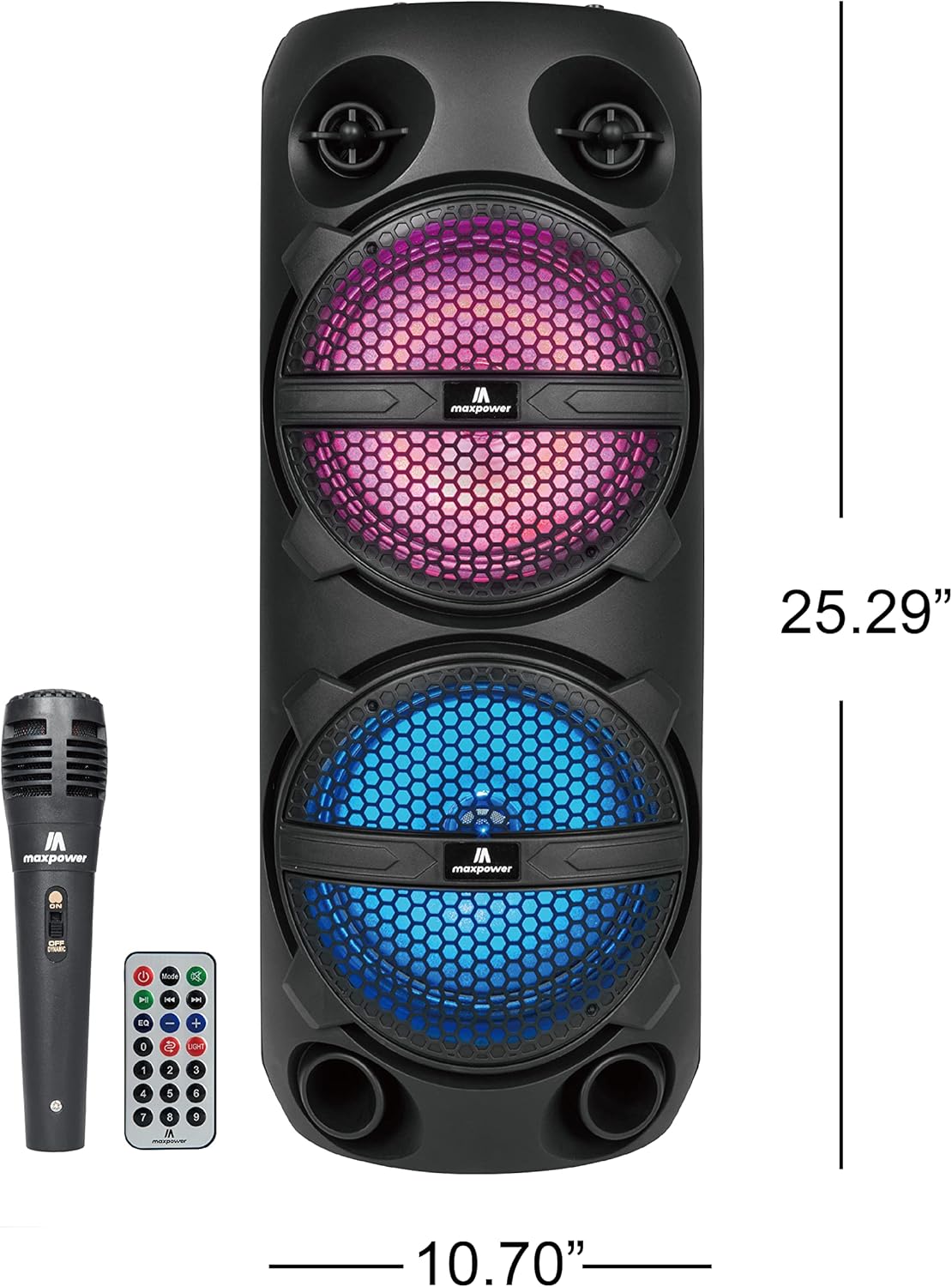
Figure 3: Max Power MPD816 PA Speaker with approximate dimensions.
Safety Information
Important Safety Instructions:
- Read these instructions carefully.
- Keep these instructions for future reference.
- Heed all warnings.
- Follow all instructions.
- Do not use this apparatus near water.
- Clean only with a dry cloth.
- Do not block any ventilation openings. Install in accordance with the manufacturer's instructions.
- Do not install near any heat sources such as radiators, heat registers, stoves, or other apparatus (including amplifiers) that produce heat.
- Protect the power cord from being walked on or pinched, particularly at plugs, convenience receptacles, and the point where they exit from the apparatus.
- Only use attachments/accessories specified by the manufacturer.
- Unplug this apparatus during lightning storms or when unused for long periods of time.
- Refer all servicing to qualified service personnel. Servicing is required when the apparatus has been damaged in any way, such as power-supply cord or plug is damaged, liquid has been spilled or objects have fallen into the apparatus, the apparatus has been exposed to rain or moisture, does not operate normally, or has been dropped.


