
Introduction
Thank you for purchasing the Max Power MPD15EQ Portable Rechargeable PA Speaker. This manual provides important information regarding the setup, operation, and maintenance of your speaker. Please read it thoroughly before using the product to ensure proper function and to maximize its lifespan.
Safety Instructions
- Do not expose the unit to rain or moisture to prevent fire or shock hazards.
- Do not open the speaker cabinet. There are no user-serviceable parts inside. Refer all servicing to qualified personnel.
- Ensure proper ventilation. Do not block any ventilation openings.
- Use only the power adapter supplied with the unit.
- Keep the speaker away from heat sources, direct sunlight, and strong magnetic fields.
- Clean only with a dry cloth.
Package Contents
- Max Power MPD15EQ PA Speaker
- Wired Microphone
- Remote Control
- Power Adapter
- User Manual (this document)
Product Overview
Familiarize yourself with the various parts of your MPD15EQ speaker.
Front Panel
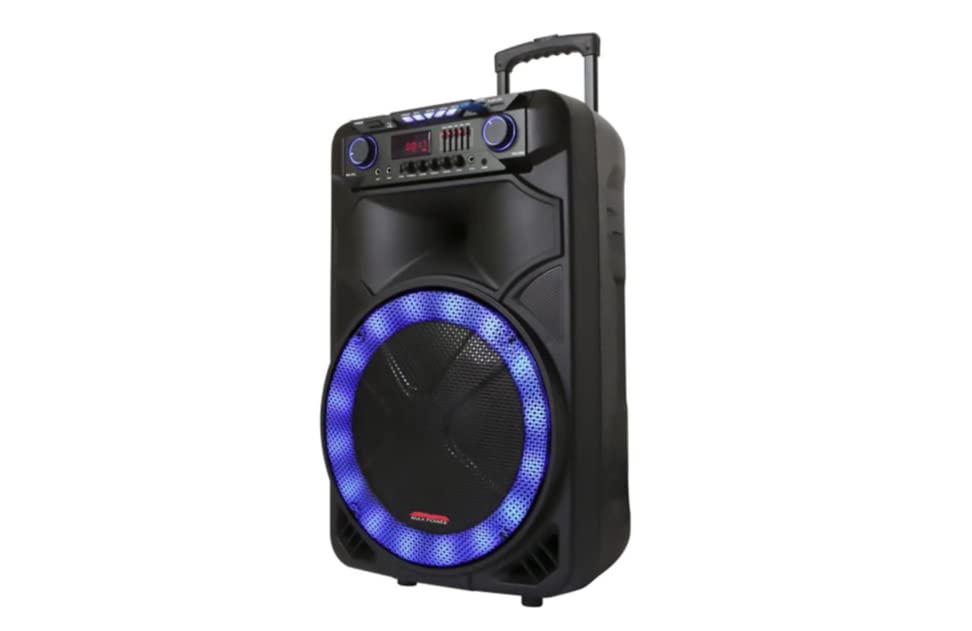
Image Description: This image displays the front of the Max Power MPD15EQ speaker. It features a large 15-inch woofer at the bottom, a 5-inch horn tweeter above it, and a control panel with an LED display screen. The speaker grille covers the woofer and tweeter, and the overall design is robust and portable.
- 15" Woofer: Provides powerful bass frequencies.
- 5" Horn Tweeter: Delivers clear high frequencies.
- LED Display Screen: Shows current mode, track information, and settings.
- Control Panel: Buttons and knobs for various functions (volume, EQ, mode, etc.).
- LED Light On/Off Switch: Controls the integrated LED lighting.
Rear Panel (Example - specific details not provided in source)
The rear panel typically includes input/output ports and the power connection.
- Power Input: For connecting the power adapter to charge the battery or operate the unit.
- USB Port: For playing audio from USB drives.
- SD Card Slot: For playing audio from SD cards.
- Microphone Input: For connecting the wired microphone.
- Auxiliary Input: For connecting external audio devices via a 3.5mm or RCA cable.
Setup
Charging the Battery
The MPD15EQ features a built-in rechargeable battery. Before first use, fully charge the speaker for approximately 6-8 hours.
- Connect the supplied power adapter to the speaker's power input port.
- Plug the power adapter into a standard wall outlet.
- The LED display or an indicator light will show the charging status.
- Once fully charged, disconnect the power adapter.
Initial Power On
- Ensure the speaker is fully charged or connected to power.
- Locate the power switch (usually on the rear or control panel) and turn it to the "ON" position.
- The LED display will illuminate, indicating the speaker is ready for use.
Operating Instructions
Bluetooth Connection
- Turn on the MPD15EQ speaker.
- Press the "MODE" button on the control panel until "BLUETOOTH" or "BT" appears on the LED display.
- Enable Bluetooth on your smartphone, tablet, or other audio device.
- Search for available devices and select "MPD15EQ" from the list.
- Once paired, you will hear a confirmation sound, and you can now play audio wirelessly.
Using the Wired Microphone
- Connect the supplied wired microphone to the "MIC IN" port on the speaker.
- Adjust the microphone volume knob (if available) on the control panel to your desired level.
- Speak into the microphone.
USB/SD Card Playback
- Insert a USB flash drive or SD card (pre-loaded with MP3 audio files) into the respective port.
- The speaker should automatically switch to USB/SD mode and begin playing. If not, press the "MODE" button.
- Use the playback controls (Play/Pause, Next, Previous) on the control panel or remote control.
5-Band Graphic EQ Adjustment
The MPD15EQ features a 5-band graphic equalizer to fine-tune your audio output.
- Locate the EQ sliders on the control panel.
- Each slider corresponds to a specific frequency band. Adjust them up or down to boost or cut those frequencies.
- Experiment with the settings to achieve your preferred sound profile.
LED Lights
The speaker includes integrated LED lights. Use the "LED Light On/Off Switch" to activate or deactivate them.
Remote Control Usage
The included remote control allows for convenient operation from a distance. It typically includes buttons for power, mode selection, volume, track control, and EQ presets.
Maintenance
Cleaning
- Always power off and unplug the speaker before cleaning.
- Use a soft, dry cloth to wipe down the exterior surfaces.
- Do not use liquid cleaners, aerosols, or abrasive chemicals.
Storage
- Store the speaker in a cool, dry place away from direct sunlight and extreme temperatures.
- If storing for extended periods, charge the battery periodically (e.g., every 3 months) to maintain battery health.
Troubleshooting
| Problem | Possible Cause | Solution |
|---|---|---|
| No power | Battery discharged; Power cable not connected; Power switch off. | Charge the battery; Check power cable connection; Turn power switch ON. |
| No sound | Volume too low; Incorrect input mode; Device not paired (Bluetooth). | Increase master volume; Select correct input mode (Bluetooth, USB, AUX); Re-pair Bluetooth device. |
| Microphone not working | Microphone not connected; Microphone volume low; Microphone switch off. | Ensure microphone is securely plugged in; Increase microphone volume; Check microphone's ON/OFF switch. |
| Bluetooth connection unstable | Device too far; Interference; Low battery. | Move device closer to speaker; Avoid obstacles; Ensure speaker battery is charged. |
Specifications
- Woofer: Single 15"
- Tweeter: Single 5" Horn
- Frequency Response: 40Hz-20KHz
- Impedance: 4 Ohms
- Sensitivity: 93dB
- Dimensions (W x D x H): 19" x 16.75" x 32"
- Weight: Approximately 38 pounds
- Battery: Built-in Rechargeable
- Connectivity: Bluetooth, USB, SD Card, Microphone Input, Auxiliary Input
- EQ: 5 Band Graphic EQ
- Display: LED Display Screen
- Included Accessories: Wired Microphone, Remote Control
Warranty and Support
Max Power products are designed for reliability and performance. For warranty information or technical support, please refer to the warranty card included with your purchase or visit the official Max Power website. Keep your proof of purchase for warranty claims.
Contact Information: Please refer to the packaging or official website for the most up-to-date contact details for customer service.
Official Product Videos
No official product videos from the seller were available for embedding at this time. If available, they would appear here with detailed descriptions.


