
1. Product Overview
The OREI BK-21 is an advanced 8K 2x1 HDMI Switch designed to streamline your audio-visual setup. This device allows you to connect two HDMI source devices to a single HDMI display, providing seamless switching between inputs. It supports high-resolution video and audio formats, making it ideal for gaming, home theater, and professional applications.

Figure 1: OREI 8K 2x1 HDMI Switch (Model BK-21)
Key capabilities include:
- Supports resolutions up to 8K@60Hz, 4K@120Hz, and 1080p@240Hz.
- HDMI 2.1 and HDCP 2.3/2.2/1.4 compliant.
- High Speed 48Gbps Video Bandwidth.
- Supports HDR10+, HDR10, Dolby Vision, 3D, and CEC.
- Features VRR (Variable Refresh Rate), ALLM (Auto Low-Latency Mode), and QFT (Quick Frame Transport).
- Dual switching options: Automatic and Manual.
2. Package Contents
Please ensure all items are present in the package:
- 1x OREI BK-21S HDMI Switcher
- 1x USB Power Cable
- 1x User Manual

Figure 2: Package Contents
3. Product Features
The OREI BK-21 HDMI Switch offers a robust set of features for high-performance audio and video distribution:
- High Resolution Support: Experience stunning visuals with support for 8K@60Hz, 4K@120Hz, and 1080p@240Hz.
- Advanced HDMI Standards: Fully compliant with HDMI 2.1 and HDCP 2.3/2.2/1.4 for broad compatibility and secure content transmission.
- High Bandwidth: Supports 48Gbps video bandwidth for uncompressed high-resolution video.
- Dynamic HDR Support: Compatible with HDR10+, HDR10, and Dolby Vision for enhanced contrast and color.
- Gaming Optimized Features: Includes VRR (Variable Refresh Rate), ALLM (Auto Low-Latency Mode), and QFT (Quick Frame Transport) for a smoother gaming experience.
- Comprehensive Audio Support: Delivers exceptional sound quality with LPCM, Dolby True HD, DTS HD Master Audio, Dolby-AC3, and DTS7.1.
- Wide Compatibility: Works with a variety of HDMI devices such as PlayStation 5, Xbox, Roku 4, 4K TV, Amazon Fire TV, Ultra Projector, PS4, Apple TV, Cable box, Blu-ray player, DVD player, PC, and STB.

Figure 3: Supported Video Standards

Figure 4: Audio Support

Figure 5: Wide Device Compatibility
4. Connections and Setup
Follow these steps to connect your OREI BK-21 HDMI Switch:
- Connect HDMI Sources: Plug your two HDMI source devices (e.g., gaming console, Blu-ray player) into the HDMI IN1 and HDMI IN2 ports on the switch.
- Connect to Display: Connect an HDMI cable from the HDMI OUT port on the switch to the HDMI input on your display (TV, monitor, projector).
- Power Connection: Connect the provided USB cable to the POWER port on the switch and to a USB power source (e.g., a USB wall adapter, a USB port on your TV or media device). The switch requires 5V DC power.

Figure 6: Rear Panel Connections
For optimal performance, use high-quality HDMI 2.1 cables under 10 feet. For longer lengths, OREI Fiber Optic HDMI cables are recommended.
Video 1: OREI Direct's overview of the 8K 2x1 HDMI Switch, demonstrating its features and connections.
5. Operating Instructions
The OREI BK-21 HDMI Switch offers both manual and automatic switching modes:
- Manual Switching: Press the button on the top of the switch to cycle between HDMI IN1 and HDMI IN2. The corresponding LED indicator (1 or 2) will illuminate to show the currently active input.
- Automatic Switching: The switch supports automatic detection of active HDMI sources. When a new source is activated, the switch can automatically switch to that input. This feature can be enabled or disabled as per user preference to prevent unintended switching.

Figure 7: Top Panel with Selection Button and Indicators
6. Technical Specifications
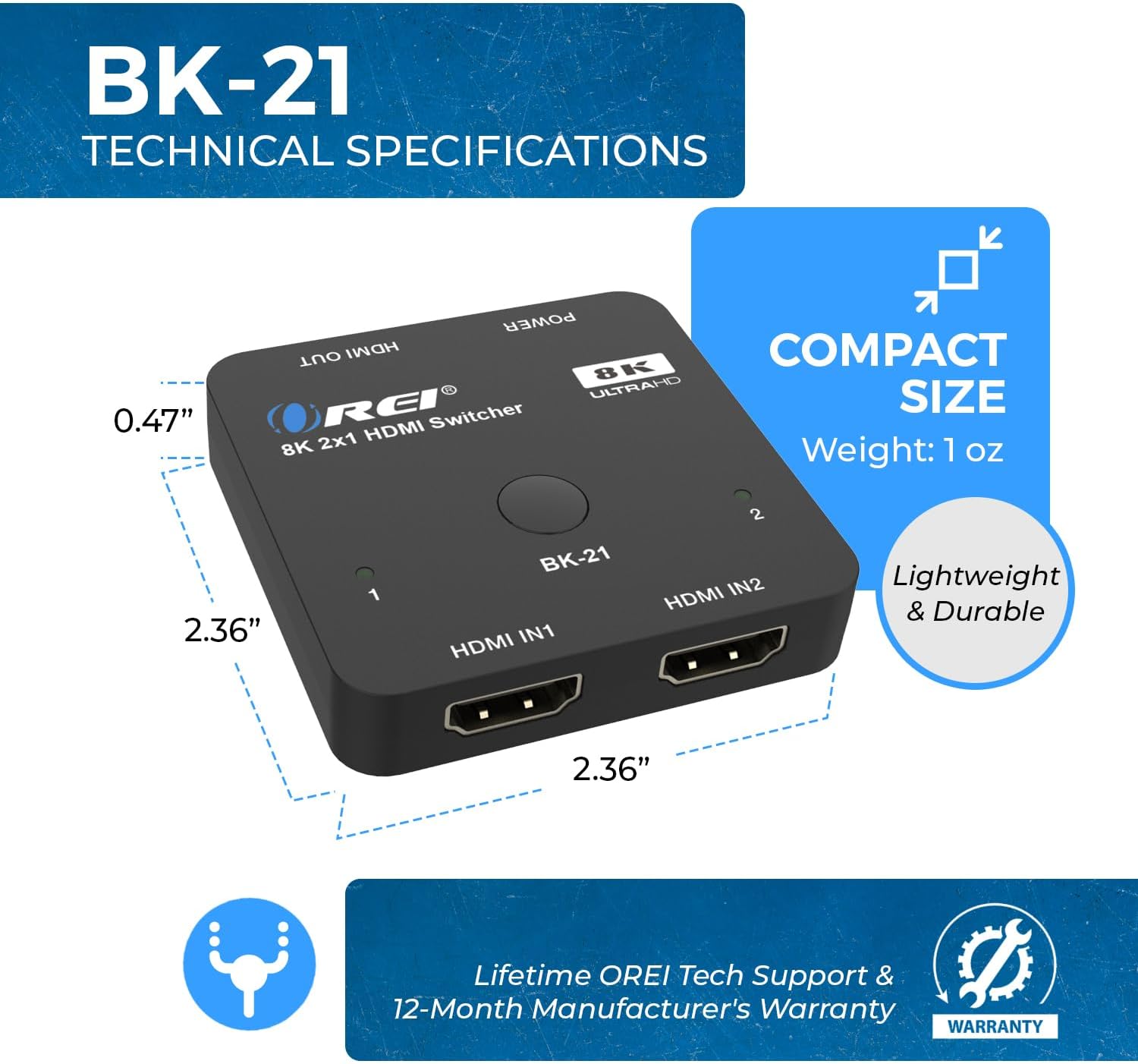
Figure 8: Compact Size and Dimensions
| Feature | Description |
|---|---|
| Model Number | BK-21 |
| Product Dimensions | 2 x 4 x 0.5 inches |
| Item Weight | 2.8 ounces |
| Color | Black |
| Connector Type | HDMI |
| Cable Type | HDMI |
| HDMI Version | HDMI 2.1 |
| HDCP Version | HDCP 2.3/2.2/1.4 |
| Max Resolution | 8K@60Hz, 4K@120Hz, 1080p@240Hz |
| Video Bandwidth | 48Gbps |
| HDR Support | HDR10+, HDR10, Dolby Vision |
| Gaming Features | VRR, ALLM, QFT |
| Audio Formats | LPCM, Dolby True HD, DTS HD Master Audio, Dolby-AC3, DTS7.1 |
| Compatible Devices | Blu-Ray Player, DVD Player, Gaming Console (PS5, Xbox), PC, Television, Roku, Amazon Fire TV, Ultra Projector, Apple TV, Cable box, STB |
7. Troubleshooting
If you encounter issues with your OREI BK-21 HDMI Switch, please refer to the following common troubleshooting steps:
- No Signal:
- Ensure all HDMI cables are securely connected to both the source devices, the switch, and the display.
- Verify the USB power cable is connected and the power LED on the switch is illuminated.
- Try connecting the HDMI source directly to the display to confirm the source and display are working correctly.
- Test with different HDMI cables, especially high-quality HDMI 2.1 certified cables.
- Ensure the correct input is selected on your display.
- Flickering or Intermittent Signal:
- Check cable lengths; for 8K/4K@120Hz, shorter, high-quality HDMI 2.1 cables are crucial.
- Ensure the power supply is stable and sufficient.
- Reduce the resolution or refresh rate of the source device to see if the issue persists.
- Audio Issues:
- Confirm that your display's audio settings are correctly configured.
- Check the audio output settings on your source device.
- Ensure the HDMI cables support audio transmission.
- Automatic Switching Not Working:
- Some devices may not trigger auto-switching effectively. Try manual switching using the button on the switch.
- Ensure the auto-switching feature is enabled if applicable (refer to specific product manual for details on enabling/disabling).
8. Care and Maintenance
To ensure the longevity and optimal performance of your OREI BK-21 HDMI Switch, please follow these guidelines:
- Cleaning: Use a soft, dry cloth to clean the device. Avoid using liquid or aerosol cleaners.
- Storage: Store the device in a cool, dry place away from direct sunlight and extreme temperatures.
- Handling: Handle the device with care. Avoid dropping it or subjecting it to strong impacts.
- Ventilation: Ensure the device has adequate ventilation to prevent overheating. Do not block any ventilation openings.
- Power: Always use the provided USB power cable. Disconnect power during electrical storms or when unused for long periods.
9. Warranty and Customer Support
The OREI BK-21 HDMI Switch comes with a 1 Year Full Warranty. For any technical assistance, troubleshooting, or warranty claims, please contact OREI Support.
For further assistance, please visit the Official OREI Store on Amazon or refer to the contact information provided in your product packaging.


