
Product Overview
The Imagitarium by Petco Newport Tank Stand is designed to support 29-gallon aquariums or terrariums. It features a clean, modern design and is constructed from durable MDF material, providing a stable and aesthetically pleasing base for your aquatic or reptilian habitat.
- Clean, modern design suitable for various home decors.
- Assembles quickly with easy-to-follow instructions.
- Equipped with adjustable protective nylon leveling feet for stability on uneven surfaces.
- Assembled dimensions: 30.5 inches (L) x 12.75 inches (W) x 30.25 inches (H).
- Maximum weight limit: 435 lbs.
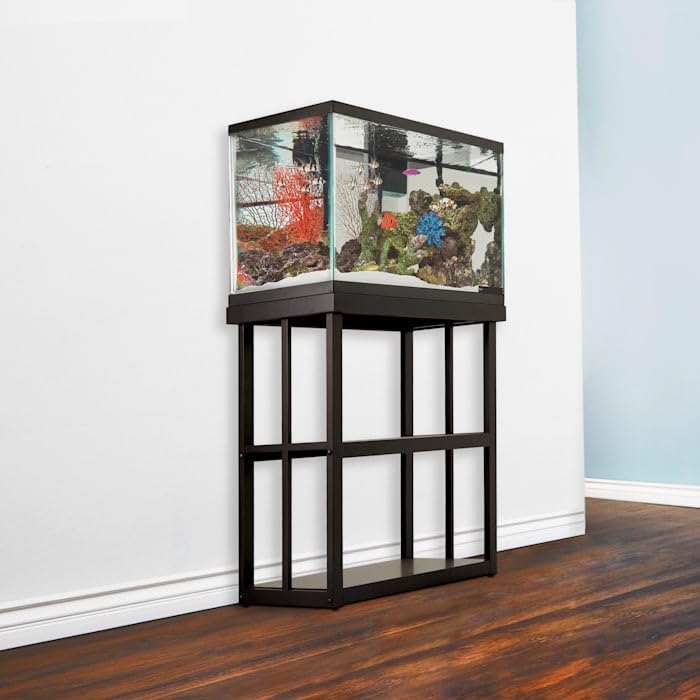
Image: The Imagitarium by Petco 29 Gallon Newport Tank Stand supporting an aquarium, showcasing its design and stability.
Setup and Assembly
This tank stand is designed for quick and straightforward assembly. Detailed instructions, including a list of all components and step-by-step guidance, are included in the product packaging. Please ensure all parts are present and undamaged before beginning assembly.
During assembly, ensure all connections are secure and stable. The stand includes adjustable protective nylon leveling feet. It is crucial to adjust these feet individually to ensure the stand is perfectly level on your chosen surface. Proper leveling is essential for the stability of the aquarium and the safety of its contents, preventing any undue stress on the tank structure.
Placement and Usage
Place the tank stand on a flat, level, and sturdy surface capable of supporting the combined weight of the stand, aquarium, water, and all contents. The stand has a maximum weight limit of 435 lbs. Verify that the adjustable leveling feet are properly set to prevent any tilting or instability, which could compromise the safety of your aquarium.
Before placing an aquarium on the stand, confirm that the stand is fully assembled, all fasteners are securely tightened, and it is perfectly level. Distribute the weight evenly across the stand's top surface to maintain structural integrity.
Care and Maintenance
To clean the stand, wipe it with a soft, damp cloth. It is important to dry the stand thoroughly immediately after cleaning to prevent moisture absorption and potential damage to the MDF material. Avoid using abrasive cleaners, harsh chemicals, or solvents, as these can damage the finish and integrity of the stand.
Troubleshooting
Stand Instability or Leaning
If the stand appears unstable or leans after assembly, first ensure that all assembly screws and fasteners are securely tightened according to the instructions. Next, carefully check the adjustable protective nylon leveling feet. Adjust each foot individually until the stand is perfectly level on the floor. An uneven floor surface or improper adjustment of the leveling feet can cause instability. Always ensure the stand is placed on a solid, flat, and level surface.
Scratches or Surface Damage
Minor scratches or scuffs on the stand's surface can sometimes be remedied with furniture repair markers or polishes specifically designed for MDF or wood finishes. For more significant damage, it is recommended to contact Imagitarium customer support for advice on repair or replacement options.
Product Specifications
| Feature | Detail |
|---|---|
| Brand | Imagitarium |
| Model | Newport Tank Stand |
| Material | MDF |
| Color | Black |
| Assembled Dimensions (L x W x H) | 30.5 x 12.75 x 30.25 inches |
| Item Weight | 20.1 Pounds |
| Weight Limit | 435 lbs |
| Compatible Aquarium Size | 29 Gallon (also fits 20 Gallon aquariums/terrariums) |
| Adjustable Feet | Yes, protective nylon leveling feet |
| Date First Available | January 25, 2022 |
Warranty and Support
For specific warranty information, details on product guarantees, or to access customer support, please refer to the documentation included with your original purchase. It is advisable to retain your proof of purchase, such as a receipt or order confirmation, as it may be required for any warranty claims or support inquiries. You may also visit the official Imagitarium website or contact their customer service directly for assistance.