
1. Introduction
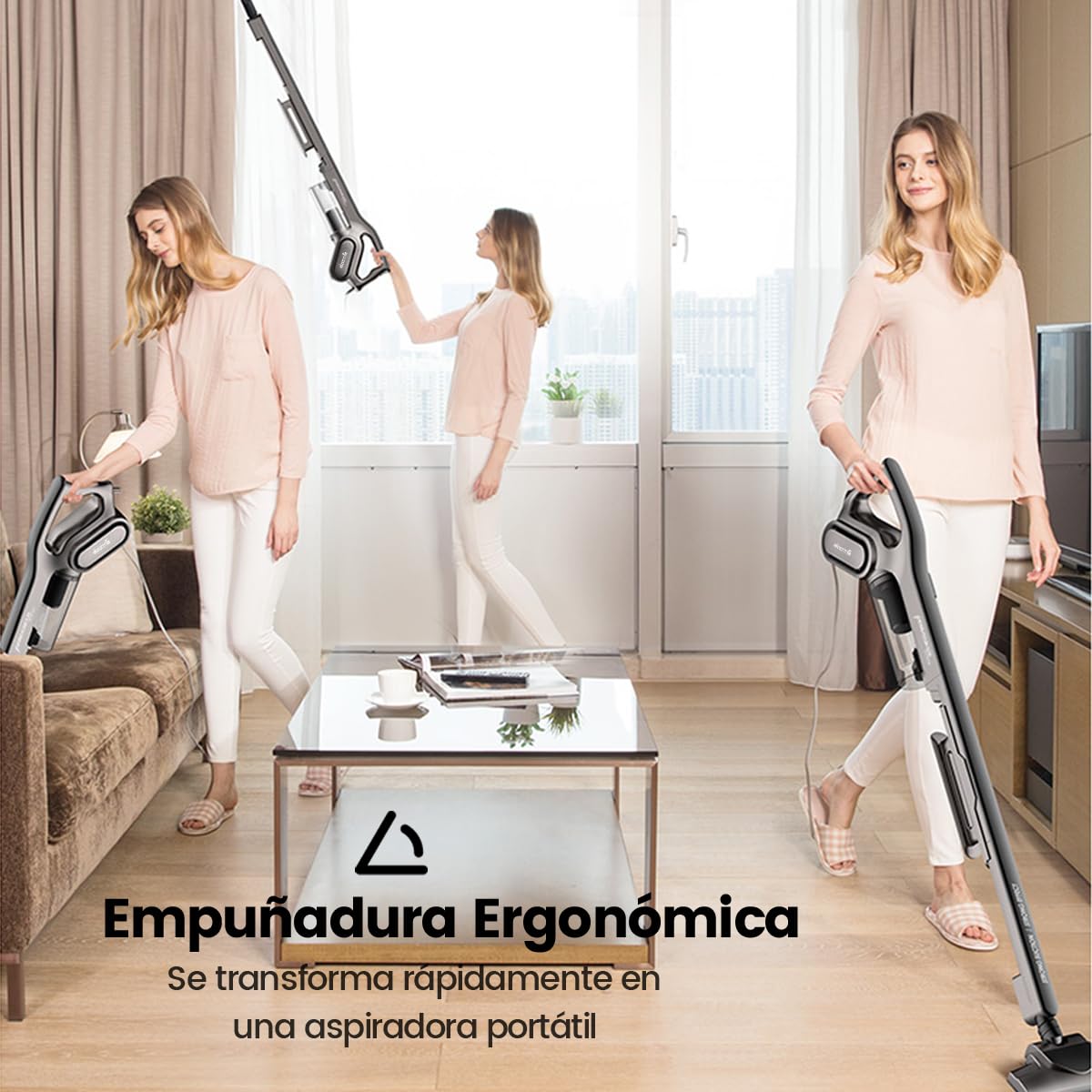
The Deerma DX115C is a versatile 2-in-1 corded portable vacuum cleaner designed for efficient cleaning across various surfaces. It functions as both an upright stick vacuum and a handheld unit, adapting to your cleaning needs. Equipped with a powerful 600W copper motor, it delivers strong suction of approximately 14000 Pa to effectively remove dirt and fine particles.
This vacuum features a smart and efficient filtration system, including an inbuilt washable HEPA filter and a unique filtering sponge, to capture tiny particles and reduce allergens. Its 1.2L dust cup capacity minimizes interruptions during cleaning. The DX115C operates quietly, with a noise level below 82dB, ensuring a less disruptive cleaning experience.
2. What's in the Box
Upon unpacking, ensure all components are present and undamaged. The package should contain:
- 1 x Deerma DX115C Vacuum Cleaner Main Unit
- 1 x Extension Tube
- 1 x Floor Brush
- 1 x Crevice Brush
- 1 x Round Brush
- 1 x User Manual
3. Assembly and Setup
The Deerma DX115C is designed for quick and easy assembly. Follow these steps to set up your vacuum cleaner:
- Step 1: Connect the Main Body to the Extension Tube. Align the main vacuum body with the extension tube and push them together until they click securely into place.
- Step 2: Attach the Floor Brush. Connect the floor brush to the other end of the extension tube. Ensure it is firmly attached.
- Step 3: Power On. Plug the power cord into a suitable electrical outlet. Press the power button located on the main unit to start the vacuum cleaner.

For handheld use, simply detach the extension tube and floor brush from the main unit. You can then attach one of the specialized brushes directly to the main unit.
4. Operating Instructions
4.1. 2-in-1 Functionality
The Deerma DX115C offers flexible cleaning options:
- Upright Stick Vacuum: For cleaning floors, carpets, and rugs. Use with the extension tube and floor brush attached.
- Handheld Vacuum: For cleaning smaller areas, upholstery, car interiors, or hard-to-reach spots. Detach the extension tube and floor brush, and attach a suitable accessory brush directly to the main unit.

4.2. Using Interchangeable Brushes
The vacuum cleaner comes with three specialized brushes to tackle different cleaning tasks:
- Floor Brush: Ideal for general floor cleaning, including hardwood, tiles, and low-pile carpets.
- Crevice Brush: Perfect for reaching into narrow gaps, corners, and tight spaces, such as between sofa cushions or along baseboards.
- Round Brush: Suitable for cleaning delicate surfaces, upholstery, keyboards, and car interiors.
To change brushes, simply twist and pull the current brush off the extension tube or main unit, then push the desired brush onto the connection point until it clicks into place.
5. Maintenance
Regular maintenance ensures optimal performance and extends the lifespan of your Deerma DX115C vacuum cleaner.
5.1. Emptying the Dust Cup
The vacuum cleaner features a 1.2L transparent and removable dust cup. It is recommended to empty the dust cup after each use or when the debris reaches the 'MAX' fill line.
- Ensure the vacuum cleaner is unplugged from the power outlet.
- Locate the dust cup release button or latch on the main unit.
- Press the button/latch and carefully detach the dust cup.
- Hold the dust cup over a trash bin and open its bottom flap to release the collected debris.
- Close the flap and reattach the dust cup to the main unit, ensuring it clicks securely.


5.2. Cleaning the HEPA Filter
The inbuilt HEPA filter and filtering sponge are washable. Clean them regularly to maintain suction power and filtration efficiency.
- Unplug the vacuum cleaner and remove the dust cup as described above.
- Carefully remove the HEPA filter and filtering sponge from the dust cup assembly.
- Rinse the HEPA filter and sponge under normal running water until the water runs clear. Do not use detergents or hot water.
- Allow the filter and sponge to air dry completely for at least 24 hours before reassembling. Do not use the vacuum with wet filters.
- Once dry, place the filter and sponge back into the dust cup, then reattach the dust cup to the main unit.

5.3. General Cleaning
- Wipe the exterior of the vacuum cleaner with a soft, damp cloth. Do not use abrasive cleaners or solvents.
- Check the floor brush and other attachments for tangled hair or debris and remove them as needed.
6. Troubleshooting
If you encounter issues with your Deerma DX115C, refer to the following common troubleshooting steps:
- Vacuum does not turn on:
- Ensure the power cord is securely plugged into a working electrical outlet.
- Check if the power button is pressed firmly.
- Verify there is power to the outlet by testing with another appliance.
- Loss of suction:
- Check if the dust cup is full and needs emptying.
- Inspect the HEPA filter and filtering sponge; clean them if they are dirty or clogged.
- Check for blockages in the extension tube, floor brush, or main unit's air inlet.
- Ensure all parts (dust cup, extension tube, brushes) are correctly assembled and sealed.
- Unusual noise:
- Turn off and unplug the vacuum. Check for any foreign objects lodged in the brushes or air pathways.
- Ensure the dust cup and filters are correctly installed.
If the problem persists after performing these checks, please contact customer support.
7. Specifications
| Brand | Deerma |
| Model Name | DX115C |
| Power Source | Corded Electric |
| Wattage | 600 Watts |
| Suction Power | 14000 Pa (approx.) |
| Dust Cup Capacity | 1.2 Litres |
| Filter Type | HEPA |
| Noise Level | Less than 82 dB |
| Item Weight | 1 Kilogram (Handheld: 1.55 kg, Full: 2.2 kg) |
| Dimensions (L x W x H) | 44L x 14W x 5H Centimeters (Main Unit) |
| Recommended Uses | Indoor, Carpet, Hardwood, Tiles, Upholstery |
| Included Components | Vacuum Cleaner, Extension Tube, Floor Brush, Crevice Brush, Round Brush |
8. Warranty and Support
For warranty information, please refer to the documentation provided with your purchase or contact the retailer. If you require technical assistance or have questions not covered in this manual, please contact Deerma customer support through their official website or the contact details provided in your product packaging.
Manufacturer Contact Information: Deerma


