
1. Introduction and Overview
The Itel it2163s is a compact and user-friendly basic mobile phone designed for reliable communication. It features a long-lasting battery, hands-free calling via Bluetooth, and a voice assistant for enhanced accessibility. This manual provides essential information for setting up, operating, maintaining, and troubleshooting your device.

Figure 1: Itel it2163s with highlighted features.
2. Setup Guide
2.1 Package Contents
Before you begin, ensure your package contains the following items:
- Itel it2163s Handset
- Battery
- Charger
- User Manual/Warranty Card

Figure 2: Itel it2163s and included accessories.
2.2 Inserting SIM Cards and Battery
- Remove the Back Cover: Gently pry open the back cover of the phone from the notch located at the bottom or side.
- Insert SIM Cards: The Itel it2163s supports Dual SIM. Locate the SIM card slots. Insert your Mini SIM cards into the designated slots with the gold contacts facing down.
- Insert Memory Card (Optional): If you wish to expand storage, insert a microSD card into the memory card slot.
- Insert Battery: Align the battery's gold contacts with the terminals inside the phone and gently press it into place.
- Replace Back Cover: Carefully place the back cover back onto the phone and press along the edges until it clicks securely into place.
2.3 Charging the Device
Before first use, fully charge the phone's battery.
- Connect the charger to the Micro USB port on the phone.
- Plug the charger into a power outlet.
- The battery indicator on the screen will show charging status. Disconnect the charger once the battery is full.
2.4 Powering On/Off
- To Power On: Press and hold the Power/End Call key until the screen lights up.
- To Power Off: Press and hold the Power/End Call key until the power-off options appear, then select 'Power off'.
3. Operating Instructions
3.1 Basic Navigation
The Itel it2163s uses a keypad for navigation. Use the directional keys (up, down, left, right) to move through menus and the center key (OK/Select) to confirm selections. The green call key initiates calls, and the red end call key ends calls or returns to the home screen.
3.2 Making and Receiving Calls
- Making a Call: Enter the phone number using the keypad and press the green call key.
- Receiving a Call: When a call comes in, press the green call key to answer.
- Ending a Call: Press the red end call key to terminate a call.
3.3 BT Caller Feature
The BT Caller feature allows you to transfer calls from your smartphone to your Itel it2163s via Bluetooth, enabling hands-free communication.
- Activate Bluetooth on both your smartphone and the Itel it2163s.
- Pair the two devices.
- Once connected, incoming calls to your smartphone can be answered and managed through your Itel it2163s.

Figure 3: BT Caller functionality.
3.4 King Talker Technology
King Talker is a voice assistant feature that reads out phone numbers and the current time. This enhances accessibility for users.
- Activation/Deactivation: Long press the '0' key to activate or deactivate the King Talker functionality.
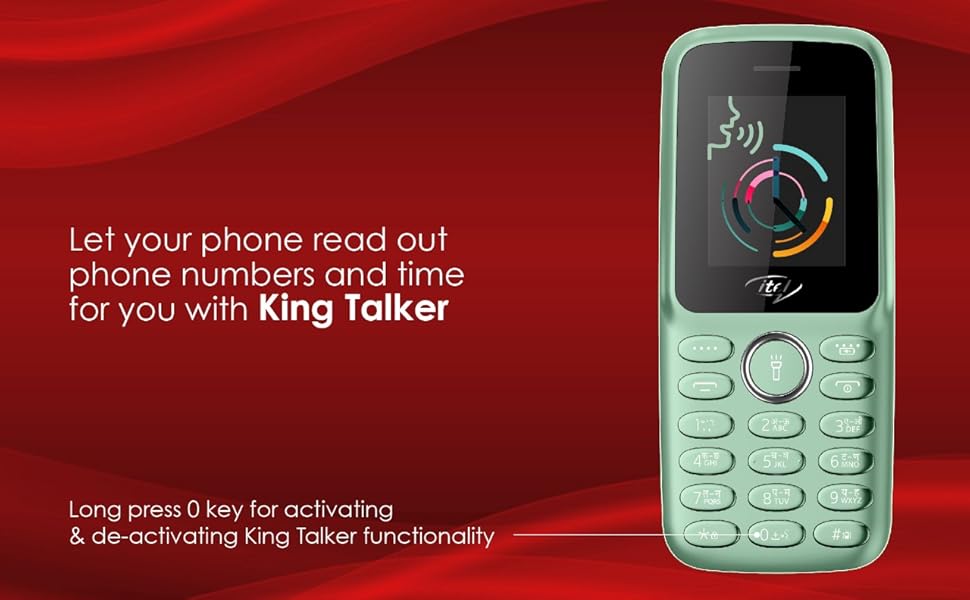
Figure 4: King Talker feature in action.
3.5 Other Features
- Wireless FM with Recording: Access FM radio without needing headphones. You can also record FM broadcasts.
- Big LED Torch: Activate the built-in LED torch for illumination in dark environments.
- Auto Call Recorder: The phone supports automatic recording of calls. Check settings for activation.
- Vibration Mode: Set the phone to vibrate for incoming calls and notifications.
- Language Support: The device supports 9 Indian languages, including English, Hindi, Gujarati, Punjabi, Bengali, Tamil, Telugu, Kannada, and Malayalam. Navigate to settings to change the display language.

Figure 5: Language support on Itel it2163s.
4. Maintenance
4.1 Battery Care
The Itel it2163s is equipped with a 1200mAh battery designed for extended use. To maximize battery life:
- Avoid extreme temperatures.
- Use only the original charger provided with the device.
- Do not leave the phone charging for excessively long periods after it is fully charged.
- If not using the phone for an extended period, store it with a partial charge (around 50%).

Figure 6: 1200mAh battery capacity.
4.2 Cleaning and General Care
- Use a soft, dry cloth to clean the phone's exterior. Avoid harsh chemicals or abrasive materials.
- The phone is water resistant, but not waterproof. Avoid submerging it in water or exposing it to heavy rain.
- Protect the screen from scratches by avoiding contact with sharp objects.
5. Troubleshooting
If you encounter issues with your Itel it2163s, refer to the following common solutions:
- Phone not turning on: Ensure the battery is properly inserted and charged. Connect the charger and try again.
- Charging issues: Check if the charger is correctly connected to both the phone and the power outlet. Try a different power outlet. Ensure the charger is not damaged.
- Poor call quality: Check your network signal strength. Move to an area with better reception. Ensure the earpiece/speaker is not obstructed.
- Bluetooth connectivity issues: Ensure Bluetooth is enabled on both devices and they are within range. Try unpairing and re-pairing the devices.
- King Talker not working: Ensure the feature is activated by long-pressing the '0' key.
For persistent issues, please contact customer support.
6. Specifications
| Feature | Specification |
|---|---|
| Brand | Itel |
| Model | it2163s |
| Operating System | Nucleus |
| CPU Model | Cortex A7 |
| CPU Speed | 260 MHz |
| RAM Memory | 4 MB |
| Memory Storage Capacity | 32 GB (expandable via microSD) |
| Display Type | TN |
| Screen Size | 4.5 Centimetres (1.8-inch) |
| Maximum Display Resolution | 128x160 Pixels |
| SIM Card Slot Count | Dual SIM (Mini) |
| Connectivity | Bluetooth, USB (Micro USB) |
| Cellular Technology | 2G (GSM) |
| Battery Capacity | 1200 mAh (Lithium-Ion) |
| Battery Average Life | 7 Days |
| Phone Talk Time | 12 Hours |
| Rear Camera Resolution | 1 MP |
| Headphones Jack | 3.5 mm |
| Form Factor | Bar |
| Material | Polycarbonate |
| Item Dimensions | 11.5 x 5 x 1.4 Centimeters |
| Item Weight | 75 Grams |
| Water Resistance Level | Water Resistant |
7. Warranty and Support
7.1 Warranty Information
Your Itel it2163s comes with a comprehensive warranty:
- Device Warranty: 12 + 1 Months manufacturer warranty.
- Replacement Offer: 111 Days Replacement as a special offer.
- Accessories Warranty: 6 Months warranty on accessories.
Please retain your purchase receipt for warranty claims.
7.2 Customer Support
For any queries, technical assistance, or warranty claims, please contact Itel customer support. Itel maintains over 1100 service centers across India.
Manufacturer Contact Information:
Ismartu India Private Limited.
D-197 and 198, Sector-63, Noida, Gautam Buddh Nagar, Uttar Pradesh-201301, S MOBILE DEVICES PRIVATE LTD


