
MLAY MLAY IPL Hair Removal Device
MLAY IPL Hair Removal Device User Manual
Model: MLAY IPL Hair Removal Device (ASIN: B09Z8XYTRR)
Introduction
This manual provides comprehensive instructions for the safe and effective use of your MLAY IPL Hair Removal Device. Please read this manual thoroughly before operating the device and retain it for future reference. The MLAY IPL Hair Removal Device utilizes advanced Intense Pulsed Light (IPL) technology to target hair follicles, inhibiting hair growth for long-term hair reduction. It features an ice cooling function for enhanced comfort during treatment.
Important Safety Information
- Always read all instructions and warnings before using the device.
- Do not use the device on eyebrows.
- The device is not suitable for very dark skin tones or very light hair colors (white, gray, red). Refer to the skin and hair color compatibility chart in the Operating section.
- Do not use if you are pregnant, breastfeeding, or have certain health conditions. Consult a healthcare professional if you have concerns.
- Always wear the provided protective eyewear during operation to shield your eyes from the intense pulsed light.
- Ensure the skin area is clean, dry, and shaved before treatment. Avoid applying any lotions, creams, or deodorants to the area immediately prior to use.
- Use the ice cooling function to minimize discomfort and prevent skin reddening during treatment.
- Keep the device away from water and do not use it in wet environments.
- Keep out of reach of children.
Package Contents
Verify that all items are present in your package:
- MLAY IPL Hair Removal Device
- Power Adapter and Cord
- Protective Eyewear
- User Manual
- Razors (for pre-treatment shaving)
- Replaceable Lamp Head (Bikini HR)

Image: MLAY IPL Hair Removal Device with its accessories, including the main unit, protective glasses, a razor, and a bikini area lamp head.
Setup
- Unpack the Device: Carefully remove all components from the packaging.
- Connect Power: Insert the power cord into the device and then plug the adapter into a suitable electrical outlet. The device will enter standby mode.
- Prepare Skin: Before each treatment, ensure the skin area is clean, dry, and freshly shaved. Do not wax, pluck, or use depilatory creams, as these remove the hair follicle necessary for IPL treatment.
- Wear Protective Eyewear: Always put on the provided protective eyewear before turning on the device to protect your eyes from the intense light flashes.
Operating Instructions
Device Overview and Controls
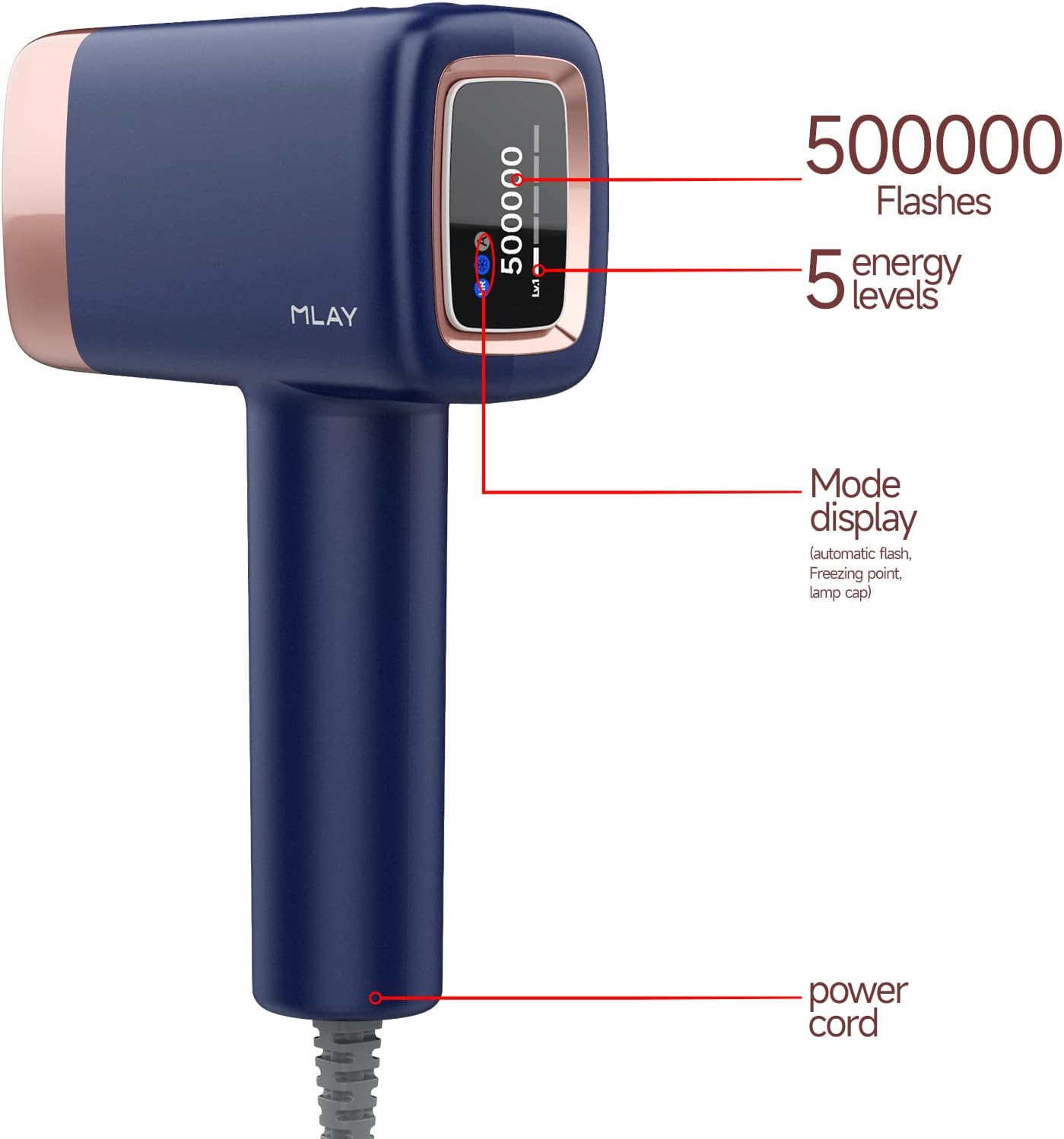
Image: The device's display indicating the remaining flashes (500,000), the current energy level (1-5), and the selected mode (automatic flash, freezing point, lamp cap).
- Power Button: Press and hold to turn the device on or off. Short press to adjust energy levels.
- Mode Button: Typically integrated with the power button or a separate button to switch between manual and automatic flash modes.
- Display Screen: Shows remaining flashes, selected energy level, and current mode.
Ice Cooling Function
The MLAY IPL device features an integrated ice cooling function to enhance comfort and protect the skin during treatment. When activated, the treatment window cools to approximately 4°C (39°F), significantly reducing the sensation of heat and minimizing the risk of skin irritation or redness.

Image: Visual representation of the device's cold compress technology, highlighting its ability to cool the skin surface for a painless, comfortable, and safe experience.
To activate the ice cooling function, press the dedicated cooling button (if available) or ensure it is enabled through the device's settings. The cooling sensation will be noticeable upon contact with the skin.
Energy Levels and Flash Modes
The device offers 5 energy levels and 2 flash modes to suit different skin sensitivities and treatment areas.
- Energy Levels (1-5):
- Start with Level 1 for your first treatment and gradually increase the energy level based on your comfort and skin reaction.
- Higher energy levels deliver more intense light and can be more effective for coarser hair, but require careful skin monitoring.
- Flash Modes:
- Automatic Mode: Ideal for larger body areas such as arms, legs, and back. The device will automatically flash when the treatment window is in full contact with the skin.
- Manual Mode: Suitable for smaller, more sensitive, or precise areas like the upper lip, armpits, and bikini lines. Press the flash button for each individual flash.
Application Areas
The MLAY IPL Hair Removal Device is designed for full body hair removal, excluding the eyebrows.

Image: Illustration of common treatment areas for the IPL device, including arms, face (cheeks, upper lip), underarms, bikini line, and legs.
Skin and Hair Color Compatibility
IPL technology works by targeting melanin in the hair follicle. Therefore, it is most effective on lighter skin tones and darker hair colors. The device is not suitable for very dark skin or very light hair (white, gray, red).

Image: A chart detailing which skin tones (White, Ivory tint, Beige, Light brown, Brow, Dark brown/black) and hair colors (Black, Dark brown, Brown, Golden, Red, White, Gray) are compatible with IPL treatment. Green checkmarks indicate applicability, while red crosses indicate non-applicability.
Usage Directions
- Prepare the Area: Ensure the skin is clean, dry, and shaved.
- Power On: Press and hold the power button to turn on the device.
- Select Energy Level: Short press the power button to cycle through the 5 energy levels. Choose a level appropriate for your skin and hair type, starting with a lower setting.
- Select Flash Mode: Choose between Automatic or Manual mode based on the treatment area.
- Apply to Skin: Place the treatment window firmly against the skin, ensuring full contact.
- Initiate Flash:
- In Manual Mode, press the flash button to emit a single flash.
- In Automatic Mode, the device will flash automatically when full skin contact is detected.
- Move to Next Area: After each flash, lift the device slightly and move it to the next adjacent area. Overlap slightly to ensure full coverage.
- Complete Treatment: Continue until the entire desired area has been treated.
- Power Off: Press and hold the power button to turn off the device after use.
Treatment Schedule and Expected Results
Consistent use is key to achieving optimal results. The IPL device works by gradually reducing hair growth over several weeks.

Image: A visual guide illustrating the hair removal process: original hair, natural hair loss after 4-8 weeks, melanin inhibition after 1-4 weeks, and lasting effect after 8 weeks of consistent IPL treatment.
- Weeks 1-4: Use the device 2-3 times per week. Hair growth will begin to slow, and some hair may fall out naturally.
- Weeks 5-8: Reduce usage to 1-2 times per week. Hair will become finer and sparser.
- After 8 Weeks: Use once every 2-4 weeks for maintenance as needed. Significant hair reduction should be noticeable, with lasting effects.
Individual results may vary based on hair type, skin tone, and consistency of use.
Maintenance
- Cleaning the Treatment Window: After each use, ensure the device is powered off and unplugged. Use a soft, dry cloth or a cotton swab to gently wipe the treatment window. Do not use abrasive cleaners or immerse the device in water.
- Storage: Store the device in a cool, dry place, away from direct sunlight and moisture. Keep it in its original packaging or a protective case to prevent damage.
- Lamp Head Replacement: The device comes with a replaceable lamp head. When the flash count on the display approaches zero, or if you notice a decrease in effectiveness, replace the lamp head according to the instructions provided with the replacement part.
Troubleshooting
| Problem | Possible Cause | Solution |
|---|---|---|
| Device does not turn on. | Not properly plugged in; power outlet issue. | Ensure the power cord is securely connected to the device and the adapter is firmly plugged into a working electrical outlet. Try a different outlet. |
| No flash emitted. | Treatment window not in full contact with skin; incorrect mode; low flash count. | Ensure the treatment window is pressed firmly and completely against the skin. Check if the device is in the correct flash mode (Manual or Automatic). Verify the remaining flash count on the display. |
| Device shuts off or displays error indicator (e.g., bell icon). | Overheating; internal malfunction. | Unplug the device and allow it to cool down for at least 30 minutes. If the issue persists after cooling, contact customer support. |
| Skin irritation or discomfort. | Energy level too high; sensitive skin; improper skin preparation. | Reduce the energy level. Ensure skin is clean and shaved. Activate the ice cooling function. If irritation persists, discontinue use and consult a dermatologist. |
| No noticeable hair reduction. | Inconsistent use; unsuitable skin/hair color; insufficient energy level. | Ensure consistent treatment schedule. Verify your skin and hair color compatibility. Gradually increase the energy level if comfortable. Ensure proper technique and coverage. |
Specifications
- Model Name: MLAY IPL Hair Removal Device
- ASIN: B09Z8XYTRR
- Brand: MLAY
- Technology: Intense Pulsed Light (IPL)
- Flashes: Up to 500,000 flashes (per lamp head)
- Energy Levels: 5 adjustable levels
- Flash Modes: Automatic and Manual
- Cooling Function: Ice Cooling Protection (approx. 4°C)
- Power Source: Corded Electric
- Package Dimensions: 9.92 x 7.6 x 3.9 inches
- Weight: 3.11 Pounds
Warranty and Support
MLAY provides a 1-year warranty for the IPL Hair Removal Device. This warranty covers manufacturing defects and ensures a no-risk refund policy.
For any questions, concerns, or technical assistance regarding your device, please contact the MLAY Official store customer service. Their service team is available 24 hours a day to assist you.
Seller: MLAY Official store
Please refer to your purchase documentation for specific contact details or visit the MLAY brand store on Amazon.
Related documentsMLAY IPL Hair Removal Device


Ask a question about this manual
Ask about setup, troubleshooting, compatibility, parts, safety, or missing instructions. Manuals+ will review the question and use this page’s manual context to help answer it.