
1. Introduction
Thank you for purchasing the ZEBRONICS Sound Bomb 7 True Wireless Stereo (TWS) Earbuds. This manual provides detailed instructions for setting up, operating, and maintaining your earbuds to ensure optimal performance and longevity. Please read this manual carefully before use.
2. Package Contents
The package includes the following items:
- Earbuds - 2 Units (Left and Right)
- Charging Case - 1 Unit
- Eartips - 4 Units (various sizes)
- Type-C Charging Cable - 1 Unit
- QR User Guide (digital access)
3. Product Overview
The ZEBRONICS Sound Bomb 7 earbuds are designed for a comfortable fit and high-quality audio experience. They feature touch controls, a portable charging case, and support for voice assistants.

Image: The ZEBRONICS Sound Bomb 7 TWS earbuds shown with their open charging case.

Image: A collage highlighting key features: Touch Control, 13mm Drivers, Splash Proof design, Portable Charging Case, Voice Assistant support, and Bluetooth v5.2 with Flash Connect.
4. Setup
4.1 Initial Charging
Before first use, ensure both the earbuds and the charging case are fully charged. Remove any protective stickers from the earbud charging contacts.
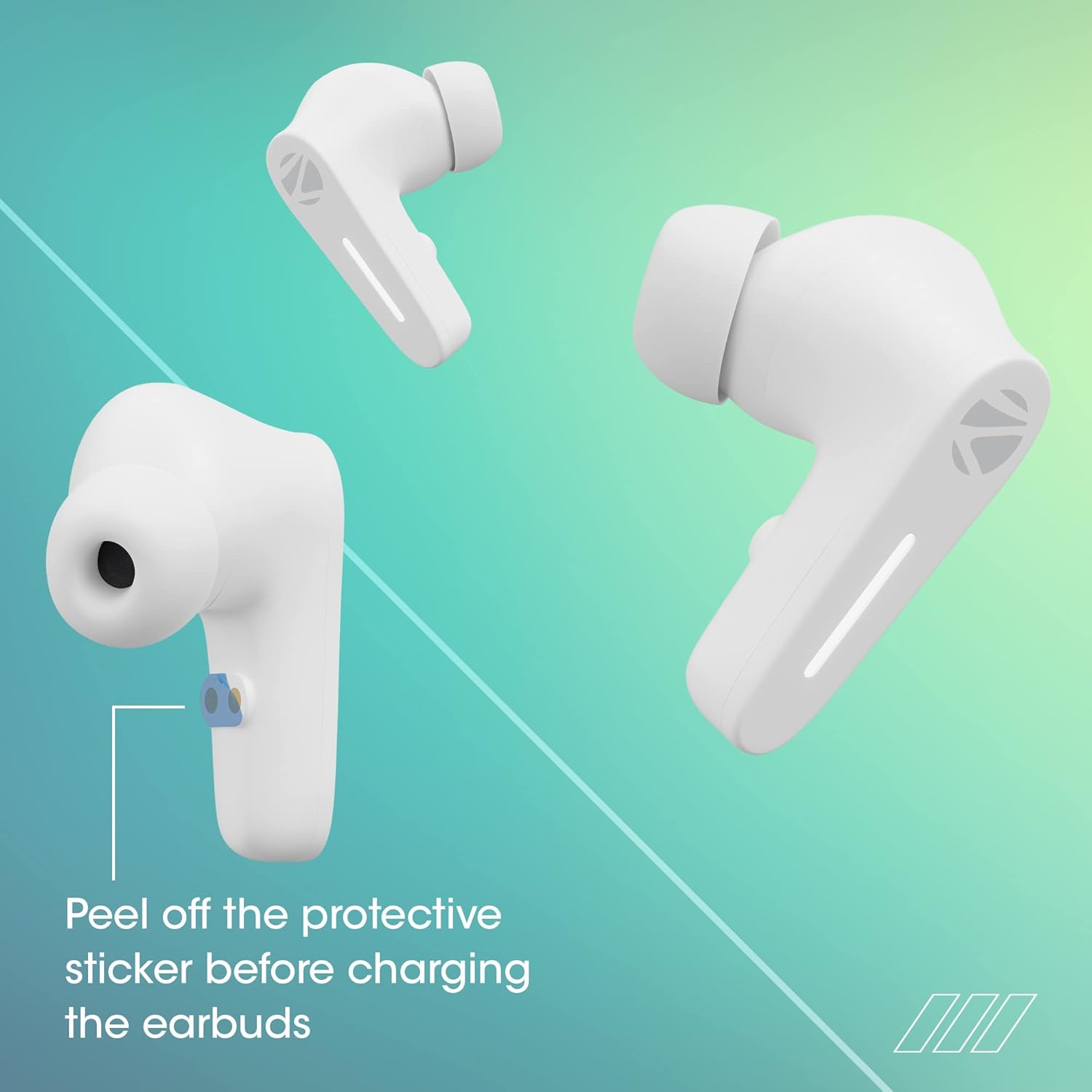
Image: Illustration showing the protective sticker on the earbud charging contacts that needs to be removed before charging.
- Place both earbuds into the charging case.
- Connect the Type-C charging cable to the charging port on the case and to a USB power source.
- The LED indicators on the case will show charging status.
- A full charge typically takes approximately 1 hour for the case and earbuds.
The Sound Bomb 7 features Rapid Charge, providing up to 180 minutes of playback with just 10 minutes of charging.

Image: A visual representation of the rapid charge feature and the Type-C charging port on the earbud case.
4.2 Bluetooth Pairing
Pair your earbuds with your device for wireless audio.
- Open the charging case. The earbuds will automatically power on and enter pairing mode (Flash Connect feature).
- On your smartphone or Bluetooth-enabled device, go to Bluetooth settings.
- Search for available devices and select "ZEB-SOUND BOMB 7" from the list.
- Once connected, you will hear a confirmation tone.
- The earbuds will automatically reconnect to the last paired device when taken out of the case, if Bluetooth is enabled on the device.

Image: An illustration demonstrating the Flash Connect feature, where opening the case initiates quick pairing with a smartphone.
5. Operating Instructions
5.1 Touch Controls
The earbuds feature intuitive touch controls for various functions:
- Single Tap: Play/Pause music, Answer/End calls.
- Double Tap (Left Earbud): Previous track.
- Double Tap (Right Earbud): Next track.
- Triple Tap (Left/Right Earbud): Activate Voice Assistant.
- Long Press (Left/Right Earbud for 2 seconds): Reject incoming call.
- Long Press (Left/Right Earbud for 3 seconds): Toggle Gaming Mode (Low Latency).
5.2 Gaming Mode (Low Latency)
Activate Gaming Mode for a low-latency audio experience, ideal for gaming. Long press either earbud for 3 seconds to toggle this mode on or off.

Image: A visual depicting the earbuds in Gaming Mode, emphasizing low latency and the 13mm audio drivers.
5.3 Voice Assistant
Access your smartphone's voice assistant (Siri or Google Assistant) by triple-tapping either earbud. This allows for hands-free control of your device.

Image: Icons for "Hey Siri" and "Google Assistant" indicating support for voice assistant functionality.
5.4 Environmental Noise Cancellation (ENC)
The earbuds feature Environmental Noise Cancellation (ENC) for clearer call quality by reducing ambient noise during conversations.

Image: A graphic illustrating the Environmental Noise Cancellation feature, showing sound waves being reduced around an earbud.
6. Maintenance
Proper care ensures the longevity of your earbuds.
- Cleaning: Use a soft, dry cloth to clean the earbuds and charging case. Do not use harsh chemicals or abrasive materials.
- Water Resistance: The earbuds are splash-proof/sweat-proof. Avoid submerging them in water or exposing them to heavy rain.
- Storage: When not in use, store the earbuds in their charging case to protect them and keep them charged.
- Temperature: Avoid exposing the earbuds to extreme temperatures (hot or cold).

Image: An earbud being splashed with water, illustrating its splash-proof design.
7. Troubleshooting
If you encounter issues, try the following solutions:
| Problem | Solution |
|---|---|
| Earbuds not pairing |
|
| Only one earbud working |
|
| Low volume or poor sound quality |
|
| Charging case not charging |
|
8. Specifications
| Feature | Detail |
|---|---|
| Model Name | ZEB-SOUND BOMB 7 |
| Connectivity Technology | Bluetooth 5.2 |
| Wireless Communication Technology | Bluetooth |
| Ear Placement | In Ear |
| Form Factor | In Ear |
| Control Type | Voice Control, Touch Control |
| Control Method | Touch |
| Noise Control | Environmental Noise Cancellation (ENC) |
| Driver Size | 13mm |
| Charging Time | Approx. 1 hour (earbuds & case) |
| Playtime | Up to 60 hours (with charging case, at 50% volume) |
| Rapid Charge | 10 min charge for 180 min use |
| Gaming Mode | 50ms Low Latency |
| Water Resistance Level | Water Resistant (Splash Proof/Sweat Proof) |
| Connector | USB Type C |
| Item Weight | 47 Grams |
| Product Dimensions | 5.5 x 5.5 x 3.2 cm |
| Compatible Devices | Laptops, Mobile Phones, Tablets, PC, Smart TVs, All Bluetooth Devices, iOS, Android |
9. Warranty and Support
Your ZEBRONICS Sound Bomb 7 TWS Earbuds come with a 1-Year Warranty from the date of purchase. This warranty covers manufacturing defects under normal use.
For warranty claims, technical support, or any product-related inquiries, please contact ZEBRONICS customer service. Keep your purchase receipt as proof of purchase.
You can find more information and support on the official ZEBRONICS website: www.zebronics.com


