1. Introduction
Thank you for purchasing the WISCENT WTB-779 Micro Hi-Fi Stereo System. This manual provides essential information for the safe and efficient operation of your new audio system. Please read it thoroughly before use and retain it for future reference.
The WISCENT WTB-779 is a versatile audio system featuring a CD/DVD player, Bluetooth connectivity, FM radio, USB and SD card playback, AUX input, and a microphone port. It is designed to deliver clear audio in a compact form factor.
2. Safety Information
Please observe the following safety precautions to prevent electric shock, fire, or damage to the unit:
- Do not expose this appliance to rain or moisture.
- Do not block any ventilation openings. Ensure adequate space around the unit for proper airflow.
- Do not place the unit near heat sources such as radiators, heat registers, stoves, or other apparatus (including amplifiers) that produce heat.
- Protect the power cord from being walked on or pinched, particularly at plugs, convenience receptacles, and the point where they exit from the apparatus.
- Only use attachments/accessories specified by the manufacturer.
- Unplug this apparatus during lightning storms or when unused for long periods.
- Refer all servicing to qualified service personnel. Servicing is required when the apparatus has been damaged in any way, such as power-supply cord or plug is damaged, liquid has been spilled or objects have fallen into the apparatus, the apparatus has been exposed to rain or moisture, does not operate normally, or has been dropped.
3. Package Contents
Carefully unpack your WISCENT WTB-779 Micro Hi-Fi Stereo System and check that all items are present and in good condition. If any items are missing or damaged, please contact your retailer.
- 1 x WISCENT WTB-779 Compact Micro Hi-Fi System (Main Unit and Speakers)
- 1 x Remote Control (batteries not included)
- 1 x 3.5mm AUX Cable
- 1 x RCA Cable
- 1 x User Manual (this document)

Figure 3.1: Package contents of the WISCENT WTB-779 Micro Hi-Fi Stereo System.
4. Product Overview
4.1 Front Panel Controls and Connections

Figure 4.1: Front panel layout and controls of the WISCENT WTB-779.
- Power Button: Turns the unit on or off.
- Mode Button: Cycles through input sources (CD/DVD, Bluetooth, FM, AUX, USB, SD).
- Volume Knob: Adjusts the master volume level.
- Stop Button: Stops playback.
- Previous/Channel- Button: Skips to the previous track/chapter or tunes down FM radio frequency.
- Mute Button: Mutes or unmutes the audio output.
- Play/Pause/Search Button: Plays or pauses playback; initiates search function in some modes.
- Next/Channel+ Button: Skips to the next track/chapter or tunes up FM radio frequency.
- Open/Close Button: Opens or closes the disc tray.
- Disc Tray: For inserting CDs or DVDs.
- Mic Input: 3.5mm jack for connecting an external microphone.
- Earphone Jack: 3.5mm jack for connecting headphones.
- USB Port: For connecting USB flash drives for media playback.
- SD Card Slot: For inserting SD cards for media playback (located on the side or rear, not visible in this image).
4.2 Rear Panel Connections
The rear panel typically includes connections for speakers, FM antenna, and RCA audio/video output for TV connection.
5. Setup
5.1 Connecting the Speakers
Connect the speaker wires from the main unit to the corresponding speaker terminals on each speaker. Ensure correct polarity (positive to positive, negative to negative) for optimal sound quality.
5.2 Connecting to Power
Plug the power cord into a standard AC power outlet. The unit is designed for wired electrical power.
5.3 Connecting to a TV (Optional)
To view DVDs, connect the RCA cable (included) from the 'Video Out' and 'Audio Out' ports on the rear of the main unit to the corresponding 'Video In' and 'Audio In' ports on your television.
5.4 FM Antenna Connection
Extend the telescopic FM antenna for better radio reception. For improved signal, you may connect an external FM antenna to the designated port on the rear of the unit.

Figure 5.1: WISCENT WTB-779 main unit and speakers.
6. Operating Instructions
6.1 Power On/Off
Press the POWER button on the front panel or remote control to turn the unit on or off.
6.2 Mode Selection
Press the MODE button on the front panel or remote control to cycle through available input sources: CD/DVD, Bluetooth (BT), FM Radio, AUX, USB, and SD.
6.3 CD/DVD Playback
- Press the OPEN/CLOSE button to open the disc tray.
- Place a CD or DVD disc gently into the tray with the label side facing up.
- Press the OPEN/CLOSE button again to close the tray.
- The unit will automatically detect the disc and begin playback. If not, press the PLAY/PAUSE button.
- Use the PREVIOUS/CHANNEL- and NEXT/CHANNEL+ buttons to skip tracks/chapters.
- Supported disc formats include CD, CD-R, CD-RW, MP3-CD, WMA, DVD, SVCD, VCD, JPEG, and Kodak Picture CD. Blu-ray discs are not supported.
- The DVD player is region-free, compatible with zones 1, 2, 3, 4, 5, and 6.
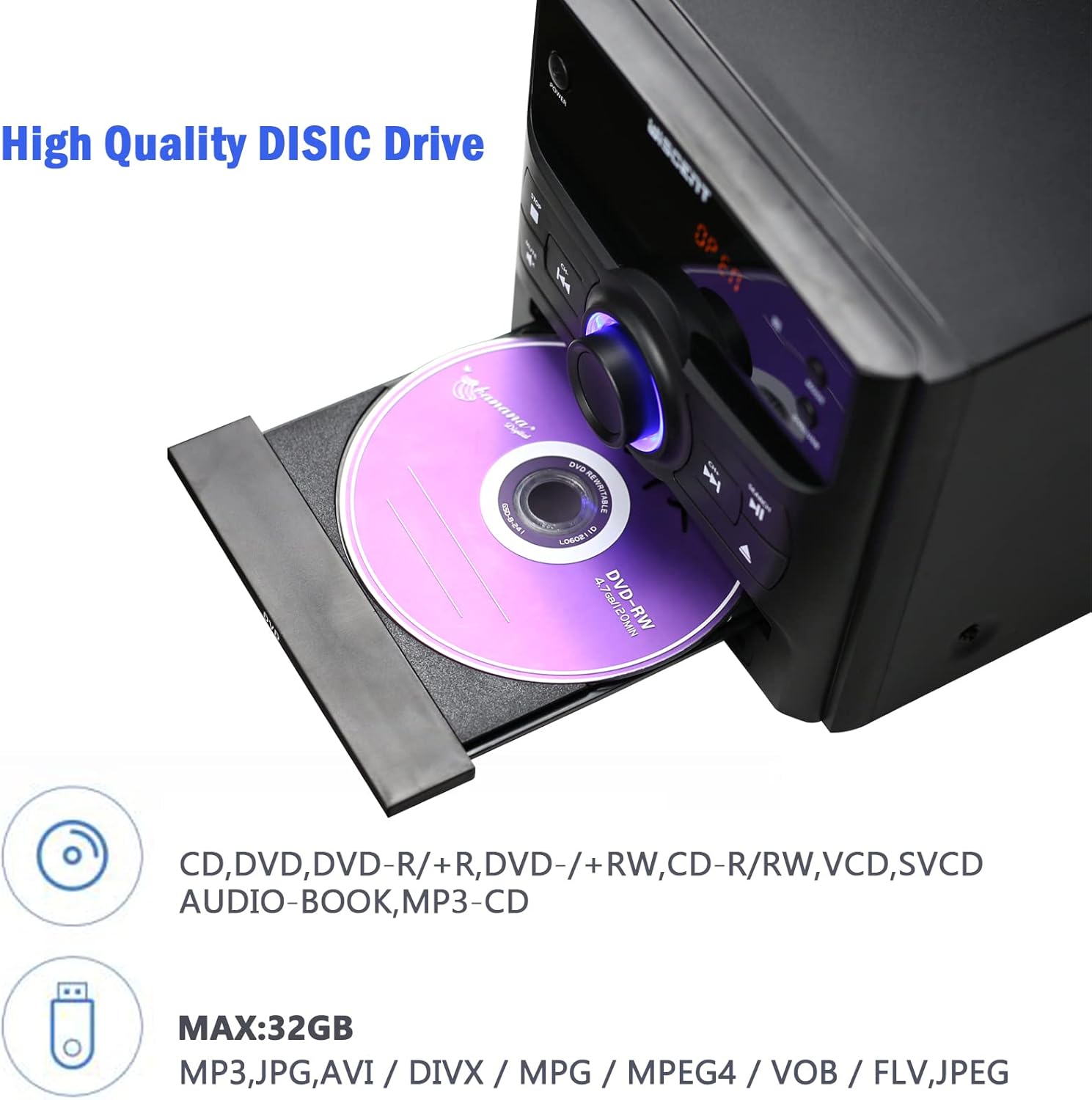
Figure 6.1: Inserting a disc into the WISCENT WTB-779.
6.4 Bluetooth Operation
- Press the MODE button until 'BT' or 'Bluetooth' appears on the display. The unit will enter pairing mode.
- On your Bluetooth-enabled device (e.g., smartphone, tablet), enable Bluetooth and search for available devices.
- Select 'WISCENT WTB-779' (or similar name) from the list to pair.
- Once paired, you can play audio from your device through the stereo system.
6.5 FM Radio
- Press the MODE button until 'FM' appears on the display.
- Extend the telescopic antenna for best reception.
- Use the PREVIOUS/CHANNEL- and NEXT/CHANNEL+ buttons to manually tune to a station.
- To auto-scan and save stations, refer to the specific instructions in the full manual (if available) or experiment with holding down the play/pause button. The unit supports 20 programmable preset stations.
6.6 USB/SD Playback
- Insert a USB flash drive into the USB port or an SD card into the SD card slot.
- Press the MODE button until 'USB' or 'SD' appears on the display.
- The unit will automatically detect and begin playing compatible audio files (MP3, WMA).
- Supported file systems are FAT16/32, with a maximum capacity of 32GB.
6.7 AUX Input
Connect an external audio device (e.g., smartphone, MP3 player) to the AUX IN jack using the provided 3.5mm AUX cable. Select 'AUX' mode to play audio from the connected device.
6.8 Microphone Input
Connect a microphone to the MIC input jack for karaoke or voice amplification. Adjust the microphone volume separately if available, or use the main volume control.
6.9 Headphone Output
Plug headphones into the earphone jack for private listening. The main speakers will be muted automatically.
6.10 Remote Control
The included remote control provides full functionality for operating the WISCENT WTB-779 from a distance. Insert two AAA batteries (not included) into the remote control before use. Point the remote control directly at the main unit's sensor.
7. Maintenance
7.1 Cleaning the Unit
Wipe the unit with a soft, dry cloth. Do not use abrasive cleaners, waxes, or solvents as they may damage the finish. Ensure the unit is unplugged before cleaning.
7.2 Disc Care
Handle discs by their edges. Keep discs clean and free of scratches. Store discs in their cases when not in use to prevent dust and damage.
8. Troubleshooting
If you encounter issues with your WISCENT WTB-779, please refer to the following common problems and solutions:
| Problem | Possible Cause | Solution |
|---|---|---|
| No power | Power cord not connected; power outlet faulty. | Ensure power cord is securely plugged in. Try a different power outlet. |
| No sound | Volume too low; Mute activated; incorrect input mode; speakers not connected. | Increase volume. Deactivate Mute. Select correct input mode. Check speaker connections. |
| Disc not playing | Disc inserted incorrectly; disc dirty or scratched; unsupported disc format. | Re-insert disc correctly. Clean or replace disc. Ensure disc format is supported (not Blu-ray). |
| Bluetooth pairing failure | Unit not in pairing mode; device too far; Bluetooth disabled on device. | Ensure unit is in BT mode. Move device closer. Enable Bluetooth on your device. |
| Poor FM reception | Antenna not extended; weak signal. | Extend the telescopic antenna fully. Try repositioning the unit or connecting an external antenna. |
| Remote control not working | Batteries depleted or inserted incorrectly; obstruction between remote and unit. | Replace batteries. Ensure correct polarity. Remove any obstructions. Point remote directly at the unit. |
If the problem persists after trying these solutions, please contact customer support.
9. Specifications
| Feature | Specification |
|---|---|
| Model | WTB-779 |
| Brand | WISCENT |
| Output Wattage | 30 Watts |
| Audio Output Mode | Stereo |
| Connectivity Technology | Bluetooth, USB |
| Supported Disc Formats | CD, CD-R, CD-RW, MP3, WMA, DVD, SVCD, VCD, JPEG, Kodak Picture CD (No Blu-ray) |
| DVD Region Compatibility | Region-free (1, 2, 3, 4, 5, 6 zones) |
| USB/SD Support | Up to 32GB, FAT16/32 file system |
| FM Radio Presets | 20 stations |
| Power Source | Corded Electric |
| Item Weight | 4.73 Kilograms |
| Product Dimensions | 56 x 31.4 x 21.2 cm |
10. Warranty and Support
The WISCENT WTB-779 Micro Hi-Fi Stereo System comes with a 36-month warranty from the date of purchase. This warranty covers manufacturing defects and ensures lifetime technical support.

Figure 10.1: Warranty information.
For warranty claims, technical assistance, or any product-related inquiries, please contact WISCENT customer support through your purchase platform or the official WISCENT website.


