
1. Overview
The Milescraft DrillBlock+ is a portable metric drilling guide designed to assist in drilling straight, accurate holes on various surfaces. It features nine hardened steel drill bushings for common metric drill bit sizes, ensuring precise 90-degree holes. Its ergonomic design and anti-slip feet provide stability and comfort during use.
2. Key Features
- Versatile Drilling: Enables drilling of straight holes on flat surfaces, cylindrical stock, and corners.
- Integrated V-Groove: Designed for accurate drilling on round or angled materials.
- Precision Bushings: Equipped with 9 hardened steel drill bushings for metric sizes: 4 mm, 5 mm, 6 mm, 7 mm, 8 mm, 9 mm, 10 mm, 11 mm, 12 mm.
- Accurate Alignment: Features integrated vertical and horizontal centerlines for precise positioning.
- Ergonomic Design: Provides a comfortable grip for extended use.
- Anti-Slip Feet: Prevents the guide from slipping and protects the work surface.
- Durable Construction: Lightweight and robust for long-lasting performance.
3. Setup and Preparation
Before using the DrillBlock+, ensure your work surface is clean and stable. Select the appropriate drill bit size corresponding to the desired hole diameter. The DrillBlock+ does not require assembly and is ready for immediate use.
- Select Drill Bit: Choose a drill bit that matches one of the 9 available metric sizes (4mm to 12mm).
- Insert Drill Bit: Securely insert the chosen drill bit into your drill.
- Position DrillBlock+: Place the DrillBlock+ on your workpiece, aligning the desired bushing with your marked drilling location.
4. Operating Instructions
The DrillBlock+ is designed for straightforward operation to achieve accurate holes.
4.1. Drilling on Flat Surfaces
For flat workpieces, simply place the DrillBlock+ directly on the surface. Use the integrated centerlines to align the guide with your mark.

Image 1: Using the DrillBlock+ on a flat surface for precise vertical drilling.
- Place the DrillBlock+ over the marked drilling point.
- Hold the DrillBlock+ firmly against the surface.
- Insert the drill bit into the chosen bushing and begin drilling, maintaining a steady, even pressure.
4.2. Drilling on Cylindrical or Angled Stock
The integrated V-groove allows for stable positioning on round pipes, dowels, or angled materials.
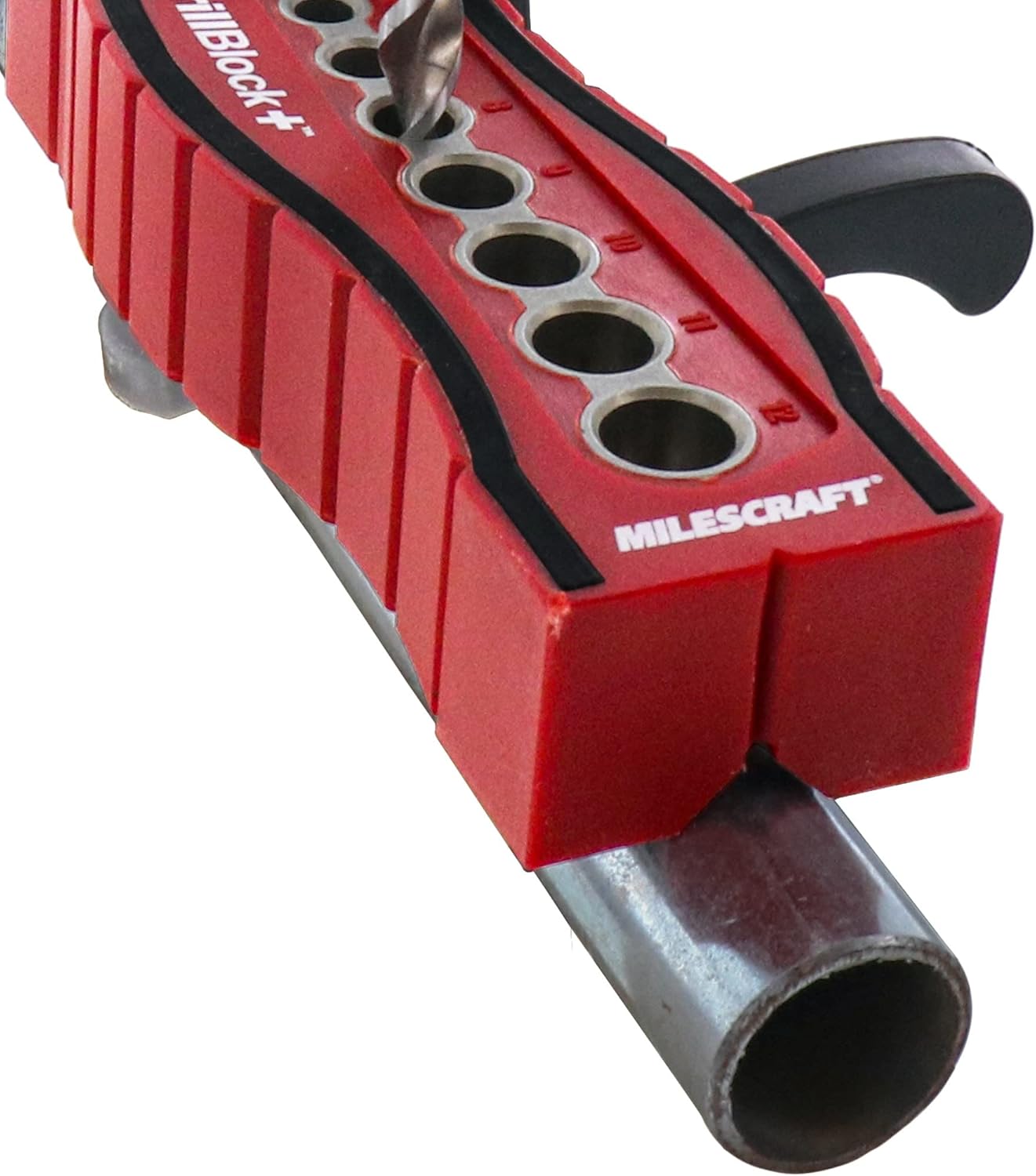
Image 2: The V-groove feature allows for stable drilling on cylindrical objects.

Image 3: Drilling on an angled wooden piece using the DrillBlock+.
- Place the V-groove side of the DrillBlock+ onto the cylindrical or angled workpiece.
- Ensure the guide is centered and stable before drilling.
- Proceed with drilling as described for flat surfaces.
4.3. Drilling into Corners
The design also allows for drilling directly into the corner of a project.

Image 4: The DrillBlock+ can be used to drill precisely into corners.
- Position the DrillBlock+ so that its edge aligns with the corner of your workpiece.
- Hold it firmly to prevent movement.
- Drill through the desired bushing.
4.4. General Drilling Tips
- Always wear appropriate safety gear, including eye protection.
- Ensure the DrillBlock+ is held securely against the workpiece to prevent movement and ensure accuracy.
- Apply consistent, moderate pressure while drilling.
- Clear wood chips or debris regularly to maintain visibility and prevent clogging.
5. Product Videos
5.1. Product Summary
Video 1: A brief overview demonstrating the key features and uses of the Milescraft DrillBlock+.
5.2. Woodworking Drilling Guide
Video 2: Demonstration of the drilling guide in various woodworking applications.
5.3. Straight Hole Drilling Positioner
Video 3: Illustrates how to achieve perfectly straight holes using the DrillBlock+ positioner.
6. Maintenance
To ensure the longevity and optimal performance of your Milescraft DrillBlock+, follow these simple maintenance guidelines:
- Cleaning: After each use, wipe down the DrillBlock+ with a dry cloth to remove dust and debris. Avoid using harsh chemicals that could damage the material.
- Storage: Store the DrillBlock+ in a clean, dry place away from direct sunlight and extreme temperatures.
- Inspection: Periodically inspect the drill bushings for wear or damage. Replace the unit if any components are compromised to maintain drilling accuracy.
7. Troubleshooting
| Problem | Possible Cause | Solution |
|---|---|---|
| Holes are not straight. | DrillBlock+ moved during drilling; incorrect drill bit size used. | Ensure the DrillBlock+ is held firmly. Verify the drill bit matches the bushing size. |
| Drill bit binds in bushing. | Debris in bushing; incorrect drill bit size. | Clean the bushing. Use the correct drill bit size for the bushing. |
| DrillBlock+ slips on surface. | Workpiece surface is dirty or oily; anti-slip feet are worn. | Clean the workpiece surface. Ensure anti-slip feet are intact. |
8. Specifications
| Brand: | Milescraft |
| Model Number: | 1385 |
| Product Dimensions: | 24 x 8 x 4 cm |
| Item Weight: | 200 g |
| Drill Bushing Sizes: | 4 mm, 5 mm, 6 mm, 7 mm, 8 mm, 9 mm, 10 mm, 11 mm, 12 mm |
| Power Source Type: | Hand-powered |
| Included Components: | Drill Jig |
| First Available Date: | May 25, 2023 |
9. Warranty and Support
For warranty information, technical support, or to inquire about replacement parts, please contact Milescraft customer service directly. Refer to the product packaging or the official Milescraft website for the most up-to-date contact details.


