
1. Introduction
The VECHLINE 1500W Power Inverter is a modulated wave inverter designed to convert 12V DC power from a vehicle battery into 230V AC power, suitable for powering various electronic devices and appliances. This model features an updated design with improved performance, including an easily accessible fuse and integrated fixing feet for secure installation. It also provides two 5V 2.1A USB ports for charging mobile devices. The inverter incorporates forced air cooling to maintain optimal operating temperatures and complies with European directives 214/30/EU and 2014/34/EU, ensuring its certification for use in mobile applications.
2. Product Overview
The VECHLINE 1500W Power Inverter is engineered for reliability and convenience, offering a continuous power output of 1500W and a peak power of 3000W. Its compact design makes it ideal for use in vehicles, campers, and other mobile setups where access to AC power is needed.
2.1 Key Features
- Power Output: 1500W Continuous, 3000W Peak
- Input Voltage: 12V DC
- Output Voltage: 230V AC
- USB Ports: 2 x 5V 2.1A
- Cooling: Forced Air Cooling
- Safety: Accessible Fuse, Certified for Mobile Use
2.2 Components
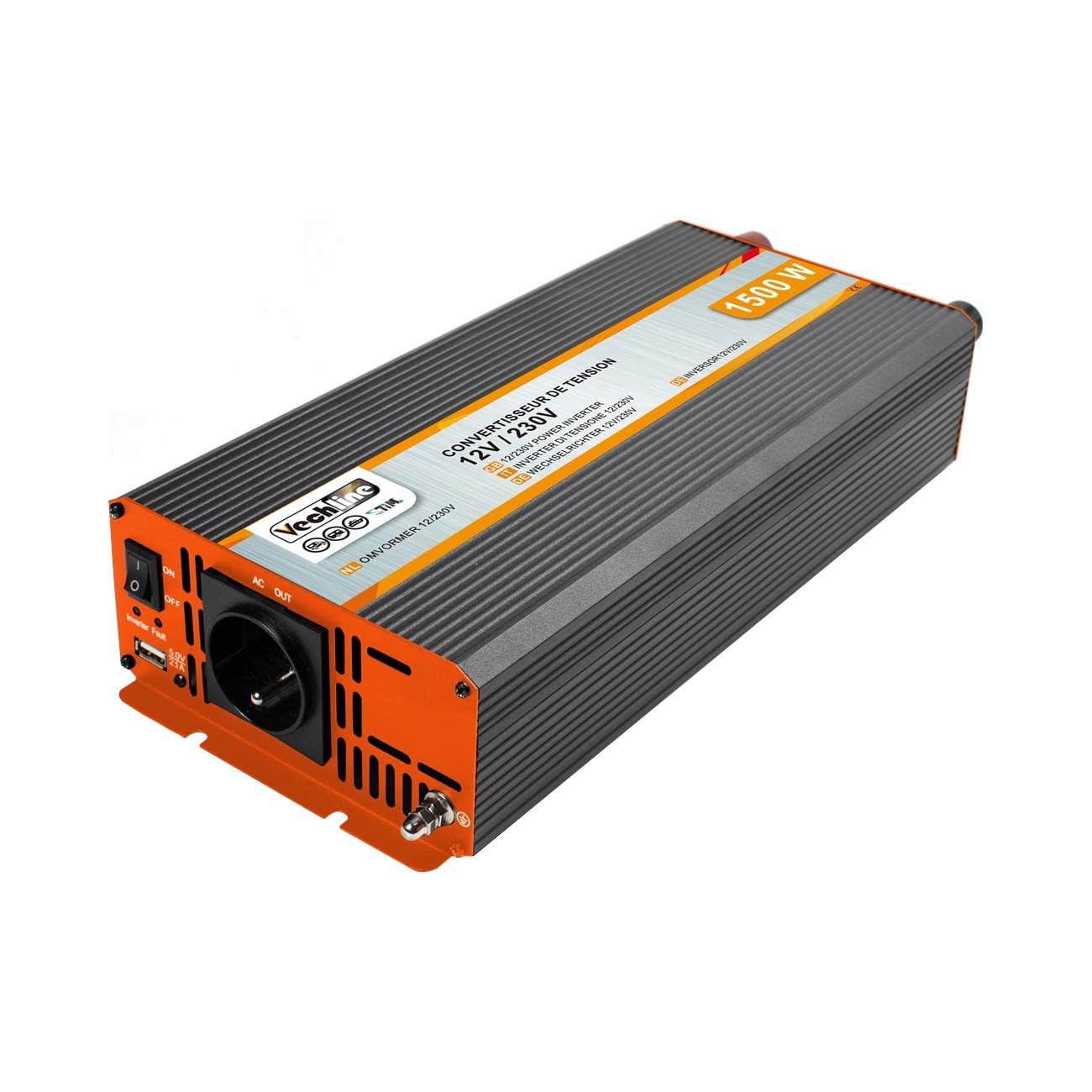
Figure 1: VECHLINE 1500W Power Inverter (Angled View). This image displays the VECHLINE 1500W Power Inverter from an angled perspective, highlighting its robust casing and the front panel. The front panel features two AC power outlets, two USB charging ports, and a power switch. The top of the inverter has a ribbed design for heat dissipation.

Figure 2: Front Panel Detail. A detailed view of the inverter's front panel. It clearly shows the two 230V AC outlets, two 5V 2.1A USB ports for charging mobile devices, and the ON/OFF power switch. Indicator lights for power and fault are also visible.
Figure 3: Rear Panel Detail. The rear panel of the inverter features the DC 12V input terminals, clearly marked for positive (+) and negative (-) connections. Two cooling fans are also visible, designed for forced air cooling to maintain optimal operating temperature.
3. Setup Instructions
Follow these steps to properly set up your VECHLINE 1500W Power Inverter:
- Unboxing: Carefully remove the inverter and all accessories from the packaging. Inspect for any damage.
- Placement: Choose a dry, well-ventilated location for the inverter, away from direct sunlight, heat sources, and flammable materials. Ensure there is sufficient space around the unit for proper airflow to the cooling fans.
- Battery Connection:
- Connect the red (positive) battery cable to the positive (+) terminal on the inverter. Tighten securely.
- Connect the black (negative) battery cable to the negative (-) terminal on the inverter. Tighten securely.
- Connect the other end of the red cable to the positive (+) terminal of your 12V DC battery.
- Connect the other end of the black cable to the negative (-) terminal of your 12V DC battery.
- Ensure all connections are tight and secure to prevent arcing or overheating.
- Grounding: Connect the grounding terminal on the inverter to a proper earth ground.
3.1 Setup Demonstration (Illustrative Video)
This video demonstrates the unboxing and initial setup of a similar power inverter, including connecting it to a 12V battery and testing it with a light bulb and a power drill. Note: This video features a similar product from a different brand and is for illustrative purposes only.
4. Operating Instructions
Once the inverter is properly connected to the battery, you can begin using it to power your devices:
- Power On: Flip the ON/OFF switch on the front panel of the inverter to the 'ON' position. The power indicator light should illuminate, and the display (if present) will show the battery voltage.
- Connect AC Devices: Plug your 230V AC devices into the AC outlets on the front panel. Ensure the total wattage of all connected devices does not exceed the inverter's continuous power rating (1500W).
- Use USB Ports: For charging mobile phones, tablets, or other USB-powered devices, connect them to the 5V 2.1A USB ports.
- Monitor Performance: Observe the inverter's indicator lights and any display readings for battery voltage, output wattage, and frequency. The cooling fans will activate automatically when needed.
- Power Off: When you are finished using the inverter, first disconnect all AC and USB devices. Then, flip the ON/OFF switch to the 'OFF' position.
4.1 Operation Demonstration (Illustrative Videos)
This video illustrates the versatility of a power inverter by demonstrating its use with various household appliances such as a hair dryer, a mobile phone (via USB), a light bulb, and a portable kettle. Note: This video features a similar product from a different brand and is for illustrative purposes only.
This video highlights the internal components and protective features of a pure sine wave inverter, including high-frequency transformers, low-resistance capacitors, IGBT technology, smart chip, and thermal-controlled cooling fans. It also shows the display indicating battery level, input/output voltage, frequency, wattage, and various protection alerts. Note: This video features a similar product from a different brand and is for illustrative purposes only.
5. Safety Information
Please read and understand all safety precautions before operating the inverter. Failure to do so may result in electric shock, fire, or serious injury.
- Ventilation: Ensure the inverter is placed in a well-ventilated area. Do not block the cooling fans or vents.
- Moisture: Keep the inverter away from water, rain, and excessive humidity.
- Flammable Materials: Do not operate the inverter near flammable liquids, gases, or other combustible materials.
- Polarity: Always connect the battery cables with correct polarity (red to positive, black to negative). Reversing polarity can cause damage to the inverter and void the warranty.
- Overload: Do not exceed the inverter's continuous power rating (1500W) or peak power rating (3000W). Overloading can damage the inverter and connected devices.
- Modified Sine Wave Compatibility: Warning: All modified sine wave inverters are not suitable for powering energy-saving light bulbs. This inverter produces a modified sine wave output, which may not be compatible with certain sensitive electronics or appliances, such as some energy-saving light bulbs, medical equipment, or devices with AC motors. Consult your device's manual for compatibility.
- Children: Keep the inverter out of reach of children.
- Servicing: Do not attempt to open or service the inverter yourself. Refer all servicing to qualified personnel.
6. Maintenance
Regular maintenance helps ensure the longevity and optimal performance of your inverter:
- Cleaning: Periodically clean the exterior of the inverter with a dry, soft cloth. Ensure the cooling vents and fans are free from dust and debris.
- Connection Check: Regularly inspect all battery cable connections to ensure they are tight and free from corrosion.
- Storage: If storing the inverter for an extended period, disconnect it from the battery and store it in a cool, dry place.
7. Troubleshooting
If you encounter issues with your inverter, try the following basic troubleshooting steps:
| Problem | Possible Cause | Solution |
|---|---|---|
| No power output | Inverter switch OFF Loose battery connections Low battery voltage Blown fuse | Turn inverter ON Check and tighten connections Recharge or replace battery Replace fuse (accessible without disassembly) |
| Low output voltage | Low battery voltage Overload | Recharge battery Reduce load on inverter |
| Inverter shuts down | Overload Overheating Low battery voltage | Reduce load Ensure proper ventilation, allow to cool Recharge battery |
| Fan not running | Normal operation (thermostatically controlled) | Fans only activate when internal temperature reaches a certain level. This is normal. |
If the problem persists after performing these checks, please contact customer support.
8. Specifications
| Feature | Value |
|---|---|
| Brand | VECHLINE |
| Model Name | 1500W |
| Manufacturer Reference | 2087 |
| Recommended Uses | Vehicle |
| Power Source | Cable |
| Input Voltage | 12 Volts DC |
| Output Voltage | 230 Volts AC |
| Continuous Power | 1500 Watts |
| Peak Power | 3000 Watts |
| USB Output | 2 x 5V 2.1A |
| Alarm Voltage | 10.5 V ± 0.5 V |
| Shutdown Voltage | 10.0 V ± 0.5 V |
| Cable with Connector | 2 x 80 cm 21 mm² |
| Product Dimensions | 31L x 75l x 15H centimeters |
| Item Weight | 2.7 Kilograms |
| Compliance | CE |
9. Warranty and Support
This product is covered by a standard return policy, typically allowing returns or replacements within 30 days of purchase. For specific warranty details, technical support, or service inquiries, please refer to the documentation included with your product or contact the seller directly. Keep your purchase receipt as proof of purchase.
