
Tadeto SL720
Tadeto Digital Sound Level Meter SL720 Instruction Manual
Model: SL720
1. Introduction
The Tadeto SL720 Digital Sound Level Meter is a portable device designed for accurate measurement of sound levels in various environments. It provides precise readings from 30dB to 130dB, featuring A/C weighting and fast/slow response modes to suit different measurement needs. This manual provides detailed instructions for the proper use, maintenance, and troubleshooting of your sound level meter.

Image 1.1: Tadeto SL720 Digital Sound Level Meter and included AAA batteries.
2. Product Features
- Accurate Measurement: Measures sound levels from 30dB to 130dB with a high accuracy of ± 2.0 dB.
- A/C Weighted Measurement: Offers A-weighting for simulating human ear response to low-intensity noise (ambient noise detection) and C-weighting for high-intensity noise (machine motor sound pressure analysis).
- Fast and Slow Response Rates: Features a fast response rate (0.125s/time) for general environmental measurements and a slow response rate (1s/time) for environments with significant noise level changes.
- Digital LCD Display: A 4-digit backlit LCD with 0.1 dB resolution ensures clear readings in various lighting conditions. Includes a low voltage icon for battery replacement indication.
- Portable Design: Lightweight and easy to carry, suitable for a wide range of applications.
3. Package Contents
Upon opening the package, please verify that all items listed below are present and in good condition:
- Tadeto SL720 Digital Sound Level Meter
- 2 x AAA Batteries
- Small Screwdriver (for battery compartment)
- Soft Carrying Bag
- User Manual

Image 3.1: All items included in the Tadeto SL720 package.
4. Safety Information
Please read and understand the following safety precautions before using the device:
- Do not attempt to disassemble or modify the device.
- Keep the device away from water and high humidity.
- Avoid exposing the device to extreme temperatures or direct sunlight for extended periods.
- Remove batteries if the device will not be used for a long time to prevent leakage.
- Dispose of batteries according to local regulations.
5. Setup
5.1 Battery Installation
- Locate the battery compartment cover on the back of the device.
- Use the provided small screwdriver to open the battery compartment.
- Insert two AAA batteries, ensuring correct polarity (+/-).
- Replace the battery compartment cover and secure it with the screw.
5.2 Device Overview
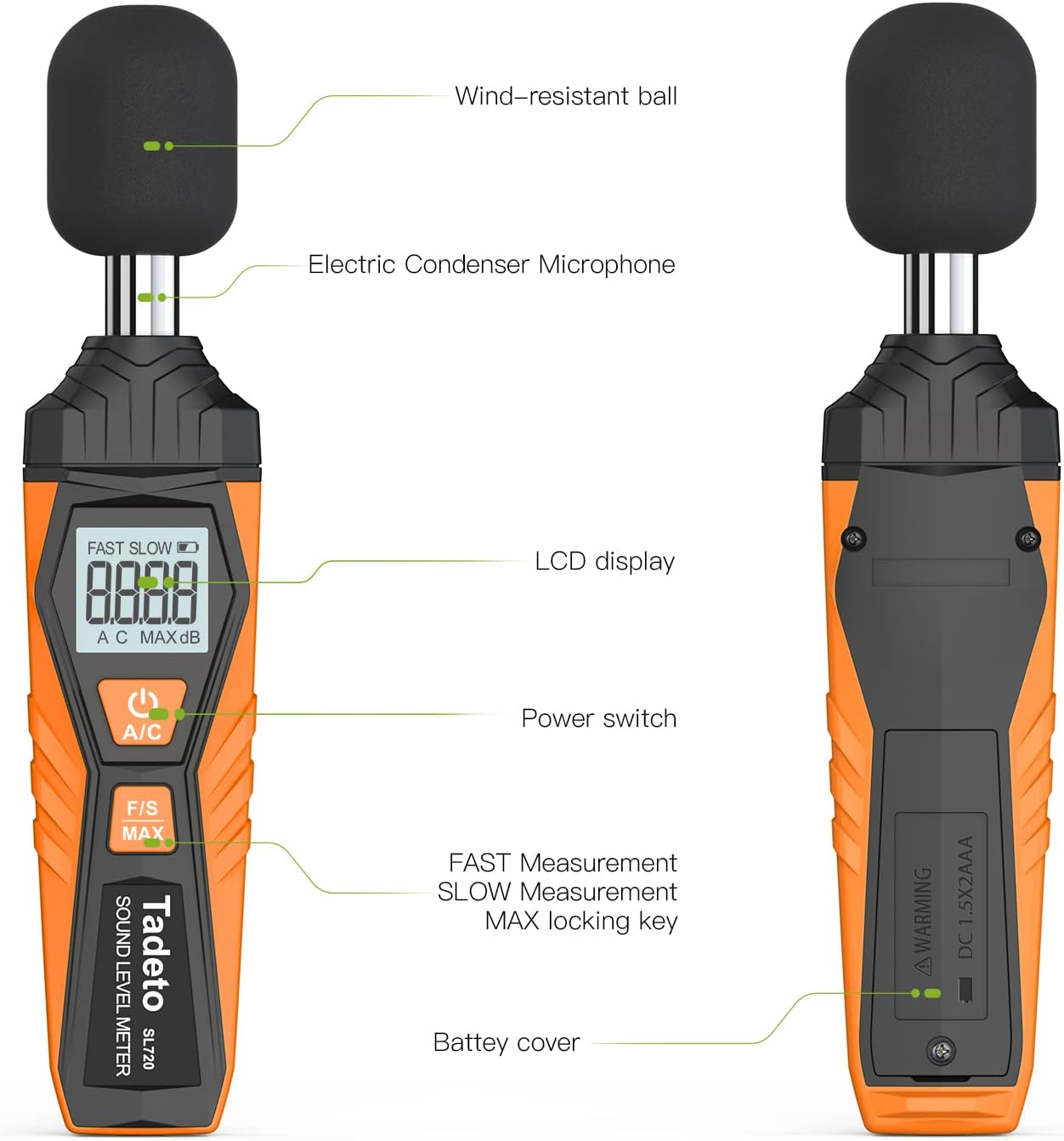
Image 5.1: Labeled components of the Tadeto SL720 Sound Level Meter.
The device features a wind-resistant ball covering an electric condenser microphone for accurate sound capture. The front panel includes an LCD display, a power switch, and an F/S MAX key for function selection. The battery cover is located on the back.
6. Operating Instructions
6.1 Power On/Off
- Press the Power button () to turn the device on.
- Press and hold the Power button to turn the device off.
6.2 Basic Measurement
Once powered on, the device will immediately begin measuring sound levels and display the readings on the LCD. Ensure the microphone is pointed towards the sound source.
6.3 MAX Data Hold Function
- Press the F/S MAX button once to activate the MAX data hold function. The display will show the maximum sound level recorded since activation.
- Press the F/S MAX button again to exit MAX hold mode and return to real-time measurement.
7. Measurement Modes
7.1 A/C Weighting
The device supports two frequency weighting modes:
- A-Weighting (A): Simulates the human ear's response to low-intensity noise. Ideal for general environmental noise detection.
- C-Weighting (C): Simulates the human ear's response to high-intensity noise. Suitable for sound pressure analysis of machine motors and industrial machinery.
Press the A/C button to switch between A and C weighting modes. The selected mode will be indicated on the LCD.

Image 7.1: Explanation of A/C Weighted Measurement.
7.2 Fast/Slow Response Rate
The device offers two response rates:
- Fast Response (FAST): Uses a time constant of 0.125 seconds. Suitable for general environmental measurements where noise levels fluctuate rapidly.
- Slow Response (SLOW): Uses a time constant of 1 second. Recommended for environments with relatively large and slower changes in noise levels.
Press the F/S MAX button (short press) to toggle between Fast and Slow response rates. The selected rate will be indicated on the LCD.
8. Display Information
The LCD provides clear visual feedback on current settings and measurements:

Image 8.1: Detailed view of the LCD display indicators.
- FAST/SLOW: Indicates the selected response rate.
- Battery Indicator: Shows the current battery level. A low voltage icon will appear when batteries need replacement.
- Measurement Value: Displays the current sound level in decibels (dB).
- dB Units: Unit of measurement.
- MAX: Indicates that the MAX data hold function is active, showing the maximum recorded value.
- A/C: Indicates the selected frequency weighting mode.
9. Applications
The Tadeto SL720 Sound Level Meter is versatile and can be used in various settings:

Image 9.1: Various application scenarios for the sound level meter.

Image 9.2: Measuring sound levels inside a vehicle.
- Home Environments: Monitor noise levels in residential areas, baby rooms, or for general sound quality control.
- Workplaces: Assess noise in offices, factories, and construction sites to ensure compliance with safety standards.
- Transportation: Measure noise inside cars, during commutes, or near transportation hubs.
- Audio Systems: Evaluate sound output from audio equipment.
9.1 Understanding Noise Levels
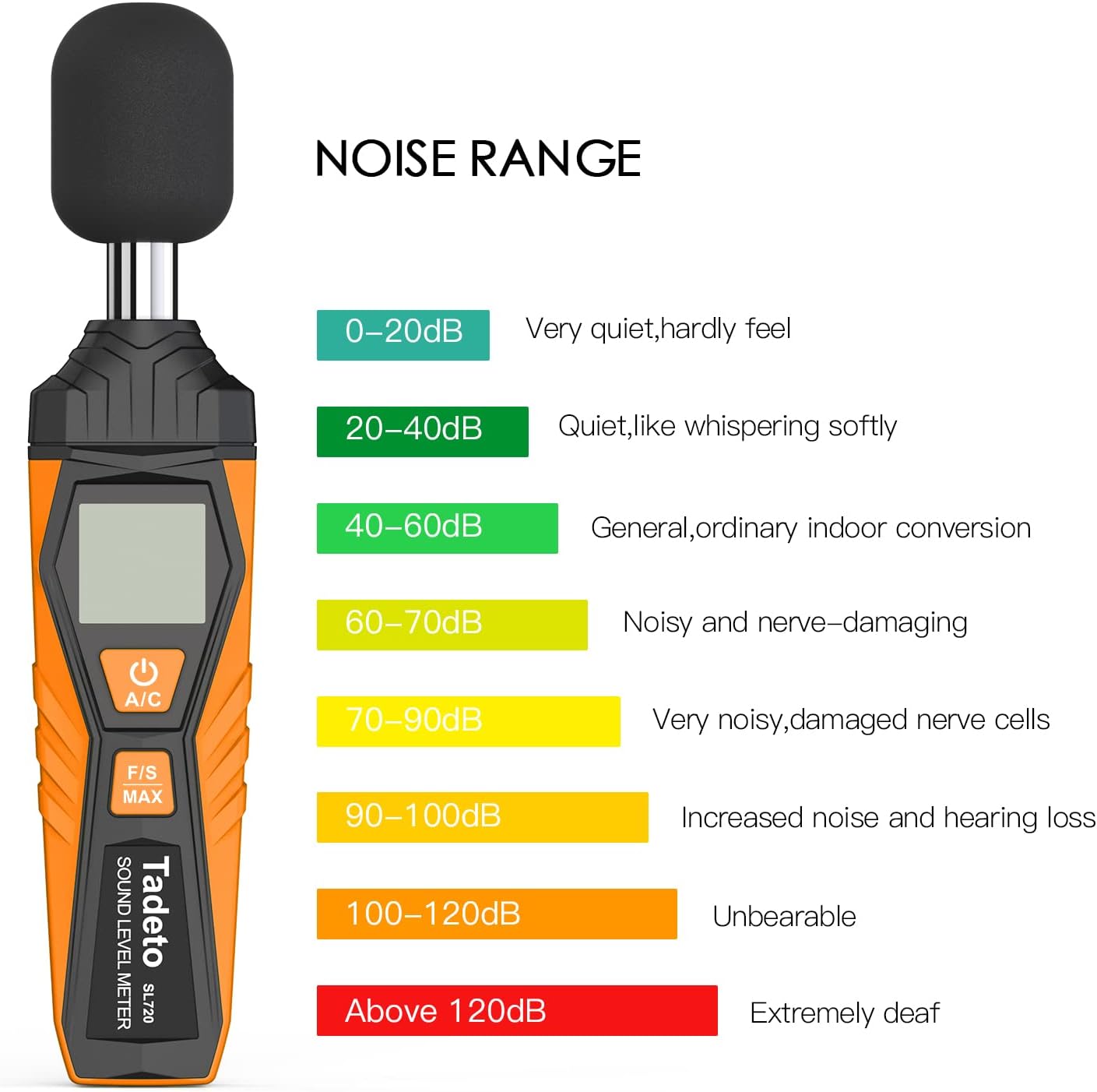
Image 9.3: Guide to understanding different noise ranges.
10. Troubleshooting
If you encounter issues with your Tadeto SL720, refer to the following common problems and solutions:
| Problem | Possible Cause | Solution |
|---|---|---|
| Device does not power on. | Low or dead batteries; incorrect battery installation. | Replace batteries with new AAA batteries, ensuring correct polarity. |
| Inaccurate readings. | Microphone obstructed; incorrect weighting mode (A/C); device not calibrated. | Ensure microphone is clear. Select appropriate A or C weighting. If persistent, consider professional calibration. |
| Display is dim or flickering. | Low battery power. | Replace batteries. |
| MAX hold not working. | Button not pressed correctly. | Ensure a single, firm press of the F/S MAX button. |
11. Specifications
| Specification | Detail |
|---|---|
| Brand | Tadeto |
| Model Number | SL720 |
| Measurement Type | Sound Level |
| Measurement Range | 30dB to 130dB |
| Accuracy | ± 2.0 dB |
| Frequency Weighting | A and C |
| Response Rate | Fast (0.125s), Slow (1s) |
| Display | 4-digit LCD with Backlight |
| Resolution | 0.1 dB |
| Power Source | 2 x AAA Batteries (included) |
| Item Dimensions (L x W x H) | 7.09 x 1.1 x 0.79 inches |
| Item Weight | 8.8 ounces |
| Included Components | Bag, Screwdriver |
12. Maintenance
12.1 Cleaning
- Wipe the device with a soft, dry cloth.
- Do not use abrasive cleaners or solvents.
- Keep the microphone area clean and free from dust or debris.
12.2 Storage
- Store the device in its protective carrying bag when not in use.
- Store in a cool, dry place, away from direct sunlight and extreme temperatures.
- Remove batteries if storing for extended periods to prevent leakage and damage.
13. Warranty and Support
Tadeto is committed to providing high-quality, reliable products. For any questions, technical support, or warranty inquiries, please refer to the contact information provided with your purchase or visit the official Tadeto store online.
You can visit the Tadeto Store for more information: Tadeto Official Store
Related documentsSL720


Ask a question about this manual
Ask about setup, troubleshooting, compatibility, parts, safety, or missing instructions. Manuals+ will review the question and use this page’s manual context to help answer it.