Introduction
This manual provides essential information for the proper setup, operation, and maintenance of your CEN Racing AMP30 3-Channel 2.4GHz Radio System with A30 Receiver. This system is designed as a replacement radio and receiver for various CEN Racing vehicles, ensuring reliable control and performance. Please read this manual thoroughly before using the product to ensure safe and efficient operation.
Safety Information
WARNING: Failure to follow these safety guidelines may result in injury or damage to the product.
- Battery Handling: Keep batteries away from extreme temperatures and humidity. Do not short-circuit batteries. Always use batteries recommended for this device.
- Potential Interference: This device operates on a 2.4GHz frequency and may interfere with other wireless devices. Avoid placing it near medical devices or other sensitive electronic equipment.
- Operating Environment: Do not operate the radio system in wet conditions or near water. Avoid dusty or corrosive environments.
- Adult Supervision: This product is not a toy. Adult supervision is recommended for users under 14 years of age.
Product Overview
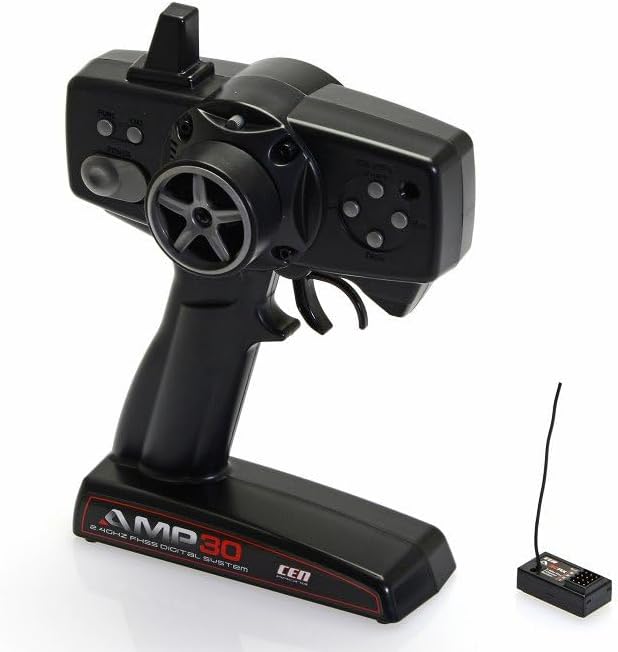
Image: The CEN Racing AMP30 2.4GHz Radio System, featuring the pistol-grip transmitter on the left and the compact A30 receiver with its antenna on the right. The transmitter has a steering wheel, throttle trigger, and various adjustment buttons.
The CEN Racing AMP30 radio system consists of a pistol-grip transmitter and a compact A30 receiver. The transmitter provides precise control over your vehicle's steering and throttle, while the receiver processes these signals for vehicle operation.
Key Features
- 2.4GHz FHSS Digital System: Provides reliable, interference-free communication.
- 3-Channel Operation: Allows for control of steering, throttle, and an auxiliary function.
- Digital Steering and Throttle Trims: Fine-tune the neutral position of steering and throttle.
- Steering Dual Rate (D/R): Adjust the maximum steering angle for different driving conditions.
- EPA (End Point Adjustment): Set the maximum travel for steering and throttle channels.
- Power Alarm: Alerts the user to low battery voltage in the transmitter.
Setup
1. Transmitter Battery Installation
- Locate the battery compartment on the bottom of the transmitter.
- Slide open the battery cover.
- Insert the required number of AA batteries (typically 4) according to the polarity indicators (+/-).
- Close the battery cover securely.
2. Receiver Installation and Connection
- Mount the A30 receiver securely in your vehicle, away from vibration and moisture.
- Connect the steering servo to Channel 1 (CH1) on the receiver.
- Connect the Electronic Speed Controller (ESC) to Channel 2 (CH2) on the receiver.
- If applicable, connect any auxiliary components to Channel 3 (CH3).
- Ensure all connections are firm and correctly oriented.
3. Binding Procedure (Transmitter and Receiver)
The transmitter and receiver are typically pre-bound from the factory. If re-binding is necessary:
- Ensure both the transmitter and receiver are powered off.
- Insert the bind plug into the "BIND" port on the A30 receiver.
- Power on the vehicle's ESC (which powers the receiver). The receiver's LED should flash rapidly.
- While holding the "BIND" button on the transmitter (refer to transmitter diagram for location), power on the transmitter.
- The receiver's LED should turn solid, indicating a successful bind.
- Release the bind button on the transmitter, then power off both the transmitter and receiver.
- Remove the bind plug from the receiver.
- Power on the transmitter first, then the receiver. Confirm proper operation.
Operation
1. Basic Controls
- Steering Wheel: Rotate left or right to control the vehicle's steering.
- Throttle Trigger: Pull back for forward motion, push forward for brake/reverse.
2. Adjustments
- ST. TRIM (Steering Trim): Adjusts the steering neutral position. If the vehicle pulls left or right when the steering wheel is centered, use this trim to correct it.
- TH. TRIM (Throttle Trim): Adjusts the throttle neutral position. If the vehicle creeps forward or backward when the throttle trigger is centered, use this trim to correct it.
- ST. D/R (Steering Dual Rate): Controls the maximum steering angle. Turn clockwise to increase steering throw, counter-clockwise to decrease. Useful for adjusting sensitivity.
- EPA (End Point Adjustment): Allows setting the maximum travel for each channel. This prevents over-stressing servos or ESCs by limiting their movement. Consult your vehicle's manual for recommended EPA settings.
3. Power Alarm
The transmitter features a power alarm that will alert you when the battery voltage is low. When this alarm sounds, it is recommended to stop operation and replace the transmitter batteries immediately to avoid loss of control.
Maintenance
- Cleaning: Use a soft, dry cloth to clean the transmitter and receiver. Avoid using solvents or harsh chemicals.
- Storage: Store the radio system in a cool, dry place, away from direct sunlight and extreme temperatures. Remove batteries from the transmitter if storing for extended periods.
- Battery Care: Always dispose of old batteries responsibly. Do not mix old and new batteries, or different types of batteries.
Troubleshooting
| Problem | Possible Cause | Solution |
|---|---|---|
| No power to transmitter | Dead or incorrectly installed batteries. | Replace batteries or check polarity. |
| No response from vehicle | Transmitter and receiver not bound; receiver not powered; loose connections. | Perform binding procedure; check receiver power supply; ensure all wires are securely connected. |
| Erratic control or interference | Other 2.4GHz devices nearby; damaged antenna; low transmitter battery. | Move to a different location; check receiver antenna for damage; replace transmitter batteries. |
| Steering or throttle not centered | Trim settings incorrect. | Adjust ST. TRIM or TH. TRIM until the control is centered. |
Specifications
| Feature | Detail |
|---|---|
| Model Number | G82198 |
| Frequency | 2.4GHz FHSS Digital System |
| Channels | 3 Channels |
| Transmitter Power Source | AA Batteries (not included) |
| Receiver Model | A30 |
| Material | Plastic |
| Product Dimensions | Approximately 1 x 1 x 1 inches (Transmitter) |
| Item Weight | Approximately 1 pound (Transmitter and Receiver combined) |
Warranty and Support
This product is intended as a replacement part for CEN Racing vehicles. For specific warranty information or technical support, please contact CEN Racing directly through their official website or authorized distributors. Keep your purchase receipt as proof of purchase.
For further assistance, you may visit the official CEN Racing website: www.cenracingusa.com


