1. Product Overview
The DORTALA 9000 BTU Portable Air Conditioner is a versatile 3-in-1 unit designed to provide cooling, dehumidification, and fan functions for your living space. This compact and freestanding air conditioner is ideal for cooling areas up to 350 square feet, ensuring a comfortable environment during warm seasons.
Key features include a powerful 9000 BTU cooling capacity, an adjustable temperature range of 60.8℉ to 87.8℉ (16℃ to 31℃), and a built-in dehumidifier function to reduce humidity levels. It offers multiple fan speeds (high, medium, low) and an auto-oscillation feature for wide air distribution. Control is convenient via an LED panel or the included remote control. For ease of use, it features a 1-24 hour timer and a quiet sleep mode.

Image: The DORTALA 9000 BTU Portable Air Conditioner shown with its remote control, illustrating its compact design and the air outlet at the top.
2. Package Contents
Before beginning installation, please ensure all components are present and undamaged. The package should contain the following items:
- 1 x Portable Air Conditioner Unit
- 1 x Remote Control
- 1 x Exhaust Hose
- 1 x Window Sealing Plate Kit (adjustable for various window types)
- 1 x Instruction Manual

Image: A visual representation of the portable air conditioner unit, remote control, exhaust hose, and window kit components, along with key dimensions.
3. Setup and Installation
Proper installation is crucial for optimal performance. Follow these steps to set up your portable air conditioner:
- Positioning the Unit: Place the air conditioner on a flat, stable surface near a window and a power outlet. Ensure there is at least 20 inches of clear space around the unit for proper airflow.
- Attaching the Exhaust Hose: Connect one end of the exhaust hose to the air outlet on the back of the unit. Twist or push firmly until it clicks into place.
- Installing the Window Kit:
- Adjust the window sealing plate kit to fit your window opening (suitable for both vertical and horizontal sliding windows).
- Secure the window kit in place using the provided screws or clips.
- Attach the other end of the exhaust hose to the opening in the window sealing plate. Ensure a tight seal to prevent hot air from re-entering the room.
- Power Connection: Plug the power cord into a grounded 115V/60Hz electrical outlet.

Image: The portable air conditioner unit connected to a window using the included window slider kit, demonstrating easy installation for various window types.
4. Operating Instructions
Your DORTALA portable air conditioner offers multiple modes and settings for customized comfort. You can operate the unit using either the control panel on top of the unit or the remote control.
4.1 Control Panel and Remote Control
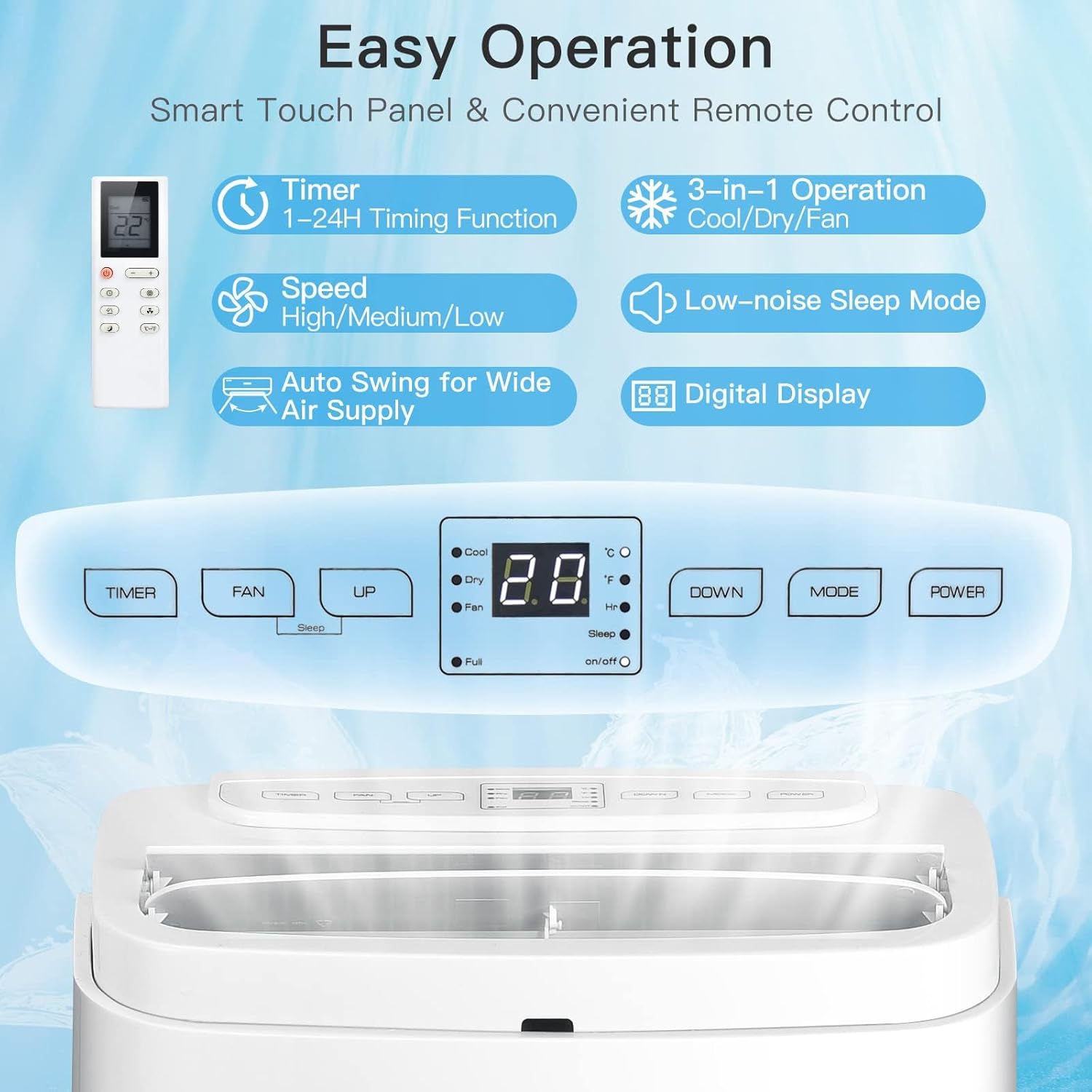
Image: A detailed view of the air conditioner's smart touch control panel and the convenient remote control, highlighting various function buttons and the digital display.
The LED panel provides clear indicators for current mode, temperature, and timer settings. The remote control allows for convenient operation from up to 26 feet away.
4.2 Operating Modes
- Cooling Mode: Press the "MODE" button until the "Cool" indicator lights up. Use the "UP" and "DOWN" arrows to set your desired temperature (60.8℉-87.8℉ / 16℃-31℃). The unit will cool the room to the set temperature.
- Dehumidifying Mode: Press the "MODE" button until the "Dry" indicator lights up. In this mode, the unit will remove excess moisture from the air. Ensure proper drainage is set up (see Maintenance section).
- Fan Mode: Press the "MODE" button until the "Fan" indicator lights up. Use the "SPEED" button to select High, Medium, or Low fan speed. The unit will circulate air without cooling.

Image: Visual examples of the air conditioner operating in Cooling Mode (with people enjoying cool air), Dehumidifying Mode (in a closet setting), and Fan Mode (in a living room setting).
4.3 Timer Function
The 1-24 hour timer allows you to program the unit to turn on or off automatically. Press the "TIMER" button and use the "UP" and "DOWN" arrows to set the desired duration.
4.4 Sleep Mode
Activate Sleep Mode for quiet operation and energy saving during nighttime. In this mode, all lights on the control panel will turn off, and the temperature will gradually increase by 1℃ (or 2℉) every hour for the first two hours, then maintain that temperature, preventing overcooling and ensuring a peaceful sleep.

Image: A baby sleeping soundly, illustrating the quiet operation and comfort provided by the air conditioner's sleep mode.
5. Maintenance
Regular maintenance ensures the longevity and efficiency of your air conditioner.
5.1 Air Filter Cleaning
The detachable and washable air filter should be cleaned every two weeks, or more frequently depending on usage and air quality. To clean:
- Unplug the unit from the power outlet.
- Remove the air filter from its slot (usually located on the back or side of the unit).
- Rinse the filter under running water (warm water with mild detergent if very dirty).
- Allow the filter to air dry completely before reinserting it into the unit.
5.2 Water Drainage
The unit has a built-in water tank for condensate collection. When the tank is full, the unit may stop operating and display an indicator. There are several ways to drain the water:
- Manual Drainage: Place a shallow pan or tray under the drainage plug (located at the bottom rear of the unit). Remove the plug to allow water to drain.
- Continuous Drainage: For continuous dehumidification, connect a drainage hose (not included) to the continuous drainage port and route it to a floor drain or larger container.
Always unplug the unit before performing any maintenance.
6. Troubleshooting
If you encounter issues with your DORTALA portable air conditioner, please refer to the following common troubleshooting steps before contacting customer support.
| Problem | Possible Cause | Solution |
|---|---|---|
| Unit does not turn on | No power; Power cord not plugged in; Circuit breaker tripped; Water tank full. | Check power outlet; Ensure cord is securely plugged in; Reset circuit breaker; Drain water tank. |
| Insufficient cooling | Air filter dirty; Exhaust hose not properly installed/sealed; Room size too large; Doors/windows open. | Clean air filter; Check exhaust hose connection and seal; Ensure unit is suitable for room size; Close all doors and windows. |
| Unit is noisy | Unit not on a level surface; Obstruction in fan/air intake. | Place unit on a flat, stable surface; Check for and remove any obstructions. |
| Water leakage | Drainage plug loose; Continuous drainage hose not properly connected. | Ensure drainage plug is secure; Check continuous drainage hose connection. |
If the problem persists after trying these solutions, please contact DORTALA customer support.
7. Specifications
| Feature | Specification |
|---|---|
| Brand | DORTALA |
| Model Number | AU-10114US-WHES |
| Cooling Capacity | 9000 BTU |
| Cooling Area | Up to 350 sq. ft. |
| Functions | Cool, Dehumidify, Fan |
| Temperature Setting Range | 60.8℉~87.8℉ / 16℃~31℃ |
| Voltage | 115 V |
| Frequency | 60 Hz |
| Wattage | 1000 W |
| Refrigerant | R32 |
| Net Weight | 55 lbs |
| Product Dimensions (L x W x H) | 17" x 14" x 28.5" |
| Control Type | LED Panel, Remote Control |
| Timer | 1-24 Hours |
| Casters | 4 Universal Casters |
8. Warranty and Support
DORTALA is committed to providing high-quality products and customer satisfaction. For warranty information, technical support, or any inquiries regarding your portable air conditioner, please refer to the contact information provided with your purchase documentation or visit the official DORTALA website.
For further assistance, you may also contact the seller directly through the platform where the product was purchased.
Seller: DORTALA
Brand Store: Visit the DORTALA Store on Amazon


