
UNITOPSCI A7097A3018A4MI2
UNITOPSCI Android 13 Car Stereo User Manual
Model: A7097A3018A4MI2
1. Product Overview
The UNITOPSCI Android 13 Car Stereo is designed for Subaru Forester Impreza WRX models from 2008-2012. It features a 9-inch HD touchscreen, 2GB RAM, 64GB ROM, and supports Wireless CarPlay, Android Auto, Bluetooth, GPS navigation, Wi-Fi, FM/RDS radio, steering wheel control, and AHD backup camera input.

Image: The UNITOPSCI Android 13 Car Stereo seamlessly integrated into a Subaru Forester/Impreza/WRX dashboard.

Image: Comparison showing the car's dashboard before and after the installation of the UNITOPSCI car stereo, highlighting compatibility for Subaru Forester Impreza WRX 2008-2012.
2. Setup and Installation
2.1 What's in the Box
- 1 x Android Car Stereo
- 1 x Microphone
- 1 x Backup Camera
- 1 x Power Cable
- 1 x GPS Antenna
- 1 x Rear Camera Input Cable
- 1 x RCA Cable
- 2 x USB Cable
- 2 x Mounting Bracket
- 4 x Screw
- 1 x Instruction manual
- 1 x dash kit
- 1 x Installation tool
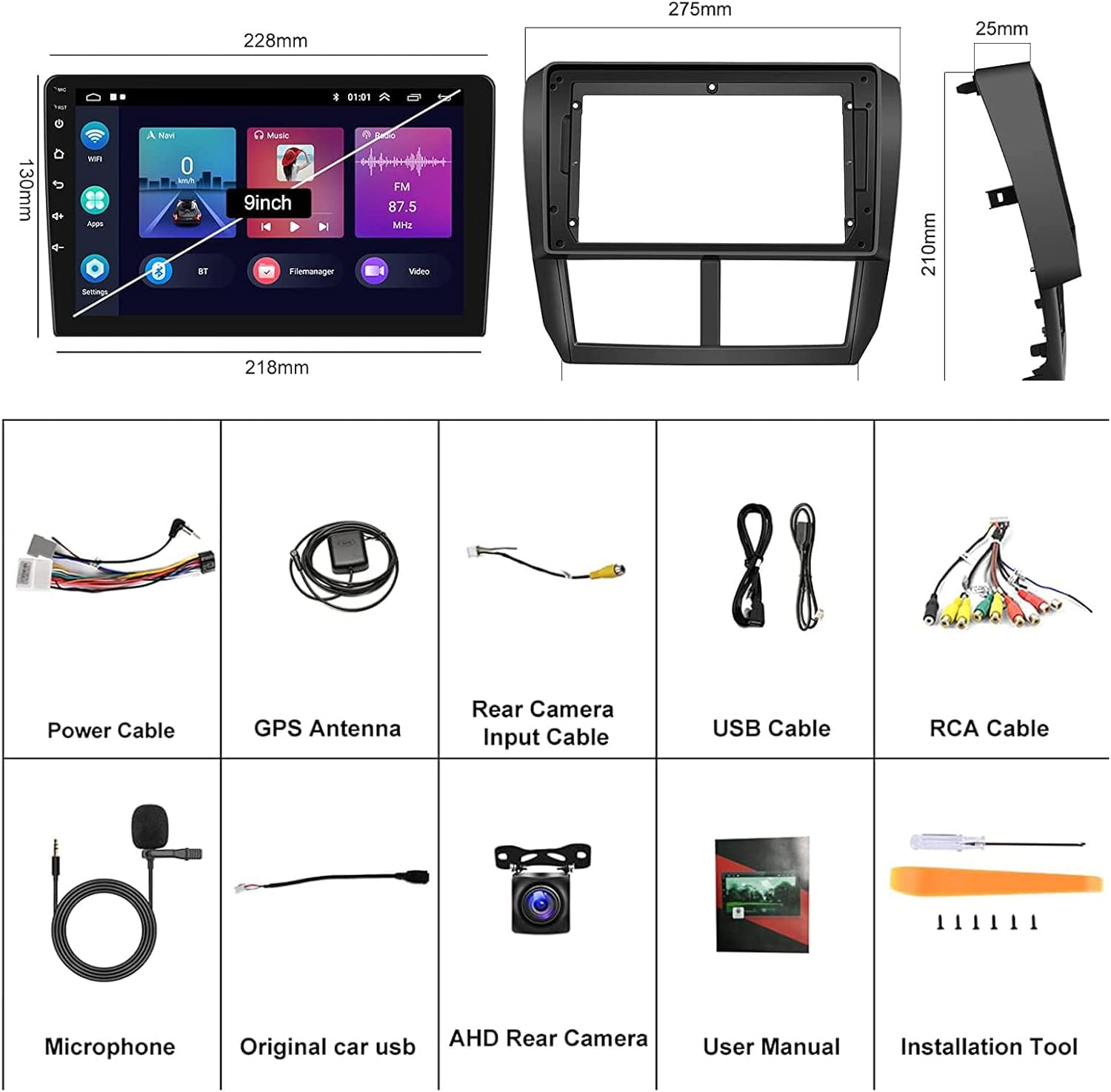
Image: A visual representation of all components included in the package, along with the dimensions of the head unit and frame.
2.2 Installation Notes
Before installation, please verify that your car's center console opening size matches the installation dimensions of this car radio. The unit is designed for plug-and-play installation with the provided wire harness, eliminating the need for a CANBUS adapter.
If your car has an original Harman Kardon Sound System, please contact the seller to obtain a suitable wire harness, as the standard harness may not be compatible.
3. Operating Instructions
3.1 Wireless CarPlay and Android Auto
The head unit supports both wireless and wired Apple CarPlay and Android Auto. Connect your iOS or Android smartphone to access navigation, music, calls, messages, and other smart functions directly on the car stereo's screen. Voice control is supported for hands-free operation.
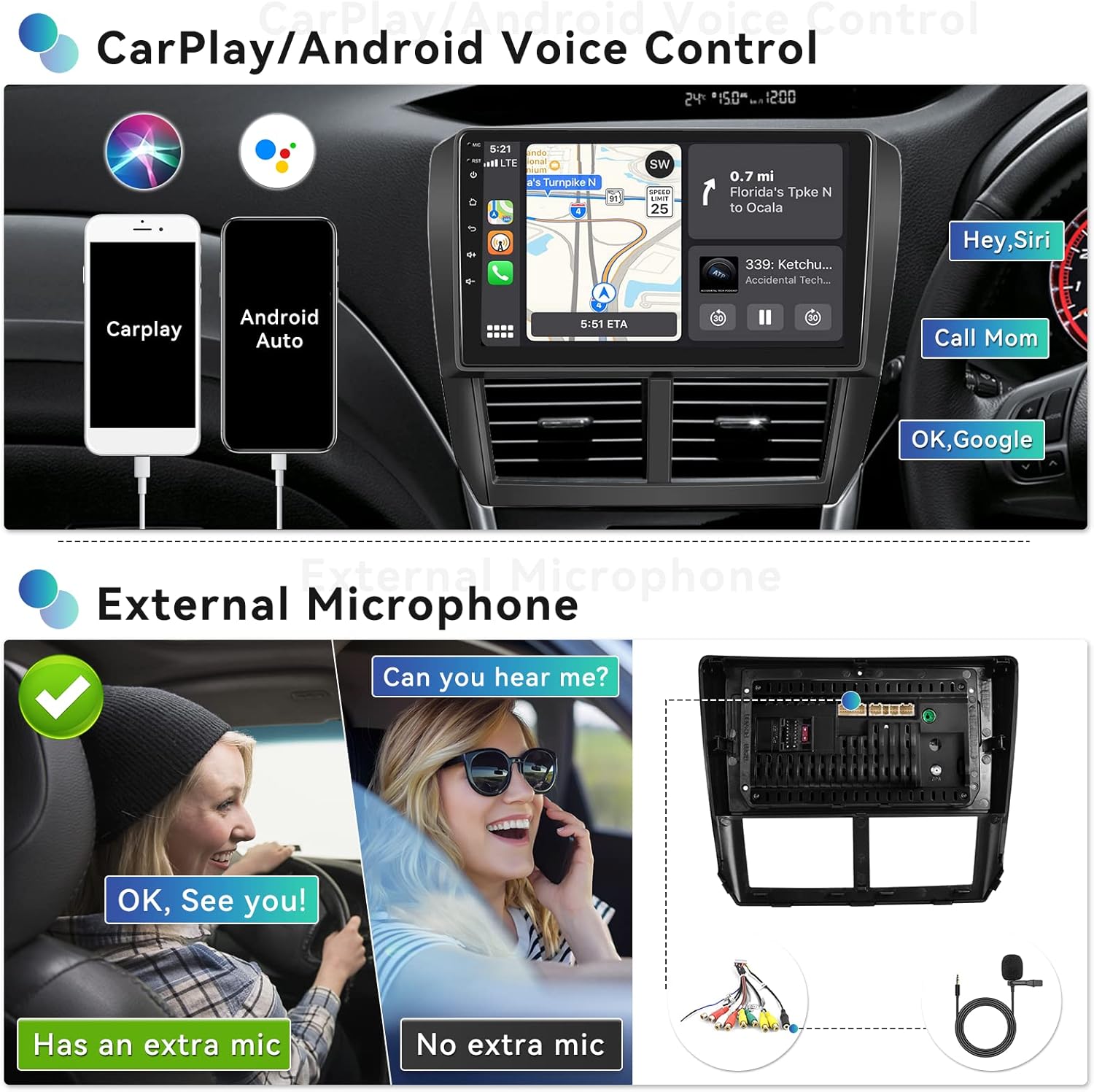
Image: Demonstrates CarPlay and Android Auto interfaces, highlighting voice control capabilities like 'Hey Siri' and 'OK Google' for navigation and calls.

Image: Illustrates the wireless connection process for CarPlay and Android Auto using the Zlink application.
3.2 Mirror Link Function
Project your Android or iOS phone's screen onto the 9-inch touchscreen radio. This allows you to view videos, maps, and pictures from your phone directly on the car stereo display.
3.3 Bluetooth 4.2
Connect your smartphone via Bluetooth 4.2 for hands-free calling, audio streaming (A2DP), and automatic phone book download. An external microphone is included to improve call quality.

Image: Displays the user interfaces for Bluetooth phone calls and music, FM radio tuning, and steering wheel control setup.
3.4 GPS Navigation & Wi-Fi Connect
The unit has built-in GPS and supports both online and offline maps. Preloaded offline maps are available for download via Wi-Fi. Connect to Wi-Fi to use the car stereo as an online multimedia player for streaming, browsing, and social media.

Image: Shows the GPS navigation interface with map data and various applications accessible via built-in Wi-Fi, such as YouTube and social media.
3.5 FM/RDS Radio
Enjoy FM radio with 18 preset stations. The RDS (Radio Data System) function provides additional information like station name and song title where available.
3.6 Steering Wheel Control (SWC)
The car stereo supports your vehicle's original steering wheel control functions, allowing you to manage audio playback, volume, and calls without taking your hands off the wheel.
3.7 AHD Rear Camera Input
A rear view camera is included. When you shift your car into reverse gear, the stereo automatically displays the reversing image, enhancing parking safety.
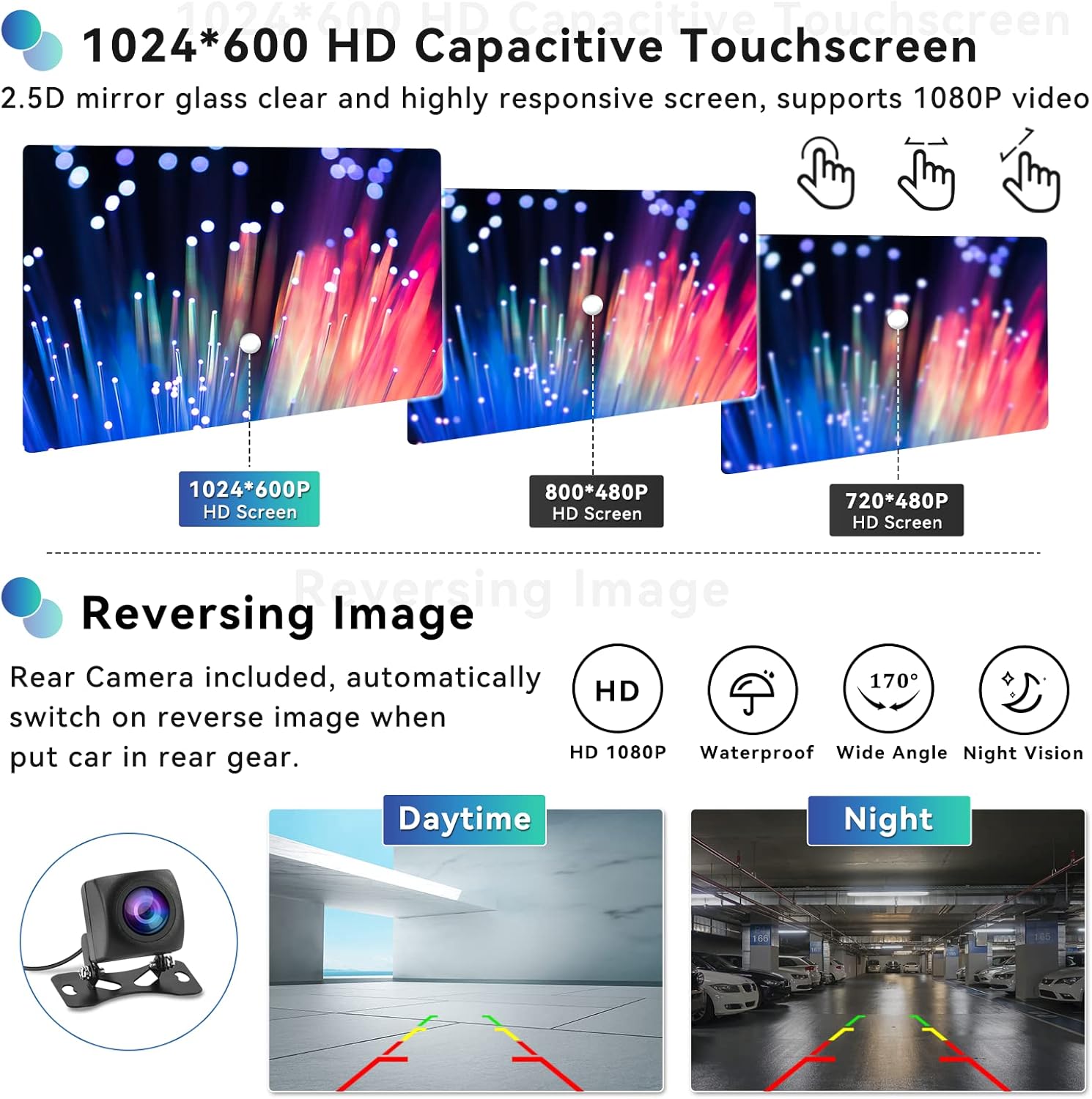
Image: Highlights the 1024x600 HD capacitive touchscreen and the clear display of the reversing camera feed, showing both daytime and night vision examples.
3.8 HiFi Audio Setting
The built-in HiFi audio system provides a superior sound quality experience, reproducing sound highly similar to the original source. You can adjust the sound style with presets like Classic, Pop, Rock, Jazz, and Flat, and fine-tune the audio balance across the car's speakers.

Image: Illustrates the HiFi sound settings, including audio balance adjustment for optimal sound distribution within the vehicle.
3.9 Split Screen Function
The split screen feature allows you to display two applications simultaneously, such as navigation on one side and music playback on the other, enhancing multitasking convenience.
3.10 Full RCA Output
The unit provides full RCA output, allowing you to connect external monitors or amplifiers for an expanded audio-visual experience within your vehicle.
4. Maintenance
To ensure the longevity and optimal performance of your car stereo, follow these general maintenance guidelines:
- Keep the screen and unit clean using a soft, dry cloth. Avoid abrasive cleaners.
- Protect the unit from extreme temperatures and direct sunlight for prolonged periods.
- Ensure all cables are securely connected and not pinched or damaged.
5. Troubleshooting
5.1 Screen Goes Black
If the car stereo screen goes black, follow these steps:
- Check Ribbon Cable: Open the rear cover and locate the screen ribbon cable (thin cable connecting the screen to the motherboard). Unplug and reconnect it securely.
- Reset or Restart: Turn off the car stereo, unplug the power cord, wait 5 minutes, then plug it back in and turn it on.
- Force Firmware Update: If the issue persists, try a forced firmware update. Refer to this user manual or contact customer support for guidance.
- Check Audio Output: Play audio to see if sound is working, even if the screen is black. This helps determine if the device is truly faulty.
If the problem remains unresolved, please check the product label for the model number and contact customer support for further assistance.
5.2 Radio Reception Spotty
If radio reception is inconsistent, ensure the antenna connection is secure and undamaged. In some cases, an antenna adapter or booster may be required depending on your vehicle's original antenna system.
6. Specifications
| Feature | Specification |
|---|---|
| Operating System | Android 13 |
| Chipset | 8227L-DEMO |
| Memory | 2GB (RAM) + 64GB (ROM) |
| Screen Size | 9 Inches |
| Display Resolution | 1024x600 |
| Bluetooth Version | 4.2 |
| Power Amplifier Chip | TDA7388 |
| Power Output | 4*45W |
| Work Temperature | -20℃ to 75℃ |
| Radio Band | FM/RDS |
| Reversing Input | AHD |
| Product Dimensions | 10.83 x 0.98 x 8.27 inches |
| Item Weight | 3.08 pounds |
7. Warranty and Support
UNITOPSCI provides lifetime after-sales consultation and technical support for this product. For any inquiries or assistance, please contact us directly.
Online Support: UNITOPSCI@126.com

Image: Information regarding UNITOPSCI's customer support, including replacement availability, quick response times, lifetime after-sales support, and return policy.
Related documentsA7097A3018A4MI2


Ask a question about this manual
Ask about setup, troubleshooting, compatibility, parts, safety, or missing instructions. Manuals+ will review the question and use this page’s manual context to help answer it.