
1. Product Overview
The Greluma RCA Chassis Panel Mount Adapter is designed for secure and reliable audio and video connections. This package includes 10 RCA female sockets, consisting of 5 red and 5 black connectors, suitable for various electronic applications.
These connectors feature a durable zinc alloy gold-plated construction, ensuring optimal signal transfer and corrosion resistance. They are compatible with standard RCA ports found on devices such as subwoofers, stereo receivers, and other audio/video equipment.
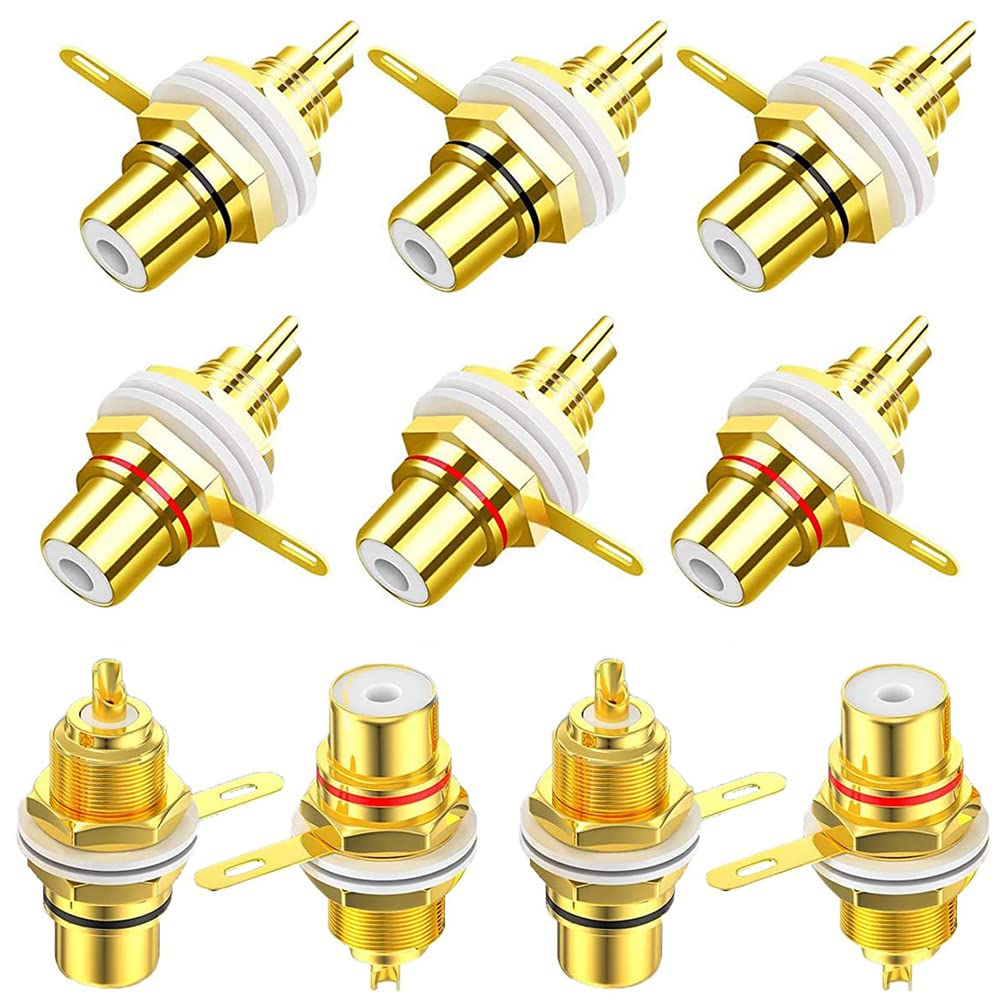
Image 1.1: Greluma RCA Female Chassis Panel Mount Adapter (10-Pack).
2. Package Contents
Each package contains the following components:
- 5 x Red RCA Female Connectors
- 5 x Black RCA Female Connectors
- Washers and Nuts for secure panel mounting

Image 2.1: Included components: RCA connector, gasket, screw, and washers.
3. Installation Guide
These RCA female sockets are designed for easy panel mounting and soldering. Follow these steps for proper installation:
- Prepare the Panel: Ensure your equipment panel has standard openings suitable for these RCA connectors. Refer to the product dimensions for precise hole sizing.
- Insert Connector: Insert the RCA connector through the prepared hole from the front of the panel.
- Secure with Washers and Nut: Place the insulated washers onto the connector shaft from the rear of the panel. These washers prevent chassis contact. Then, thread and tighten the nut to secure the connector firmly to the panel.
- Solder Connections: The connections are designed for easy soldering. Solder your audio/video cables to the positive (center pin) and negative (ground tab) terminals of the RCA socket.

Image 3.1: Detailed view of RCA connector components for installation.
4. Operating Instructions
Once installed, the Greluma RCA Chassis Panel Mount Adapters function as standard RCA female ports. Connect your RCA-enabled audio or video cables to these sockets to establish signal pathways between compatible devices.
- Ensure that the RCA cables you are using are compatible with your equipment and the specific signal type (audio or video).
- Gently insert the male RCA plug into the female socket until a secure connection is felt. Avoid excessive force.
- These adapters are commonly used with subwoofers, stereo receivers, amplifiers, and other devices requiring RCA component connections.

Image 4.1: RCA connectors compatible with various audio equipment.

Image 4.2: Example of RCA connectors in use on an audio device.
5. Maintenance
To ensure the longevity and optimal performance of your Greluma RCA Chassis Panel Mount Adapters, consider the following maintenance tips:
- Keep Clean: Periodically clean the contact surfaces of the connectors with a dry, lint-free cloth to remove dust or debris. Avoid using liquid cleaners directly on the contacts.
- Inspect Connections: Regularly check that the nuts securing the connectors to the panel are tight. Loose connections can lead to signal degradation.
- Handle with Care: When connecting or disconnecting RCA cables, grasp the plug firmly and pull straight out. Avoid pulling on the cable itself or applying excessive force, which can damage the connector or cable.
- Environmental Conditions: Store and operate the connectors in a dry environment, away from extreme temperatures and humidity, to prevent corrosion.
6. Troubleshooting
If you experience issues with your RCA connections, consider these troubleshooting steps:
- No Signal: Ensure all cables are securely connected at both ends. Check that the correct input/output ports are selected on your audio/video equipment.
- Poor Signal Quality (Static, Hum, Distortion): Verify that the cables are not damaged. Check for loose connections at the RCA sockets or device ports. Ensure proper grounding if applicable.
- Intermittent Connection: This often indicates a loose connection or a faulty cable. Re-seat all connections and test with a different cable if possible.
- Physical Damage: Inspect the RCA connectors for any visible damage, such as bent pins or cracked housing. Damaged connectors should be replaced.
7. Specifications
| Feature | Specification |
|---|---|
| Brand | Greluma |
| Model Number | ZL372LUM |
| Connector Type | RCA Female Socket |
| Material | Zinc Alloy, Gold Plated |
| Color | Red and Black (5 of each) |
| Number of Pins | 3 |
| Maximum Voltage | 5 Volts (DC) |
| Special Feature | Lightweight, Easy Installation |
| Compatibility | Subwoofers, Stereo Receivers, Devices with RCA Component Audio/Video Ports |
| Environmental Compliance | RoHS Compliant |
| Recommended Use | Connecting electronic devices, extending signal transmission distance, data transfer between components |

Image 7.1: Product dimensions in millimeters and inches.
8. Warranty and Support
Warranty information for the Greluma RCA Chassis Panel Mount Adapter is typically provided at the point of purchase or included with the product packaging. Please refer to these resources for details regarding warranty coverage and terms.
For technical support, product inquiries, or assistance with any issues not covered in this manual, please contact Greluma customer service or the retailer from whom you purchased the product. Contact information can usually be found on the product packaging or the manufacturer's official website.