
1. Introduction
The Yottamaster 5-Bay RAID HDD Enclosure (Model DF5RU3) is designed for high-performance external storage, supporting up to five 3.5-inch or 2.5-inch SATA SSD/HDD drives. It features USB 3.0 connectivity for fast data transfer and offers multiple RAID modes for flexible data management and protection. The enclosure also includes an RGB silent cooling fan and a transparent side panel for efficient heat dissipation and visual appeal.

Image: Yottamaster 5-Bay RAID HDD Enclosure, front view.
2. Package Contents
Please verify that all items are present in your package:
- 1 x Yottamaster 5-Bay Gaming HDD Enclosure with RAID Functionality
- 1 x USB Cable (Type-A to Type-B, 100cm)
- 1 x Power Cable
- 1 x Screwdriver & Screw Set (for 2.5" and 3.5" hard drives)
- 1 x User Manual
3. Setup
3.1. Drive Installation
To install hard drives or SSDs into the enclosure:
- Ensure the enclosure is safely disconnected from your computer and the power is off.
- Open the drive bays and insert your 3.5-inch or 2.5-inch SATA HDDs/SSDs. Secure them with the provided screws if necessary.
- Close the drive bays.

Image: Illustrates the insertion of hard drives into the enclosure bays.
3.2. Connecting the Enclosure
Connect the enclosure to your computer using the provided USB cable and power adapter. Ensure stable power supply by using the original data cable and connecting to a stable USB interface on the host side.
3.3. Initial Drive Formatting and RAID Configuration
Before using new hard drives, they must be formatted. If you plan to use RAID modes, it is crucial to back up all important data as changing RAID modes typically requires formatting the drives.
3.3.1. Adding a Hard Drive (PM/Normal Mode)
This video demonstrates how to add a hard drive when the enclosure is in PM (Normal) mode.
Video: Guide on adding a hard drive to the enclosure in PM (Normal) mode, including initial formatting steps.
3.3.2. Setting up Soft-RAID in Windows
This video provides instructions for setting up Soft-RAID using Windows' built-in tools.
Video: Detailed steps for configuring Soft-RAID on a Windows operating system.
3.3.3. Setting up Soft-RAID in Mac OS
This video guides you through the process of setting up Soft-RAID on a Mac OS system.
Video: Instructions for configuring Soft-RAID on a Mac OS operating system.
4. Operating Instructions
4.1. Data Transfer
The enclosure supports USB 3.0 for high-speed data transfer up to 5Gbps. Connect the enclosure to a compatible USB 3.0 port on your computer for optimal performance.

Image: Depicts the enclosure connected to a computer, highlighting fast data transfer capabilities.
4.2. RAID Modes
The Yottamaster DF5RU3 supports 8 different RAID modes: RAID0, RAID1, RAID3, RAID5, RAID10, SPAN (JBOD), Clone, and Normal. These modes can be managed via both hardware (DIP switches) and software. Each mode offers different benefits in terms of speed, data redundancy, and capacity utilization.
| RAID Mode | Minimum Drives | Capacity | Safety | Speed |
|---|---|---|---|---|
| RAID 5 | 3 | High | High | Good |
| RAID 0 | 2 | High | Low | Very High |
| RAID 1 | 2 | Low | Very High | Good |
| RAID 3 | 3 | High | High | Good |
| RAID 10 | 4 | High | Very High | Very High |
| CLONE | 2 | Low | Very High | Good |
| JBOD (SPAN) | 2 | Very High | Low | Good |
| PM (Normal) | 1 | Individual | Individual | Individual |
Important Note:
- When changing RAID modes, it is necessary to format the HDDs. Always back up your data before formatting.
- To change RAID modes using hardware DIP switches, ensure the enclosure is safely disconnected from the computer and powered off. Adjust the DIP switches according to the desired RAID mode configuration (refer to the diagram on the enclosure's rear panel). Then, press and hold the SET button while powering on the enclosure. Release the SET button after approximately 15 seconds.
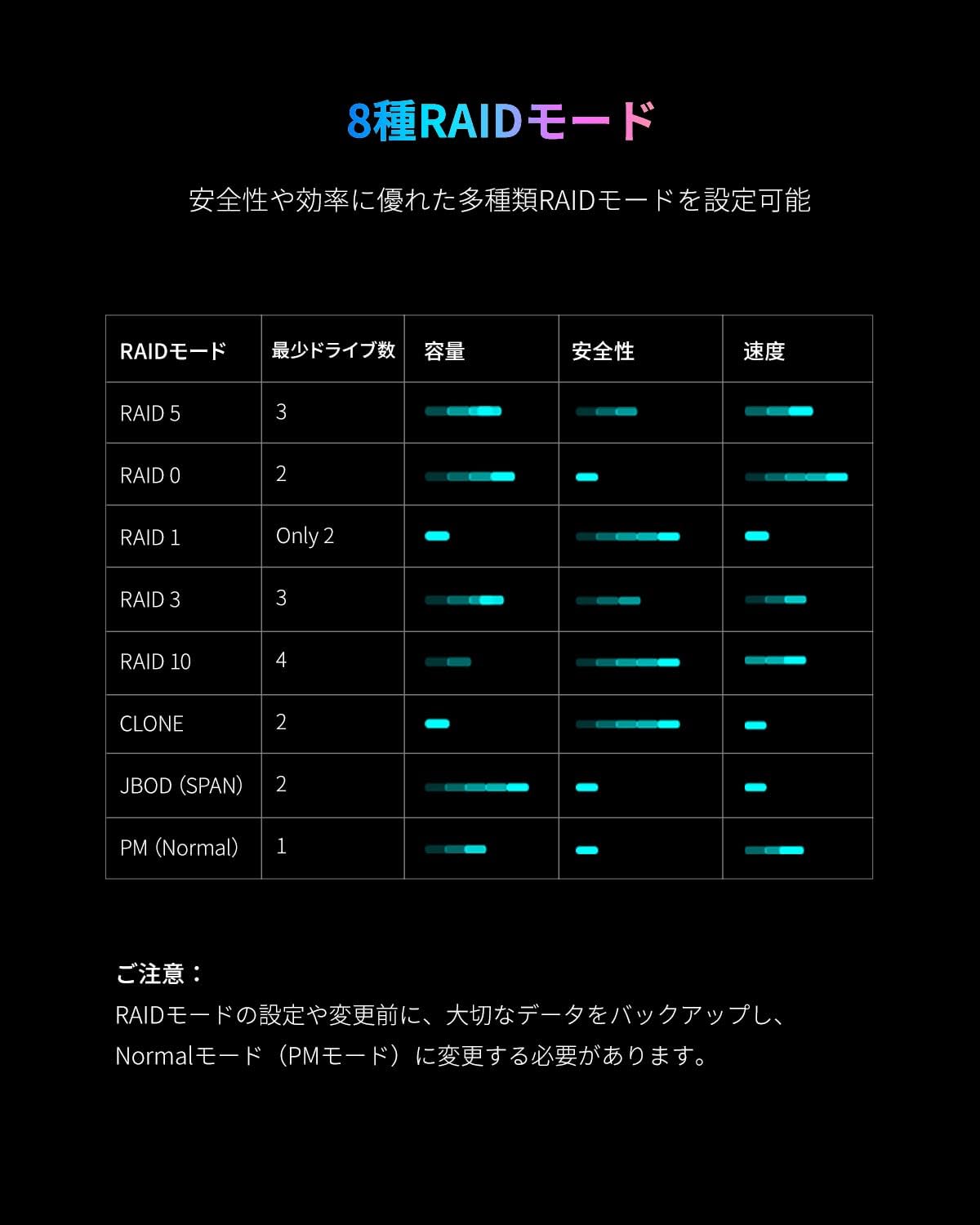
Image: Detailed table explaining the characteristics of each RAID mode.
4.3. Sleep Mode Settings
The enclosure features an energy-saving automatic sleep mode that activates after 10 minutes of inactivity. The sleep mode duration can be adjusted.
Video: Instructions on how to set or disable the sleep timer function for the enclosure.
4.4. RGB Cooling Fan
The enclosure is equipped with an 80mm RGB silent cooling fan and large-area heat dissipation holes to minimize heat generated by the drives during operation. The transparent acrylic side panels allow the colorful RGB LED lights to enhance your setup.

Image: Close-up view of the RGB silent cooling fan and transparent side panel.
5. Maintenance
5.1. Data Backup
Regularly back up important data from your drives, especially before performing any RAID configuration changes or formatting operations, as these actions can lead to data loss.
5.2. Safe Removal
Always use the computer's "Safely Remove Hardware" function before disconnecting the enclosure to prevent data corruption or drive damage. Do not directly unplug the power cable while the enclosure is operating.
5.3. Power Stability
Unstable voltage can affect the lifespan and performance of your mobile hard drives. Ensure the enclosure is connected to a stable power source and use the original data cable for optimal performance.
6. Troubleshooting
6.1. RAID Mode Issues
If you encounter issues with RAID mode configuration or changes, refer to the following video for guidance on deleting and changing RAID modes.
Video: Demonstrates how to delete and change RAID modes, including formatting drives if necessary.
6.2. Sleep Mode Recovery
If the enclosure fails to wake up from sleep mode, please contact technical support for the latest firmware update.
7. Specifications
| Feature | Description |
|---|---|
| Brand | Yottamaster |
| Model Number | DF5RU3 |
| Color | Gray |
| Material | Aluminum |
| Internal Bay Count | 5 |
| Hard Disk Form Factor | 3.5 inch / 2.5 inch SATA SSD/HDD |
| Max Capacity | Up to 18TB per drive, 90TB total |
| Interface | USB 3.0 (5Gbps) |
| RAID Modes | RAID0, RAID1, RAID3, RAID5, RAID10, SPAN(JBOD), Clone, Normal |
| Cooling Method | Air cooling (80mm RGB silent fan) |
| Power Supply | 150W built-in power adapter |
| Compatible OS | Windows, Mac OS, Linux |
| Product Weight | 3.5 kg |
| Special Features | RGB silent cooling fan, 8 RAID modes, 3.5/2.5 inch SATA SSD/HDD support, USB 3.0 high-speed data transfer, energy-saving sleep mode |
8. Support
8.1. Technical Support
For any technical inquiries, firmware updates, or assistance with your Yottamaster product, please contact our technical support team at supports@yottamaster.com.
8.2. Warranty Information
Please refer to the product packaging or the official Yottamaster website for detailed warranty information.


