
1. Safety Information
Please read all safety instructions carefully before using the product. Failure to follow these instructions may result in electric shock, fire, or serious injury.
- Do not disassemble, repair, or modify the product.
- Keep the product away from water and high humidity.
- Ensure the power adapter is compatible with your local voltage.
- Do not cover the light with flammable materials.
- Keep out of reach of children.
- If any damage occurs, discontinue use immediately and contact customer support.
2. Package Contents
Verify that all items are present in the package:
- SOAIY LED Bar Light (40cm)
- AC Power Adapter
- Self-adhesive Magnetic Clips (for installation)
- User Manual

Image: SOAIY LED Bar Light, AC adapter, and magnetic clips.
3. Setup & Installation
The SOAIY LED Bar Light is designed for easy, tool-free installation. No electrical work is required.
3.1 Choosing an Installation Location
Select a flat, clean surface such as under a cabinet, shelf, or counter. Ensure there is a power outlet nearby for the AC adapter.
3.2 Installation Steps
- Prepare the Surface: Clean the desired installation surface thoroughly to ensure the self-adhesive magnetic clips adhere properly.
- Attach Magnetic Clips: Peel the protective film from the self-adhesive side of the magnetic clips. Attach the clips to the chosen surface, ensuring they are spaced appropriately to securely hold the LED bar light.

Image: Applying adhesive to magnetic clips.
- Mount the Light: Align the LED bar light with the attached magnetic clips. The magnets will hold the light securely in place.

Image: Attaching the LED light to the magnetic clips.
- Connect Power: Plug the AC adapter into the power port on the LED bar light, then plug the adapter into a standard electrical outlet.
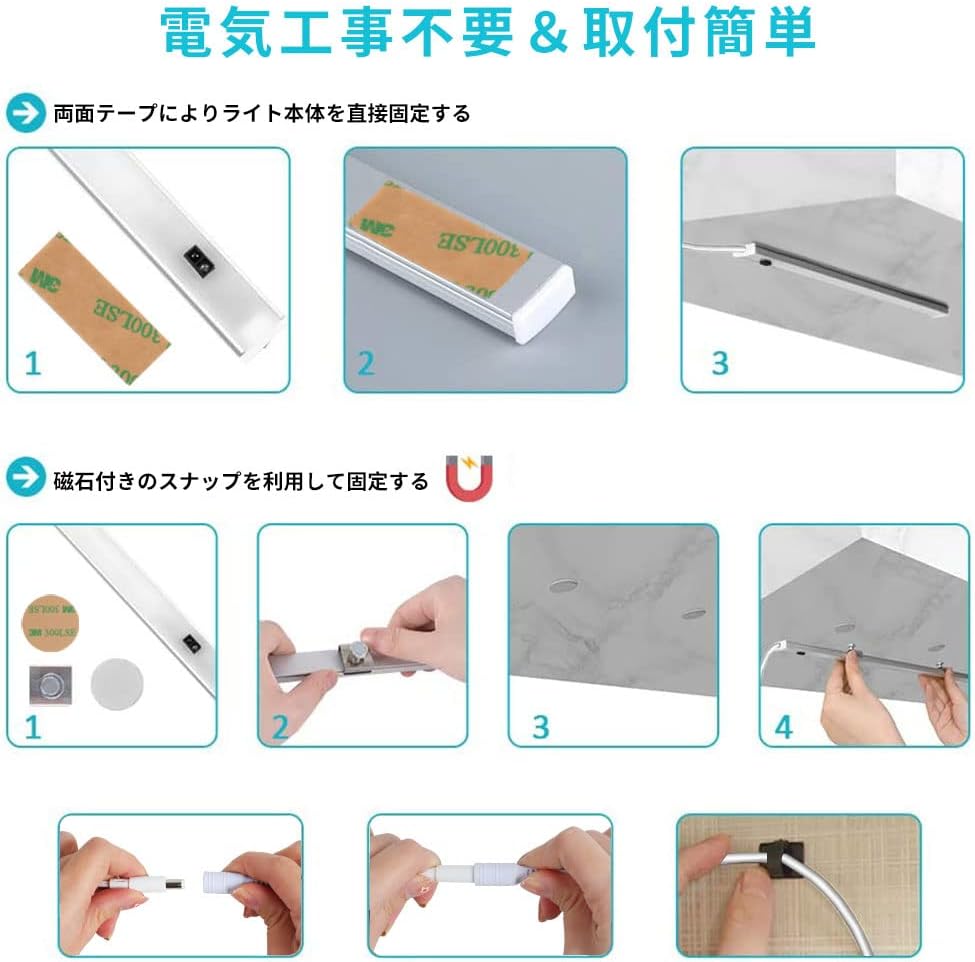
Image: Overview of power connection and installed light.
The magnetic mounting allows for easy removal and reinstallation if needed.
4. Operation
The SOAIY LED Bar Light features touchless control for convenience and hygiene.
4.1 Turning On/Off
- To turn the light ON: Wave your hand quickly (within 5cm) under the sensor.
- To turn the light OFF: Wave your hand quickly (within 5cm) under the sensor again.

Image: Demonstrating hand gesture for touchless on/off operation.
4.2 Stepless Dimming
- To adjust brightness: With the light on, hold your hand steadily under the sensor (within 5cm). The brightness will gradually change. Remove your hand when the desired brightness is reached.
- The light will cycle through its brightness range.

Image: Illustrating stepless dimming by holding hand under the sensor.
4.3 Memory Function
The light remembers your last brightness setting. If the power is disconnected and reconnected, the light will turn on at the brightness level it was set to previously.
5. Maintenance
To ensure optimal performance and longevity of your SOAIY LED Bar Light, follow these maintenance guidelines:
- Cleaning: Disconnect the power before cleaning. Use a soft, dry cloth to wipe the surface of the light. Do not use abrasive cleaners, solvents, or excessive moisture, as these can damage the product.
- Sensor Care: Keep the sensor area clean and free from obstructions to ensure proper touchless operation.
- Storage: If storing the light for an extended period, disconnect it from power and store it in a cool, dry place.
6. Troubleshooting
If you encounter issues with your SOAIY LED Bar Light, refer to the following common problems and solutions:
| Problem | Possible Cause | Solution |
|---|---|---|
| Light does not turn on. | No power connection or faulty adapter. | Ensure the AC adapter is securely plugged into both the light and the power outlet. Test the outlet with another device. |
| Touchless sensor is unresponsive. | Sensor obstructed or incorrect hand gesture. | Ensure the sensor area is clean and clear. Use a quick wave for on/off, and hold your hand steadily for dimming, within 5cm of the sensor. |
| Brightness adjustment is erratic. | Interference or sensor issue. | Ensure no other objects are near the sensor during adjustment. Try resetting the power by unplugging and replugging the adapter. |
| Light flickers. | Unstable power supply or internal fault. | Check power connection. If flickering persists, discontinue use and contact customer support. |
If the problem persists after trying these solutions, please contact SOAIY customer support.
7. Specifications
| Feature | Detail |
|---|---|
| Brand | SOAIY |
| Model Number | SSDT40 |
| Lamp Type | LED |
| Switch Type | Touchless Sensor |
| Product Dimensions | 43.1 x 7.1 x 5.4 cm (approx. 40cm length) |
| Product Weight | 0.22 kg |
| Base Material | Plastic |
| Power Source | AC Adapter (included) |
| Dimming | Stepless Dimming |
| Special Features | Memory Function, Easy Installation (Magnetic) |

Image: Diagram showing product dimensions (40cm length).
8. Warranty & Support
SOAIY products are manufactured with high-quality standards. For warranty information or technical support, please refer to the warranty card included in your package or contact SOAIY customer service through your retailer.
Please have your model number (SSDT40) and purchase date ready when contacting support.