
Mini Brands 77172-S2
5 Surprise Mini Brands Series 2 Mini Mart
User Manual
Product Overview
The 5 Surprise Mini Brands Mini Mart is the ultimate playset designed for storing and displaying your collection of miniature brands. It allows you to create your own immersive shopping world, complete with shelves, display cases, and interactive elements.
This playset includes a modular base plate, various types of shelves, refrigerators, cash registers, and accessories like shopping carts and baskets. It's designed to be expandable, allowing you to connect multiple Mini Marts to build a larger, comprehensive shopping experience for hundreds of your Mini Brands.

Image: The 5 Surprise Mini Brands Mini Mart playset, fully assembled and ready for miniature products. It features multiple shelving units, a checkout counter, and a storefront sign.
- Exclusive Minis: Each Mini Mart comes with 5 exclusive mini brands not found elsewhere, essential for completing your collection.
- Storage & Display: An ideal way to showcase your real mini brands collection within a miniature shopping environment.
- Customization: Build and personalize your Mini Mart with additional shelves, cash registers, and accessories from 5 Surprise Mini Brands capsules (sold separately).
- Interactive Sounds: Press the Mini Mart sign to activate realistic shopping sounds, enhancing the play experience.
Setup Guide
Assembly Instructions
Your Mini Mart playset includes 27 pieces designed for easy assembly. Follow these steps to construct your miniature shopping world:
- Unpack Components: Carefully remove all 27 pieces from the packaging. Verify that all components listed in the product contents are present.
- Assemble the Base Plate: Connect the modular base plate sections to form the foundation of your Mini Mart. Ensure they click securely into place.
- Construct Storefront: Attach the storefront facade to the designated area on the base plate. This includes the main entrance and the Mini Mart sign.
- Install Shelving Units: Place the various shelving units (3 types), refrigerators, and display cases onto the base plate. These are designed to fit into specific slots.
- Set Up Checkout Counter: Position the cash register and checkout counter assembly in its designated spot.
- Add Accessories: Distribute the included accessories, such as shopping carts and baskets, around the Mini Mart.
- Place Exclusive Minis: Unpack the 5 exclusive mini brands and place them on the shelves or in display cases.
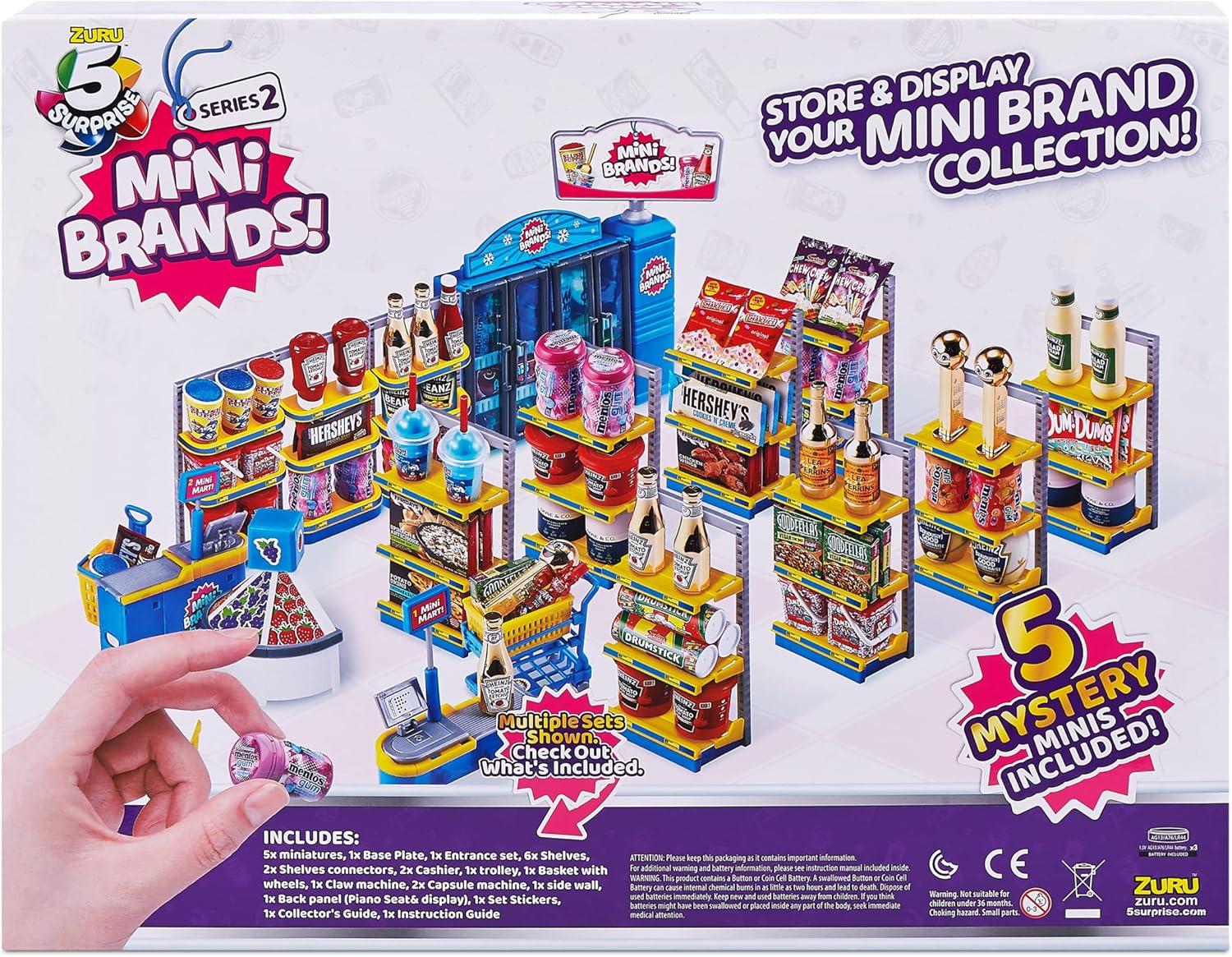
Image: The reverse side of the Mini Mart packaging, illustrating the various components included in the playset and providing a visual guide for assembly.
For optimal stability, ensure all connections are firm. The modular design allows for flexible arrangement of shelves and other elements.
Operating Your Mini Mart
Interactive Features
Once assembled, your Mini Mart is ready for play. Here's how to interact with its features:
- Stocking Shelves: Fill the shelves, refrigerators, and display cases with your existing Mini Brands collection and the 5 exclusive minis included with the playset. Arrange them as you would in a real store.
- Shopping Experience: Use the miniature shopping carts and baskets to collect your favorite mini brands as if you were shopping in a real supermarket.
- Sound Activation: Locate the Mini Mart sign at the front of the playset. Press the sign to activate realistic shopping sounds, adding an immersive audio element to your play.
- Expanding Your Mart: The modular base plate allows you to connect additional Mini Mart playsets (sold separately) to create an even larger, more expansive shopping world. Simply align the connection points and snap them together.

Image: The Mini Mart playset fully stocked with a diverse array of miniature brand products, showcasing its display capabilities.
Care and Maintenance
Cleaning Instructions
To ensure the longevity and cleanliness of your Mini Mart playset, follow these simple care instructions:
- General Cleaning: Wipe down all plastic surfaces with a soft, damp cloth. For stubborn dirt, a mild soap solution can be used.
- Drying: After cleaning, ensure all parts are thoroughly dry before storing or reassembling to prevent water spots or damage.
- Avoid Harsh Chemicals: Do not use abrasive cleaners, solvents, or strong chemical solutions, as these can damage the plastic and printed details.
- Storage: Store the playset in a cool, dry place away from direct sunlight to prevent discoloration or warping of the plastic.
Troubleshooting
Common Issues
If you encounter any issues with your Mini Mart playset, refer to the following common troubleshooting tips:
- Sound Not Working:
- Ensure the Mini Mart sign is pressed firmly.
- While the product specifications state no batteries are required, if your specific model has a battery compartment, check if batteries are correctly installed or need replacement. (Note: Product specifications indicate no batteries required for this model.)
- Parts Not Connecting Securely:
- Ensure all pieces are aligned correctly before attempting to snap them together.
- Apply gentle, even pressure. Do not force pieces, as this may cause damage.
- Missing Pieces:
- Refer to the "Components Included" section in the specifications to verify all parts.
- If a piece is genuinely missing, contact customer support for assistance.
Product Specifications
| Feature | Detail |
|---|---|
| Brand | Mini Brands |
| Model Number | 77172-S2 |
| UPC | 193052044440 |
| Material | Plastic |
| Dimensions (L x W x H) | 45 x 8 x 35 cm (17.7 x 3.1 x 13.8 inches) |
| Weight | 1.14 Kilograms (2.51 lbs) |
| Recommended Age | 3 years and up |
| Assembly Required | No (refers to complex assembly, basic setup is required) |
| Batteries Required | No |
| Number of Pieces | 27 |
| Theme | Mini Market |
Warranty and Support
For any questions regarding your 5 Surprise Mini Brands Mini Mart playset, including inquiries about missing parts or product functionality, please contact the manufacturer's customer support.
While specific warranty details are not provided in this manual, most products come with a standard manufacturer's warranty against defects in materials and workmanship. Please retain your proof of purchase for any warranty claims.
For further assistance, refer to the contact information provided on the product packaging or the official Mini Brands website.
Ask a question about this manual
Ask about setup, troubleshooting, compatibility, parts, safety, or missing instructions. Manuals+ will review the question and use this page’s manual context to help answer it.