
Introduction
Thank you for choosing the MassaMAX MD321 Yoga Zero Gravity SL Track Massage Chair. This manual provides essential information for the safe and effective use of your new massage chair. Please read all instructions carefully before assembly, operation, and maintenance to ensure optimal performance and user safety.

The MassaMAX MD321 Massage Chair, designed for full-body relaxation and therapeutic massage.
Safety Instructions
Important Safety Warnings:
- Read the assembly and operating instructions carefully before using the product.
- Do not exceed the recommended weight capacity of 150 kg (330 lbs).
- Exercise caution when using the massage and recline functions to prevent falls or injuries.
- Ensure adequate space around the chair during operation to avoid obstructions.
- Keep children and pets away from the chair's moving parts.
Product Components
The MassaMAX MD321 Massage Chair package includes the following components:
- Massage Chair Unit
- Air Cushions (pre-installed)
- Rollers (pre-installed)
- User Manual
Setup and Installation
The MassaMAX MD321 Massage Chair comes largely pre-assembled. Follow these general guidelines for setup:
- Unpacking: Carefully remove all packaging materials. Retain packaging for future transport or storage.
- Placement: Position the chair on a flat, stable surface. Ensure there is at least 5 cm (1.98 inches) of space between the back of the chair and any wall for the recline function.
- Power Connection: Connect the power cord to a grounded electrical outlet.
- Initial Check: Before first use, inspect the chair for any visible damage or loose connections.

The chair features a space-saving design, requiring minimal clearance from the wall.
Operating Instructions
This section details the various functions and how to operate your MassaMAX MD321 Massage Chair.
Overview of MassaMAX MD321 Massage Chair features, including voice control, body scan, and various massage modes.
1. AI Intelligent Voice Control
The chair is equipped with intelligent voice control. Simply speak commands to activate or adjust massage programs. For example, say "Hi, Alice" to wake up the system, then issue commands like "Massage on," "Full body massage," or "Massage close."

Activate and control your massage experience using simple voice commands.
2. Automatic Body Scan System
Upon activation, the chair performs an automatic body scan to detect your shoulder position and body type. This ensures the massage rollers are precisely aligned with your body's curvature for a personalized and effective massage.
3. SL Track Massage
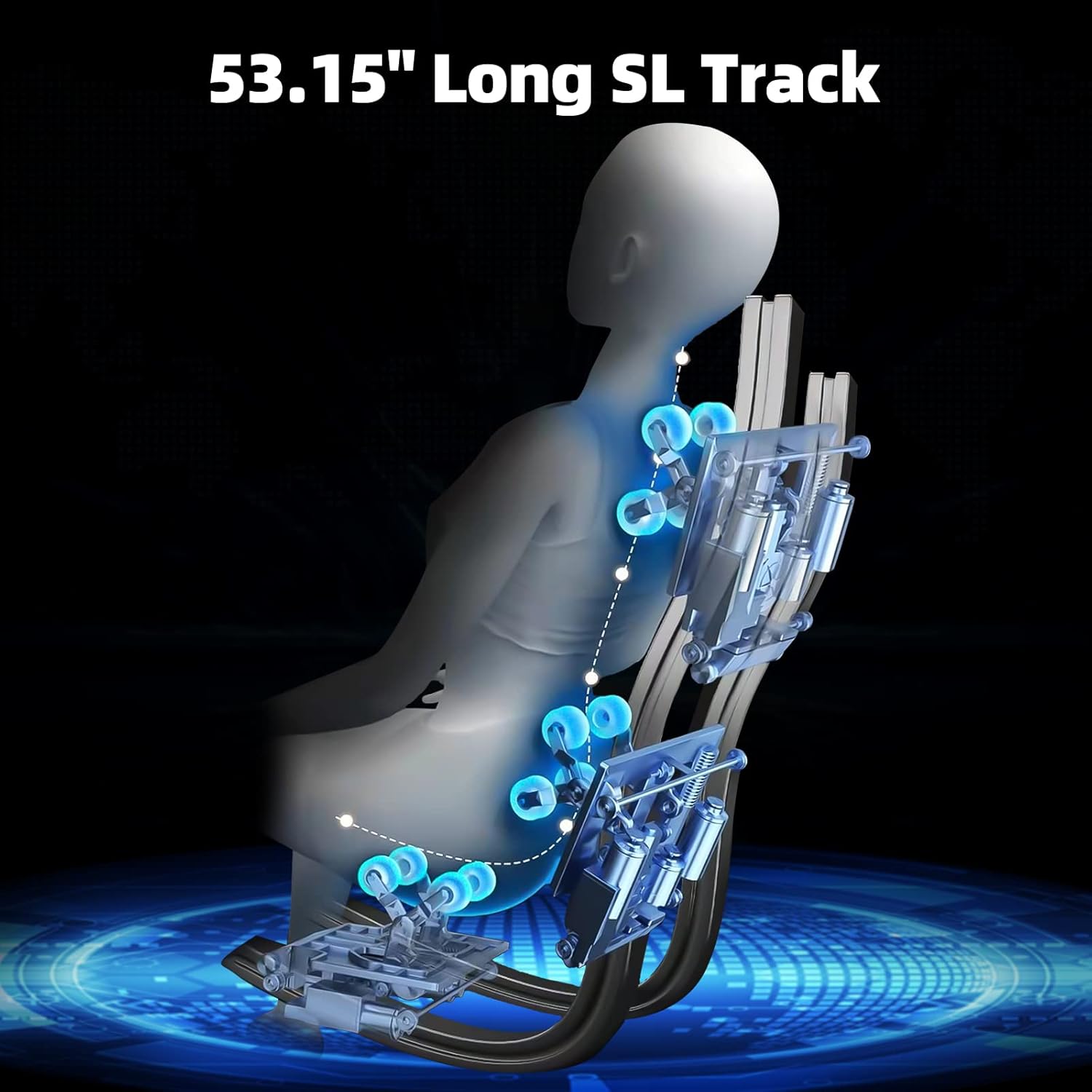
The 135 cm (53.15 inch) long SL track follows the natural curve of your spine, extending from your neck down to your thighs. This design allows the massage rollers to cover a larger area, providing comprehensive relief.
The SL track ensures a thorough massage along the entire spine.
4. Massage Techniques
The intelligent mechanical massage hands offer various techniques to target different muscle groups and provide diverse sensations:
- Shiatsu: Deep tissue massage applying pressure to specific points.
- Knocking: Rhythmic tapping to stimulate muscles.
- Kneading: Circular motions to relieve muscle tension.
- Tapping: Light, rapid strokes for circulation.

Various massage techniques provided by the mechanical rollers.
5. Yoga Stretching Massage
In Auto Stretch mode, the chair gently grips your feet and legs, then lowers them towards the floor while the backrest reclines your upper body. This motion helps to stretch and relax muscles throughout the entire body, alleviating fatigue.

The Yoga Stretching feature helps to elongate and relax the body.
6. Zero Gravity Function
The Zero Gravity recline position elevates your legs above your heart, distributing your body weight evenly and reducing pressure on your spine. This position enhances relaxation and the effectiveness of the massage.
Experience deep relaxation with the chair's Zero Gravity recline.
7. Full Body Air Compression Massage
Airbags strategically placed throughout the chair inflate and deflate to provide a compression massage to various body parts, promoting circulation and muscle relaxation.
- Shoulders and Arms: Airbags gently compress the shoulders and arms.
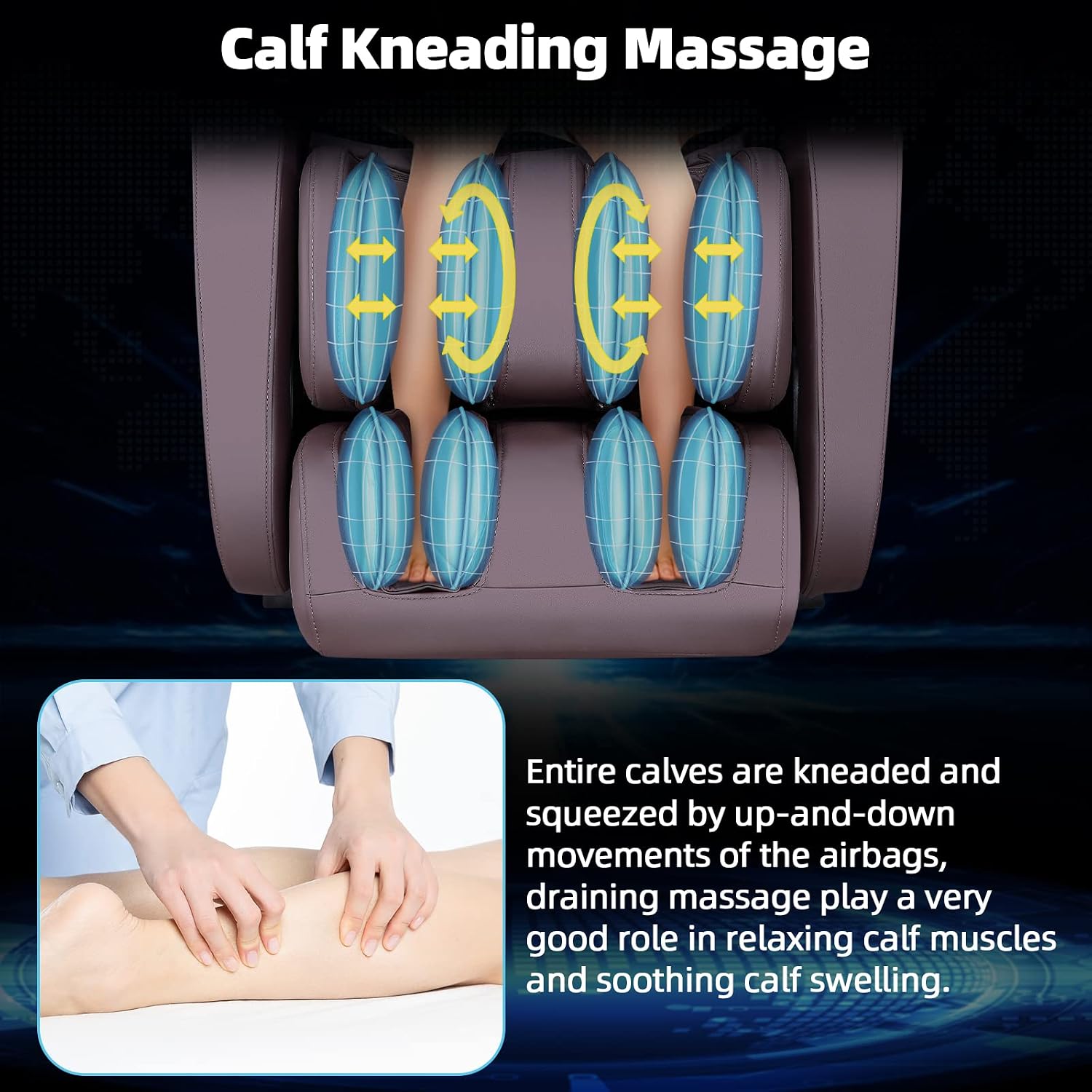
- Calves and Feet: Airbags knead and squeeze the calves and feet, aiding in muscle relaxation and reducing swelling.

Air compression massage targets various areas for enhanced relaxation.
8. Calf Kneading/Drainage Massage
The calf area features airbags that perform up-and-down kneading and squeezing movements. This drainage massage is beneficial for relaxing calf muscles and alleviating swelling.

Targeted massage for calf muscle relaxation and swelling reduction.
9. Foot Roller Massage
Rollers located in the footrest provide a stimulating massage to the soles of your feet, targeting pressure points for overall well-being.

Foot rollers provide a soothing and invigorating massage to the soles.
10. Heating Therapy
Integrated heating elements provide gentle warmth to the back area, helping to relax muscles and enhance the massage experience.

Heating therapy provides soothing warmth to the back.
11. USB Charging Port
A convenient USB charging port is integrated into the armrest, allowing you to charge your mobile devices while enjoying your massage.

Charge your devices conveniently with the built-in USB port.
12. Wireless Bluetooth HIFI Speaker
Connect your device via Bluetooth to the integrated HIFI speakers and enjoy your favorite music or audio during your massage session.
Specifications
| Feature | Detail |
|---|---|
| Product Dimensions (L x W x H) | 155 x 75 x 115 cm (61 x 29.5 x 45.3 inches) |
| Weight | 115 kg (253.5 lbs) |
| Manufacturer | MassaMAX |
| Model Number | MD321 |
| Brand | MassaMAX |
| Color | Brown |
| Material | Polyurethane (PU) |
| Back Style | Continuous Backrest |
| Special Feature | Rolling Massage |
| Recommended Use | Relaxation |
| Maximum Weight Recommendation | 150 Kilograms (330 lbs) |
| Style | Modern |
| Number of Reclining Positions | 2 |
| Room Type | Living Room |
| Age Range Description | Adult |
| Indoor/Outdoor Use | Indoor |
| UPC | 850037299331 |
| GTIN | 850037299331 |
Maintenance
To ensure the longevity and optimal performance of your MassaMAX MD321 Massage Chair, follow these maintenance guidelines:
- Cleaning: Wipe the chair's surface with a soft, damp cloth. Avoid harsh chemicals or abrasive cleaners.
- Storage: When not in use for extended periods, store the chair in a cool, dry place away from direct sunlight.
- Inspection: Periodically check all connections and moving parts for any signs of wear or damage. Contact customer support if any issues are found.
Troubleshooting
If you encounter any issues with your massage chair, please refer to the following common troubleshooting steps:
- Chair not powering on: Ensure the power cord is securely plugged into both the chair and the electrical outlet. Check the power switch on the chair.
- Massage functions not working: Verify that the chair is fully reclined or in an appropriate position for the selected massage program. Check if any safety features are engaged.
- Voice control not responding: Ensure you are speaking clearly and at a reasonable volume. Check if the voice control feature is enabled.
- For persistent issues, please contact customer support.
Warranty and Support
MassaMAX offers a 2-year warranty for all quality defects. If you have any questions about your product or require assistance, please do not hesitate to contact our local customer service team via Amazon or by calling our after-sales phone number directly. Our specialized customer support is available to assist you.
