
1. Introduction
Thank you for purchasing the U`King ZQ05154 5-in-1 Stage Light. This device combines multiple lighting effects including pattern projection, dyeing, magic ball, strobe, and red/green lasers, designed to enhance various events and venues. This manual provides essential information for safe operation, setup, and maintenance of your stage light. Please read it thoroughly before use.
2. Safety Instructions
- Always connect the device to a grounded power outlet.
- Do not expose the device to rain or moisture to prevent fire or electric shock.
- Ensure proper ventilation; do not block ventilation openings.
- Avoid direct eye exposure to the laser beams. Laser radiation can be harmful.
- Disconnect from power before cleaning or servicing.
- Do not attempt to repair the device yourself. Refer all servicing to qualified personnel.
- Keep the device away from flammable materials.
- Operate within the specified voltage range (AC 95V-245V, 50-60Hz).
3. Package Contents
Verify that all items are present in the package:
- U`King ZQ05154 Stage Light (1 unit)
- Remote Control (1 unit)
- Power Cord (1 unit)
- Mounting Bracket (1 unit)
- Screws (2 units)
4. Product Overview
The U`King ZQ05154 is a versatile 5-in-1 stage lighting unit designed for various entertainment applications. It integrates multiple light sources to produce a wide array of effects.

This image displays the U`King ZQ05154 5-in-1 Stage Light, a compact black unit with multiple light apertures. A remote control is visible in the foreground. The background shows vibrant red, green, and blue laser beams and LED patterns projected onto a surface, demonstrating the device's multi-effect capabilities.
Key Components:
- Pattern Bead: 1 x 9W LED for intricate pattern projections.
- Dyeing Bead: 1 x 10W LED for color wash effects.
- Magic Ball Bead: 1 x 9W LED for dynamic rotating sphere effects.
- Strobe Bead: 1 x 5W LED for rapid flash effects.
- Laser: 50mW Red and 50mW Green lasers for sharp beam and pattern generation.
- Control Panel: For mode selection and DMX addressing.
- Mounting Bracket: For flexible installation.
5. Specifications
| Feature | Specification |
|---|---|
| Model Number | ZQ05154 |
| Color | Black |
| Material | Aluminium |
| Working Voltage | AC 95V-245V, 50-60Hz |
| Product Power | 45W (Magic Ball 15W, Dyeing 10W, Strobe 20W, 50mW Red/Green Laser) |
| Light Source | 1 x 15W Osram RGBW 4-in-1 LED, 2 x 5W 3-in-1 LEDs, 2 x 10W Strobe, 1 x 50mW Red Laser, 1 x 50mW Green Laser |
| Control Mode | DMX512, Master/Slave, Self-propelled, Sound Activated |
| DMX Channels | 16CH |
| Dimming Method | 0~100% Ultra-smooth Dimming |
| Strobe Rate | 20 times/sec |
| Cooling Method | Small Fan |
| Power Cord Length | Approx. 121 cm |
| Product Dimensions | 20.98 x 13.18 x 19.99 cm |
| Product Weight | 1.57 kg |
6. Setup and Installation
The U`King ZQ05154 stage light offers flexible installation options. Always ensure the device is securely mounted to prevent accidental falls.
Installation Steps:
- Unpack: Carefully remove the stage light and all accessories from the packaging.
- Positioning: Decide on the desired location. The unit can be placed on a flat surface (table, ground), or mounted to a ceiling or truss using the provided bracket.
- Mounting (if applicable): If mounting, attach the bracket to the desired surface using appropriate screws and hardware (ensure the surface can support the device's weight). Securely fasten the stage light to the bracket.
- Power Connection: Connect the power cord to the device and then to a grounded AC 95V-245V, 50-60Hz power outlet.
- Initial Power On: Turn on the device. It should enter an automatic mode by default.

This image is divided into four sections, each depicting a different setting where the U`King ZQ05154 stage light can be used. These include a cozy home environment, a spacious ballroom, a lively party, and an outdoor festival, demonstrating the product's adaptability for various indoor and outdoor entertainment venues.
7. Operating Modes
The U`King ZQ05154 offers multiple control options, including a remote control and DMX512.
7.1 Remote Control Operation
The included remote control allows for convenient adjustment of various settings and effects.
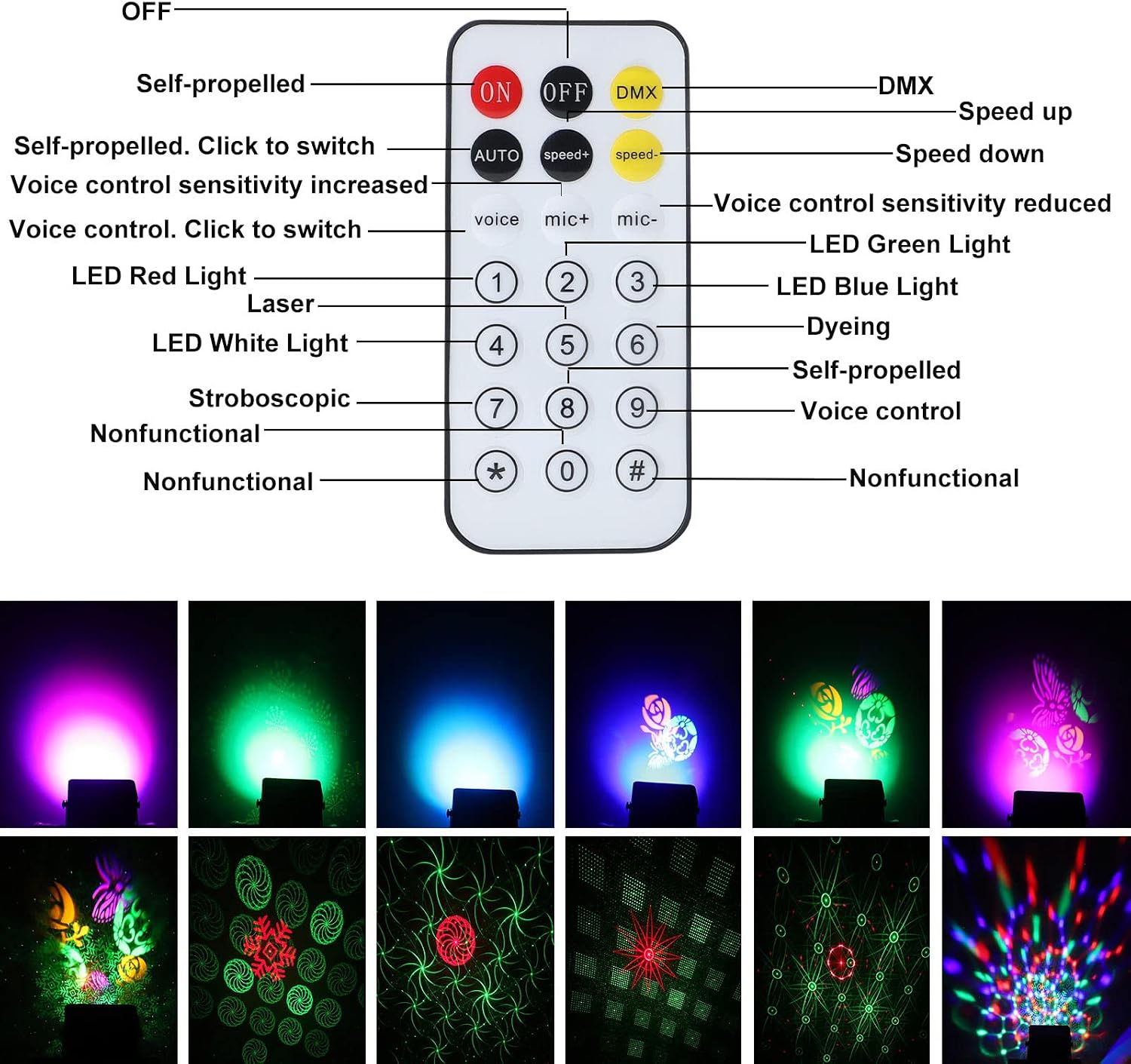
This image provides a detailed diagram of the U`King ZQ05154 remote control, with each button clearly labeled for its function, such as ON/OFF, DMX, speed control, voice control sensitivity, and specific light color/effect selection. Below the remote, a grid of twelve small images illustrates various light patterns and colors that can be activated, serving as a visual guide for remote operation.
- ON/OFF: Powers the unit on or off.
- DMX: Activates DMX control mode.
- AUTO: Activates automatic mode, cycling through various effects.
- Speed +/-: Adjusts the speed of effects in Auto mode.
- Voice/Mic +/-: Adjusts sound activation sensitivity.
- LED Red/Green/Blue/White: Activates specific LED colors.
- Dyeing: Activates the dyeing light effect.
- Stroboscopic: Activates the strobe effect.
- Numbered Buttons (1-9): Selects various pre-programmed patterns and effects.
7.2 Working Modes:
- Auto Mode: The light automatically cycles through various colors and patterns, creating a dynamic display.
- Strobe Mode: The lights flash rapidly, creating a pulsating effect.
- Sound Activated Mode: The lighting effects change in response to ambient music or sound, detected by the built-in microphone. Adjust sensitivity using the remote.
- Master/Slave Mode: Connect multiple ZQ05154 units via DMX cables. Set one unit as 'Master' and others as 'Slave' to synchronize their operation without a DMX controller.

This image features three distinct panels illustrating the lighting effects of the U`King ZQ05154. The top panel shows a solid red wash, the middle panel displays dynamic multi-colored beams, and the bottom panel combines multi-colored beams with intricate patterns projected onto the floor, showcasing the versatility of the stage light.

This composite image presents nine individual panels, each showcasing a different light projection from the U`King ZQ05154 stage light. These include solid blue, green, and purple washes, as well as complex red and green laser patterns, swirling multi-color effects, and intricate geometric designs, highlighting the device's pattern generation capabilities.
8. DMX Control
The U`King ZQ05154 supports DMX512 control, allowing integration into professional lighting setups. The device utilizes 16 DMX channels for comprehensive control over its various functions.
DMX Connection:
- Connect a DMX cable from your DMX controller's output to the DMX IN port of the ZQ05154.
- For multiple units, connect the DMX OUT of the first unit to the DMX IN of the next, creating a daisy chain.
- Set the DMX address for each unit using the control panel or remote. Ensure each unit has a unique starting address.
For detailed DMX channel assignments and values, please refer to the specific DMX chart provided with the product or available from the manufacturer's support resources. This chart will outline control over individual LEDs, lasers, patterns, speed, dimming, and strobe functions.
9. Maintenance
Regular maintenance ensures optimal performance and extends the lifespan of your stage light.
- Cleaning: Periodically clean the lenses and housing with a soft, lint-free cloth. Do not use abrasive cleaners or solvents. Ensure the device is unplugged before cleaning.
- Ventilation: Keep ventilation openings clear of dust and debris to prevent overheating.
- Storage: When not in use, store the device in a cool, dry place, away from extreme temperatures and humidity.
- Inspection: Regularly check power cords and DMX cables for any signs of damage. Replace damaged cables immediately.
10. Troubleshooting
If you encounter issues with your U`King ZQ05154 stage light, refer to the following common problems and solutions:
- No Power:
- Check if the power cord is securely connected to both the device and the power outlet.
- Verify that the power outlet is functional.
- Ensure the ON/OFF switch on the remote or device is in the 'ON' position.
- No Light Output:
- Confirm the unit is powered on.
- Check the selected operating mode (Auto, Sound, DMX).
- If in DMX mode, ensure the DMX controller is sending signals and the address is correct.
- Remote Control Not Working:
- Ensure there are no obstructions between the remote and the device's IR receiver.
- Replace the remote control battery if necessary.
- Sound Activated Mode Not Responding:
- Increase the microphone sensitivity using the 'Mic+' button on the remote.
- Ensure there is sufficient sound for the microphone to detect.
- DMX Control Issues:
- Verify DMX cable connections are secure and correct (IN to OUT).
- Check DMX addresses for conflicts or incorrect settings.
- Ensure the DMX controller is functioning correctly.
11. Warranty and Support
The U`King ZQ05154 stage light is covered by a manufacturer's warranty. For specific warranty terms and conditions, please refer to the documentation included with your purchase or contact U`King customer support. If you require technical assistance or have questions not covered in this manual, please reach out to the seller or manufacturer's customer service team.

This image contains two panels. The top panel shows a group of smiling people celebrating Christmas, illuminated by festive light patterns. The bottom panel depicts individuals in Halloween costumes, surrounded by green laser patterns, illustrating the stage light's use in themed events and celebrations.


