
1. Introduction
This manual provides instructions for the CHICIRIS 6-in-1 Air Quality Monitor. This device is designed to detect and display levels of Carbon Dioxide (CO2), Formaldehyde (HCHO), Total Volatile Organic Compounds (TVOC), Particulate Matter (PM2.5), Temperature, and Humidity. It is suitable for monitoring air quality in various indoor environments such as homes, offices, and schools.

Image 1: The CHICIRIS Air Quality Monitor can be used in various settings including homes, greenhouses, warehouses, and during raw material processing to monitor air quality.
2. Safety Information
- Do not expose the device to extreme temperatures, humidity, or direct sunlight.
- Avoid dropping or subjecting the device to strong impacts.
- Do not attempt to disassemble or repair the device yourself. Contact qualified personnel for service.
- Keep the device away from water and other liquids.
- Use only the provided USB power cable for charging.
3. Package Contents
Verify that all items are present in the package:
- 1 x CHICIRIS 6-in-1 Air Quality Monitor
- 1 x User Manual
- 1 x USB Power Cable
4. Product Overview
The CHICIRIS Air Quality Monitor features a compact design with an intelligent color screen display for clear readings. It integrates multiple sensors to provide comprehensive air quality data.
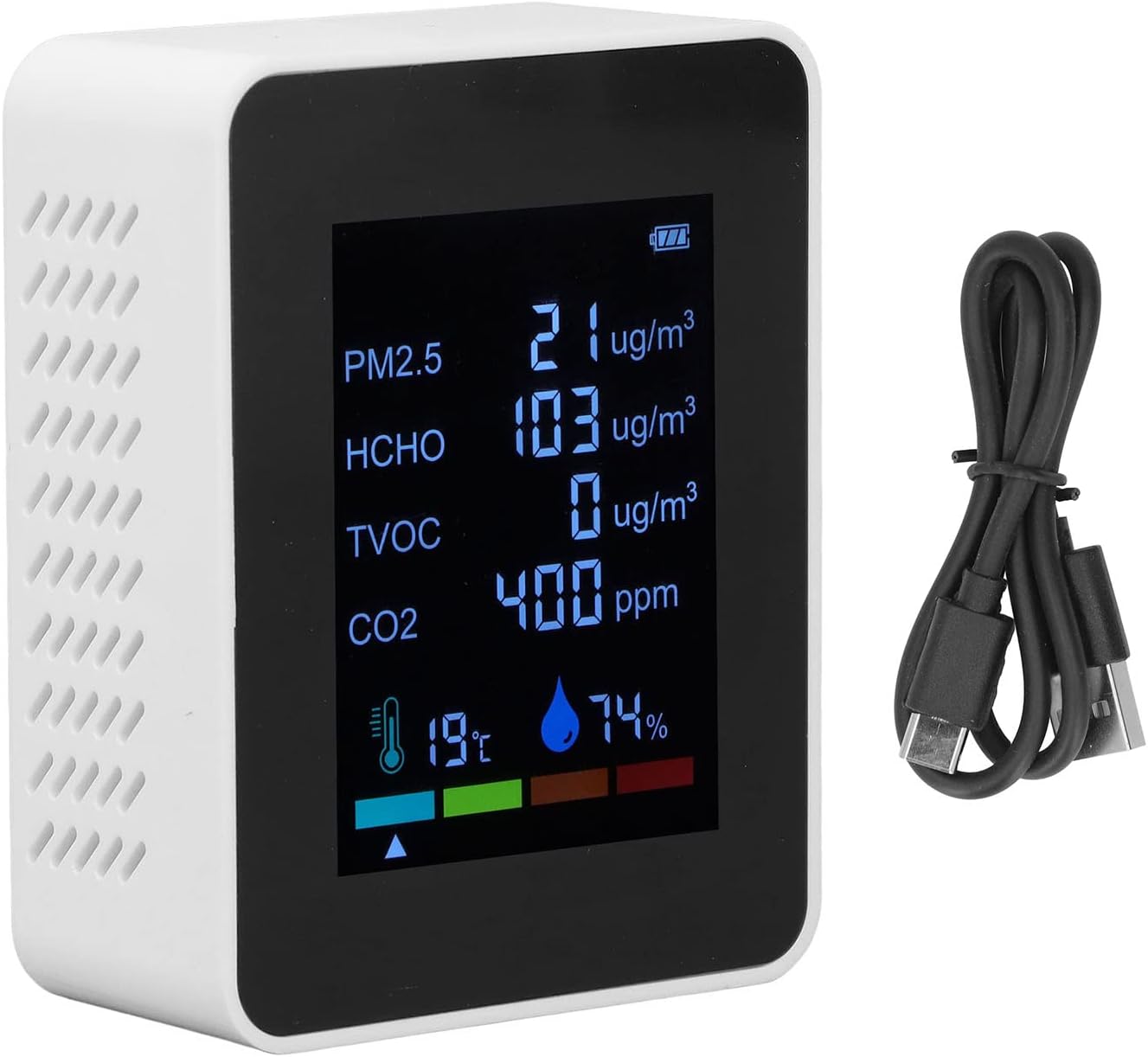
Image 2: Front view of the monitor, showing the LCD color screen with real-time readings for PM2.5, HCHO, TVOC, CO2, temperature, and humidity. A USB charging cable is also shown.

Image 3: Icons illustrating key features: real-time monitoring, audible alarm, automatic calibration, USB charging, battery indicator, and quality assurance.

Image 4: Back view of the monitor, displaying the product label with model number (VT-6IN1), charging type (Type-C), voltage (5V DC), battery capacity (1200mAh), and examination ranges for PM2.5, HCHO, TVOC, CO, and CO2.
5. Setup
- Charging: Before first use, fully charge the device using the provided USB power cable. Connect the cable to the device's USB port and a compatible 5V USB power adapter (not included). The battery indicator on the screen will show charging status.
- Placement: Place the monitor in the desired location, ensuring proper airflow around the device for accurate readings. Avoid placing it near vents, windows, or direct heat sources.
6. Operating Instructions
- Power On/Off: Long press the power button (usually located on the side or front) to turn the device on. Long press again to turn it off.
- Initial Calibration: Upon powering on, the device may undergo an initial calibration period. Allow approximately 15 minutes for the sensors to stabilize and provide accurate readings.
- Real-time Monitoring: The LCD color screen will display real-time measurements for CO2, HCHO, TVOC, PM2.5, temperature, and humidity.
- Alert Mode: The device features an alert mode where the screen color changes to indicate different levels of air pollution, providing a visual warning.
7. Understanding Air Quality Readings
The monitor uses a color-coded system to help interpret air quality levels:

Image 5: A visual representation of air quality levels, ranging from 'Excellent air quality' (green) to 'Heavy pollution' (red), with 'Light pollution' (yellow) and 'Moderate pollution' (orange) in between.
Refer to the device's display for specific thresholds and corresponding color indicators for each pollutant.
8. Maintenance
- Cleaning: Gently wipe the device with a soft, dry cloth. Do not use abrasive cleaners or solvents.
- Storage: When not in use for extended periods, store the device in a cool, dry place away from direct sunlight.
- Battery: For optimal battery life, avoid fully discharging the battery frequently. Recharge when the battery indicator is low.
9. Troubleshooting
- Device not turning on: Ensure the device is fully charged. Connect it to a power source using the USB cable and try again.
- Inaccurate readings: Allow the device sufficient time (approx. 15 minutes) to stabilize after powering on. Ensure it is placed in an area with good airflow and away from direct heat or strong drafts.
- Short battery life: Ensure the device is fully charged. Battery performance can vary with usage and environmental conditions.
- Screen not displaying: Check if the device is powered on. If the issue persists, try recharging the device.
10. Specifications
| Feature | Specification |
|---|---|
| Item Type | 6-in-1 Air Quality Monitor |
| Voltage | 5V |
| Material | ABS |
| Weight | Approx. 184g / 6.5oz |
| Battery | Polymer Lithium Battery 1200mAh (Included) |
| Display Mode | LCD Color Screen + Backlight Display |
| PM2.5 Detection Range | 0-999μg/m³ |
| HCHO Detection Range | 0-1999μg/m³ |
| TVOC Detection Range | 0-1999μg/m³ |
| CO2 Detection Range | 400-5000PPM |
| Temperature Detection Range | 0-50℃ |
| Humidity Detection Range | 0-99%RH |
| Product Size | Approx. 9x7x3.4cm / 3.5x2.8x1.3in |
| Power Source | USB Charging |
| Alarm | Audible |
| Operating Humidity | 99 percent (maximum) |
| Upper Temperature Rating | 50 Degrees Celsius |
| Sensor Type | TVOC (also CO2, HCHO, PM2.5, Temp, Humidity) |
| Model Number | CHICIRIS94avtbc0x5686-12 |

Image 6: Product dimensions: 9cm (3.5in) height, 7cm (2.8in) width, and 3.4cm (1.3in) depth.
11. Important Note
Please be aware that due to manufacturing variations, you may receive either a 'new type' or 'old type' version of this product. Both versions offer the same core functionality and specifications. The specific type received is random.

Image 7: Comparison showing visual differences between the 'New Type' and 'Old Type' models of the air quality monitor. Both types provide the same functionality.
12. Warranty and Support
For warranty information or technical support, please refer to the contact details provided with your purchase documentation or visit the official CHICIRIS website. Keep your purchase receipt as proof of purchase.