
Introduction
Thank you for choosing the PELONIS 16" Height Adjustable Silent Oscillating Pedestal Fan. This manual provides important information regarding the safe operation, assembly, maintenance, and troubleshooting of your fan. Please read it thoroughly before use and retain it for future reference.
Important Safety Instructions
When using electrical appliances, basic precautions should always be followed to reduce the risk of fire, electric shock, and injury to persons, including the following:
- Read all instructions before using this fan.
- Use this fan only as described in this manual. Other uses not recommended may cause fire, electric shock, or injury to persons.
- To protect against electrical shock, do not place fan in window, immerse unit, plug or cord in water or spray with liquids.
- Close supervision is necessary when any appliance is used by or near children.
- Unplug from outlet when not in use, when moving fan from one location to another, and before cleaning.
- Do not operate any fan with a damaged cord or plug, or after the fan malfunctions or has been dropped or damaged in any manner.
- Do not run cord under carpeting. Do not cover cord with throw rugs, runners, or similar coverings. Do not route cord under furniture or appliances. Arrange cord away from traffic area and where it will not be tripped over.
- Do not insert or allow foreign objects to enter any ventilation or exhaust opening as this may cause an electric shock or fire, or damage the fan.
- Do not block air intakes or exhaust in any manner. Do not use on soft surfaces, like a bed, where openings may become blocked.
- This fan is intended for household use only.
Product Overview
The PELONIS PSPF18AR40B fan is designed for efficient air circulation with multiple features for user convenience.
Key Features:
- 12-speed fan configuration for precise airflow control.
- Remote control included for convenient operation from a distance.
- Adjustable height settings: 28", 40", and 52" to suit various needs.
- Clear LED display on the fan for easy monitoring of settings.
- 12-Hour Programmable Timer for automatic shut-off.
- Oscillation function for wide area coverage or static adjustment for direct airflow.
- Power off memory function retains last settings upon restart.
- Easy to carry handle for portability.
Components:

Front view of the assembled PELONIS 16-inch Pedestal Fan, showcasing its sleek black design and stable round base.

Angled view of the PELONIS Pedestal Fan, highlighting its height-adjustable pole and the fan head's position.
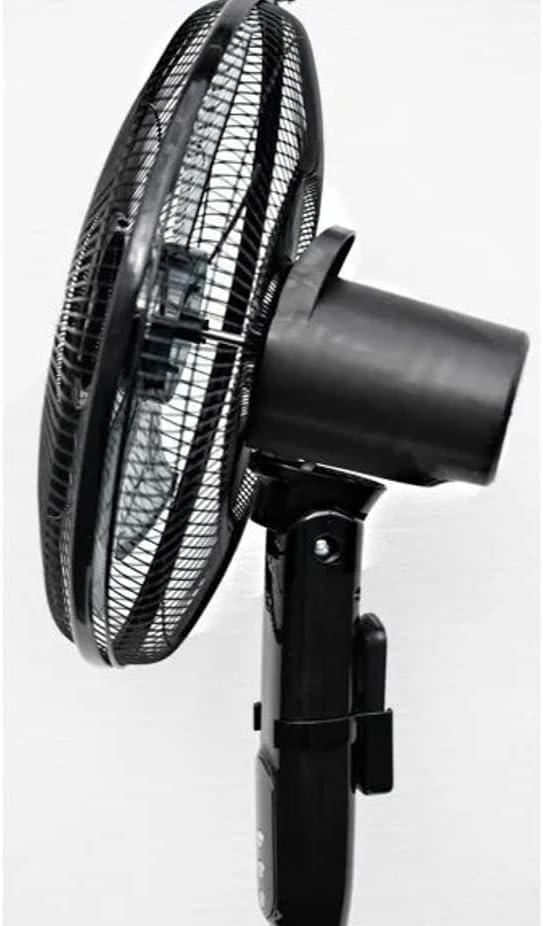
Side view of the fan head, demonstrating the adjustable tilt mechanism for directing airflow up or down.

Close-up view of the fan's protective grill and internal blades, designed for silent and efficient air movement.

Detailed view of the control panel on the fan's stand, showing the power, oscillation, and mode buttons.
Setup and Assembly
Please follow these steps to assemble your PELONIS Pedestal Fan:
- Carefully unpack all components from the box and ensure all parts are present: fan head, front and rear grills, fan blade, motor shaft nut, grill retaining nut, stand pole, base, and remote control.
- Attach the stand pole to the base. Secure it firmly using the provided screws or locking mechanism.
- Mount the motor housing onto the top of the stand pole. Ensure it clicks securely into place.
- Remove the grill retaining nut and motor shaft nut from the motor shaft.
- Place the rear grill onto the motor housing, aligning the locating pins. Secure it with the grill retaining nut.
- Slide the fan blade onto the motor shaft, ensuring the notch on the blade aligns with the pin on the shaft. Secure it with the motor shaft nut, tightening it counter-clockwise.
- Attach the front grill to the rear grill, ensuring the clips snap together firmly around the edge. Secure with any provided screws or clips.
- Adjust the height of the fan by loosening the height adjustment collar on the stand pole, extending or retracting the pole, and then tightening the collar firmly.
- Place the fan on a firm, level surface.
- Plug the power cord into a standard electrical outlet.
Operating Instructions
Control Panel and Remote Control:
The fan can be operated using the control buttons on the fan's stand or the included remote control. The LED display will show current settings.
- Power Button (ⓘ): Press to turn the fan ON or OFF.
- Speed Button (✴): Press repeatedly to cycle through the 12 available fan speeds. The current speed will be indicated on the LED display.
- Oscillation Button (⌣): Press to activate or deactivate the oscillation function, which allows the fan head to sweep from side to side.
- Timer Button (on Remote): Press to set the auto-off timer in 1-hour increments, up to 12 hours. The fan will automatically turn off after the set time.
- Mode Button (on Remote): Cycles through different fan modes (e.g., Normal, Natural, Sleep, if available). Refer to the LED display for the active mode.
Adjusting Fan Height and Tilt:
- Height Adjustment: Loosen the height adjustment collar on the main pole, extend or retract the inner pole to the desired height (28", 40", or 52"), and then firmly tighten the collar.
- Tilt Adjustment: Gently push the fan head up or down to adjust the vertical angle of airflow. The fan head will hold its position once set.
Maintenance and Cleaning
Regular cleaning will help maintain your fan's performance and extend its lifespan.
- Always unplug the fan from the power outlet before cleaning.
- Use a soft, damp cloth to wipe the exterior surfaces of the fan. Do not use abrasive cleaners or solvents.
- To clean the fan blades and inside the grills, you may need to disassemble the front grill. Refer to the assembly instructions in reverse. Use a soft cloth or a vacuum cleaner with a brush attachment to remove dust and debris.
- Ensure all parts are completely dry before reassembling and plugging the fan back in.
- Store the fan in a cool, dry place when not in use, preferably in its original packaging.
Troubleshooting
If you experience issues with your fan, please consult the following common problems and solutions:
| Problem | Possible Cause | Solution |
|---|---|---|
| Fan does not turn on. | Not plugged in; power outlet not working; fan not assembled correctly. | Ensure the power cord is securely plugged into a working outlet. Check circuit breaker. Verify all assembly steps are correct. |
| Fan is noisy. | Loose parts; fan not on a level surface; dust accumulation. | Check for any loose screws or components. Place fan on a stable, level surface. Clean fan blades and grills. |
| Oscillation not working. | Oscillation function not activated; obstruction. | Press the oscillation button. Ensure there are no obstructions preventing the fan head from turning. |
| Remote control not working. | Batteries are dead or incorrectly inserted; remote out of range. | Replace batteries (ensure correct polarity). Point remote directly at the fan's receiver. Ensure you are within effective range. |
Specifications
| Brand | PELONIS |
| Model Number | PSPF18AR40B / VES760 |
| Colour | Black |
| Product Dimensions | 38.1 x 12.7 x 88.9 cm (15 x 5 x 35 inches) |
| Item Weight | 3.5 kg (7.7 lbs) |
| Number of Speeds | 12 |
| Special Features | Oscillating, Digital Display, Remote Control, 12-Hour Timer, Power Off Memory |
| Power Source | Corded Electric |
Warranty and Support
This PELONIS Pedestal Fan is an Amazon Renewed product and comes with a 90-day Amazon Renewed warranty. This warranty covers any defects in material or workmanship under normal use during the warranty period.
For warranty claims or technical support, please contact Amazon Renewed customer service directly through your Amazon purchase history. They will assist you with troubleshooting or arranging a replacement/refund as per the warranty terms.


