
1. Safety Information
Please read all instructions carefully before assembly and use. Retain this manual for future reference.
- Ensure all parts are present and undamaged before assembly. Do not use if any parts are missing or broken.
- Assemble the chair on a soft, clean surface to prevent damage to the chair or floor.
- Do not overtighten screws during assembly.
- This chair is designed to support a maximum weight of 350 pounds (158 kg). Exceeding this limit may cause damage or injury.
- Keep children and pets away from the assembly area.
- Avoid standing on the chair or using it as a step stool.
- Do not expose the chair to direct sunlight or extreme temperatures for prolonged periods.
- Note: Due to the characteristics of the spring, the support effect of the gaming chair may decrease if the weight is ≥300lbs.
2. Package Contents
Verify that all components are included in your package:
- Backrest
- Seat Cushion
- Armrests (2)
- Base (5-star)
- Casters (5)
- Gas Lift Cylinder
- Gas Lift Cover
- Mechanism Plate
- Lumbar Support Pillow (with massage function)
- Headrest Pillow
- Hardware Pack (screws, washers, Allen wrench)

Image: The Dowinx Gaming Chair Model 6659 in Grey, showcasing its ergonomic design and included pillows.
3. Assembly Instructions
Follow these steps to assemble your Dowinx Gaming Chair:
- Attach Casters to Base: Insert the five casters into the holes at the end of each leg of the 5-star base. Push firmly until they click into place.
- Insert Gas Lift: Place the gas lift cylinder into the center hole of the base. Cover it with the gas lift cover.
- Attach Mechanism Plate to Seat: Align the mechanism plate with the screw holes on the underside of the seat cushion. Ensure the front arrow on the mechanism plate points towards the front of the seat. Secure with screws and washers using the provided Allen wrench.
- Attach Armrests to Seat: Secure the armrests to the sides of the seat cushion using the designated screws.
- Connect Seat to Gas Lift: Carefully place the assembled seat cushion onto the gas lift cylinder.
- Attach Backrest to Seat: Align the backrest with the metal brackets on the seat cushion. Secure with screws.
- Install Pillows: Attach the headrest pillow to the top of the backrest and the lumbar support pillow to the lower back area using their elastic straps.
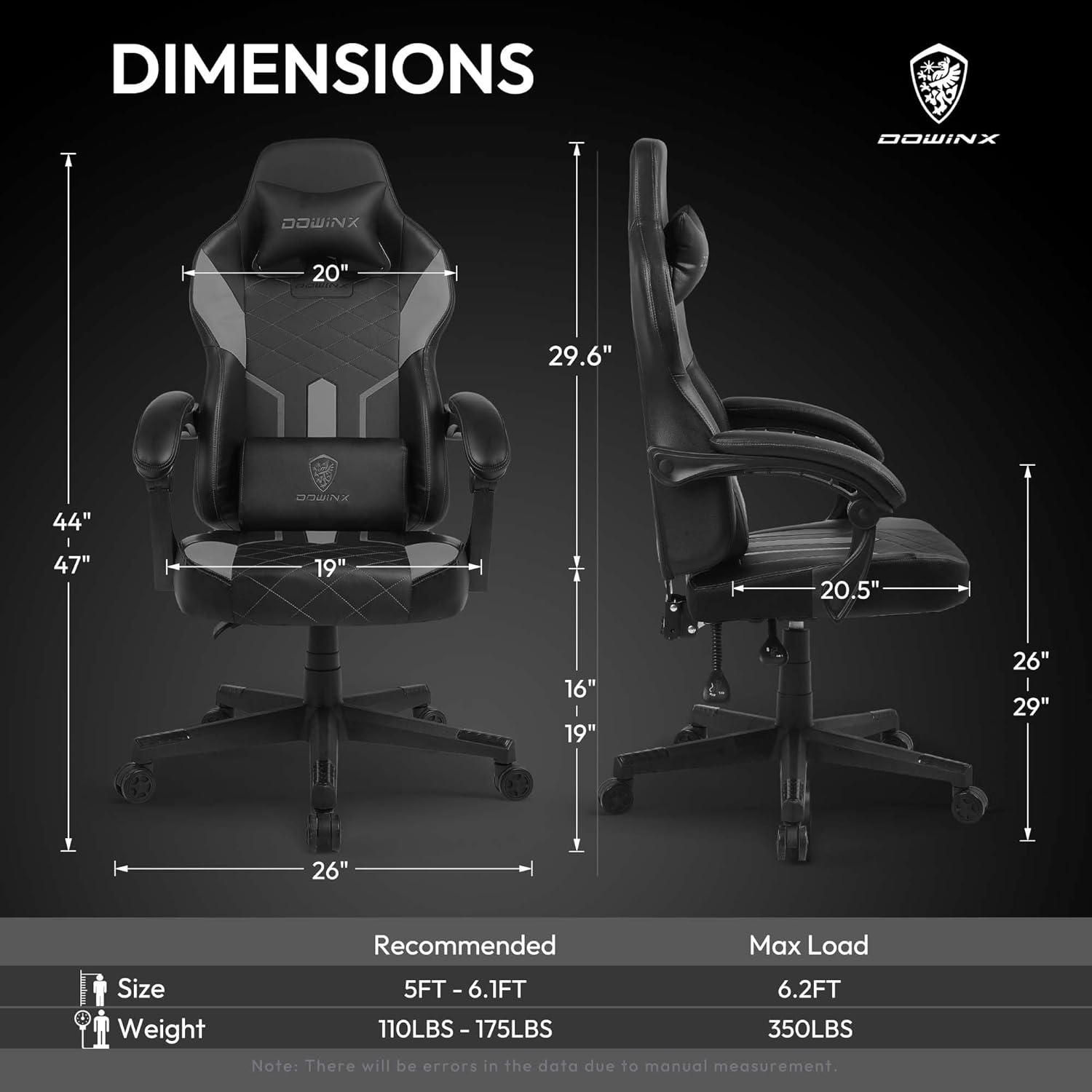
Image: Diagram illustrating the dimensions of the Dowinx Gaming Chair, including seat height, depth, and backrest height.
4. Operating Instructions
Familiarize yourself with the chair's adjustable features for optimal comfort:
- Height Adjustment: Pull the lever located on the right side of the seat upwards to raise or lower the chair. Release the lever at your desired height.
- Reclining Function: Pull the lever on the left side of the seat upwards to recline the backrest. Push the lever down to lock the backrest in place. The chair reclines up to 135 degrees.
- Tilt Tension: The knob under the seat allows you to adjust the tension of the chair's rocking motion. Turn clockwise to increase tension, counter-clockwise to decrease.
- Armrest Adjustment: The armrests can be adjusted vertically. Press the button on the side of the armrest to unlock, adjust to your preferred height, and release to lock.
- Lumbar Support Massage: The lumbar pillow features a massage function. Connect the USB cable from the pillow to a compatible USB power source (e.g., computer, power bank) to activate.
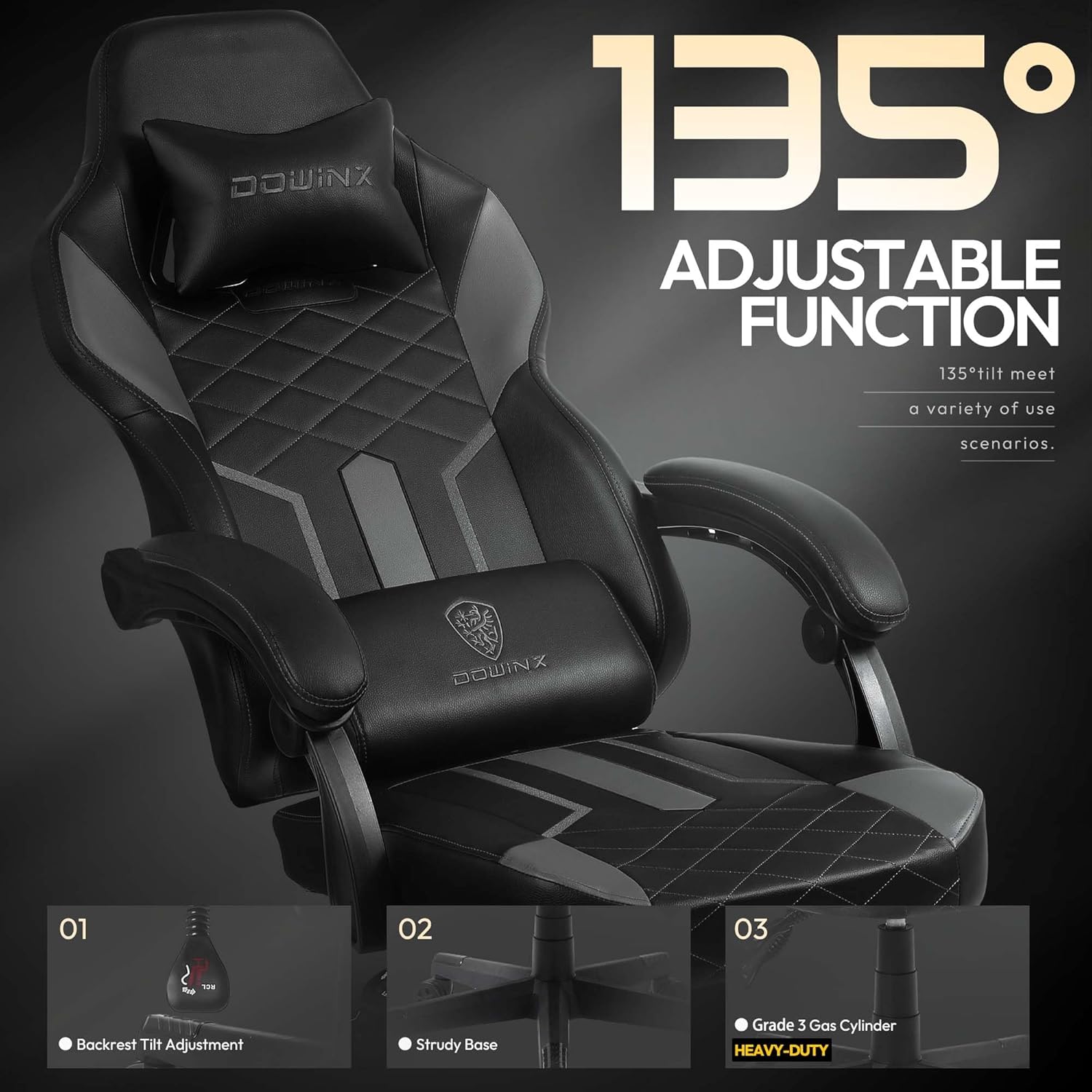
Image: Visual representation of the chair's 135-degree adjustable recline function, highlighting the backrest tilt adjustment, sturdy base, and Grade 3 gas cylinder.

Image: Close-up of the adjustable lumbar pillow with massage function, designed to follow the natural curve of the back and provide comfort via USB power.
Video: Official Dowinx Gaming Chair 6659 Series Detail Show. This video highlights various features and design aspects of the chair.
5. Maintenance
Proper maintenance will extend the life of your chair:
- Cleaning: Wipe clean with a damp cloth. Avoid harsh chemicals or abrasive cleaners that may damage the PU leather.
- Fasteners: Periodically check all screws and bolts to ensure they are tight. Retighten as necessary to maintain stability.
- Moving Parts: If any moving parts (e.g., casters, gas lift) become stiff or noisy, apply a small amount of silicone-based lubricant.
- Avoid Overloading: Do not exceed the maximum weight recommendation of 350 pounds.
6. Troubleshooting
If you encounter any issues, refer to the following common problems and solutions:
| Problem | Possible Cause | Solution |
|---|---|---|
| Chair wobbles or feels unstable. | Loose screws or uneven assembly. | Check and tighten all screws. Ensure the base is properly assembled and casters are fully inserted. |
| Chair does not adjust height. | Gas lift cylinder malfunction or lever issue. | Ensure the height adjustment lever is fully engaged. If the issue persists, the gas lift may need replacement. |
| Backrest does not recline or lock. | Recline mechanism issue or lever not fully engaged. | Check the recline lever for proper engagement. Ensure no obstructions are preventing movement. |
| Squeaking noises during use. | Friction between moving parts or loose connections. | Apply silicone-based lubricant to moving joints, especially where metal parts meet. Check and tighten all screws. |
| Lumbar massage not working. | USB power issue or cable connection. | Ensure the USB cable is securely connected to a working power source. Try a different USB port or power adapter. |
7. Specifications
| Feature | Detail |
|---|---|
| Brand | Dowinx |
| Model Number | 6659 |
| Color | Grey |
| Product Dimensions (D x W x H) | 30.7"D x 10.2"W x 20.9"H |
| Maximum Weight Recommendation | 350 Pounds |
| Material | PU Leather, Sponge (Fill Material) |
| Special Features | Pocket Spring Cushion, Ergonomic Design, Reclining (up to 135 degrees), Rolling Casters, Lumbar Massage |
| Included Components | Waist Cushion, Headrest |
| Item Weight | 41.4 pounds |
| Assembly Required | Yes |

Image: Illustration of the chair's quality components, including the aluminum thickened tilt mechanism, Grade 3 gas cylinder, heavy-duty nylon base, and quiet swiveling casters.
8. Warranty and Support
Dowinx stands behind the quality of its products:
- Returns: Our gaming chairs offer 30-day returns.
- Replacement Parts: Enjoy one year of replacement parts coverage. We have our own factory to guarantee replacement parts are the same as the original.
- Customer Support: For any questions, concerns, or warranty claims, please contact Dowinx customer service through the retailer's platform or visit the official Dowinx website.

Image: Hero image from the Dowinx brand story, representing the company's commitment to quality and user experience.


