
1. Introduction
Thank you for choosing the FYDEE Turntable Record Player Model A6. This device combines classic vinyl playback with modern connectivity options, including Bluetooth, AUX input, and RCA output. Please read this manual carefully before use to ensure proper operation and to maximize your listening experience. Keep this manual for future reference.
2. Safety Information
- Power Source: Use only the provided 5V/1A power adapter. Ensure the voltage matches your local power supply.
- Water and Moisture: Do not expose the unit to rain, moisture, or dripping/splashing liquids. Do not place objects filled with liquids, such as vases, on the unit.
- Ventilation: Ensure adequate ventilation around the unit. Do not block ventilation openings.
- Heat: Keep the unit away from heat sources such as radiators, heat registers, stoves, or other apparatus (including amplifiers) that produce heat.
- Cleaning: Unplug the unit from the power outlet before cleaning. Use a soft, dry cloth. Do not use liquid cleaners or aerosol cleaners.
- Servicing: Do not attempt to service this product yourself. Refer all servicing to qualified service personnel.
- Children: Keep out of reach of children. Small parts may pose a choking hazard.
3. Package Contents
Verify that all items listed below are included in your package:
- 1 x FYDEE Turntable Record Player
- 1 x Dust Cover
- 1 x User Manual
- 1 x 5V/1A Power Adapter
- 1 x RCA Audio Cable
- 1 x 45 RPM Adapter
4. Product Overview
Familiarize yourself with the components of your FYDEE Turntable:
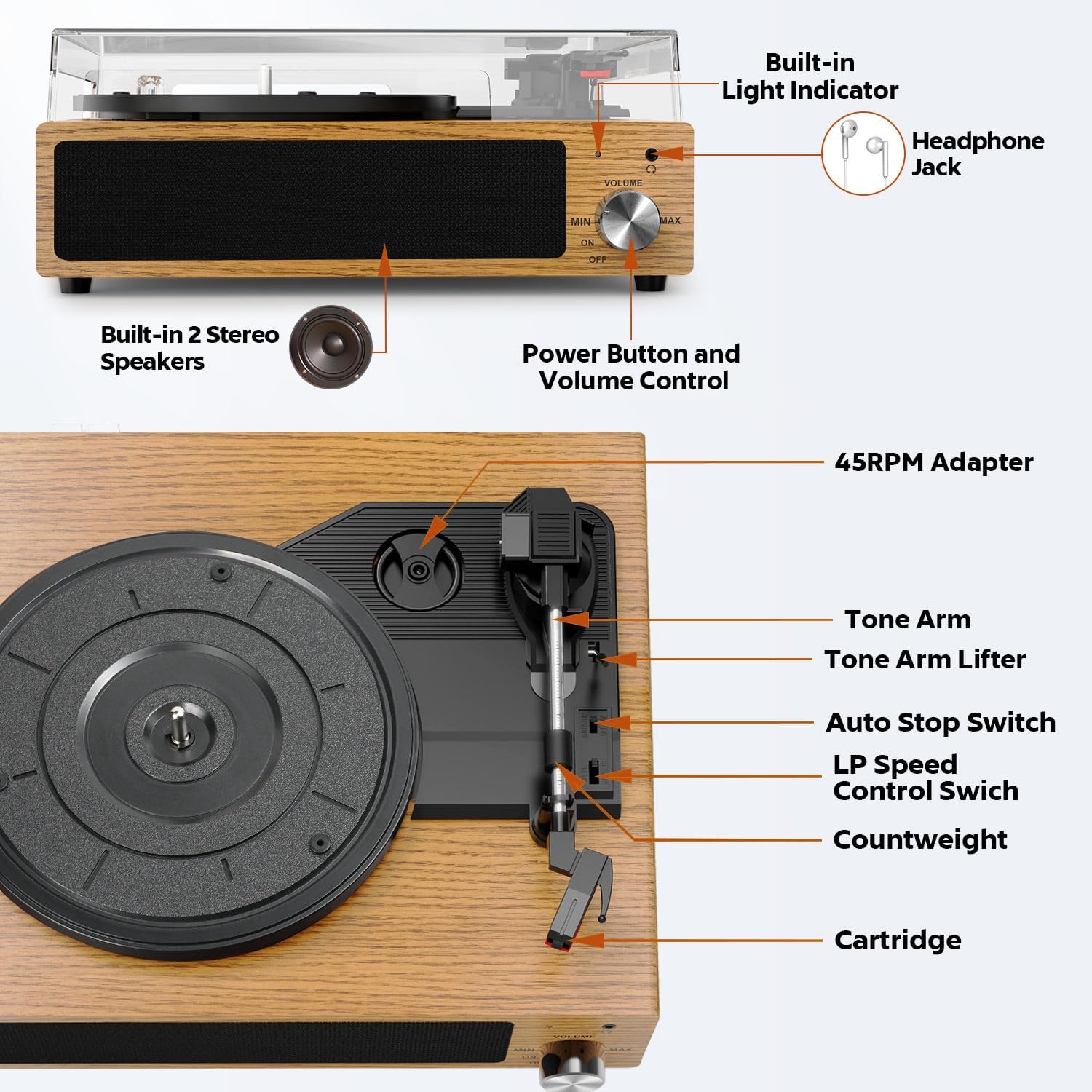
- Power Button and Volume Control: Turns the unit on/off and adjusts speaker volume.
- Built-in Light Indicator: Indicates power status and Bluetooth pairing status.
- Headphone Jack (3.5mm): For private listening with headphones.
- Built-in Stereo Speakers: Provides integrated audio output.
- 45 RPM Adapter: Used for playing 7-inch records with a large center hole.
- Tone Arm: Holds the cartridge and stylus.
- Tone Arm Lifter: Raises and lowers the tone arm gently.
- Auto Stop Switch: Enables or disables the automatic stop function at the end of a record.
- LP Speed Control Switch: Selects playback speed (33, 45, or 78 RPM).
- Counterweight: Adjusts the tracking force of the stylus.
- Cartridge: Contains the stylus for reading vinyl grooves.
5. Setup
5.1 Unpacking and Placement
- Carefully remove the turntable from its packaging.
- Place the turntable on a stable, level surface away from direct sunlight, heat sources, and excessive dust or vibrations.
- Remove any protective materials from the tone arm and platter.
5.2 Installing the Dust Cover
Gently align the hinges of the dust cover with the slots on the back of the turntable and insert them. The dust cover helps protect the turntable from dust when not in use.
5.3 Connecting Power
Connect the provided 5V/1A power adapter to the DC 5V input port on the back of the turntable, then plug the adapter into a wall outlet.
5.4 Adjusting the Counterweight
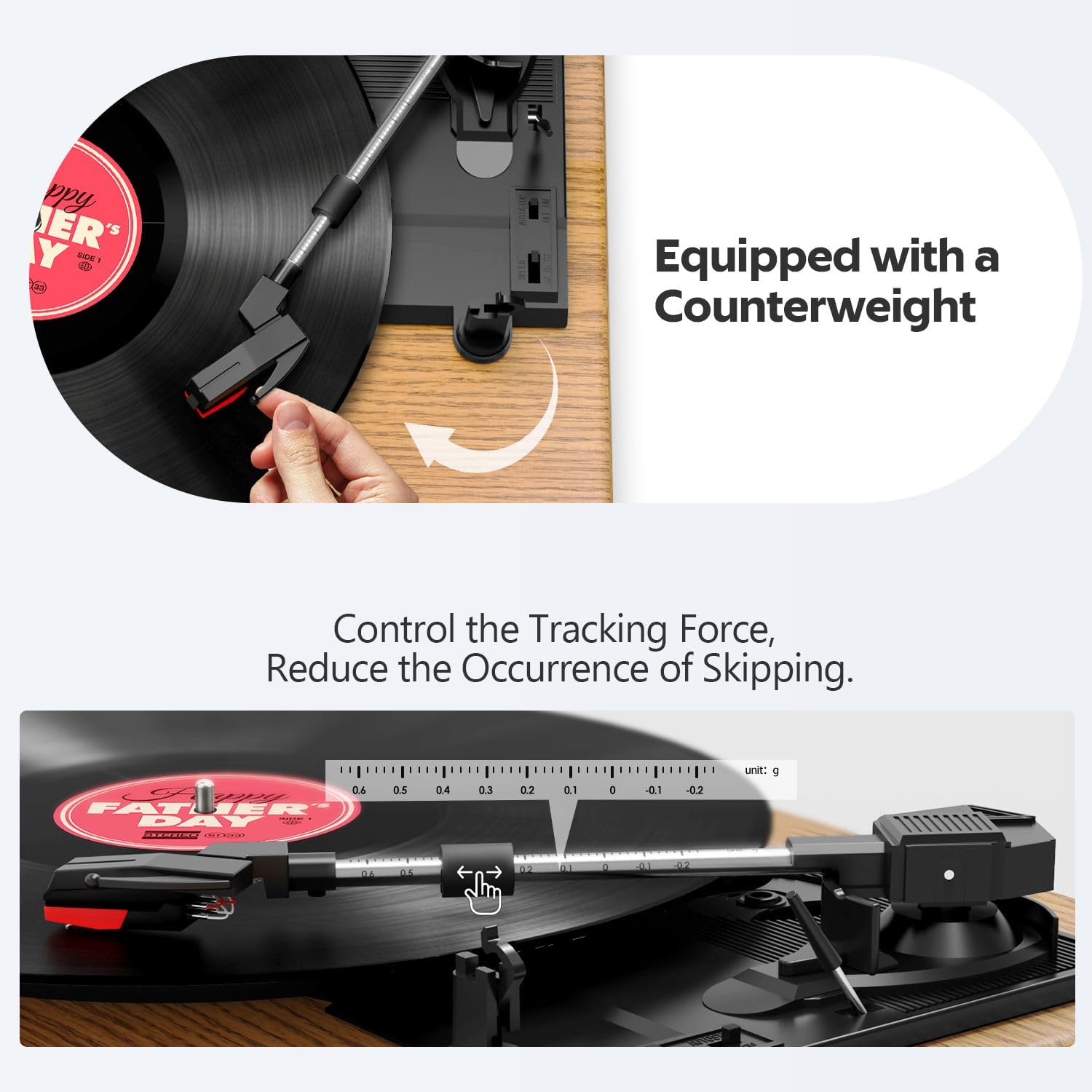
The counterweight helps ensure proper tracking force, preventing skipping and protecting your records. Refer to the image below for guidance.
- Gently remove the stylus protector.
- Balance the tone arm by rotating the counterweight until the tone arm floats horizontally.
- Once balanced, hold the counterweight steady and rotate the numbered ring to '0'.
- Rotate the entire counterweight (including the numbered ring) to the recommended tracking force (typically 2-3 grams for most cartridges, consult cartridge specifications if available).
6. Operating Instructions
6.1 Basic Playback
- Turn the Power Button/Volume Control knob clockwise to power on the unit. The indicator light will illuminate.
- Place a vinyl record on the turntable platter.
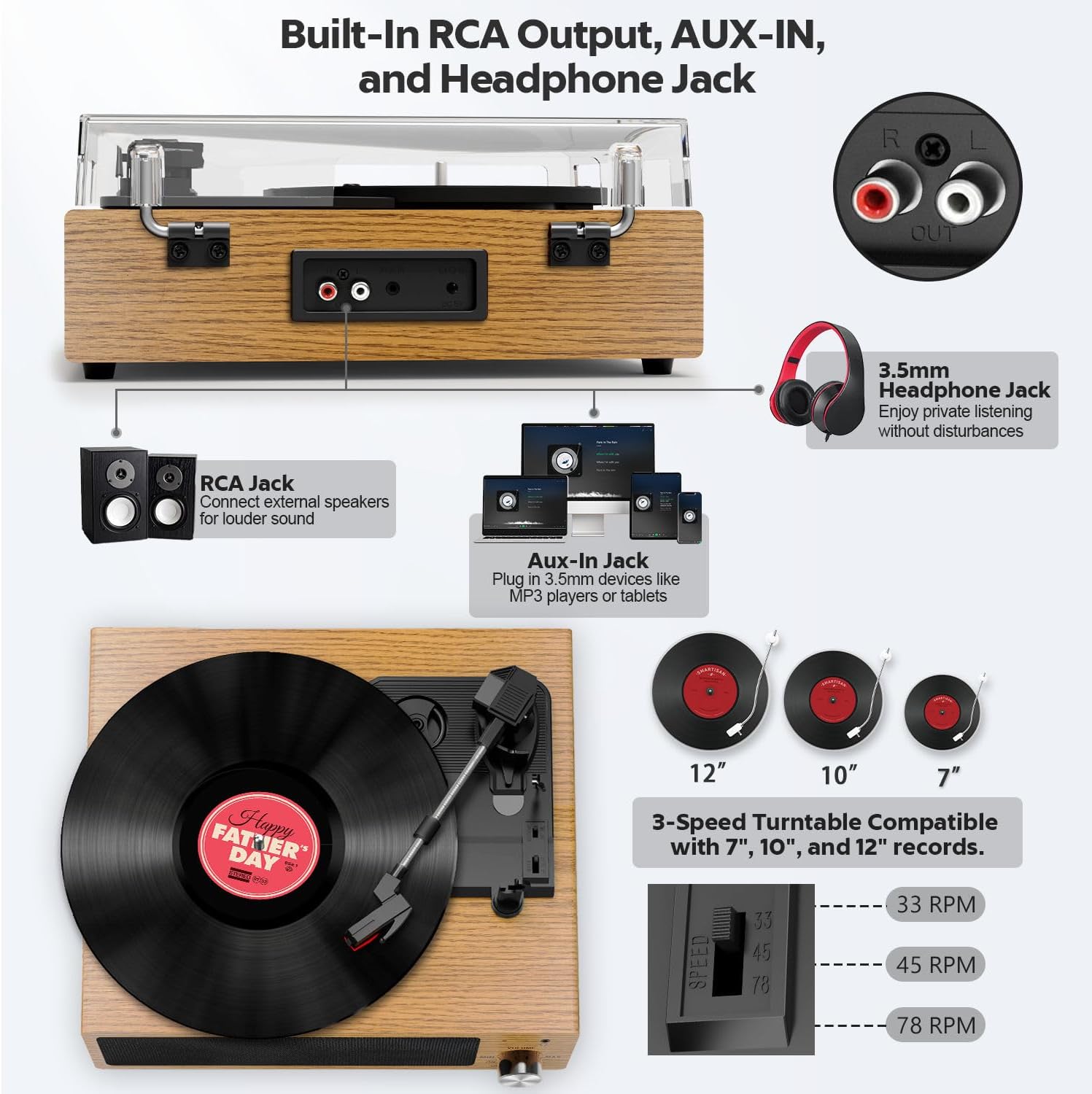
- Select the appropriate speed (33, 45, or 78 RPM) using the LP Speed Control Switch. For 7-inch records with a large center hole, place the 45 RPM Adapter on the spindle before placing the record.
- Set the Auto Stop Switch to ON if you want the turntable to stop spinning automatically at the end of the record, or OFF for continuous play.
- Gently lift the tone arm using the Tone Arm Lifter.
- Move the tone arm over the desired starting groove of the record.
- Slowly lower the tone arm onto the record using the Tone Arm Lifter. The music will begin to play.
- Adjust the volume using the Power Button/Volume Control knob.
- To stop playback, lift the tone arm, return it to its rest, and turn the volume knob counter-clockwise until the unit powers off.

7. Bluetooth Connectivity
The FYDEE Turntable can receive Bluetooth audio from compatible devices, acting as a Bluetooth speaker.
7.1 Pairing with a Bluetooth Device
- Turn on the turntable. The indicator light will flash, indicating it is in Bluetooth pairing mode.
- On your smartphone, tablet, or other Bluetooth-enabled device, enable Bluetooth and search for available devices.
- Select "A6" from the list of devices.
- Once paired, the indicator light on the turntable will stop flashing and remain solid. You can now stream audio from your device to the turntable.

Note: This turntable acts as a Bluetooth receiver only. It cannot transmit Bluetooth signals to other devices like wireless headphones or external Bluetooth speakers.
8. External Audio Connections
8.1 RCA Output
The RCA output ports (red for right channel, white for left channel) allow you to connect the turntable to an external amplifier or powered speakers for a louder and more expansive sound experience. Use the provided RCA cable to connect the turntable to the corresponding input on your audio system.
8.2 AUX Input
The 3.5mm AUX-IN port allows you to connect external audio devices such as smartphones, tablets, or MP3 players directly to the turntable, using its built-in speakers for playback. Connect a 3.5mm audio cable from your device's headphone jack to the AUX-IN port on the turntable.
8.3 Headphone Jack
For private listening, plug any standard 3.5mm headphones into the headphone jack located on the front panel of the turntable.
9. Maintenance
9.1 Cleaning the Turntable
- Always unplug the turntable from the power outlet before cleaning.
- Use a soft, dry, lint-free cloth to wipe the cabinet and dust cover.
- Do not use harsh chemicals, abrasive cleaners, or waxes, as these can damage the finish.
9.2 Cleaning the Stylus
- A dirty stylus can degrade sound quality and damage your records.
- Use a soft brush specifically designed for stylus cleaning, brushing gently from back to front.
- Avoid touching the stylus with your fingers.
9.3 Stylus Replacement
The stylus is a consumable part and will wear out over time. While the FYDEE turntable features a durable stylus, it will eventually require replacement for optimal sound quality. Consult the manufacturer's website or contact customer support for information on compatible replacement styli.
10. Troubleshooting
If you encounter issues with your turntable, please refer to the following common problems and solutions:
| Problem | Possible Cause | Solution |
|---|---|---|
| No power | Power adapter not connected; Power outlet not working; Unit not turned on. | Ensure power adapter is securely connected. Test the power outlet with another device. Turn the Power Button/Volume Control knob clockwise. |
| No sound from speakers | Volume too low; Headphones connected; External speakers connected via RCA. | Increase volume. Disconnect headphones. If using RCA output, sound will be directed to external speakers. |
| Skipping or distorted sound | Record is dirty or damaged; Stylus is dirty or worn; Tracking force incorrect; Turntable not level; Excessive vibration. | Clean the record. Clean or replace the stylus. Re-adjust the counterweight. Place the turntable on a stable, level surface. Avoid placing near vibrating objects. |
| Bluetooth not pairing | Turntable not in pairing mode; Device Bluetooth off; Device too far. | Ensure turntable is on and indicator light is flashing. Enable Bluetooth on your device. Move device closer to the turntable (within 10 meters). |
| Auto-stop not working | Auto Stop Switch is OFF; Some records may not trigger auto-stop. | Ensure Auto Stop Switch is ON. Some records, especially older or non-standard ones, may have a lead-out groove that does not trigger the auto-stop mechanism. |
11. Specifications
| Feature | Detail |
|---|---|
| Brand | FYDEE |
| Model Number | A6 |
| Color | Natural Wood |
| Material | Wood |
| Playback Speeds | 33, 45, 78 RPM |
| Compatible Record Sizes | 7, 10, 12 inches |
| Connectivity | Bluetooth, AUX-IN, RCA Output, 3.5mm Headphone Jack |
| Special Features | Adjustable 3 speeds, adjustable counterweight, anti-skate mechanism, built-in stereo speakers, removable dust cover, auto-stop function. |
| Compatible Devices | MP3 Player, Smartphone, Tablet |
| Power Supply | 5V/1A DC Adapter |
| Item Weight | 2.67 Kilograms |
12. Warranty and Support
12.1 Manufacturer's Warranty
This FYDEE Turntable Record Player Model A6 comes with a one-year manufacturer's warranty, including replacement in case of repair. Please retain your proof of purchase for warranty claims.
12.2 Customer Support
For any questions, technical assistance, or warranty inquiries, please contact FYDEE customer service. Refer to the contact information provided with your product or visit the official FYDEE website for support details.

