
1. Introduction
This manual provides detailed instructions for the safe and effective use of your Generic WS-887 Mini Wireless Portable Bluetooth Speaker. This compact and lightweight speaker is designed for portability and offers multiple playback options, including Bluetooth, TF/SD card, and FM radio. It also supports hands-free phone calls.
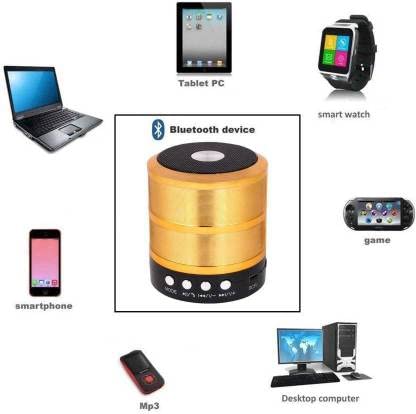
Image: The WS-887 speaker being placed into a handbag, highlighting its mini size and portability.
2. Product Features
- Wireless Connectivity: Bluetooth version V4.0 for stable connection up to 15 meters.
- Portable Design: Compact and lightweight, weighing 250g, for easy transport.
- Multi-mode Playback: Supports Bluetooth, TF/SD card, and built-in FM radio.
- Hands-free Calling: Built-in microphone for phone calls while playing music.
- Long Battery Life: 820mAh battery provides 5-6 hours of lasting time.
- Quick Charging: Fully charges in approximately 2 hours via 5V/1.0A input.
- Durable: Waterproof design for outdoor use.
- Broad Compatibility: Connects with smartphones, tablets, laptops, and various Bluetooth-enabled devices.
3. Setup
3.1 Charging the Speaker
Before initial use, fully charge the speaker. Connect the provided USB charging cable to the DC5V port on the speaker and the other end to a USB power source (e.g., computer USB port, USB wall adapter 5V/1.0A). The charging indicator light will illuminate during charging and turn off once fully charged. A full charge takes approximately 2 hours.
3.2 Powering On/Off
To power on the speaker, press and hold the power button (often integrated with the Play/Pause button) for a few seconds until you hear an audible prompt. To power off, repeat the process.
3.3 Bluetooth Pairing
- Ensure the speaker is powered on and in Bluetooth mode. If not, press the 'MODE' button until you hear the Bluetooth pairing prompt. The indicator light will flash, indicating it is ready for pairing.
- On your device (smartphone, tablet, laptop), enable Bluetooth and search for available devices.
- Select "WS-887" from the list of found devices.
- Once paired, you will hear a confirmation sound, and the indicator light will stop flashing.
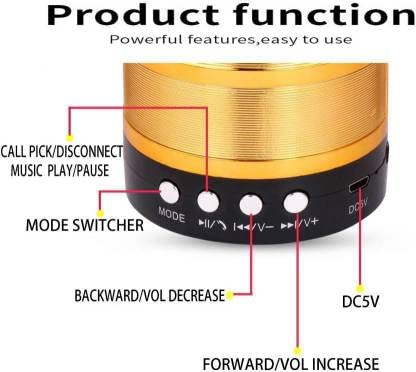
Image: The WS-887 speaker and its compatibility with various Bluetooth devices, including smartphones, tablets, and desktop computers.
4. Operating Instructions
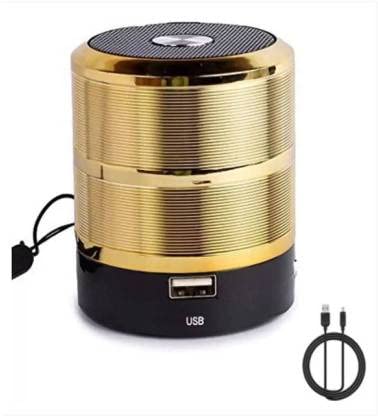
Image: Detailed view of the WS-887 speaker's function buttons and ports.
4.1 Button Functions
- MODE Button: Press to switch between Bluetooth, FM Radio, and TF/SD Card playback modes.
- Play/Pause / Call Button (►▮ / ☎):
- Short Press: Play/Pause music.
- Short Press (during incoming call): Answer call.
- Short Press (during call): End call.
- Long Press: Power On/Off (if applicable, or dedicated power button).
- Backward / Volume Decrease Button (◀◀ / V-):
- Short Press: Go to previous track (Bluetooth/TF/SD mode) or previous FM station (FM mode).
- Long Press: Decrease volume.
- Forward / Volume Increase Button (►► / V+):
- Short Press: Go to next track (Bluetooth/TF/SD mode) or next FM station (FM mode).
- Long Press: Increase volume.
4.2 TF/SD Card Playback
Insert a TF/SD card with MP3 audio files into the designated slot. The speaker will automatically switch to TF/SD card mode and begin playing music. Use the Forward/Backward buttons to navigate tracks and the Volume buttons to adjust volume.
4.3 FM Radio Operation
Press the 'MODE' button to switch to FM radio mode. The speaker will automatically scan and save available FM stations. Use the Forward/Backward buttons to switch between saved stations. Long press the Play/Pause button to initiate an automatic station scan.
5. Maintenance
- Cleaning: Use a soft, dry cloth to clean the speaker. Do not use abrasive cleaners or solvents.
- Storage: Store the speaker in a cool, dry place away from direct sunlight and extreme temperatures.
- Battery Care: To prolong battery life, avoid fully discharging the battery frequently. Charge the speaker regularly, even if not in use for extended periods.
- Water Resistance: The speaker is waterproof. However, avoid submerging it in water for prolonged periods or exposing it to high-pressure water jets. Ensure the charging port cover is securely closed when near water.
6. Troubleshooting
| Problem | Possible Cause | Solution |
|---|---|---|
| Speaker does not power on. | Battery is depleted. | Charge the speaker for at least 30 minutes. |
| Cannot pair via Bluetooth. | Speaker is not in pairing mode; device Bluetooth is off; too far from speaker. | Ensure speaker is in Bluetooth pairing mode (flashing light). Turn on Bluetooth on your device. Move device closer to speaker (within 15m). |
| No sound or low volume. | Volume too low on speaker or connected device; incorrect mode. | Increase volume on both speaker and connected device. Ensure correct mode (Bluetooth, TF/SD, FM). |
| Poor FM radio reception. | Weak signal; interference. | Relocate the speaker to an area with better reception. Perform an automatic station scan again. |
| TF/SD card not recognized. | Card inserted incorrectly; unsupported format; damaged card. | Reinsert the TF/SD card correctly. Ensure files are in MP3 format. Try a different TF/SD card. |
7. Specifications
| Model Name | WS-887 |
| Brand | Generic |
| Speaker Maximum Output Power | 10 Watts |
| Frequency Response | 80 GHz |
| Connectivity Technology | Bluetooth, Wireless |
| Audio Output Mode | Stereo |
| Mounting Type | Tabletop Mount |
| Speaker Type | Woofer |
| Bluetooth Version | V4.0 |
| Bluetooth Range | Up to 15 Metres |
| Is Waterproof | TRUE |
| Control Method | Touch |
| Controller Type | Touch Control |
| Number of Microphones | 1 |
| Item Weight | 250 Grams |
| Compatible Devices | Smartphone, Tablet, Laptop, Various Bluetooth-enabled Devices |
| Power Source | Battery Powered |
| Audio Driver Type | Dynamic Driver |
| Battery Capacity | 820 Milliamp Hours |
| Battery Charge Time | 2 Hours |
| Battery Average Life | 5-6 Hours |
| Input | 5V/1.0A |
| Output | 5W |
8. Warranty and Support
Specific warranty information for the Generic WS-887 Mini Wireless Portable Bluetooth Speaker is not provided in this manual. For warranty claims, technical support, or service inquiries, please contact the retailer where the product was purchased or refer to any warranty documentation included with your product packaging.