Introduction
Welcome to the user manual for your Tuanzi MaxO MAXo 4G Mini Rugged Android 12 Smartphone. This guide provides essential information on setting up, operating, and maintaining your device. Please read this manual thoroughly to ensure optimal performance and longevity of your smartphone.
Package Contents
- 1x Tuanzi MaxO MAXo Phone
- 1x Protective Film
- 1x Charging Cable
- 1x Instruction Manual
- 1x Charger
Product Overview
Key Features
- IP68 Waterproof & Rugged Outdoor Design: Fully sealed to withstand rain, dust, and submersion, suitable for outdoor activities.
- Mini Android 12 Smartphone: Compact size (101*50.7*17.2mm) for portability and easy one-hand operation.
- Global 4G Bands & Dual SIM Support: Unlocked for worldwide use with dual nano-SIM slots for flexible connectivity.
- Octa-Core Performance & 6GB+128GB Memory: Equipped with a 2.0GHz 8-core processor and ample storage for smooth multitasking.
- Long-Lasting 3000mAh Battery & Compact HD Display: High-capacity battery for extended use, paired with a 3.88-inch HD screen.
- Instant Side-Key Flashlight & Face Recognition: Features a super-bright flashlight and secure facial recognition technology for quick unlocking.
Device Layout
The image below illustrates the front and back of the Tuanzi MaxO MAXo smartphone, highlighting its display, camera module, and robust exterior.

Front and back view of the Tuanzi MaxO MAXo smartphone, showing the display, camera, and rugged design.
Setup
1. SIM Card Installation
- Locate the SIM card tray on the side of the device.
- Insert the SIM ejector tool (not included, use a thin pin) into the small hole next to the tray to open it.
- Place your Nano-SIM card(s) and/or microSD card into the tray with the gold contacts facing down.
- Carefully push the tray back into the slot until it is flush with the device.
2. Initial Power On
- Press and hold the Power button (usually on the right side) until the screen lights up.
- Follow the on-screen prompts to select your language, region, and connect to a Wi-Fi network.
3. Basic Setup
- Sign in with your Google account to access the Play Store and other Google services.
- Set up your screen lock method (PIN, pattern, password, or facial recognition).
- Review and adjust privacy settings as desired.
Operating Instructions
Making Calls
Tap the Phone icon on the home screen. Enter the phone number using the dial pad or select a contact from your address book. Tap the call button to initiate the call.
Sending Messages
Open the Messaging app. Tap the 'Start chat' or '+' icon to compose a new message. Enter the recipient's number or select from contacts, then type your message and send.
Using the Camera
Open the Camera app from your home screen or app drawer. You can switch between photo and video modes. Tap the shutter button to capture an image or start/stop video recording.

A hand holding the Tuanzi MaxO MAXo smartphone, demonstrating the camera interface.
Connectivity (Wi-Fi, Bluetooth)
Access Wi-Fi and Bluetooth settings from the Quick Settings panel (swipe down from the top of the screen) or through the main Settings app. Toggle Wi-Fi or Bluetooth on/off and select networks or devices to connect.
Visual Guide
Product Images
Explore various aspects of your Tuanzi MaxO MAXo smartphone through these detailed images.


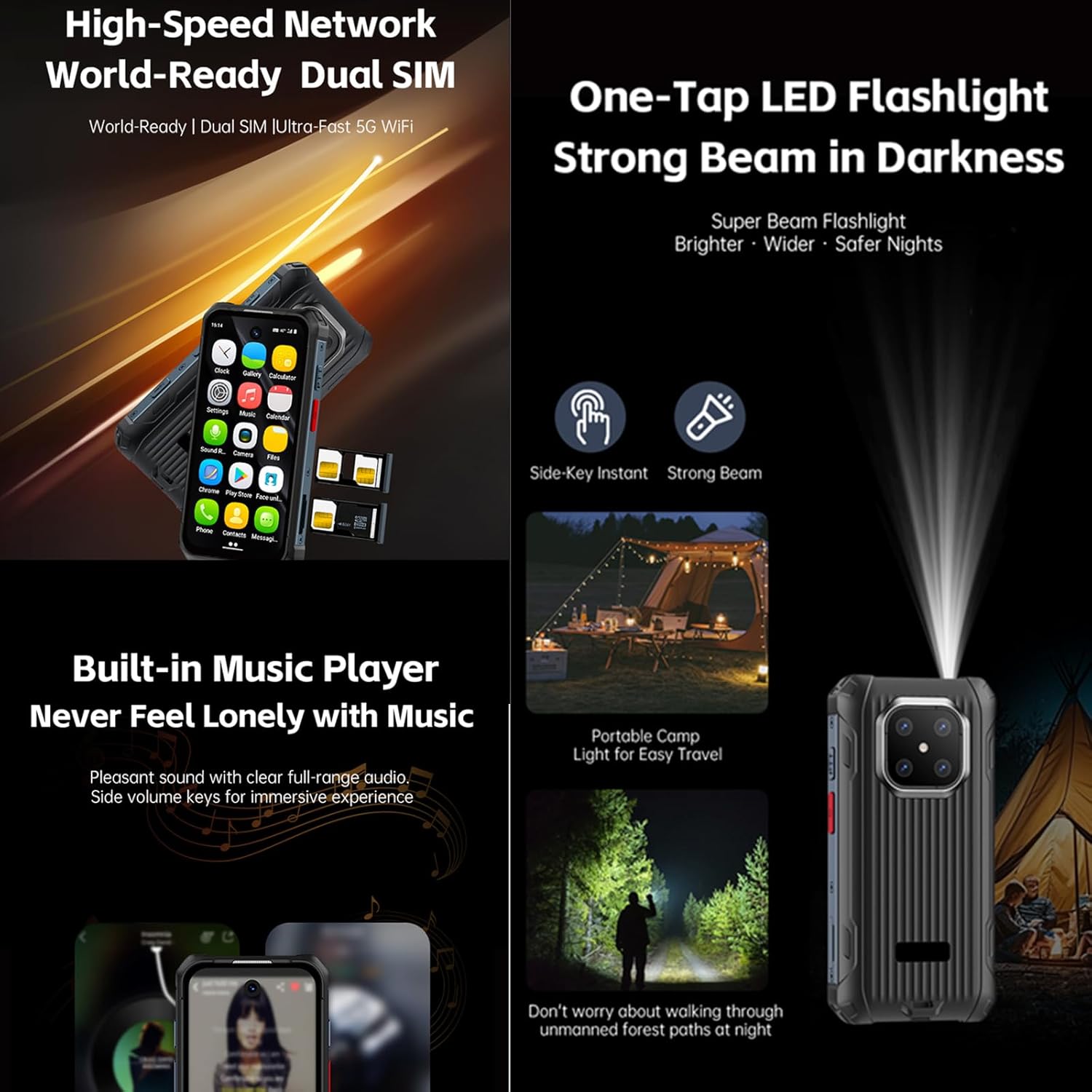
Official Product Videos
No official product videos from the seller for the Tuanzi MaxO MAXo smartphone were found that meet the specified criteria for inclusion in this manual.
Maintenance
Cleaning Your Device
Use a soft, lint-free cloth to clean the screen and body of your phone. Avoid using harsh chemicals or abrasive materials, as these can damage the device's surfaces and waterproof seals. For stubborn dirt, a slightly damp cloth with water is recommended.
Battery Care
To prolong battery life, avoid exposing your phone to extreme temperatures. Charge your device using the provided charger and cable. Do not leave the phone charging for extended periods after it has reached 100% to prevent overcharging.
Software Updates
Regularly check for and install software updates to ensure your device has the latest features, security patches, and performance improvements. You can usually find this option in the 'Settings' menu under 'System' or 'About phone'.
Troubleshooting
Common Issues and Solutions
- Device not turning on: Ensure the battery is charged. Connect the charger and wait a few minutes before attempting to power on again.
- Screen unresponsive: Try restarting the device by holding down the Power button for about 10-15 seconds.
- Network connectivity issues: Check if your SIM card is properly inserted. Toggle Airplane Mode on and off. Restart your device. Verify your mobile data or Wi-Fi settings.
- Apps crashing or freezing: Clear the cache and data for the problematic app in 'Settings > Apps'. If the issue persists, uninstall and reinstall the app.
- Slow performance: Close unused apps, clear cache regularly, and ensure sufficient storage space. Consider a factory reset as a last resort (back up your data first).
Technical Specifications
| Feature | Specification |
|---|---|
| Product Dimensions | 3.98 x 2 x 0.68 inches |
| Item Model Number | MAXo |
| Operating System | Android 12 |
| RAM | 6 GB |
| Memory Storage Capacity | 128 GB |
| Wireless Communication Technologies | Bluetooth, Cellular, NFC, Wi-Fi |
| Connectivity Technologies | Wi-Fi |
| Special Features | Water Resistant |
| Scanner Resolution | 384 x 854 |
| Other Camera Features | Front |
| Audio Jack | No headphone jack |
| Form Factor | Bar |
| Color | MaxO Black 128GB |
| Battery Power Rating | 3800 Milliamp Hours |
| Phone Talk Time | 18 Hours |
| Phone Standby Time (with data) | 7 days |
| Manufacturer | PADY-Soyes |
| Date First Available | April 26, 2022 |
| Standing Screen Display Size | 3.88 Inches |
| CPU Model | MediaTek Helio |
| CPU Speed | 2000 MHz |
| Resolution | 384 x 854 |
| Wireless Carrier | Unlocked for All Carriers |
Safety Information
Please observe the following safety guidelines to prevent damage to your device or injury to yourself:
- Do not attempt to disassemble, repair, or modify the device yourself.
- Keep the device away from extreme heat sources, direct sunlight, and open flames.
- Avoid exposing the device to strong magnetic fields.
- Use only manufacturer-approved chargers and accessories.
- Dispose of the device and its battery responsibly according to local regulations.
Warranty and Support
Your Tuanzi MaxO MAXo smartphone comes with a standard manufacturer's warranty. For detailed warranty terms, conditions, and support, please refer to the warranty card included in your package or contact Tuanzi customer service directly. Keep your proof of purchase for warranty claims.


