
1. Product Overview
The NOYAFA C-600 is a versatile 7-in-1 digital water quality tester designed for accurate measurement of multiple parameters. This device is suitable for various applications including household drinking water, hydroponics, pools, and aquariums. It provides readings for Temperature (TEM), Electrical Conductivity (EC), Total Dissolved Solids (TDS), Oxidation-Reduction Potential (ORP), pH, Salinity, and Specific Gravity (S.G).

The NOYAFA C-600 Digital pH Tester, shown here with the included pH buffer powders for calibration.
2. Package Contents
Please ensure all items are present in the package before proceeding with setup:
- NOYAFA C-600 Digital Water Quality Tester Unit
- Protective Cap
- pH Buffer Powders (pH 4.00, pH 6.86, pH 9.18)
- Operation Manual
- Lithium Metal Batteries (pre-installed or included)

An exploded view illustrating the main components of the NOYAFA C-600 Digital pH Tester, including the protective cap, high precision probe, screen display, power button, mode/calibration key, data hold/temperature key, and battery compartment.
3. Setup
3.1 Battery Installation
The NOYAFA C-600 requires 1 Lithium Metal battery. Ensure the battery is correctly inserted into the battery compartment, observing the polarity markings. The battery compartment is located at the top of the device, under the cap.
3.2 Initial Check
Before first use, remove the protective cap from the probe. Press the Power button to turn on the device. The display should light up, indicating the device is ready for use. If the display does not turn on, check battery installation.
3.3 Calibration
For accurate readings, regular calibration is essential. The device comes with pH buffer powders (4.00, 6.86, 9.18) for calibration. Follow these steps:
- Prepare the buffer solutions by dissolving each powder packet in 250ml of distilled water.
- Turn on the meter.
- Rinse the electrode with distilled water and blot dry with a clean tissue.
- Immerse the electrode into the pH 6.86 buffer solution.
- Press and hold the 'MODE/CAL' button until 'CAL' appears on the display. The meter will automatically recognize the buffer solution and calibrate.
- Once calibration is complete (reading stabilizes), rinse the electrode again.
- Repeat steps 4-6 for pH 4.00 and pH 9.18 buffer solutions, calibrating in ascending or descending order as per the specific model's manual.
4. Operating Instructions
The NOYAFA C-600 offers 7 measurement modes. To switch between modes, press the 'MODE/CAL' button. The current mode will be displayed on the screen.
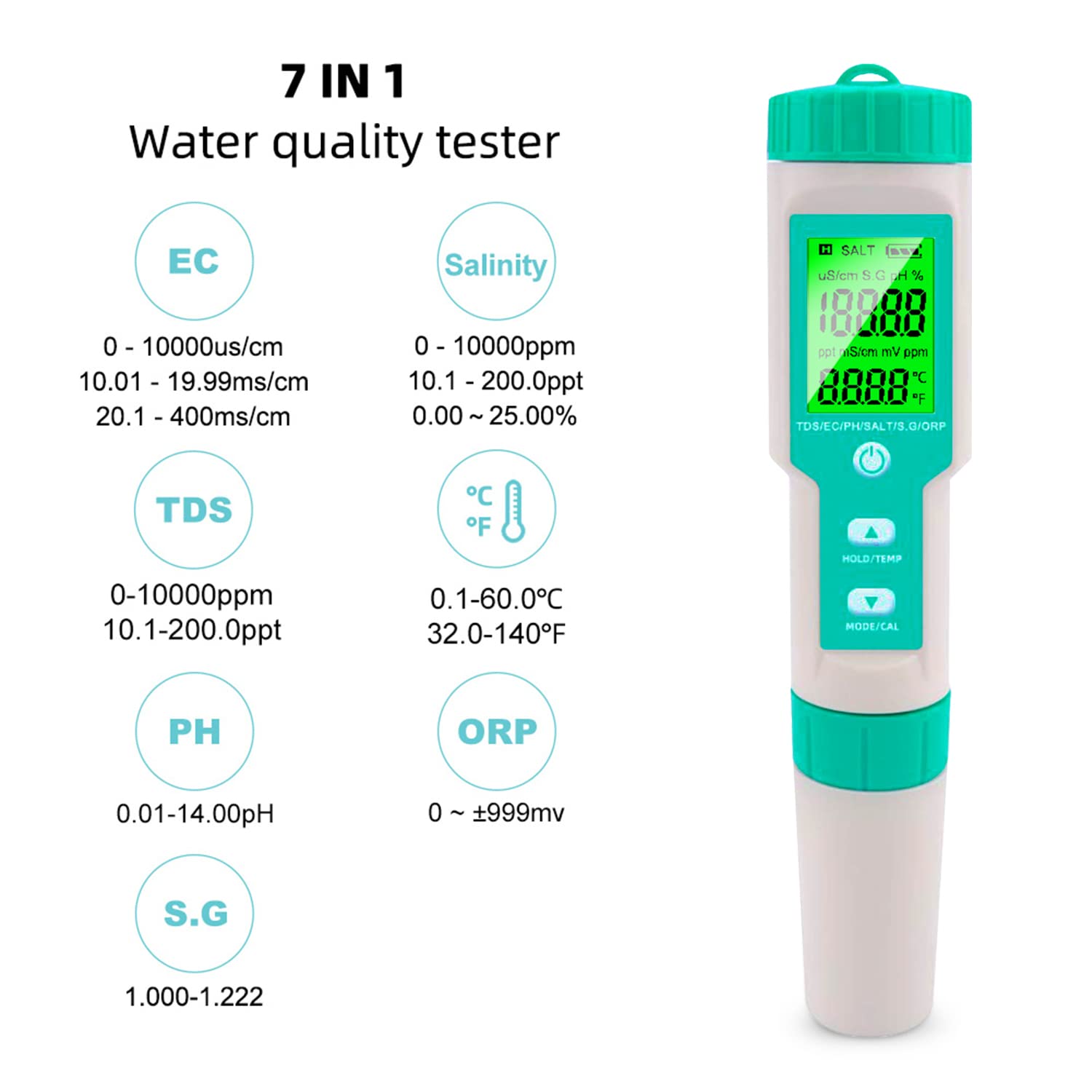
This image highlights the seven different water quality parameters the NOYAFA C-600 tester can measure: EC, Salinity, TDS, Temperature, pH, ORP, and S.G.
4.1 Taking Measurements
- Ensure the device is clean and calibrated.
- Immerse the electrode into the sample water up to the maximum immersion line.
- Gently stir the electrode to remove any air bubbles.
- Wait for the reading to stabilize on the display.
- For pH measurement, the color chart on the meter will indicate the pH level. For other measurements, refer to the meter's digital display.
- Press the 'HOLD/TEMP' button to hold the current reading on the screen. Press again to release.
- Long press the 'HOLD/TEMP' button to switch between Celsius and Fahrenheit temperature units.

A visual representation of the pH scale from acidic to alkaline, demonstrating how the NOYAFA C-600 tester displays pH readings, such as 6.58 pH at 30.3°C.
5. Maintenance
5.1 Cleaning the Electrode
After each use, rinse the electrode with distilled water to prevent contamination. Do not use tap water or harsh chemicals. Gently blot dry with a clean, soft tissue. Do not rub the electrode.
5.2 Storage
Always replace the protective cap after use to keep the electrode moist and protected. Store the meter in a cool, dry place, away from direct sunlight and extreme temperatures.
5.3 Battery Replacement
If the display becomes dim or the device does not power on, it may be time to replace the battery. Open the battery compartment, remove the old battery, and insert a new Lithium Metal battery, ensuring correct polarity.
6. Troubleshooting
6.1 Inaccurate Readings
- Calibration: Ensure the device is properly calibrated using fresh buffer solutions.
- Electrode Cleanliness: Clean the electrode thoroughly with distilled water.
- Temperature: Ensure the sample temperature is within the operating range of the device.
6.2 Display Not Working
- Battery: Check if the battery is properly installed and has sufficient charge. Replace if necessary.
- Power Button: Ensure the power button is pressed firmly.
7. Specifications
| Feature | Specification |
|---|---|
| Brand | NOYAFA |
| Model | C-600 |
| pH Range | 0-14 |
| Material | Crystal |
| Batteries | 1 Lithium Metal battery (included) |
| Package Dimensions | 9.13 x 3.11 x 2.05 inches |
| Weight | 5.61 ounces |
8. Warranty and Support
For warranty information, technical support, or further assistance, please refer to the official NOYAFA website or contact their customer service directly. Contact details can typically be found in the packaging or on the manufacturer's website.


